Components / data-display
Data table
Presents rows of data in columns: sort by header, selection, empty and loading states. On a phone it scrolls sideways with the first column held, or stacks each row.
Import
In a Flutter app where fliin init has run:
Examples
Example
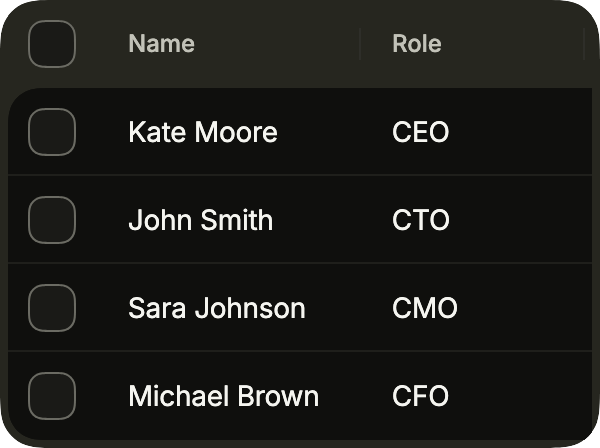
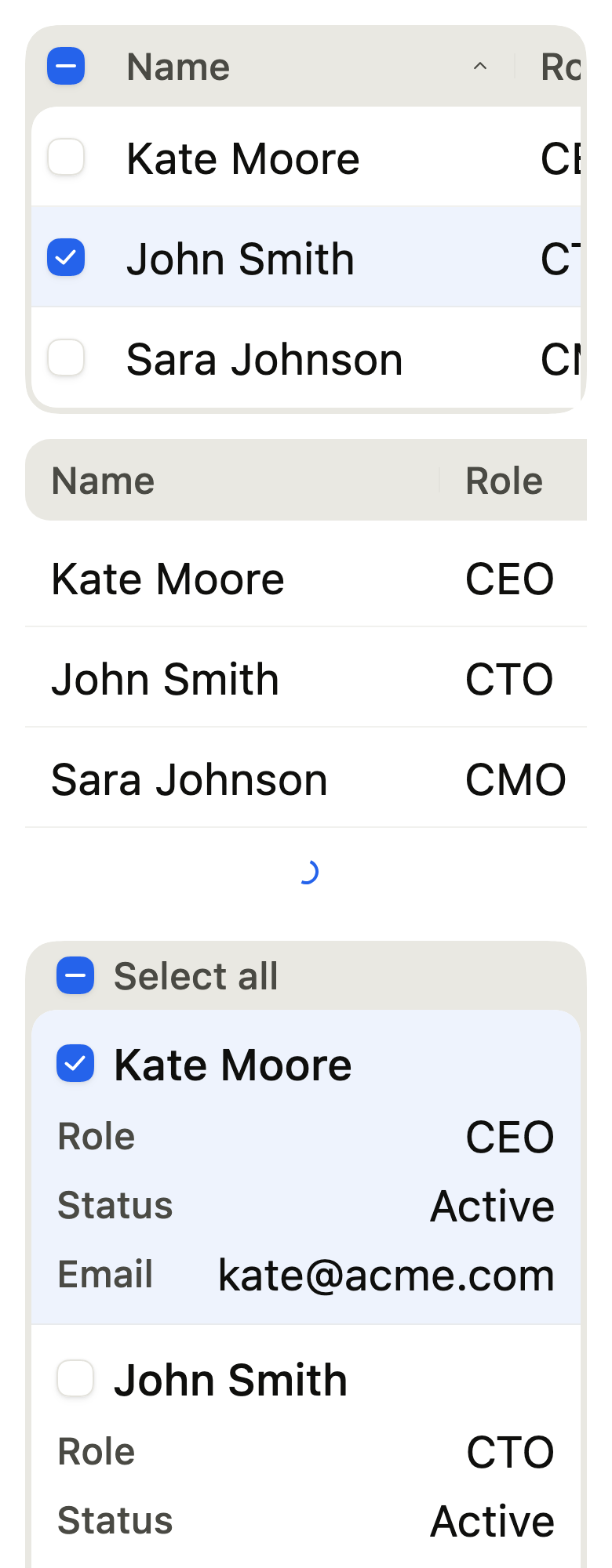
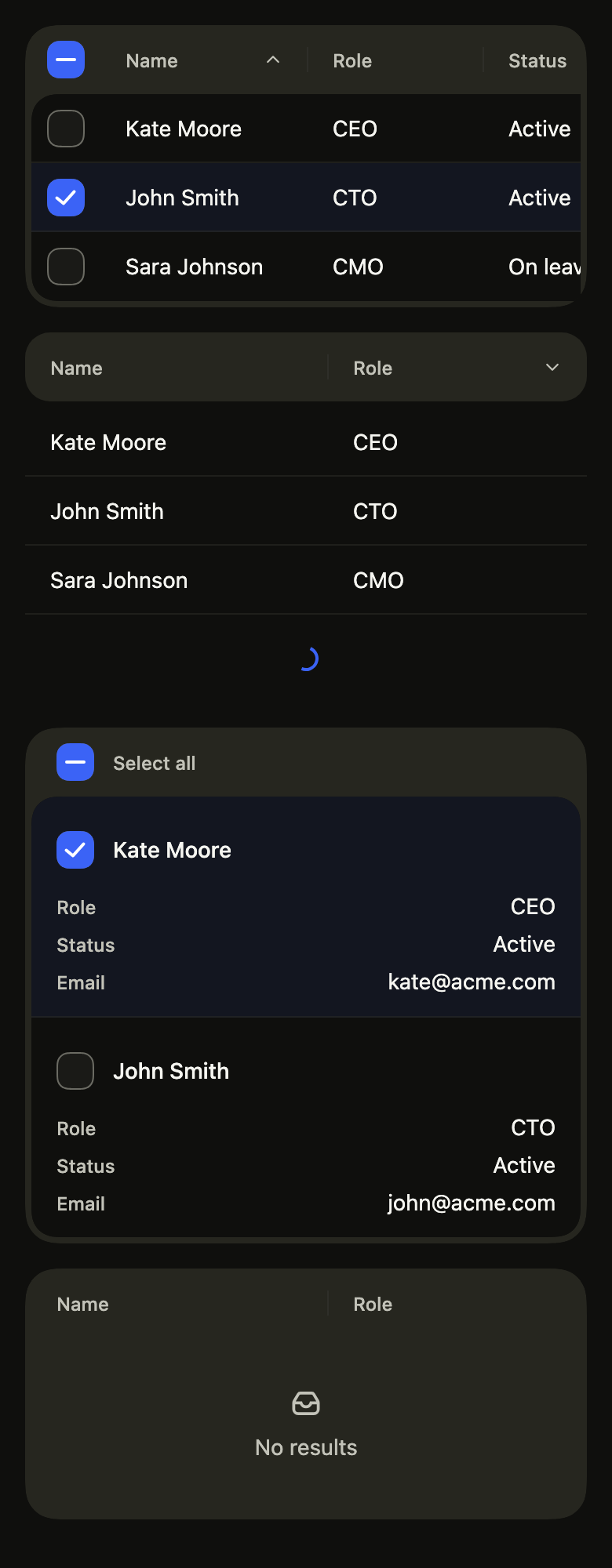
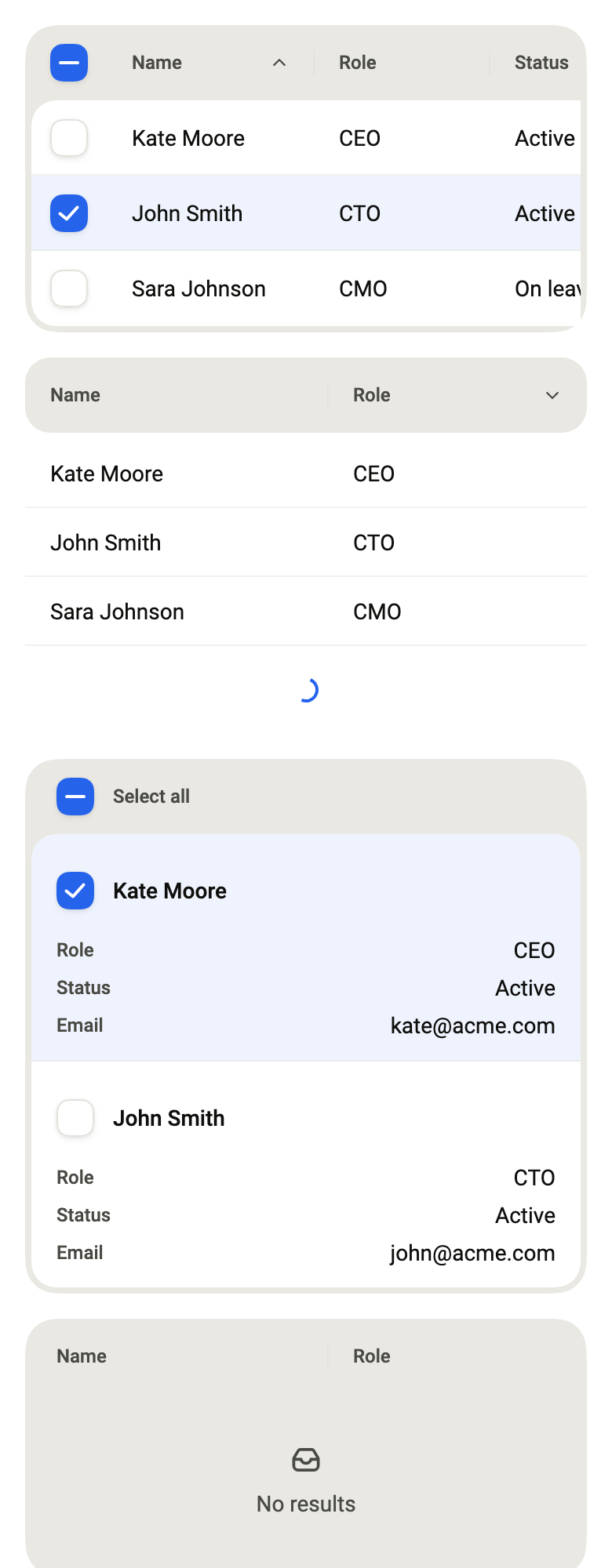
A data table on a phone: the first column stays put while the others scroll sideways. Touch a header to sort, a row to select it.
import 'package:your_app/ui/fliin/components/table/fl_table.dart';
import 'package:flutter/widgets.dart';

class TableExample extends StatefulWidget {
  const TableExample({super.key});

  @override
  State<TableExample> createState() => _TableExampleState();
}

typedef _Person = ({String email, String name, String role, String status});

const _people = <_Person>[
  (email: '[email protected]', name: 'Kate Moore', role: 'CEO', status: 'Active'),
  (email: '[email protected]', name: 'John Smith', role: 'CTO', status: 'Active'),
  (email: '[email protected]', name: 'Sara Johnson', role: 'CMO', status: 'On leave'),
  (email: '[email protected]', name: 'Michael Brown', role: 'CFO', status: 'Active'),
];

class _TableExampleState extends State<TableExample> {
  FlTableSort? _sort;
  Set<Object> _selected = <Object>{};

  final _columns = [
    FlTableColumn<_Person>(id: 'name', label: 'Name', text: (p) => p.name, width: 132, sortable: true),
    FlTableColumn<_Person>(id: 'role', label: 'Role', text: (p) => p.role, width: 112, sortable: true),
    FlTableColumn<_Person>(id: 'status', label: 'Status', text: (p) => p.status, width: 104),
    FlTableColumn<_Person>(id: 'email', label: 'Email', text: (p) => p.email, width: 168),
  ];

  List<_Person> get _rows {
    final rows = [..._people];
    if (_sort case final sort?) {
      final column = _columns.firstWhere((c) => c.id == sort.column);
      rows.sort((a, b) => column.text(a).compareTo(column.text(b)));
      if (sort.direction == FlSortDirection.descending) return rows.reversed.toList();
    }
    return rows;
  }

  @override
  Widget build(BuildContext context) {
    return FlTable<_Person>(
      label: 'Team',
      columns: _columns,
      rows: _rows,
      rowKey: (p) => p.email,
      labels: const FlTableLabels(
        ascending: 'Ascending',
        descending: 'Descending',
        selectAll: 'Select all',
        loading: 'Loading',
        empty: 'No results found',
      ),
      sort: _sort,
      onSortChanged: (sort) => setState(() => _sort = sort),
      selected: _selected,
      onSelectionChanged: (selected) => setState(() => _selected = selected),
    );
  }
}Sorted
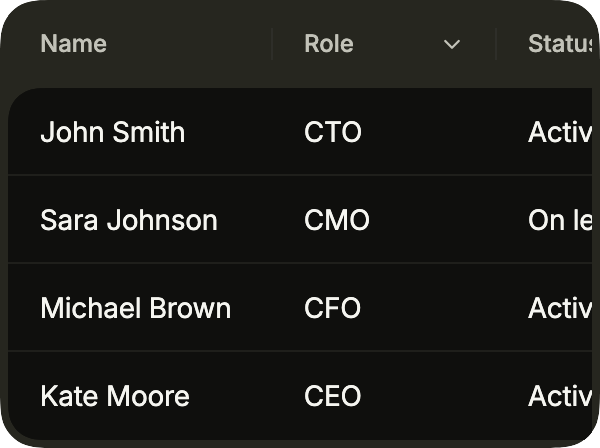
Sorted by role, descending: sort names the column and the direction, the header shows it, and onSortChanged gives the next one; the sorting itself is yours.
import 'package:your_app/ui/fliin/components/table/fl_table.dart';
import 'package:flutter/widgets.dart';

class TableSortedExample extends StatefulWidget {
  const TableSortedExample({super.key});

  @override
  State<TableSortedExample> createState() => _TableSortedExampleState();
}

typedef _Person = ({String email, String name, String role, String status});

const _people = <_Person>[
  (email: '[email protected]', name: 'Kate Moore', role: 'CEO', status: 'Active'),
  (email: '[email protected]', name: 'John Smith', role: 'CTO', status: 'Active'),
  (email: '[email protected]', name: 'Sara Johnson', role: 'CMO', status: 'On leave'),
  (email: '[email protected]', name: 'Michael Brown', role: 'CFO', status: 'Active'),
];

class _TableSortedExampleState extends State<TableSortedExample> {
  FlTableSort? _sort = (column: 'role', direction: FlSortDirection.descending);

  final _columns = [
    FlTableColumn<_Person>(id: 'name', label: 'Name', text: (p) => p.name, width: 132, sortable: true),
    FlTableColumn<_Person>(id: 'role', label: 'Role', text: (p) => p.role, width: 112, sortable: true),
    FlTableColumn<_Person>(id: 'status', label: 'Status', text: (p) => p.status, width: 104),
    FlTableColumn<_Person>(id: 'email', label: 'Email', text: (p) => p.email, width: 168),
  ];

  List<_Person> get _rows {
    final rows = [..._people];
    if (_sort case final sort?) {
      final column = _columns.firstWhere((c) => c.id == sort.column);
      rows.sort((a, b) => column.text(a).compareTo(column.text(b)));
      if (sort.direction == FlSortDirection.descending) return rows.reversed.toList();
    }
    return rows;
  }

  @override
  Widget build(BuildContext context) {
    return FlTable<_Person>(
      label: 'Team',
      columns: _columns,
      rows: _rows,
      rowKey: (p) => p.email,
      labels: const FlTableLabels(
        ascending: 'Ascending',
        descending: 'Descending',
        selectAll: 'Select all',
        loading: 'Loading',
        empty: 'No results found',
      ),
      sort: _sort,
      onSortChanged: (sort) => setState(() => _sort = sort),
    );
  }
}Selected
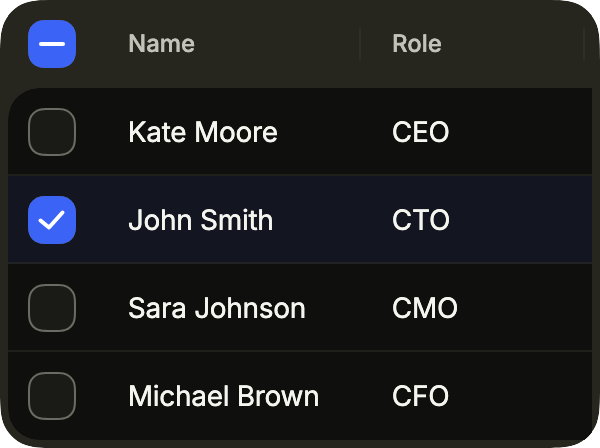
A selected row, tinted and checked. selected holds the keys that rowKey gives; the header box selects all.
import 'package:your_app/ui/fliin/components/table/fl_table.dart';
import 'package:flutter/widgets.dart';

class TableSelectedExample extends StatefulWidget {
  const TableSelectedExample({super.key});

  @override
  State<TableSelectedExample> createState() => _TableSelectedExampleState();
}

typedef _Person = ({String email, String name, String role, String status});

const _people = <_Person>[
  (email: '[email protected]', name: 'Kate Moore', role: 'CEO', status: 'Active'),
  (email: '[email protected]', name: 'John Smith', role: 'CTO', status: 'Active'),
  (email: '[email protected]', name: 'Sara Johnson', role: 'CMO', status: 'On leave'),
  (email: '[email protected]', name: 'Michael Brown', role: 'CFO', status: 'Active'),
];

class _TableSelectedExampleState extends State<TableSelectedExample> {
  Set<Object> _selected = {'[email protected]'};

  final _columns = [
    FlTableColumn<_Person>(id: 'name', label: 'Name', text: (p) => p.name, width: 132),
    FlTableColumn<_Person>(id: 'role', label: 'Role', text: (p) => p.role, width: 112),
    FlTableColumn<_Person>(id: 'status', label: 'Status', text: (p) => p.status, width: 104),
    FlTableColumn<_Person>(id: 'email', label: 'Email', text: (p) => p.email, width: 168),
  ];

  @override
  Widget build(BuildContext context) {
    return FlTable<_Person>(
      label: 'Team',
      columns: _columns,
      rows: _people,
      rowKey: (p) => p.email,
      labels: const FlTableLabels(
        ascending: 'Ascending',
        descending: 'Descending',
        selectAll: 'Select all',
        loading: 'Loading',
        empty: 'No results found',
      ),
      selected: _selected,
      onSelectionChanged: (selected) => setState(() => _selected = selected),
    );
  }
}Stacked
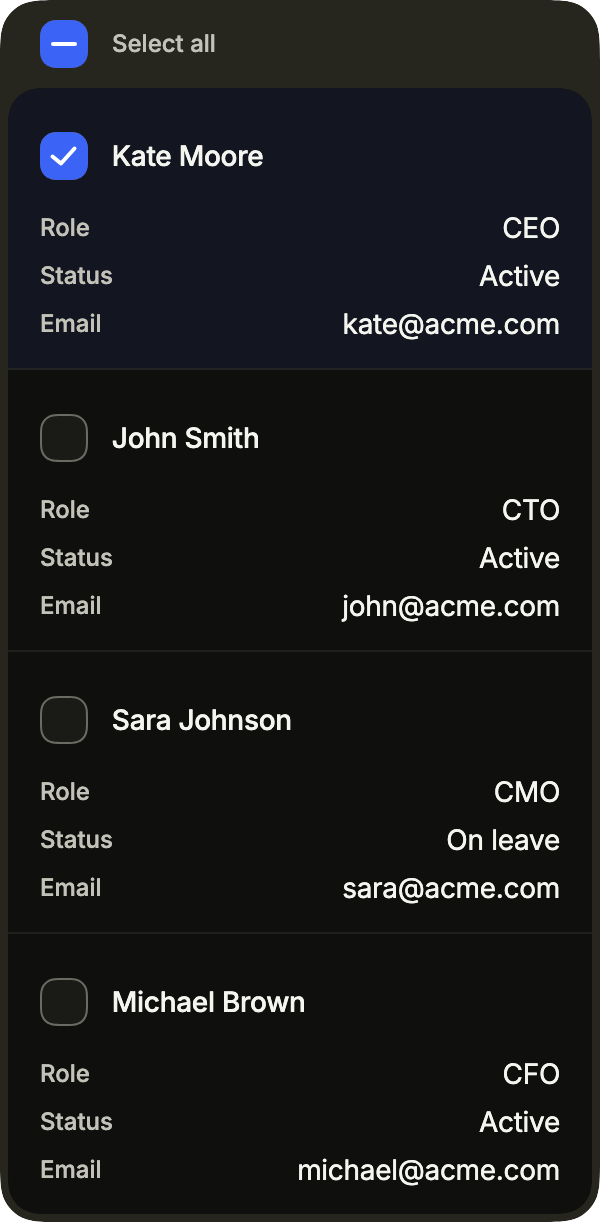
FlTableLayout.stacked shows each row as a block of label and value pairs, for a narrow screen where scrolling sideways would hide too much.
import 'package:your_app/ui/fliin/components/table/fl_table.dart';
import 'package:flutter/widgets.dart';

class TableStackedExample extends StatefulWidget {
  const TableStackedExample({super.key});

  @override
  State<TableStackedExample> createState() => _TableStackedExampleState();
}

typedef _Person = ({String email, String name, String role, String status});

const _people = <_Person>[
  (email: '[email protected]', name: 'Kate Moore', role: 'CEO', status: 'Active'),
  (email: '[email protected]', name: 'John Smith', role: 'CTO', status: 'Active'),
  (email: '[email protected]', name: 'Sara Johnson', role: 'CMO', status: 'On leave'),
  (email: '[email protected]', name: 'Michael Brown', role: 'CFO', status: 'Active'),
];

class _TableStackedExampleState extends State<TableStackedExample> {
  Set<Object> _selected = {'[email protected]'};

  final _columns = [
    FlTableColumn<_Person>(id: 'name', label: 'Name', text: (p) => p.name, width: 132),
    FlTableColumn<_Person>(id: 'role', label: 'Role', text: (p) => p.role, width: 112),
    FlTableColumn<_Person>(id: 'status', label: 'Status', text: (p) => p.status, width: 104),
    FlTableColumn<_Person>(id: 'email', label: 'Email', text: (p) => p.email, width: 168),
  ];

  @override
  Widget build(BuildContext context) {
    return FlTable<_Person>(
      label: 'Team',
      columns: _columns,
      rows: _people,
      rowKey: (p) => p.email,
      layout: FlTableLayout.stacked,
      labels: const FlTableLabels(
        ascending: 'Ascending',
        descending: 'Descending',
        selectAll: 'Select all',
        loading: 'Loading',
        empty: 'No results found',
      ),
      selected: _selected,
      onSelectionChanged: (selected) => setState(() => _selected = selected),
    );
  }
}Empty
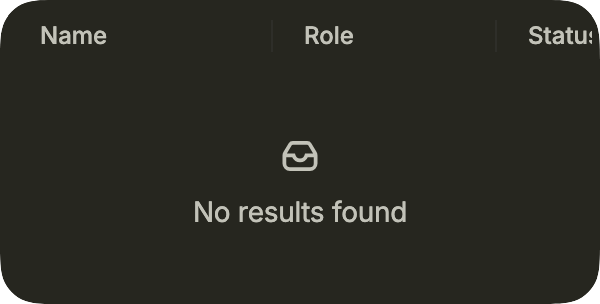
With no rows, the table says so with labels.empty.
import 'package:your_app/ui/fliin/components/table/fl_table.dart';
import 'package:flutter/widgets.dart';

class TableEmptyExample extends StatelessWidget {
  const TableEmptyExample({super.key});

  @override
  Widget build(BuildContext context) {
    return FlTable<_Person>(
      label: 'Team',
      columns: _columns,
      rows: const [],
      rowKey: _email,
      labels: const FlTableLabels(
        ascending: 'Ascending',
        descending: 'Descending',
        selectAll: 'Select all',
        loading: 'Loading',
        empty: 'No results found',
      ),
    );
  }
}

typedef _Person = ({String email, String name, String role, String status});

const _columns = [
  FlTableColumn<_Person>(id: 'name', label: 'Name', text: _name, width: 132),
  FlTableColumn<_Person>(id: 'role', label: 'Role', text: _role, width: 112),
  FlTableColumn<_Person>(id: 'status', label: 'Status', text: _status, width: 104),
  FlTableColumn<_Person>(id: 'email', label: 'Email', text: _email, width: 168),
];

String _name(_Person p) => p.name;
String _role(_Person p) => p.role;
String _status(_Person p) => p.status;
String _email(_Person p) => p.email;Loading
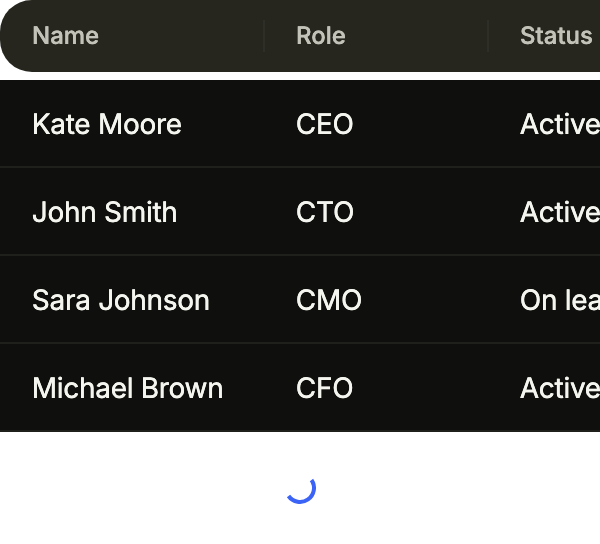
loading replaces the rows with placeholders while the data arrives; FlTableVariant.secondary drops the frame, for a table inside a card.
import 'package:your_app/ui/fliin/components/table/fl_table.dart';
import 'package:flutter/widgets.dart';

class TableLoadingExample extends StatelessWidget {
  const TableLoadingExample({super.key});

  @override
  Widget build(BuildContext context) {
    return FlTable<_Person>(
      label: 'Team',
      columns: _columns,
      rows: _people,
      rowKey: _email,
      variant: FlTableVariant.secondary,
      loading: true,
      labels: const FlTableLabels(
        ascending: 'Ascending',
        descending: 'Descending',
        selectAll: 'Select all',
        loading: 'Loading',
        empty: 'No results found',
      ),
    );
  }
}

typedef _Person = ({String email, String name, String role, String status});

const _people = <_Person>[
  (email: '[email protected]', name: 'Kate Moore', role: 'CEO', status: 'Active'),
  (email: '[email protected]', name: 'John Smith', role: 'CTO', status: 'Active'),
  (email: '[email protected]', name: 'Sara Johnson', role: 'CMO', status: 'On leave'),
  (email: '[email protected]', name: 'Michael Brown', role: 'CFO', status: 'Active'),
];

const _columns = [
  FlTableColumn<_Person>(id: 'name', label: 'Name', text: _name, width: 132),
  FlTableColumn<_Person>(id: 'role', label: 'Role', text: _role, width: 112),
  FlTableColumn<_Person>(id: 'status', label: 'Status', text: _status, width: 104),
  FlTableColumn<_Person>(id: 'email', label: 'Email', text: _email, width: 168),
];

String _name(_Person p) => p.name;
String _role(_Person p) => p.role;
String _status(_Person p) => p.status;
String _email(_Person p) => p.email;Custom cells
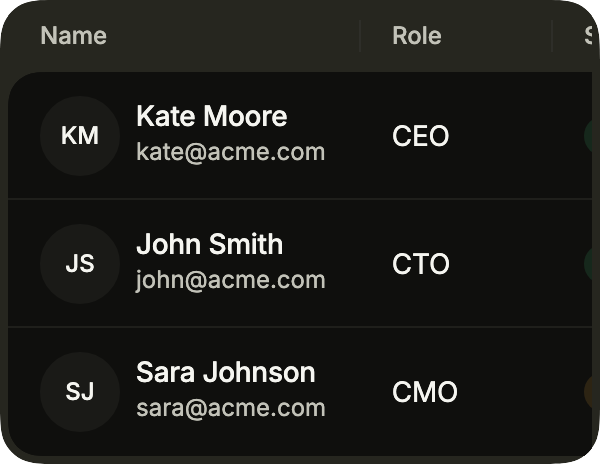
A column's builder draws its cell: an avatar beside the name, a badge for the status. text stays what the screen reader reads. onRowPressed opens a row's detail.
import 'package:your_app/ui/fliin/components/avatar/fl_avatar.dart';
import 'package:your_app/ui/fliin/components/badge/fl_badge.dart';
import 'package:your_app/ui/fliin/components/table/fl_table.dart';
import 'package:your_app/ui/fliin/components/text/fl_text.dart';
import 'package:your_app/ui/fliin/core/fliin.dart';
import 'package:flutter/widgets.dart';

class TableCustomCellsExample extends StatelessWidget {
  const TableCustomCellsExample({super.key});

  @override
  Widget build(BuildContext context) {
    return FlTable<_Person>(
      label: 'Team',
      columns: [
        FlTableColumn<_Person>(
          id: 'name',
          label: 'Name',
          text: (p) => p.name,
          width: 176,
          builder: (context, p) => Row(
            spacing: FlScope.of(context).space.sm,
            children: [
              FlAvatar(initials: p.initials, size: FlAvatarSize.sm),
              Expanded(
                child: Column(
                  crossAxisAlignment: CrossAxisAlignment.start,
                  children: [
                    FlText(p.name, type: FlTextType.bodySm, weight: FontWeight.w500),
                    FlText(p.email, type: FlTextType.bodyXs, tone: FlTextTone.muted),
                  ],
                ),
              ),
            ],
          ),
        ),
        FlTableColumn<_Person>(id: 'role', label: 'Role', text: (p) => p.role, width: 96),
        FlTableColumn<_Person>(
          id: 'status',
          label: 'Status',
          text: (p) => p.active ? 'Active' : 'On leave',
          width: 112,
          builder: (context, p) => Align(
            alignment: AlignmentDirectional.centerStart,
            child: p.active
                ? const FlBadge.text(text: 'Active', color: FlBadgeColor.success, variant: FlBadgeVariant.soft)
                : const FlBadge.text(text: 'On leave', color: FlBadgeColor.warning, variant: FlBadgeVariant.soft),
          ),
        ),
      ],
      rows: _people,
      rowKey: (p) => p.email,
      onRowPressed: (p) {},
    );
  }
}

typedef _Person = ({String email, String initials, String name, String role, bool active});

const _people = <_Person>[
  (email: '[email protected]', initials: 'KM', name: 'Kate Moore', role: 'CEO', active: true),
  (email: '[email protected]', initials: 'JS', name: 'John Smith', role: 'CTO', active: true),
  (email: '[email protected]', initials: 'SJ', name: 'Sara Johnson', role: 'CMO', active: false),
];Secondary
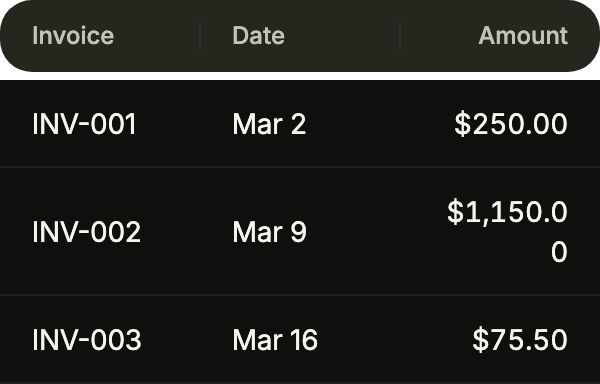
The secondary variant drops the frame: the header in a rounded band, the rows straight on the page, for a table inside a card.
import 'package:your_app/ui/fliin/components/table/fl_table.dart';
import 'package:flutter/widgets.dart';

class TableSecondaryExample extends StatelessWidget {
  const TableSecondaryExample({super.key});

  @override
  Widget build(BuildContext context) {
    return FlTable<_Invoice>(
      label: 'Invoices',
      variant: FlTableVariant.secondary,
      columns: [
        FlTableColumn<_Invoice>(id: 'number', label: 'Invoice', text: (i) => i.number, width: 96),
        FlTableColumn<_Invoice>(id: 'date', label: 'Date', text: (i) => i.date, width: 96),
        FlTableColumn<_Invoice>(id: 'amount', label: 'Amount', text: (i) => i.amount, width: 96, numeric: true),
      ],
      rows: _invoices,
      rowKey: (i) => i.number,
    );
  }
}

typedef _Invoice = ({String number, String date, String amount});

const _invoices = <_Invoice>[
  (number: 'INV-001', date: 'Mar 2', amount: '\$250.00'),
  (number: 'INV-002', date: 'Mar 9', amount: '\$1,150.00'),
  (number: 'INV-003', date: 'Mar 16', amount: '\$75.50'),
];Pagination
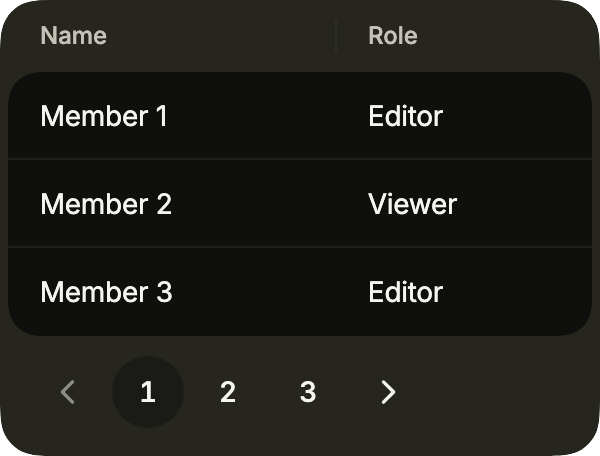
footer holds what goes under the rows, here a pagination: the app keeps the page and passes its rows.
import 'package:your_app/ui/fliin/components/pagination/fl_pagination.dart';
import 'package:your_app/ui/fliin/components/table/fl_table.dart';
import 'package:flutter/widgets.dart';

class TablePaginationExample extends StatefulWidget {
  const TablePaginationExample({super.key});

  @override
  State<TablePaginationExample> createState() => _TablePaginationExampleState();
}

const _pageSize = 3;

final _people = [for (var i = 1; i <= 9; i++) (id: i, name: 'Member $i', role: i.isOdd ? 'Editor' : 'Viewer')];

class _TablePaginationExampleState extends State<TablePaginationExample> {
  var _page = 1;

  @override
  Widget build(BuildContext context) {
    final rows = _people.skip((_page - 1) * _pageSize).take(_pageSize).toList();
    return FlTable<({int id, String name, String role})>(
      label: 'Members',
      columns: [
        FlTableColumn(id: 'name', label: 'Name', text: (p) => p.name, width: 144),
        FlTableColumn(id: 'role', label: 'Role', text: (p) => p.role, width: 112),
      ],
      rows: rows,
      rowKey: (p) => p.id,
      footer: FlPagination(
        page: _page,
        pageCount: (_people.length / _pageSize).ceil(),
        onChanged: (page) => setState(() => _page = page),
        previousLabel: 'Previous',
        nextLabel: 'Next',
      ),
    );
  }
}Empty action
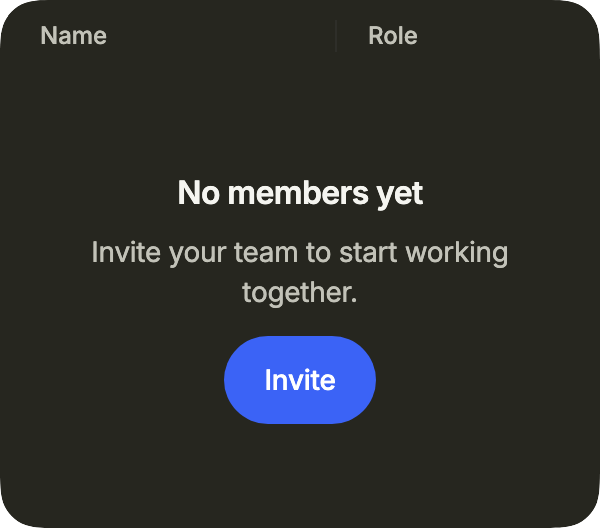
emptyState replaces the default message of a table without rows, here with an action that fills it.
import 'package:your_app/ui/fliin/components/empty_state/fl_empty_state.dart';
import 'package:your_app/ui/fliin/components/table/fl_table.dart';
import 'package:flutter/widgets.dart';

class TableEmptyActionExample extends StatelessWidget {
  const TableEmptyActionExample({super.key});

  @override
  Widget build(BuildContext context) {
    return FlTable<({String name, String role})>(
      label: 'Team',
      columns: [
        FlTableColumn(id: 'name', label: 'Name', text: (p) => p.name, width: 144),
        FlTableColumn(id: 'role', label: 'Role', text: (p) => p.role, width: 112),
      ],
      rows: const [],
      rowKey: (p) => p.name,
      emptyState: FlEmptyState(
        title: 'No members yet',
        description: 'Invite your team to start working together.',
        size: FlEmptyStateSize.compact,
        primaryAction: FlEmptyStateAction(label: 'Invite', onPressed: () {}),
      ),
    );
  }
}Usage
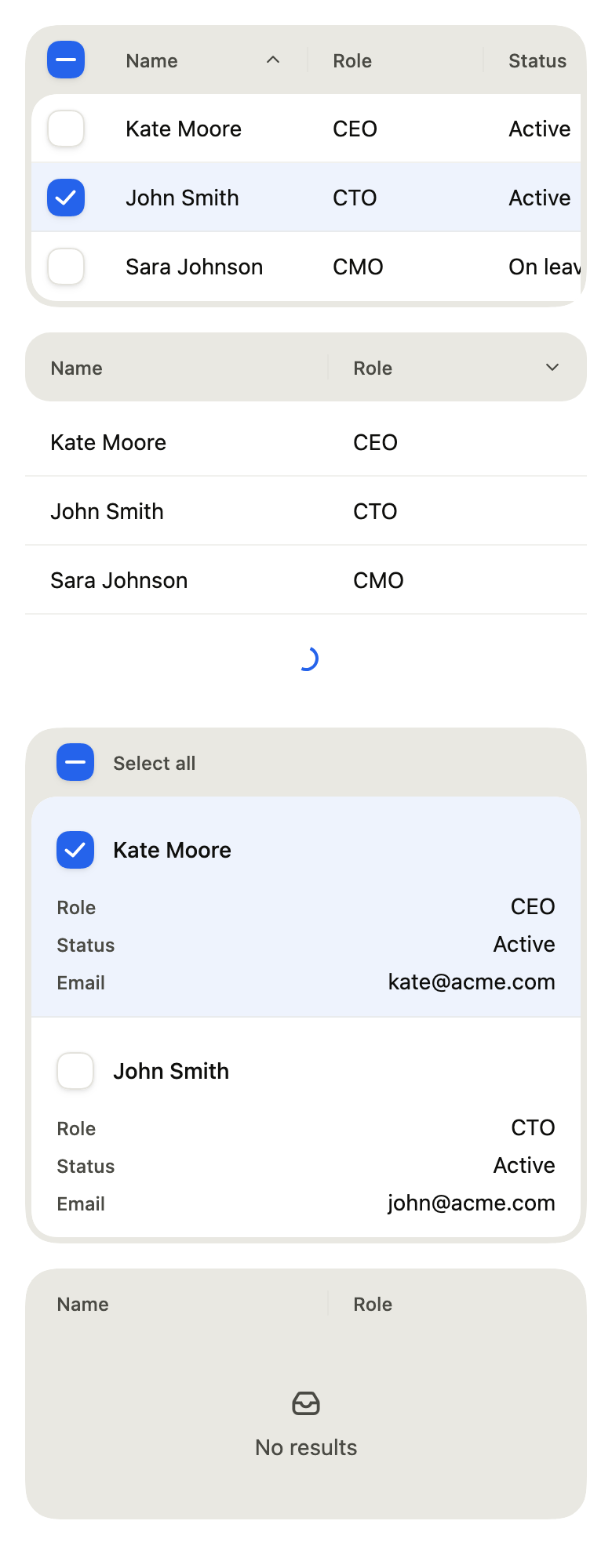
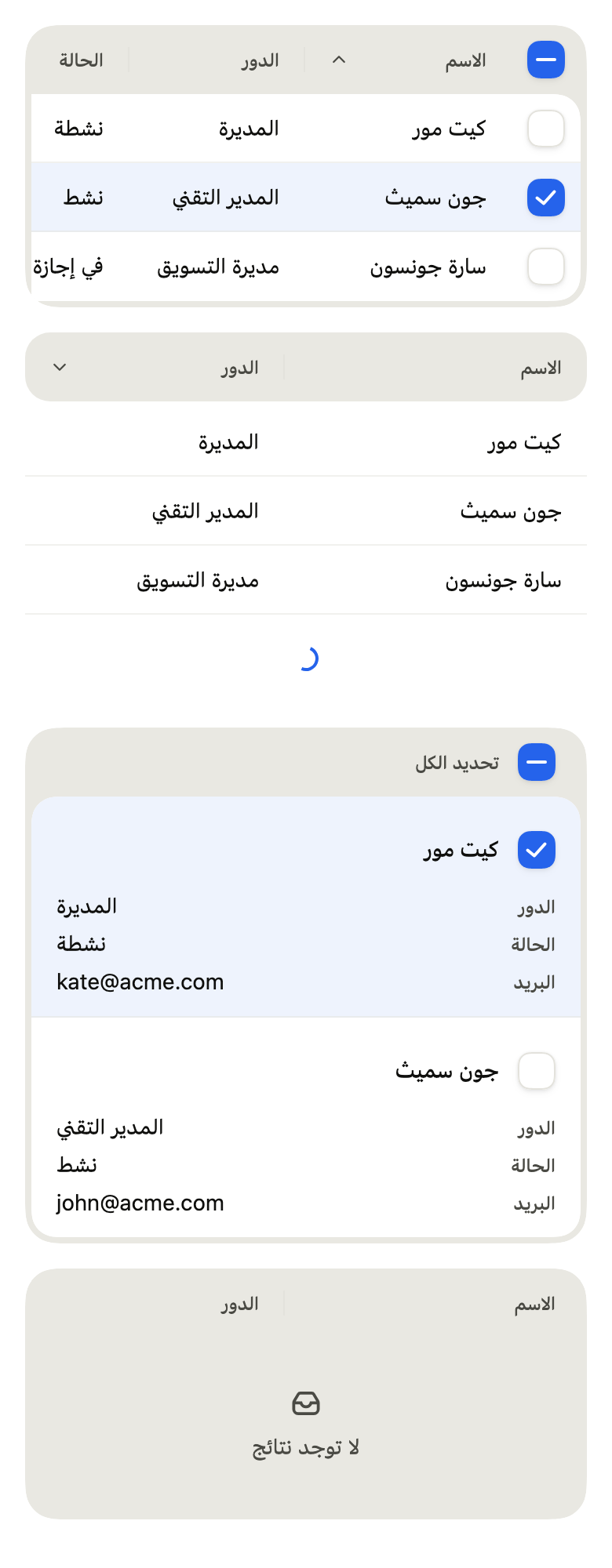
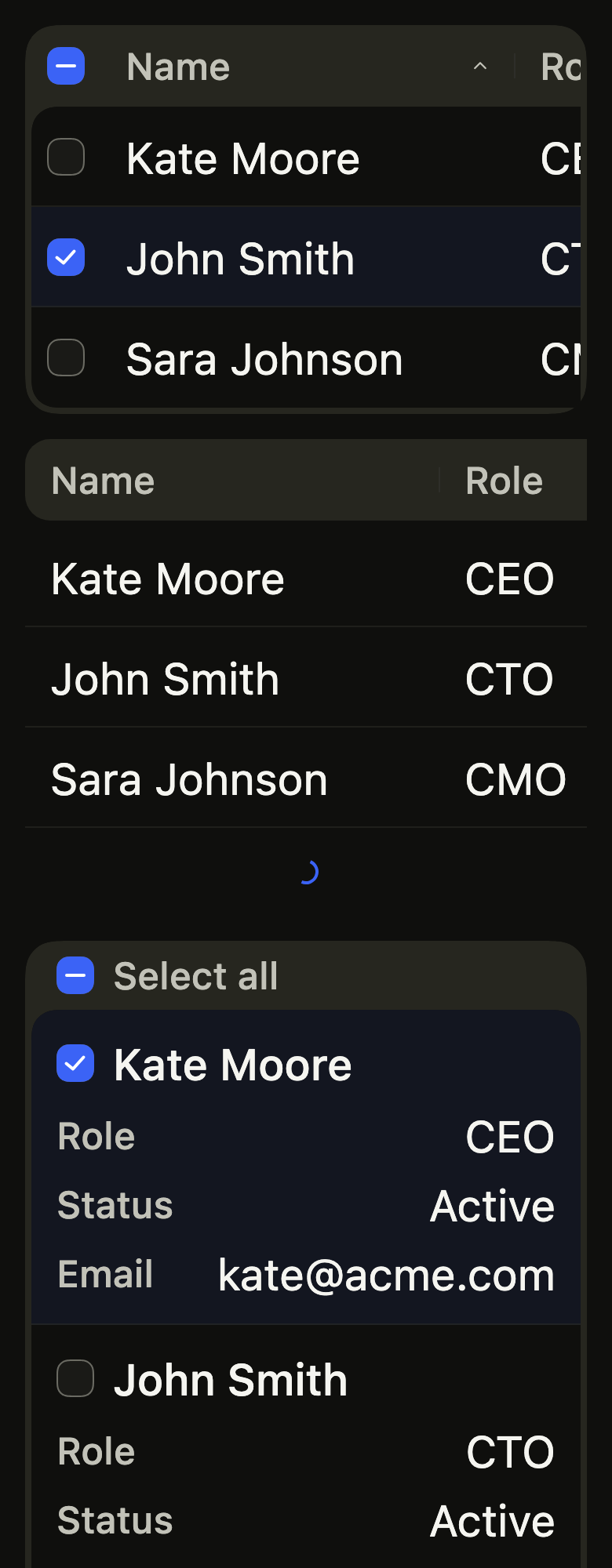
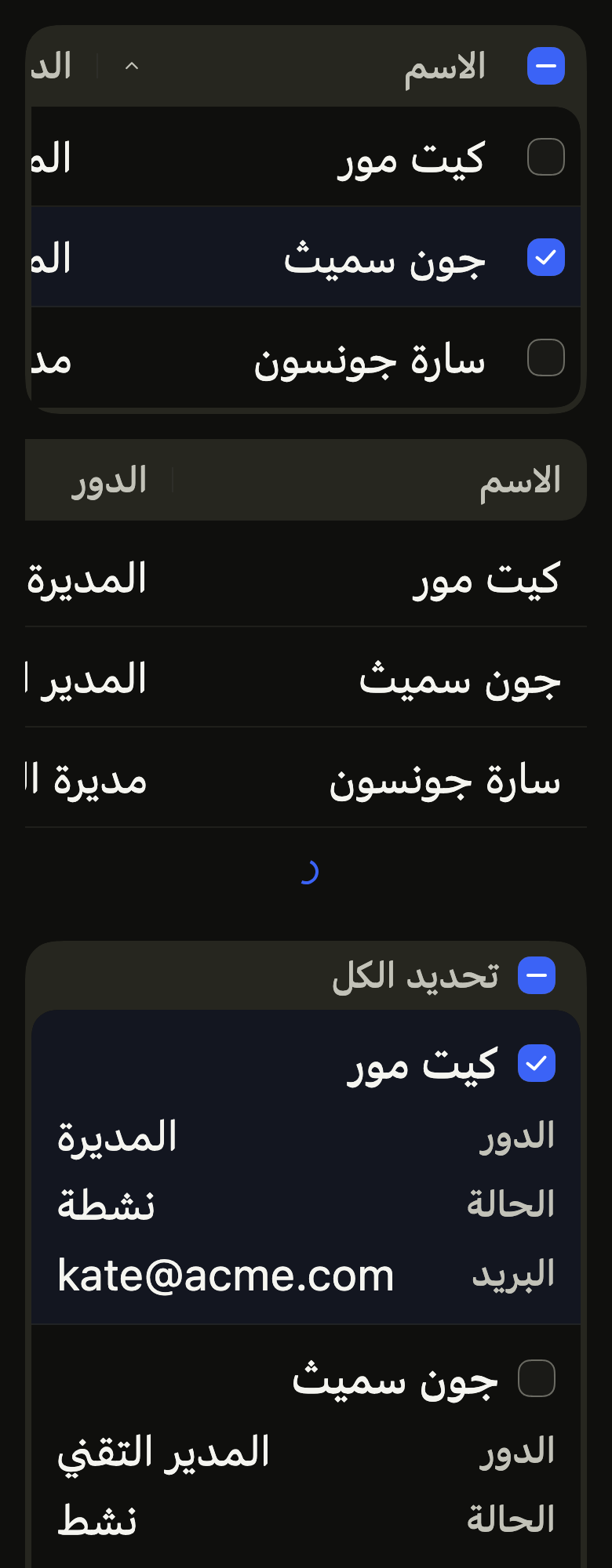
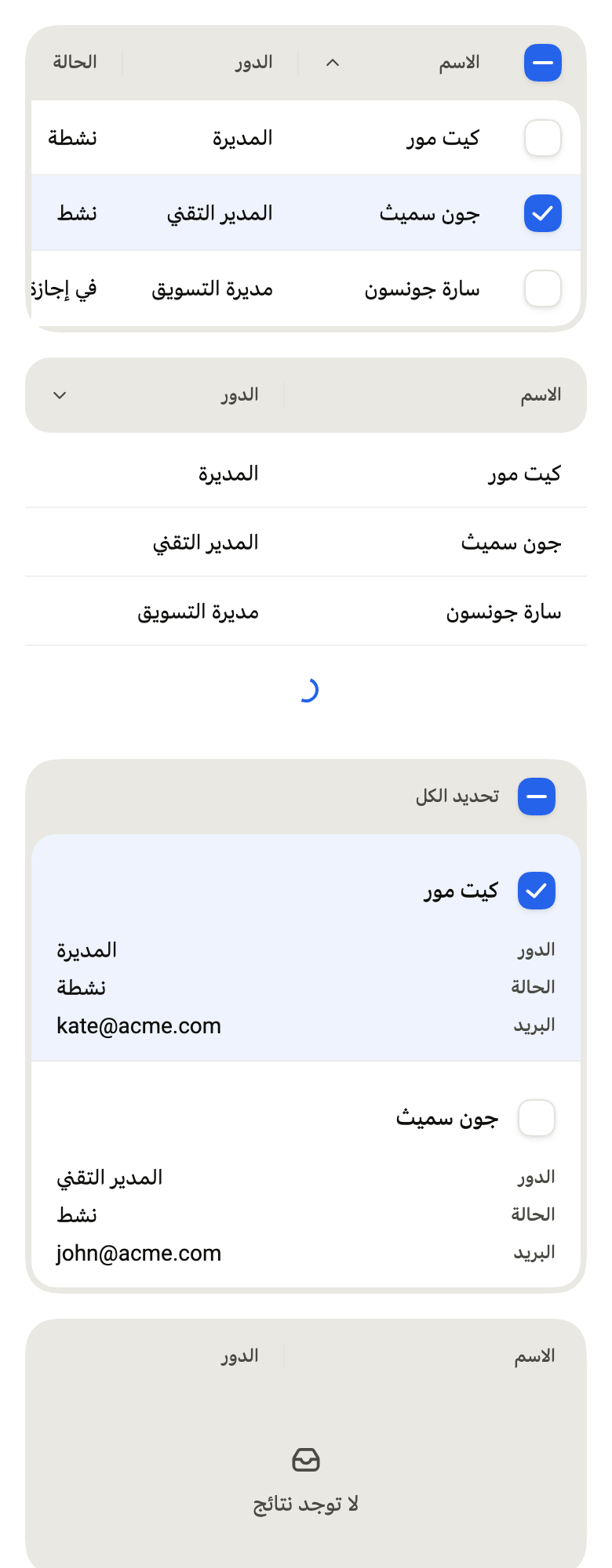
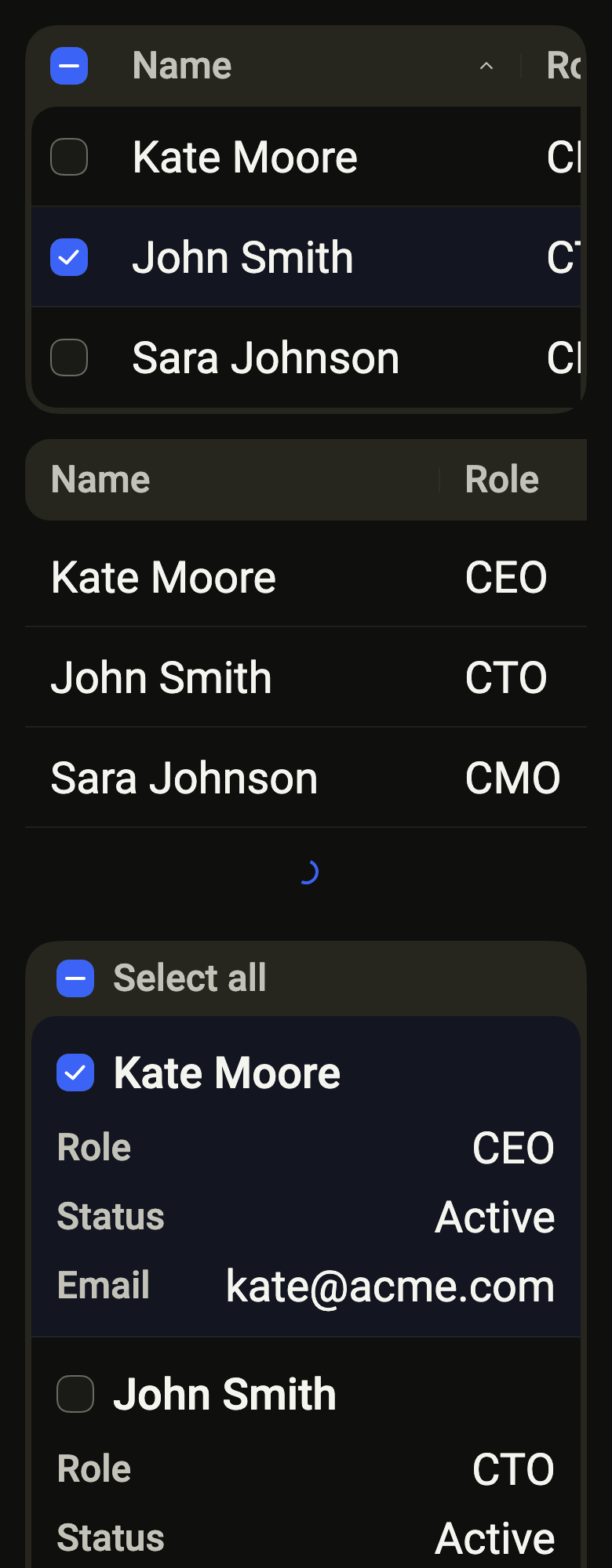
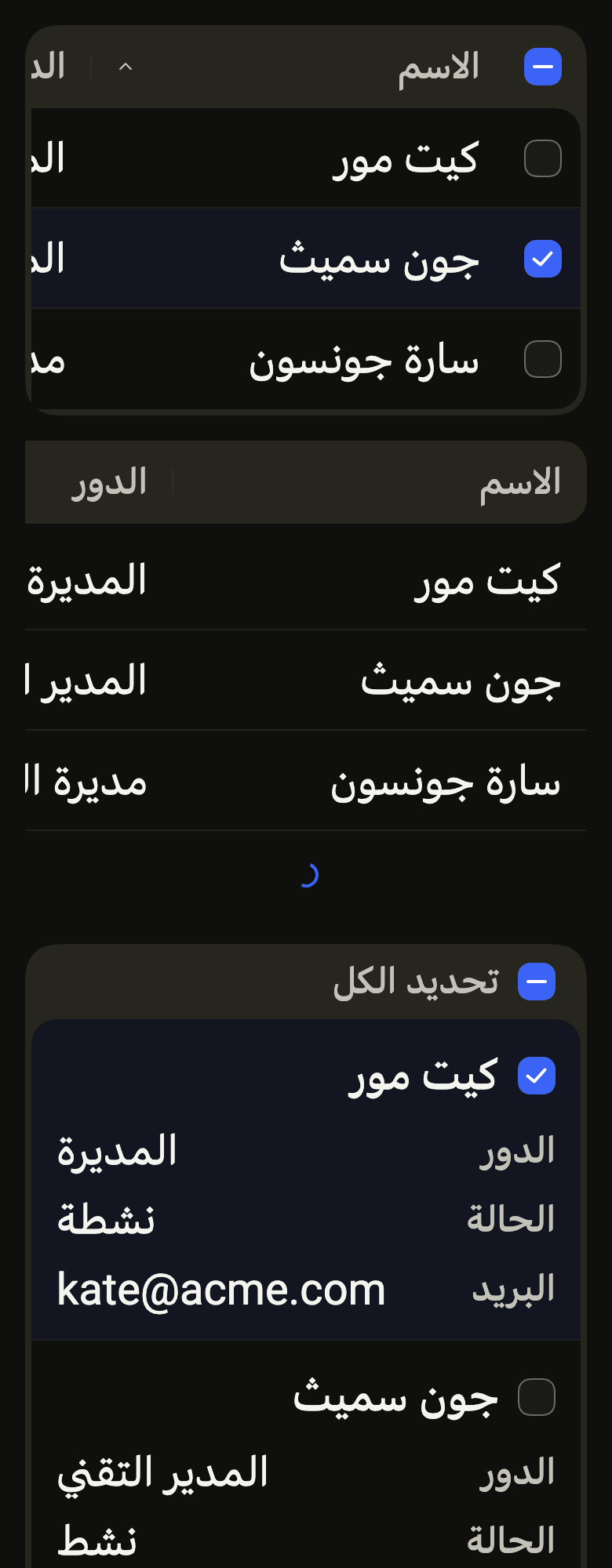
The code the reference images render:
final example = Builder(
  builder: (context) {
    final rtl = variant.dir == TextDirection.rtl;
    final theme = FlScope.of(context);
    String tr(String fr, String ar) => rtl ? ar : fr;
    final people = [
      (
        tr('Kate Moore', 'كيت مور'),
        tr('CEO', 'المديرة'),
        tr('Active', 'نشطة'),
        '[email protected]',
      ),
      (
        tr('John Smith', 'جون سميث'),
        tr('CTO', 'المدير التقني'),
        tr('Active', 'نشط'),
        '[email protected]',
      ),
      (
        tr('Sara Johnson', 'سارة جونسون'),
        tr('CMO', 'مديرة التسويق'),
        tr('On leave', 'في إجازة'),
        '[email protected]',
      ),
    ];
    final columns = [
      FlTableColumn<(String, String, String, String)>(
        id: 'name',
        label: tr('Name', 'الاسم'),
        text: (p) => p.$1,
        width: 132,
        sortable: true,
      ),
      FlTableColumn<(String, String, String, String)>(
        id: 'role',
        label: tr('Role', 'الدور'),
        text: (p) => p.$2,
        width: 112,
        sortable: true,
      ),
      FlTableColumn<(String, String, String, String)>(
        id: 'status',
        label: tr('Status', 'الحالة'),
        text: (p) => p.$3,
        width: 104,
      ),
      FlTableColumn<(String, String, String, String)>(
        id: 'email',
        label: tr('Email', 'البريد'),
        text: (p) => p.$4,
        width: 152,
      ),
    ];
    final labels = FlTableLabels(
      ascending: tr('Ascending', 'تصاعدي'),
      descending: tr('Descending', 'تنازلي'),
      selectAll: tr('Select all', 'تحديد الكل'),
      loading: tr('Loading', 'جارٍ التحميل'),
      empty: tr('No results', 'لا توجد نتائج'),
    );
    return ColoredBox(
      color: theme.colors.surface,
      child: SingleChildScrollView(
        padding: EdgeInsetsDirectional.all(theme.space.lg),
        child: Column(
          crossAxisAlignment: CrossAxisAlignment.stretch,
          spacing: theme.space.lg,
          children: [
            FlTable<(String, String, String, String)>(
              label: tr('Team', 'الفريق'),
              columns: columns,
              rows: people,
              rowKey: (p) => p.$4,
              labels: labels,
              sort: (column: 'name', direction: FlSortDirection.ascending),
              onSortChanged: (_) {},
              selected: const {'[email protected]'},
              onSelectionChanged: (_) {},
            ),
            FlTable<(String, String, String, String)>(
              label: tr('Roles', 'الأدوار'),
              variant: FlTableVariant.secondary,
              columns: columns.take(2).toList(),
              rows: people,
              rowKey: (p) => p.$4,
              labels: labels,
              sort: (column: 'role', direction: FlSortDirection.descending),
              onSortChanged: (_) {},
              loading: true,
            ),
            FlTable<(String, String, String, String)>(
              label: tr('Team', 'الفريق'),
              layout: FlTableLayout.stacked,
              columns: columns,
              rows: people.take(2).toList(),
              rowKey: (p) => p.$4,
              labels: labels,
              selected: const {'[email protected]'},
              onSelectionChanged: (_) {},
            ),
            FlTable<(String, String, String, String)>(
              label: tr('Invitations', 'الدعوات'),
              columns: columns.take(2).toList(),
              rows: const [],
              rowKey: (p) => p.$4,
              labels: labels,
            ),
          ],
        ),
      ),
    );
  },
);API
FlTableVariant: enum {primary, secondary}
FlTableVariant.primary: static final FlTableVariant
FlTableVariant.secondary: static final FlTableVariant
FlTableLayout: enum {scroll, stacked, adaptive}
FlTableLayout.scroll: static final FlTableLayout
FlTableLayout.stacked: static final FlTableLayout
FlTableLayout.adaptive: static final FlTableLayout
FlSortDirection: enum {ascending, descending}
FlSortDirection.ascending: static final FlSortDirection
FlSortDirection.descending: static final FlSortDirection
FlTableSort: typedef = ({Object column, FlSortDirection direction})
FlTableColumn: class<T>
FlTableColumn.new: const new({required Object id, required String label, required String Function(T row) text, Widget Function(BuildContext context, T row)? builder, double width, bool sortable, bool numeric})
FlTableColumn.id: get Object
FlTableColumn.label: get String
FlTableColumn.text: get String Function(T row)
FlTableColumn.builder: get Widget Function(BuildContext context, T row)?
FlTableColumn.width: get double
FlTableColumn.sortable: get bool
FlTableColumn.numeric: get bool
FlTableLabels: final class
FlTableLabels.new: const new({String? ascending, String? descending, String? selectAll, String? loading, String? empty})
FlTableLabels.ascending: get String?
FlTableLabels.descending: get String?
FlTableLabels.selectAll: get String?
FlTableLabels.loading: get String?
FlTableLabels.empty: get String?
FlTable: class<T> extends StatefulWidget
FlTable.new: const new({super.key, required String label, required List<FlTableColumn<T>> columns, required List<T> rows, required Object Function(T row) rowKey, FlTableLabels labels, FlTableVariant variant, FlTableLayout layout, FlTableSort? sort, ValueChanged<FlTableSort>? onSortChanged, Set<Object>? selected, ValueChanged<Set<Object>>? onSelectionChanged, bool loading, Widget? footer, ValueChanged<T>? onRowPressed, Widget? emptyState})
FlTable.label: get String
FlTable.columns: get List<FlTableColumn<T>>
FlTable.rows: get List<T>
FlTable.rowKey: get Object Function(T row)
FlTable.labels: get FlTableLabels
FlTable.variant: get FlTableVariant
FlTable.layout: get FlTableLayout
FlTable.sort: get FlTableSort?
FlTable.onSortChanged: get ValueChanged<FlTableSort>?
FlTable.selected: get Set<Object>?
FlTable.onSelectionChanged: get ValueChanged<Set<Object>>?
FlTable.loading: get bool
FlTable.footer: get Widget?
FlTable.onRowPressed: get ValueChanged<T>?
FlTable.emptyState: get Widget?
FlTable.createState: State<FlTable<T>>()Reference renders
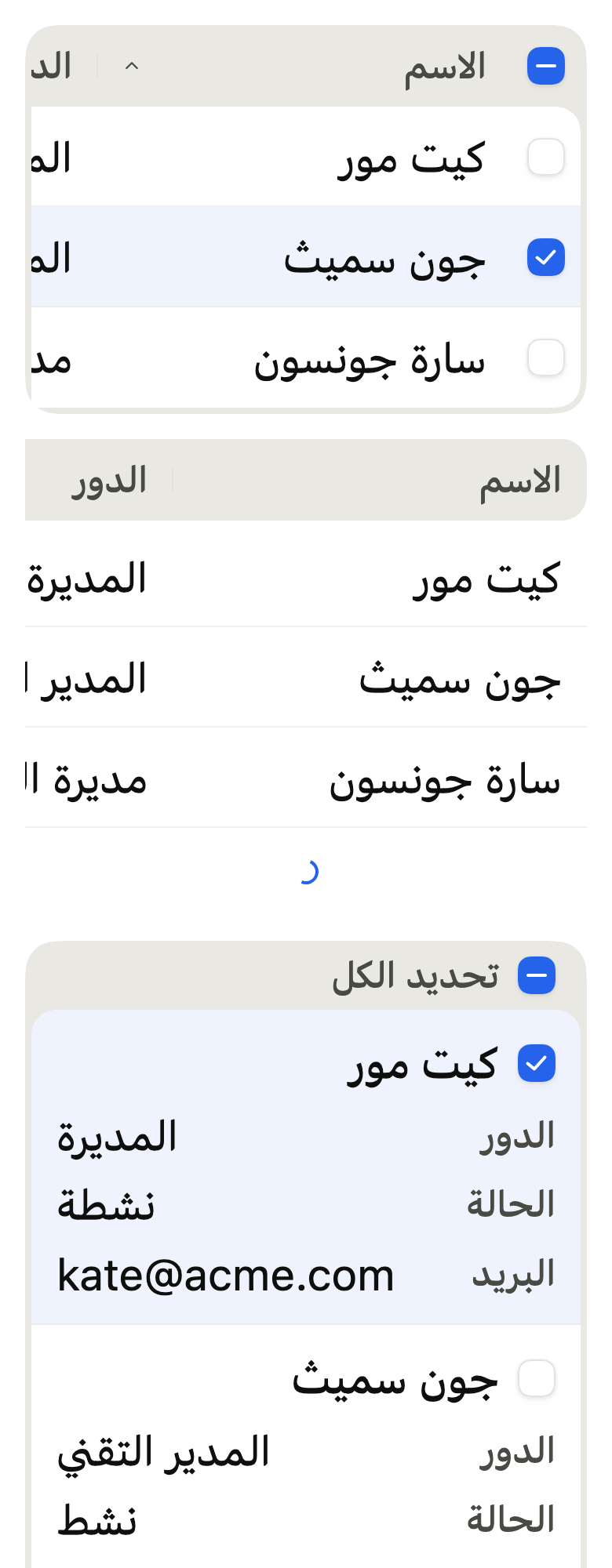
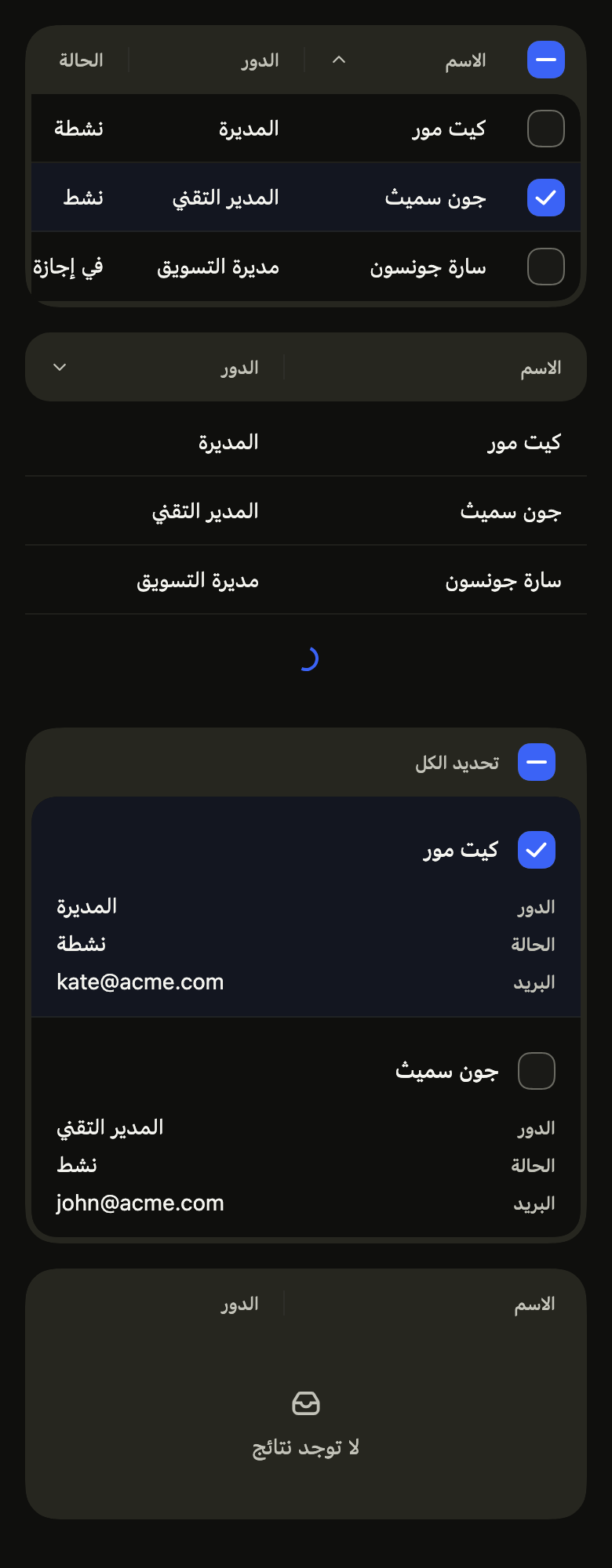
The 16 images published with version 0.1.1, rendered by the shared harness on macOS with Flutter 3.47.7. fliin verify table compares your copy to them.
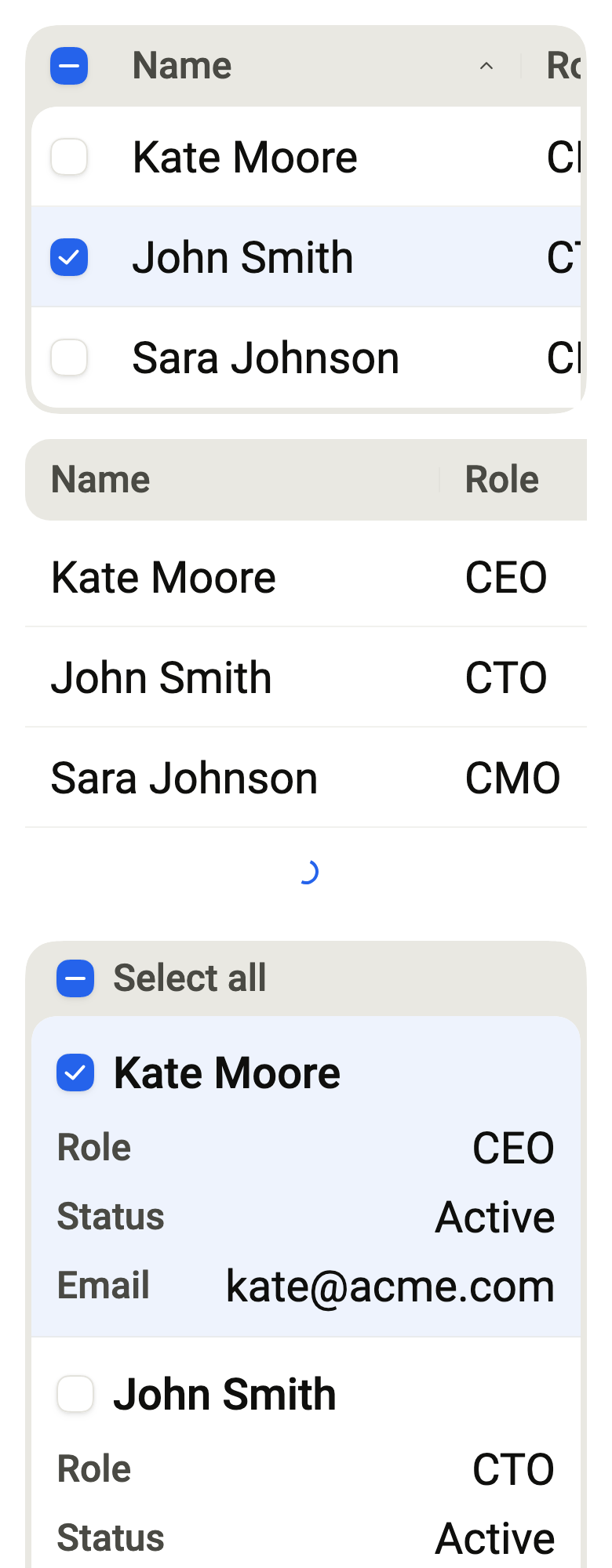
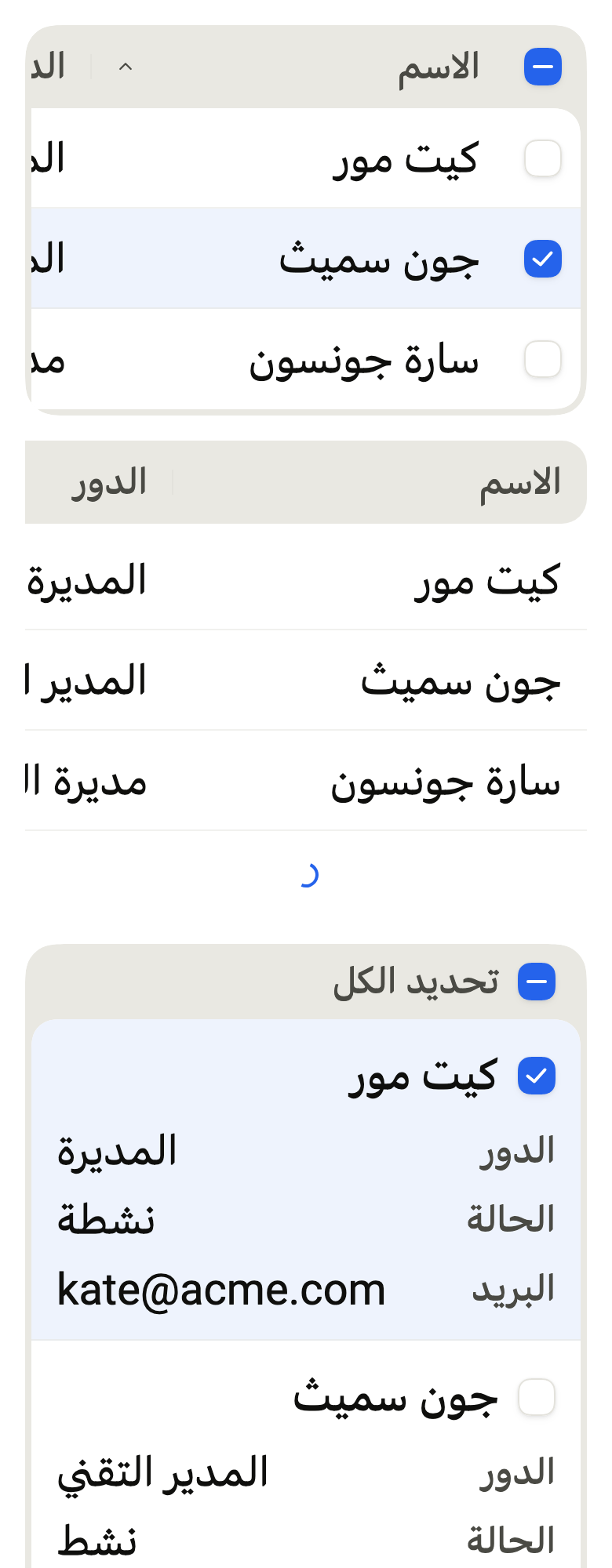
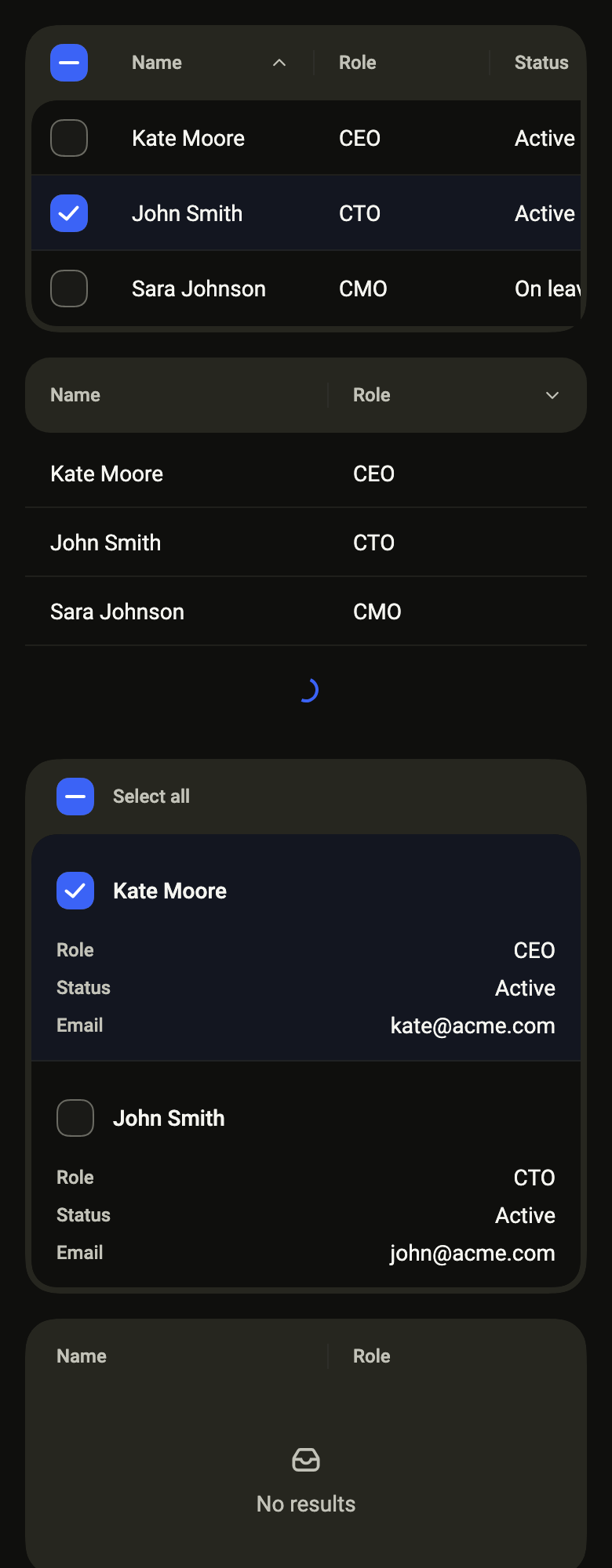
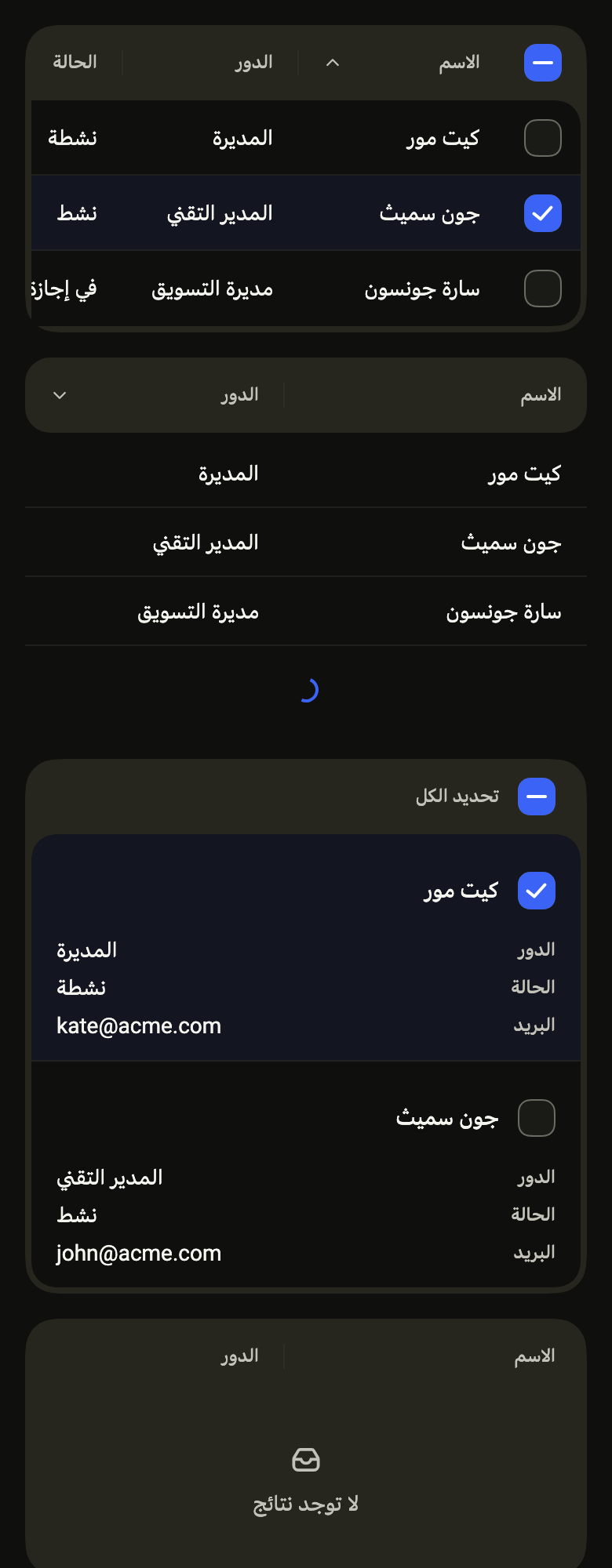
Use it to
- show data in rows and columns
- change the order of a table by tapping a column header
- select rows of a data table to act on them together
- keep the first column in view while a wide table scrolls sideways
- turn each table row into a block on a narrow phone
- show an empty or loading data table
- Not for
- a list of settings or contacts: use a list row (list-row)
- one figure in the spotlight: use a stat card (stat-card)
- values over time: use a chart (chart)
- States
Source
The files fliin add table copies into your app, before your prefix and imports are applied.
table/fl_table.dart
// Modified from the Table of HeroUI React v3, Copyright 2025 NextUI Inc.,
// licensed under Apache 2.0: https://www.apache.org/licenses/LICENSE-2.0
import 'dart:math' as math;
import 'package:flutter/semantics.dart';
import 'package:flutter/widgets.dart';
import 'package:fliin_ui/components/checkbox/fl_checkbox.dart';
import 'package:fliin_ui/components/spinner/fl_spinner.dart';
import 'package:fliin_ui/core/fliin.dart';
import 'package:fliin_ui/icons/fl_icons.dart';
/// The rules between rows: `border-separator/50` of `table__row`.
const double _ruleOpacity = 0.5;
/// The tint of a selected row: the accent at 8 %, under text that keeps
/// its contrast.
const double _selectedOpacity = 0.08;
/// The look of a [FlTable].
enum FlTableVariant {
/// The header on a `surfaceSecondary` frame that holds the rows on a white
/// card (`table-root--primary`).
primary,
/// No frame: the header in a rounded `surfaceSecondary` band, the rows on
/// the page, each with its rule (`table-root--secondary`).
secondary,
}
/// How a [FlTable] fits a phone.
enum FlTableLayout {
/// Columns side by side: a table wider than its box scrolls sideways,
/// its first column held at the start.
scroll,
/// One block per row: the first column as its title, then each other
/// column under its name.
stacked,
/// `scroll` when the columns fit the width, `stacked` otherwise.
adaptive,
}
/// The direction of a sort.
enum FlSortDirection {
/// From the smallest to the largest; the chevron points up.
ascending,
/// From the largest to the smallest; the chevron points down.
descending,
}
/// The sort of a [FlTable]: the [FlTableColumn.id] of the column and its
/// direction.
typedef FlTableSort = ({Object column, FlSortDirection direction});
/// A column of a [FlTable]: its name, the text of each cell, and how it
/// lays out.
class FlTableColumn<T> {
/// A column [id] named [label], whose cells write [text].
const FlTableColumn({
required this.id,
required this.label,
required this.text,
this.builder,
this.width = 120,
this.sortable = false,
this.numeric = false,
});
/// What identifies the column in a [FlTableSort].
final Object id;
/// The header ("Email"), read before each cell in a stacked layout.
final String label;
/// The text of the cell for [T]; read by the screen reader even when
/// [builder] draws something else.
final String Function(T row) text;
/// A cell other than its text (a badge, an avatar); null, the text.
final Widget Function(BuildContext context, T row)? builder;
/// The width at text scale 1, in logical points; it grows with the text.
/// Columns narrower than the table share the remainder.
final double width;
/// True: tapping the header asks [FlTable.onSortChanged] to sort by it.
final bool sortable;
/// True: a number, aligned to the end in tabular figures.
final bool numeric;
}
/// The texts a [FlTable] needs for the screen reader and its states, in the
/// app's language.
final class FlTableLabels {
/// The texts of a table.
const FlTableLabels({this.ascending, this.descending, this.selectAll, this.loading, this.empty});
/// The value of a header sorted up ("Ascending"); required with a sortable
/// column.
final String? ascending;
/// The value of a header sorted down ("Descending").
final String? descending;
/// The name of the header box that selects every row ("Select all");
/// required with a selection.
final String? selectAll;
/// What the spinner of a loading table says ("Loading"); required with
/// `loading`.
final String? loading;
/// The text of a table without rows ("No results found"); null, an empty
/// body.
final String? empty;
}
/// A data table: a header of muted `textXs` names split
/// by short rules, then rows of `textSm` cells, sortable by column, with an
/// optional selection, an empty state and a loading row.
///
/// On a phone, a table wider than its box scrolls sideways and keeps its
/// first column (and the selection boxes) at the start, with a rule that
/// marks the edge once the rest has slid under it ([FlTableLayout.scroll]);
/// or each row becomes a block, its first column as a title and the others
/// under their names ([FlTableLayout.stacked]); [FlTableLayout.adaptive]
/// picks the second when the columns do not fit.
///
/// The table holds neither its sort nor its selection: [onSortChanged]
/// receives the sort a header asks for, and [onSelectionChanged] the keys
/// a tap selects; the app sorts [rows] and gives back [sort] and
/// [selected].
///
/// The screen reader reads a table named [label], its rows and cells, and
/// the column headers, each sortable one as a button whose value is its
/// direction. Each row carries a checkbox named after its first cell, and
/// the header one that selects them all. Rows, headers and boxes are at
/// least the platform's touch target high.
class FlTable<T> extends StatefulWidget {
/// A table named [label] of [rows] in [columns].
const FlTable({
super.key,
required this.label,
required this.columns,
required this.rows,
required this.rowKey,
this.labels = const FlTableLabels(),
this.variant = FlTableVariant.primary,
this.layout = FlTableLayout.scroll,
this.sort,
this.onSortChanged,
this.selected,
this.onSelectionChanged,
this.loading = false,
this.footer,
this.onRowPressed,
this.emptyState,
}) : assert(columns.length > 0, 'at least one column');
/// The table's name for the screen reader ("Team members").
final String label;
/// The columns, in reading order; the first one names each row.
final List<FlTableColumn<T>> columns;
/// The rows, in the order shown: the app sorts them.
final List<T> rows;
/// What identifies a row in [selected].
final Object Function(T row) rowKey;
/// The texts of the sort, the selection and the states.
final FlTableLabels labels;
/// `primary` by default.
final FlTableVariant variant;
/// `scroll` by default.
final FlTableLayout layout;
/// The current sort; null, none.
final FlTableSort? sort;
/// Receives the sort a header asks for: its column, ascending, or the
/// other direction when it is already sorted by it.
final ValueChanged<FlTableSort>? onSortChanged;
/// The keys of the selected rows; null, no selection column.
final Set<Object>? selected;
/// Receives the keys after a tap on a row or a box; null, the selection is
/// shown without being changeable.
final ValueChanged<Set<Object>>? onSelectionChanged;
/// True: a spinner row after the rows, while more are loading.
final bool loading;
/// Under the rows, on the frame (`table__footer`): a count, a pagination.
final Widget? footer;
/// Receives the row tapped: opens its detail. With
/// a selection, the box alone toggles the row; the screen reader activates
/// the row itself. Null: a tap on the row toggles its selection, if any.
final ValueChanged<T>? onRowPressed;
/// What a table without rows shows in place of the inbox and
/// [FlTableLabels.empty]: an `FlEmptyState`
/// with its action, centered under the header.
final Widget? emptyState;
@override
State<FlTable<T>> createState() => _FlTableState<T>();
}
class _FlTableState<T> extends State<FlTable<T>> {
final ScrollController _scroll = ScrollController();
@override
void dispose() {
_scroll.dispose();
super.dispose();
}
bool get _selectable => widget.selected != null;
/// What a tap on [row] does: [FlTable.onRowPressed], otherwise toggling
/// its selection when it can change; null, nothing.
VoidCallback? _rowTap(T row) {
if (widget.onRowPressed case final pressed?) {
return () => pressed(row);
}
if (_selectable && widget.onSelectionChanged != null) {
return () => _toggle(row);
}
return null;
}
void _toggle(T row) {
final selected = widget.selected;
final onChanged = widget.onSelectionChanged;
if (selected == null || onChanged == null) return;
final key = widget.rowKey(row);
onChanged(selected.contains(key) ? ({...selected}..remove(key)) : {...selected, key});
}
bool? get _allSelected {
final selected = widget.selected ?? const {};
final count = widget.rows.where((row) => selected.contains(widget.rowKey(row))).length;
if (count == 0) return false;
return count == widget.rows.length ? true : null;
}
void _toggleAll() {
final onChanged = widget.onSelectionChanged;
if (onChanged == null) return;
onChanged(_allSelected == true ? <Object>{} : {for (final row in widget.rows) widget.rowKey(row)});
}
void _sortBy(FlTableColumn<T> column) {
final sort = widget.sort;
final direction = sort != null && sort.column == column.id && sort.direction == FlSortDirection.ascending
? FlSortDirection.descending
: FlSortDirection.ascending;
widget.onSortChanged?.call((column: column.id, direction: direction));
}
@override
Widget build(BuildContext context) {
final theme = FlScope.of(context);
assert(
!widget.columns.any((c) => c.sortable) || (widget.labels.ascending != null && widget.labels.descending != null),
'a sortable column needs labels.ascending and labels.descending',
);
assert(!_selectable || widget.labels.selectAll != null, 'a selection needs labels.selectAll');
assert(!widget.loading || widget.labels.loading != null, 'a loading table needs labels.loading');
final primary = widget.variant == FlTableVariant.primary;
final xs = theme.space.xs;
// `px-1 pb-1` of `table-root--primary`.
final inset = primary ? xs : 0.0;
final scale =
MediaQuery.textScalerOf(context).scale(theme.typography.style(FlTextRole.textSm).size) /
theme.typography.style(FlTextRole.textSm).size;
final footer = widget.footer;
return LayoutBuilder(
builder: (context, constraints) {
final available = constraints.maxWidth - 2 * inset;
final check = _selectable ? _checkWidth(theme) : 0.0;
final natural = [for (final column in widget.columns) column.width * scale];
final total = check + natural.fold(0.0, (a, b) => a + b);
final stacked = switch (widget.layout) {
FlTableLayout.stacked => true,
FlTableLayout.scroll => false,
FlTableLayout.adaptive => total > available,
};
final Widget body;
if (stacked) {
body = _Stacked<T>(state: this, theme: theme);
} else {
final extra = math.max(0.0, available - total);
final sum = total - check;
// Whole points: two cells meeting on a fraction would leave a seam
// of their antialiased edges. The last column takes the remainder.
final shares = [for (final w in natural) w + (sum <= 0 ? 0 : extra * w / sum)];
final widths = [for (final w in shares) w.floorToDouble()];
widths.last += shares.fold(0.0, (a, b) => a + b) - widths.fold(0.0, (a, b) => a + b);
body = _Grid<T>(state: this, theme: theme, check: check, widths: widths, viewport: available);
}
final frame = Column(
mainAxisSize: MainAxisSize.min,
crossAxisAlignment: CrossAxisAlignment.stretch,
children: [
body,
if (footer != null)
Padding(
// `px-4 py-2.5` of `table__footer`.
padding: EdgeInsetsDirectional.symmetric(horizontal: theme.space.lg - inset, vertical: xs * 2.5),
child: footer,
),
],
);
if (!primary) return frame;
final shape = FlContinuousBorder(radius: theme.shape.radiusCard);
// Clipped to its corners: the header's cells reach its top edge.
return ClipPath(
clipper: ShapeBorderClipper(shape: shape, textDirection: Directionality.of(context)),
child: DecoratedBox(
decoration: ShapeDecoration(color: theme.colors.surfaceSecondary, shape: shape),
child: Padding(padding: EdgeInsetsDirectional.fromSTEB(inset, 0, inset, inset), child: frame),
),
);
},
);
}
/// A row on `surface`, tinted by `selected` when selected: opaque, so that
/// the held column hides what slides under it.
Color _rowBackground(FlTheme theme, {required bool selected}) => selected
? Color.alphaBlend(theme.colors.selected.withValues(alpha: _selectedOpacity), theme.colors.surface)
: theme.colors.surface;
/// The selection column: the box and `px-3` around it, at least the touch
/// target wide, so that the box's target, centered, stays inside the
/// table's clip.
double _checkWidth(FlTheme theme) => math.max(theme.hitTarget, theme.size.indicatorBox + 2 * theme.space.md);
TextStyle _style(FlTheme theme, FlTextRole role, Color color, {FontWeight? weight, bool numeric = false}) => theme
.typography
.resolve(role)
.copyWith(color: color, fontWeight: weight, fontFeatures: numeric ? const [FontFeature.tabularFigures()] : null);
StrutStyle _strut(FlTheme theme, FlTextRole role) =>
theme.typography.strut(role, inheritedFamily: DefaultTextStyle.of(context).style.fontFamily);
/// The text of a cell, or what its builder draws.
Widget _content(FlTheme theme, FlTableColumn<T> column, T row) {
if (column.builder case final builder?) return builder(context, row);
return Text(
column.text(row),
style: _style(theme, FlTextRole.textSm, theme.colors.onSurface, numeric: column.numeric),
strutStyle: _strut(theme, FlTextRole.textSm),
textAlign: column.numeric ? TextAlign.end : TextAlign.start,
);
}
Widget _rowCheckbox(T row) {
final key = widget.rowKey(row);
final onChanged = widget.onSelectionChanged;
return FlCheckbox(
value: widget.selected!.contains(key),
label: widget.columns.first.text(row),
onChanged: onChanged == null ? null : (_) => _toggle(row),
);
}
Widget _headerCheckbox() {
final onChanged = widget.onSelectionChanged;
return FlCheckbox(
value: _allSelected,
tristate: true,
label: widget.labels.selectAll!,
onChanged: onChanged == null || widget.rows.isEmpty ? null : (_) => _toggleAll(),
);
}
/// The loading row (`table__load-more-content`): a spinner, centered.
Widget _loadingRow(FlTheme theme) => Semantics(
container: true,
role: SemanticsRole.row,
explicitChildNodes: true,
child: Semantics(
container: true,
role: SemanticsRole.cell,
child: Padding(
padding: EdgeInsetsDirectional.symmetric(vertical: theme.space.md + theme.space.sm),
child: Center(
child: FlSpinner(label: widget.labels.loading!, size: FlSpinnerSize.sm),
),
),
),
);
/// The state of a table without rows: the inbox and its text, muted, or
/// [FlTable.emptyState].
Widget _emptyRow(FlTheme theme) {
final text = widget.labels.empty;
final custom = widget.emptyState;
return Semantics(
container: true,
role: SemanticsRole.row,
explicitChildNodes: true,
child: Semantics(
container: true,
role: SemanticsRole.cell,
child: Padding(
padding: EdgeInsetsDirectional.symmetric(vertical: theme.space.xxl, horizontal: theme.space.lg),
child:
custom ??
Column(
mainAxisSize: MainAxisSize.min,
spacing: theme.space.sm,
children: [
ExcludeSemantics(
child: FlIcon(
FlIcons.inbox,
size: theme.space.lg + theme.space.xs,
color: theme.colors.onSurfaceMuted,
),
),
if (text != null)
Text(
text,
textAlign: TextAlign.center,
style: _style(theme, FlTextRole.textSm, theme.colors.onSurfaceMuted),
strutStyle: _strut(theme, FlTextRole.textSm),
),
],
),
),
),
);
}
}
/// The columns side by side, wider than [viewport] or not.
class _Grid<T> extends StatelessWidget {
const _Grid({
required this.state,
required this.theme,
required this.check,
required this.widths,
required this.viewport,
});
final _FlTableState<T> state;
final FlTheme theme;
final double check;
final List<double> widths;
final double viewport;
FlTable<T> get table => state.widget;
@override
Widget build(BuildContext context) {
final primary = table.variant == FlTableVariant.primary;
final width = check + widths.fold(0.0, (a, b) => a + b);
final rule = theme.colors.separator.withValues(alpha: _ruleOpacity);
final card = theme.shape.radiusXxl;
final rows = table.rows;
final empty = rows.isEmpty && !table.loading;
final body = Column(
mainAxisSize: MainAxisSize.min,
crossAxisAlignment: CrossAxisAlignment.stretch,
children: [
for (var i = 0; i < rows.length; i++)
_row(context, rows[i], ruled: !primary || i < rows.length - 1 || table.loading, rule: rule),
if (table.loading) _state(context, state._loadingRow(theme)),
],
);
final content = SizedBox(
width: width,
child: Semantics(
container: true,
role: SemanticsRole.table,
label: table.label,
explicitChildNodes: true,
child: Column(
mainAxisSize: MainAxisSize.min,
crossAxisAlignment: CrossAxisAlignment.stretch,
children: [
_header(context),
if (empty)
_state(context, state._emptyRow(theme))
else if (primary)
ClipPath(
clipper: ShapeBorderClipper(
shape: FlContinuousBorder(radius: card),
textDirection: Directionality.of(context),
),
child: ColoredBox(color: theme.colors.surface, child: body),
)
else
body,
],
),
),
);
if (!_scrolls) return content;
// The container puts the scroll at the origin of its semantic parent, so
// that a header cut by the edge reads as cut by the scroll.
return Semantics(
container: true,
explicitChildNodes: true,
child: SingleChildScrollView(
scrollDirection: Axis.horizontal,
controller: state._scroll,
physics: const _TableScrollPhysics(),
child: content,
),
);
}
/// The cells of a row, the held ones first in reading order but painted
/// last: the reversed row paints them over the cells sliding under them.
Widget _line(BuildContext context, List<Widget> held, List<Widget> rest) {
final direction = Directionality.of(context);
final opposite = direction == TextDirection.ltr ? TextDirection.rtl : TextDirection.ltr;
return IntrinsicHeight(
child: Row(
textDirection: opposite,
crossAxisAlignment: CrossAxisAlignment.stretch,
children: [...rest.reversed, ..._hold(context, held).reversed],
),
);
}
bool get _scrolls => check + widths.fold(0.0, (a, b) => a + b) > viewport;
/// [child] translated by the scroll, so that it stays at the start; with
/// [edge], a rule at its end once the rest has slid under it.
Widget _pin(BuildContext context, Widget child, {bool edge = false}) {
if (!_scrolls) return child;
final ltr = Directionality.of(context) == TextDirection.ltr;
return ListenableBuilder(
listenable: state._scroll,
builder: (context, child) {
final offset = state._scroll.hasClients ? state._scroll.offset : 0.0;
return Transform.translate(
offset: Offset(ltr ? offset : -offset, 0),
child: edge && offset > 0
? DecoratedBox(
position: DecorationPosition.foreground,
decoration: BoxDecoration(
border: BorderDirectional(end: BorderSide(color: theme.colors.separator)),
),
child: child,
)
: child,
);
},
child: child,
);
}
/// The first column (and the boxes), held at the start.
List<Widget> _hold(BuildContext context, List<Widget> cells) => [
for (var i = 0; i < cells.length; i++) _pin(context, cells[i], edge: i == cells.length - 1),
];
/// A full-width state row (empty, loading), as wide as the box and held
/// in it.
Widget _state(BuildContext context, Widget child) => Align(
alignment: AlignmentDirectional.centerStart,
child: _pin(context, SizedBox(width: math.min(viewport, check + widths.fold(0.0, (a, b) => a + b)), child: child)),
);
Widget _cell({
required Widget child,
required double width,
required Color? background,
required Color? rule,
required bool numeric,
required int order,
required SemanticsRole role,
String? label,
double? minHeight,
EdgeInsetsDirectional? padding,
bool centered = false,
}) {
// The rule is painted over the cell, outside its layout: the box keeps
// the full height of its touch target.
final cell = DecoratedBox(
position: DecorationPosition.foreground,
decoration: BoxDecoration(
border: rule == null ? null : Border(bottom: BorderSide(color: rule)),
),
child: Container(
width: width,
constraints: BoxConstraints(minHeight: minHeight ?? 0),
alignment: centered
? AlignmentDirectional.center
: numeric
? AlignmentDirectional.centerEnd
: AlignmentDirectional.centerStart,
// `px-4 py-3` of `table__cell`.
padding: padding ?? EdgeInsetsDirectional.symmetric(horizontal: theme.space.lg, vertical: theme.space.md),
color: background,
child: child,
),
);
return Semantics(
container: true,
role: role,
sortKey: OrdinalSortKey(order.toDouble()),
label: label,
child: label == null ? cell : ExcludeSemantics(child: cell),
);
}
Widget _header(BuildContext context) {
final primary = table.variant == FlTableVariant.primary;
final background = theme.colors.surfaceSecondary;
final minHeight = table.columns.any((c) => c.sortable) || state._selectable ? theme.hitTarget : null;
final xs = theme.space.xs;
final radius = Radius.circular(theme.shape.radiusXxl);
final columns = table.columns;
final sort = table.sort;
final cells = <Widget>[
if (state._selectable)
_cell(
child: state._headerCheckbox(),
width: check,
background: background,
rule: null,
numeric: false,
order: 0,
role: SemanticsRole.columnHeader,
minHeight: minHeight,
padding: EdgeInsetsDirectional.zero,
centered: true,
),
for (var i = 0; i < columns.length; i++)
_headerCell(context, columns[i], i, sort, background, minHeight, last: i == columns.length - 1),
];
final held = cells.take(state._selectable ? 2 : 1).toList();
final line = _line(context, held, cells.skip(held.length).toList());
final band = Semantics(container: true, role: SemanticsRole.row, explicitChildNodes: true, child: line);
// Secondary: the header is a rounded band (`rounded-2xl` at its ends).
if (primary) return band;
return Padding(
padding: EdgeInsetsDirectional.only(bottom: xs),
child: ClipRRect(borderRadius: BorderRadiusDirectional.all(radius), child: band),
);
}
Widget _headerCell(
BuildContext context,
FlTableColumn<T> column,
int index,
FlTableSort? sort,
Color background,
double? minHeight, {
required bool last,
}) {
final xs = theme.space.xs;
final direction = sort != null && sort.column == column.id ? sort.direction : null;
final style = state._style(
theme,
FlTextRole.textXs,
theme.colors.onSurfaceMuted,
weight: theme.tokens.typography.weight.medium,
);
final motion = FlMotion.of(context);
final text = Text(
column.label,
style: style,
strutStyle: state._strut(theme, FlTextRole.textXs),
textAlign: column.numeric ? TextAlign.end : TextAlign.start,
);
Widget content = Row(
mainAxisAlignment: column.numeric ? MainAxisAlignment.end : MainAxisAlignment.spaceBetween,
spacing: xs,
children: [
Flexible(child: text),
// `table__sortable-column-indicator`: a 12 chevron that turns over
// `short1` along `easeOut` when descending.
if (direction != null)
AnimatedRotation(
turns: direction == FlSortDirection.descending ? 0.5 : 0,
duration: motion.reduced ? Duration.zero : motion.tokens.short1,
curve: motion.tokens.easeOut,
child: FlIcon(FlIcons.chevronUp, size: xs * 3, color: theme.colors.onSurfaceMuted),
),
],
);
// The short rule at the end of each header but the last (`::after`, 16
// high, `bg-separator`).
if (!last) {
content = CustomPaint(
foregroundPainter: _HeaderRule(
color: theme.colors.separator,
height: xs * 4,
inset: theme.space.lg,
textDirection: Directionality.of(context),
),
child: content,
);
}
final cell = Container(
width: widths[index],
constraints: BoxConstraints(minHeight: minHeight ?? 0),
alignment: AlignmentDirectional.centerStart,
// `px-4 py-2.5` of `table__column`.
padding: EdgeInsetsDirectional.symmetric(horizontal: theme.space.lg, vertical: xs * 2.5),
color: background,
child: content,
);
final sortable = column.sortable && table.onSortChanged != null;
final value = switch (direction) {
FlSortDirection.ascending => table.labels.ascending,
FlSortDirection.descending => table.labels.descending,
null => null,
};
return Semantics(
container: true,
role: SemanticsRole.columnHeader,
sortKey: OrdinalSortKey((index + 1).toDouble()),
label: column.label,
value: value,
button: sortable ? true : null,
onTap: sortable ? () => state._sortBy(column) : null,
child: ExcludeSemantics(
child: sortable
? GestureDetector(behavior: HitTestBehavior.opaque, onTap: () => state._sortBy(column), child: cell)
: cell,
),
);
}
Widget _row(BuildContext context, T row, {required bool ruled, required Color rule}) {
final selected = table.selected?.contains(table.rowKey(row)) ?? false;
final background = state._rowBackground(theme, selected: selected);
final minHeight = state._selectable || table.onRowPressed != null ? theme.hitTarget : null;
final columns = table.columns;
final cells = <Widget>[
if (state._selectable)
_cell(
child: state._rowCheckbox(row),
width: check,
background: background,
rule: ruled ? rule : null,
numeric: false,
order: 0,
role: SemanticsRole.cell,
minHeight: minHeight,
padding: EdgeInsetsDirectional.zero,
centered: true,
),
for (var i = 0; i < columns.length; i++)
_cell(
child: state._content(theme, columns[i], row),
width: widths[i],
background: background,
rule: ruled ? rule : null,
numeric: columns[i].numeric,
order: i + 1,
role: SemanticsRole.cell,
label: columns[i].builder == null ? columns[i].text(row) : null,
minHeight: minHeight,
),
];
final held = cells.take(state._selectable ? 2 : 1).toList();
final line = _line(context, held, cells.skip(held.length).toList());
final tap = state._rowTap(row);
return Semantics(
container: true,
role: SemanticsRole.row,
selected: state._selectable ? selected : null,
explicitChildNodes: true,
onTap: table.onRowPressed == null ? null : tap,
child: tap != null
? GestureDetector(behavior: HitTestBehavior.opaque, excludeFromSemantics: true, onTap: tap, child: line)
: line,
);
}
}
/// The rule at the end of a header cell, [height] high, centered.
class _HeaderRule extends CustomPainter {
const _HeaderRule({required this.color, required this.height, required this.inset, required this.textDirection});
final Color color;
final double height;
final double inset;
final TextDirection textDirection;
@override
void paint(Canvas canvas, Size size) {
// The rule sits on the cell's edge, past the content's padding.
final x = textDirection == TextDirection.ltr ? size.width + inset : -inset;
final top = (size.height - height) / 2;
canvas.drawRect(Rect.fromLTWH(x - 0.5, top, 1, height), Paint()..color = color);
}
@override
bool shouldRepaint(_HeaderRule oldDelegate) =>
color != oldDelegate.color ||
height != oldDelegate.height ||
inset != oldDelegate.inset ||
textDirection != oldDelegate.textDirection;
}
/// One block per row: its first column as a title in medium `textSm`, with
/// its box when selectable, then each other column, its name at the start
/// in muted `textXs`, its text at the end.
class _Stacked<T> extends StatelessWidget {
const _Stacked({required this.state, required this.theme});
final _FlTableState<T> state;
final FlTheme theme;
FlTable<T> get table => state.widget;
@override
Widget build(BuildContext context) {
final primary = table.variant == FlTableVariant.primary;
final rows = table.rows;
final rule = theme.colors.separator.withValues(alpha: _ruleOpacity);
final empty = rows.isEmpty && !table.loading;
final selectable = state._selectable;
final header = selectable
? Semantics(
container: true,
role: SemanticsRole.row,
explicitChildNodes: true,
child: Semantics(
container: true,
role: SemanticsRole.columnHeader,
child: Container(
constraints: BoxConstraints(minHeight: theme.hitTarget),
padding: EdgeInsetsDirectional.symmetric(horizontal: theme.space.lg),
alignment: AlignmentDirectional.centerStart,
child: Row(
spacing: theme.space.md,
children: [
state._headerCheckbox(),
Flexible(
child: ExcludeSemantics(
child: Text(
table.labels.selectAll!,
style: state._style(
theme,
FlTextRole.textXs,
theme.colors.onSurfaceMuted,
weight: theme.tokens.typography.weight.medium,
),
strutStyle: state._strut(theme, FlTextRole.textXs),
),
),
),
],
),
),
),
)
: SizedBox(height: primary ? theme.space.xs : 0);
final body = Column(
mainAxisSize: MainAxisSize.min,
crossAxisAlignment: CrossAxisAlignment.stretch,
children: [
for (var i = 0; i < rows.length; i++)
_block(context, rows[i], ruled: !primary || i < rows.length - 1 || table.loading, rule: rule),
if (table.loading) state._loadingRow(theme),
],
);
return Semantics(
container: true,
role: SemanticsRole.table,
label: table.label,
explicitChildNodes: true,
child: Column(
mainAxisSize: MainAxisSize.min,
crossAxisAlignment: CrossAxisAlignment.stretch,
children: [
header,
if (empty)
state._emptyRow(theme)
else if (primary)
ClipPath(
clipper: ShapeBorderClipper(
shape: FlContinuousBorder(radius: theme.shape.radiusXxl),
textDirection: Directionality.of(context),
),
child: ColoredBox(color: theme.colors.surface, child: body),
)
else
body,
],
),
);
}
Widget _block(BuildContext context, T row, {required bool ruled, required Color rule}) {
final selected = table.selected?.contains(table.rowKey(row)) ?? false;
final columns = table.columns;
final sm = theme.space.sm;
final title = Semantics(
container: true,
role: SemanticsRole.cell,
sortKey: const OrdinalSortKey(1),
label: columns.first.builder == null ? columns.first.text(row) : null,
child: Container(
constraints: BoxConstraints(minHeight: state._selectable ? theme.hitTarget : 0),
alignment: AlignmentDirectional.centerStart,
child: columns.first.builder != null
? state._content(theme, columns.first, row)
: ExcludeSemantics(
child: Text(
columns.first.text(row),
style: state._style(
theme,
FlTextRole.textSm,
theme.colors.onSurface,
weight: theme.tokens.typography.weight.medium,
),
strutStyle: state._strut(theme, FlTextRole.textSm),
),
),
),
);
final lines = [
for (var i = 1; i < columns.length; i++)
Semantics(
container: true,
role: SemanticsRole.cell,
sortKey: OrdinalSortKey((i + 1).toDouble()),
label: columns[i].builder == null ? '${columns[i].label}, ${columns[i].text(row)}' : null,
child: Row(
crossAxisAlignment: CrossAxisAlignment.center,
spacing: theme.space.md,
children: [
ExcludeSemantics(
child: Text(
columns[i].label,
style: state._style(
theme,
FlTextRole.textXs,
theme.colors.onSurfaceMuted,
weight: theme.tokens.typography.weight.medium,
),
strutStyle: state._strut(theme, FlTextRole.textXs),
),
),
Expanded(
child: Align(
alignment: AlignmentDirectional.centerEnd,
child: columns[i].builder != null
? state._content(theme, columns[i], row)
: ExcludeSemantics(
child: Text(
columns[i].text(row),
textAlign: TextAlign.end,
style: state._style(
theme,
FlTextRole.textSm,
theme.colors.onSurface,
numeric: columns[i].numeric,
),
strutStyle: state._strut(theme, FlTextRole.textSm),
),
),
),
),
],
),
),
];
final block = Container(
padding: EdgeInsetsDirectional.symmetric(horizontal: theme.space.lg, vertical: theme.space.md),
decoration: BoxDecoration(
color: state._rowBackground(theme, selected: selected),
border: ruled ? Border(bottom: BorderSide(color: rule)) : null,
),
child: Column(
mainAxisSize: MainAxisSize.min,
crossAxisAlignment: CrossAxisAlignment.stretch,
spacing: sm / 2,
children: [
if (state._selectable)
Row(
spacing: theme.space.md,
children: [
Semantics(
container: true,
role: SemanticsRole.cell,
sortKey: const OrdinalSortKey(0),
child: state._rowCheckbox(row),
),
Expanded(child: title),
],
)
else
title,
...lines,
],
),
);
final tap = state._rowTap(row);
return Semantics(
container: true,
role: SemanticsRole.row,
selected: state._selectable ? selected : null,
explicitChildNodes: true,
onTap: table.onRowPressed == null ? null : tap,
child: tap != null
? GestureDetector(behavior: HitTestBehavior.opaque, excludeFromSemantics: true, onTap: tap, child: block)
: block,
);
}
}
/// The platform's scroll, with implicit scrolling: a screen reader reaches
/// the cells out of view and the table scrolls them in, as a page view
/// does.
class _TableScrollPhysics extends ScrollPhysics {
const _TableScrollPhysics({super.parent});
@override
_TableScrollPhysics applyTo(ScrollPhysics? ancestor) => _TableScrollPhysics(parent: buildParent(ancestor));
@override
bool get allowImplicitScrolling => true;
}