Screens / search
Filtered search
Searches products while people type, with a row of categories, advanced filters in a sheet, recent searches, results that load more as you scroll, and its empty, no results, error and offline states.
Import
Filtered search is part of Fliin Pro. With a license key, sign in once with fliin login, then add it in a Flutter app where fliin init has run:
fliin login
fliin add search
Also installs: app-bar, badge, button, control-field, core, empty-state, icons, list-row, page, radio, result-card, search-field, section-header, settings-section, sheet, skeleton, slider, spinner, surface, tag-group, text, link-button, menu
Examples
Simple
A plain search: no category row (categories: []) and no filters button (showFilters: false), the field at full width. title and placeholder say what your app searches.
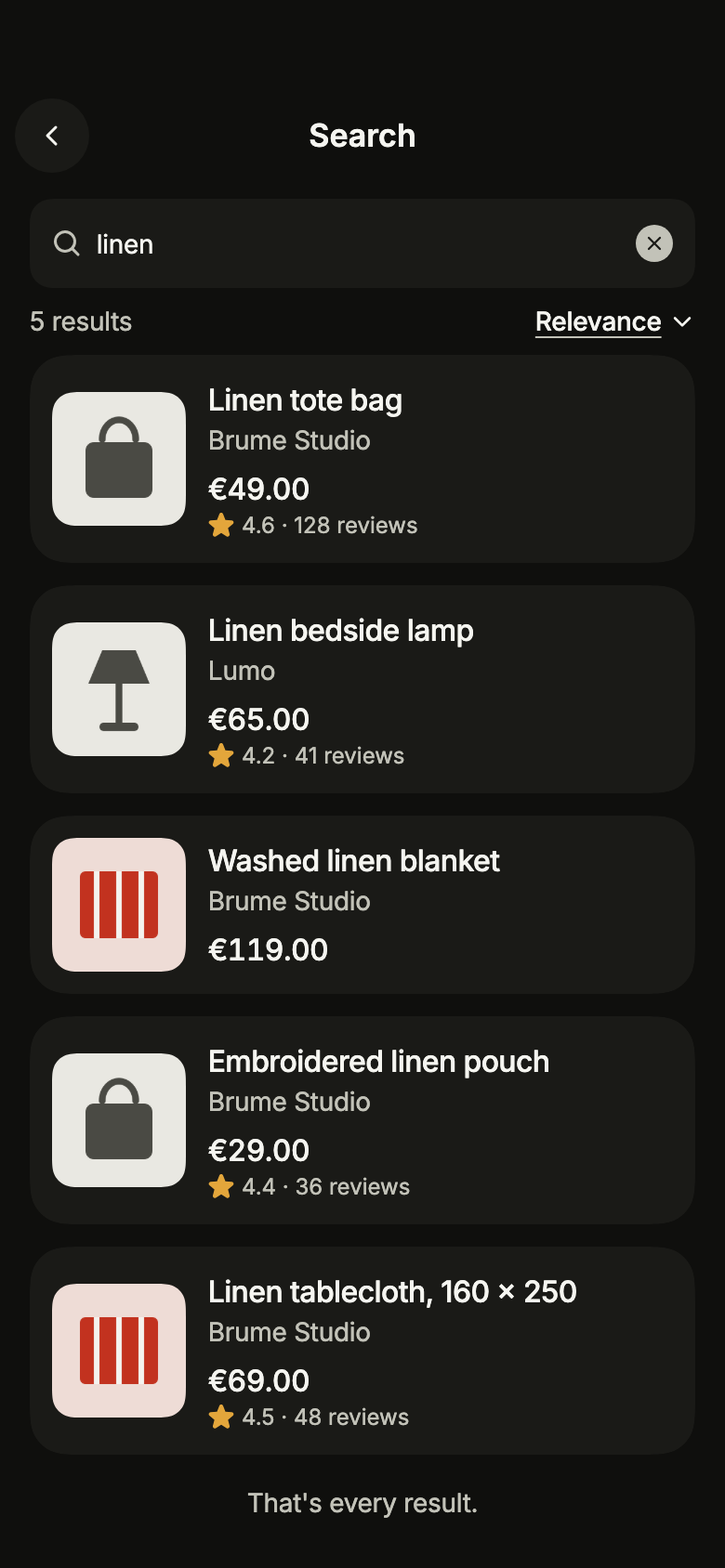
import 'package:your_app/ui/fliin/screens/search/search_controller.dart';
import 'package:your_app/ui/fliin/screens/search/search_data.dart';
import 'package:your_app/ui/fliin/screens/search/search_screen.dart';
import 'package:flutter/widgets.dart';

class SearchSimpleExample extends StatelessWidget {
  const SearchSimpleExample({super.key});

  @override
  Widget build(BuildContext context) {
    final page = sampleSearchPage('linen', const SearchFilters());
    return SearchScreen.standalone(
      service: const SampleSearchService(latency: Duration(milliseconds: 600)),
      categories: const [],
      showFilters: false,
      text: 'linen',
      initial: SearchResults(
        page.results,
        total: page.total,
        more: switch (page.next) {
          final next? => SearchMoreAvailable(next),
          null => const SearchMoreEnd(),
        },
      ),
      onBack: () {},
      onOpen: (_) {},
    );
  }
}Idle
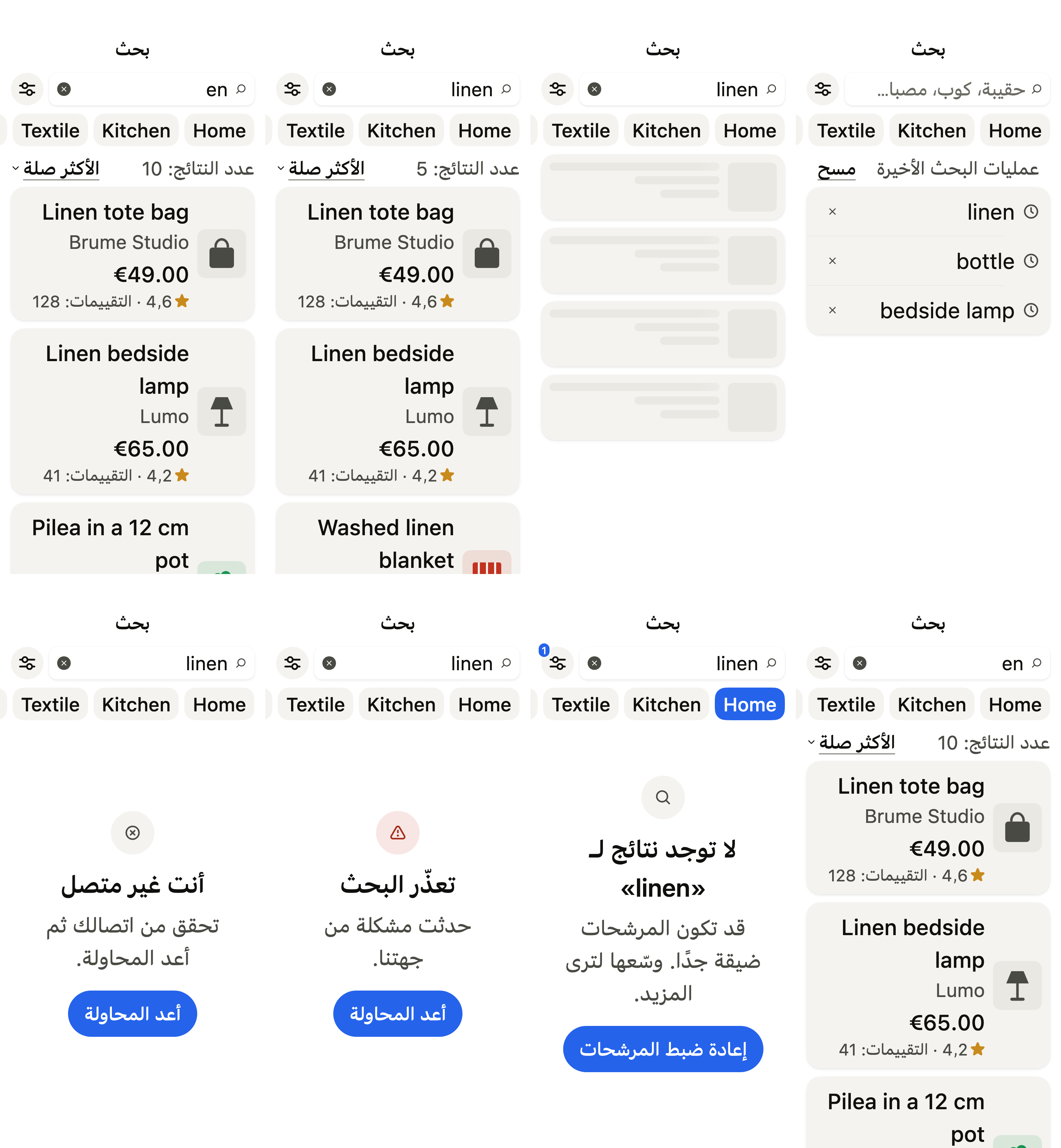
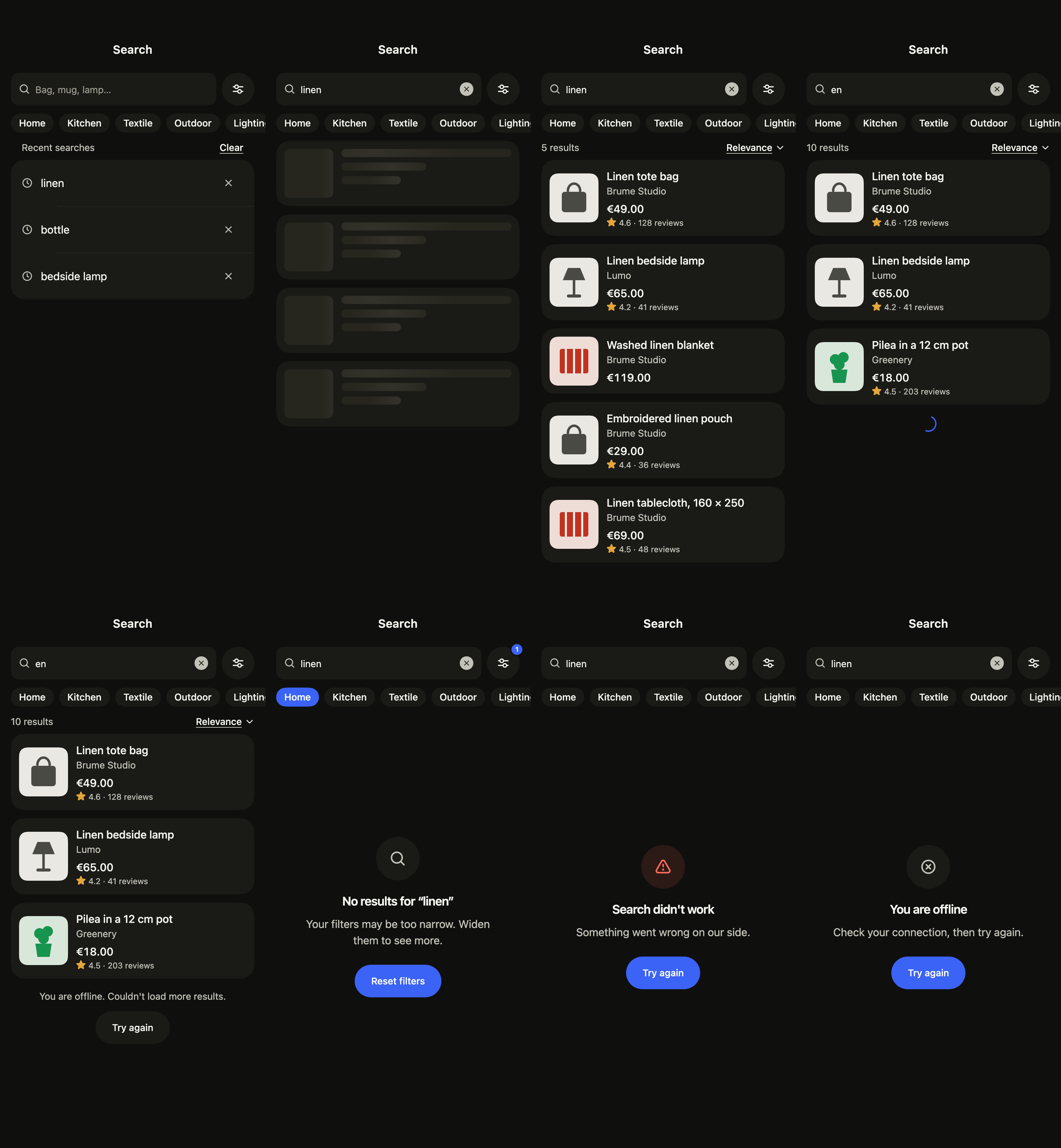
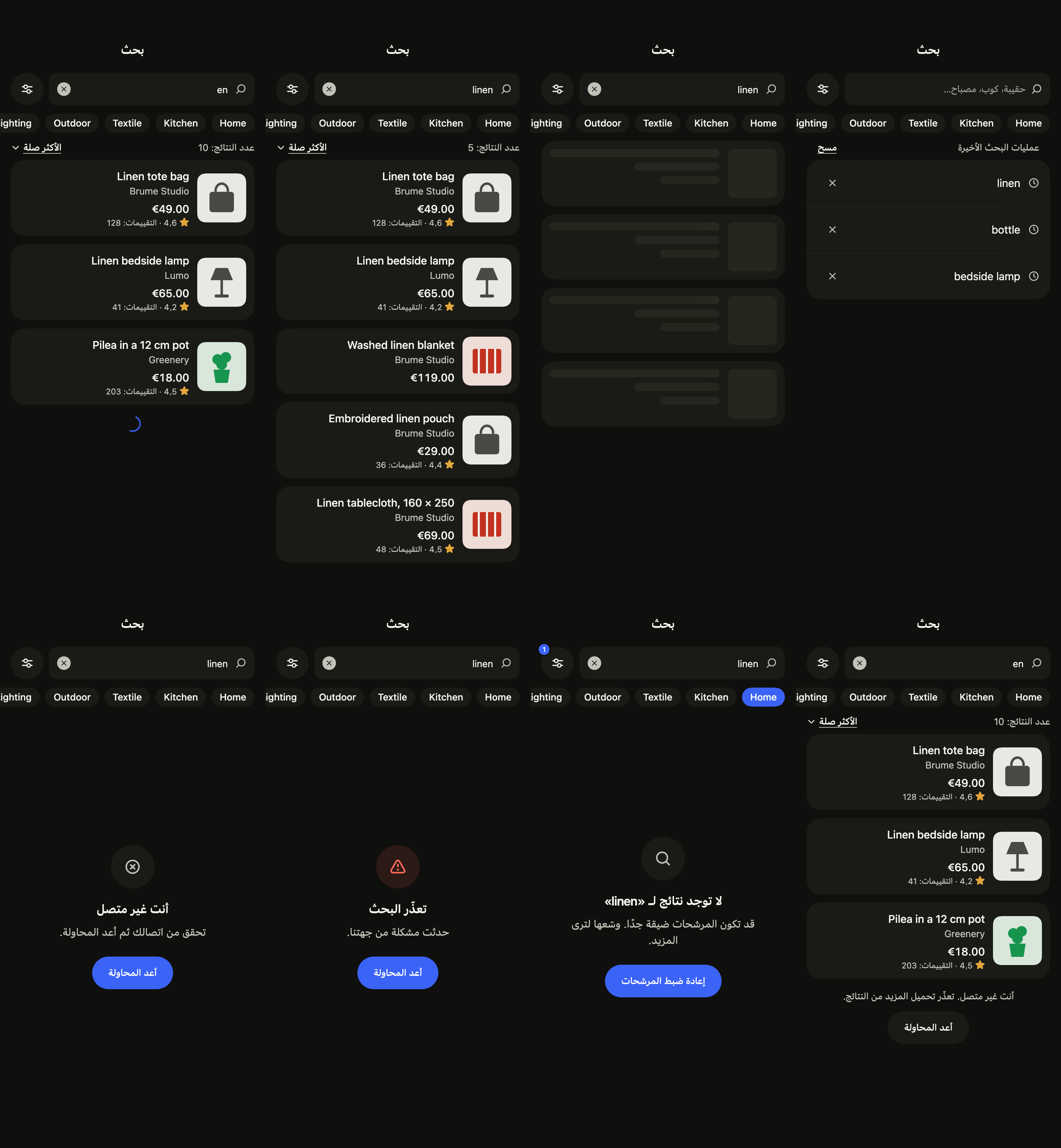
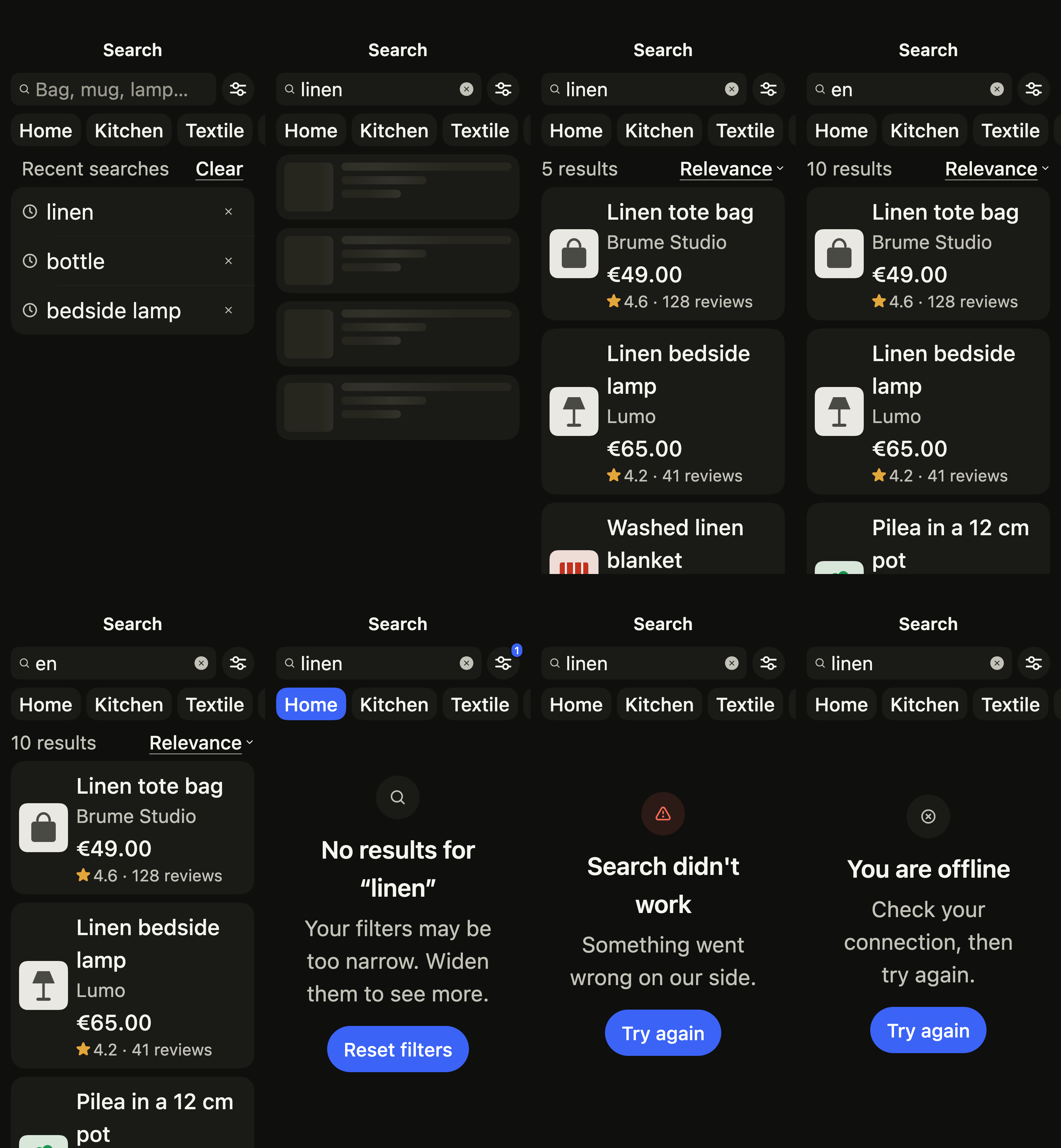
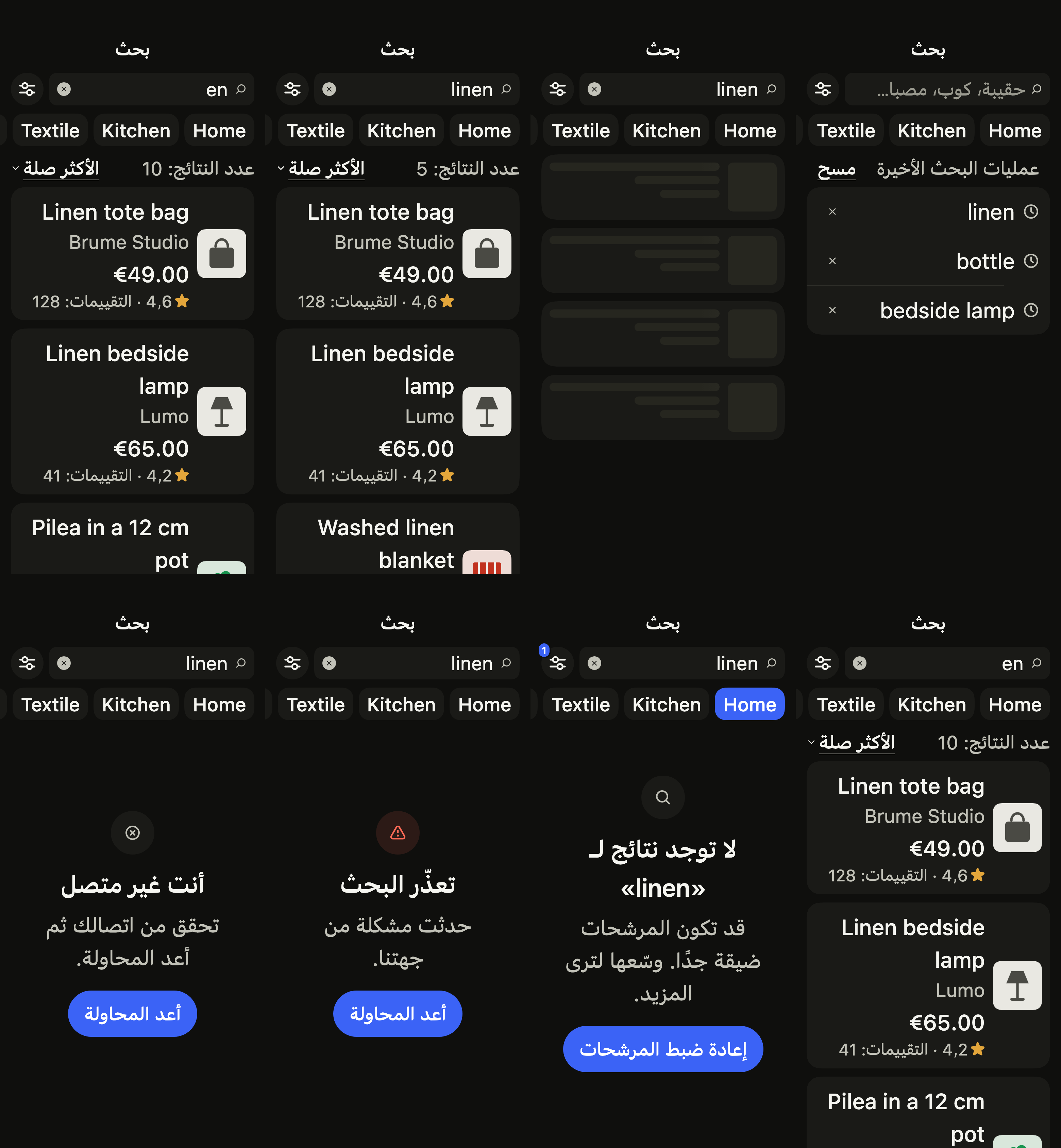
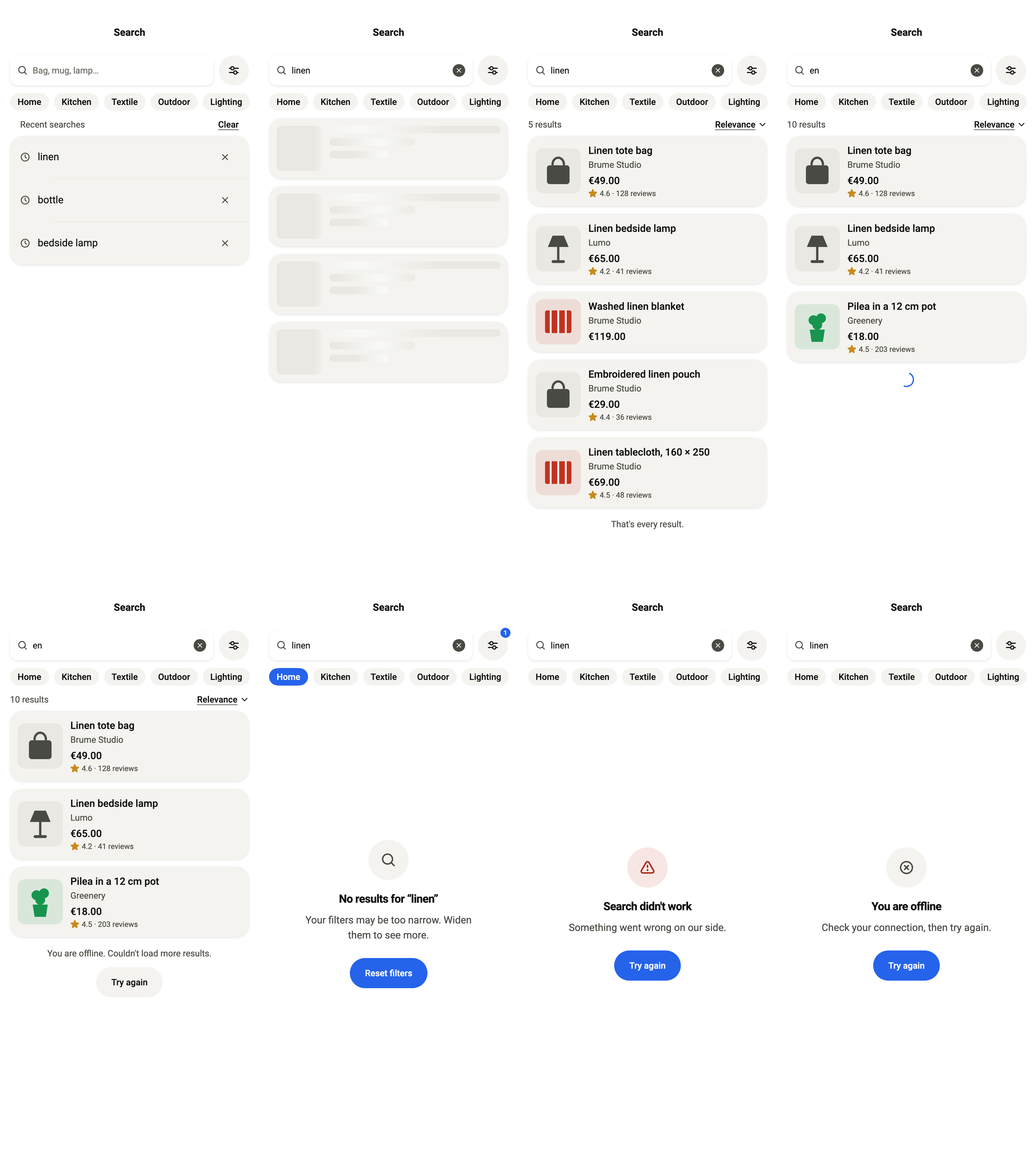
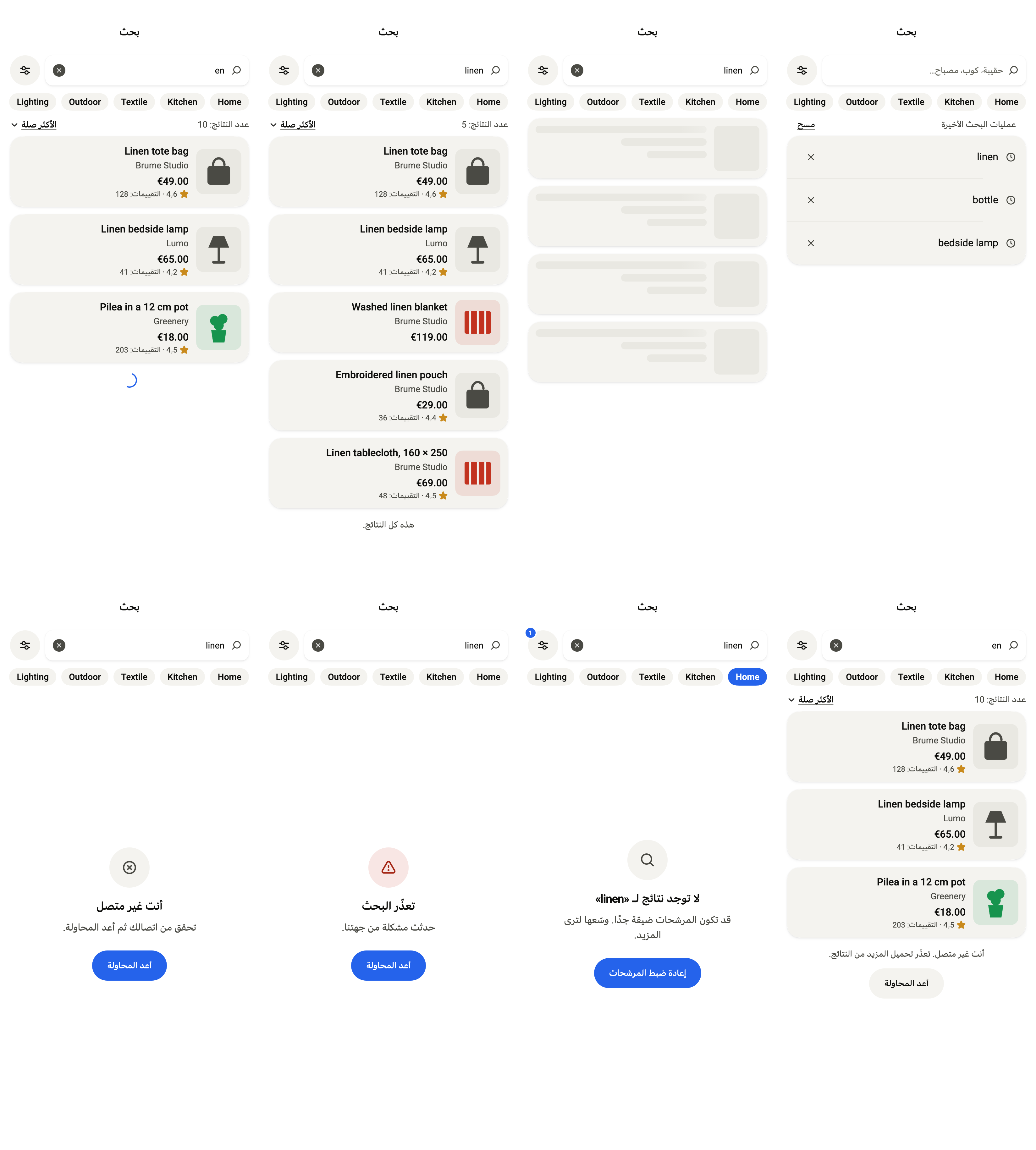
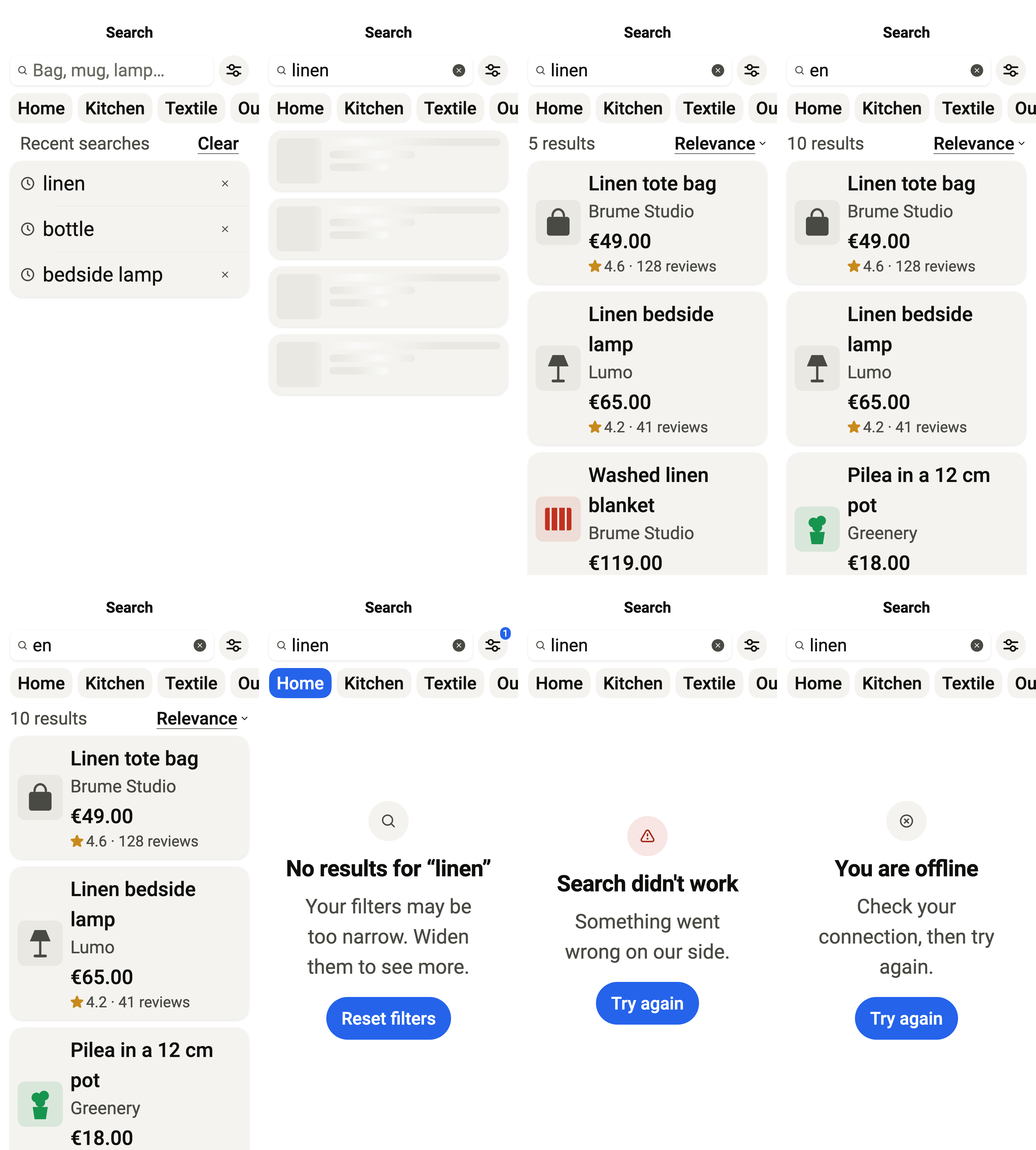
Before typing: the recent searches and the categories to browse. standalone holds its own controller over the service you pass.
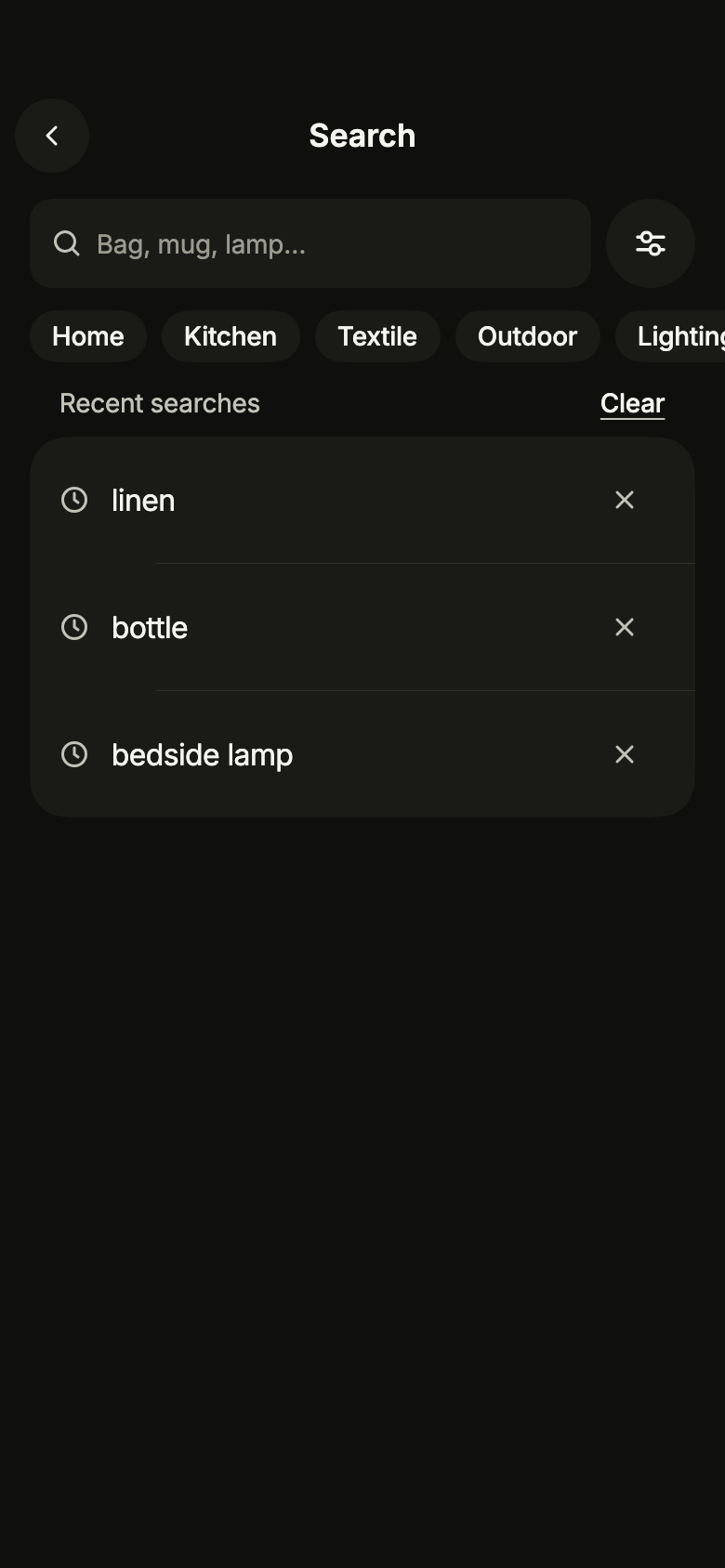
import 'package:your_app/ui/fliin/screens/search/search_controller.dart';
import 'package:your_app/ui/fliin/screens/search/search_data.dart';
import 'package:your_app/ui/fliin/screens/search/search_screen.dart';
import 'package:flutter/widgets.dart';

class SearchIdleExample extends StatelessWidget {
  const SearchIdleExample({super.key});

  @override
  Widget build(BuildContext context) {
    return SearchScreen.standalone(
      service: const SampleSearchService(latency: Duration(milliseconds: 600)),
      categories: sampleSearchCategories,
      initial: const SearchIdle(),
      recent: const ['linen', 'bottle', 'bedside lamp'],
      onBack: () {},
      onOpen: (_) {},
    );
  }
}Loading
While the first page of results loads, placeholder rows hold their place.
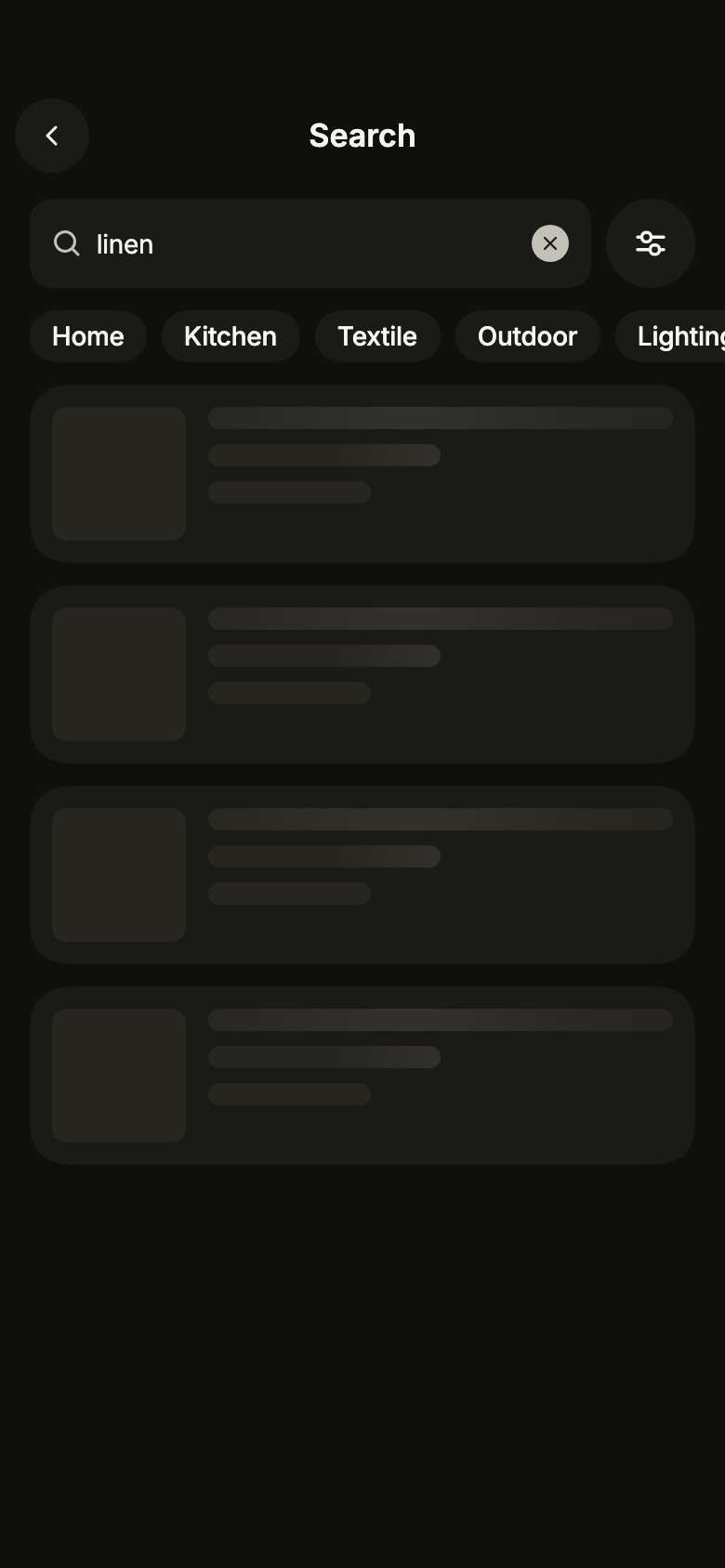
import 'package:your_app/ui/fliin/screens/search/search_controller.dart';
import 'package:your_app/ui/fliin/screens/search/search_data.dart';
import 'package:your_app/ui/fliin/screens/search/search_screen.dart';
import 'package:flutter/widgets.dart';

class SearchLoadingExample extends StatelessWidget {
  const SearchLoadingExample({super.key});

  @override
  Widget build(BuildContext context) {
    return SearchScreen.standalone(
      service: const SampleSearchService(latency: Duration(milliseconds: 600)),
      categories: sampleSearchCategories,
      text: 'linen',
      initial: const SearchLoading(),
      recent: const ['linen', 'bottle', 'bedside lamp'],
      onBack: () {},
      onOpen: (_) {},
    );
  }
}Results
The results for the text, with their count; the next page loads as the list scrolls.
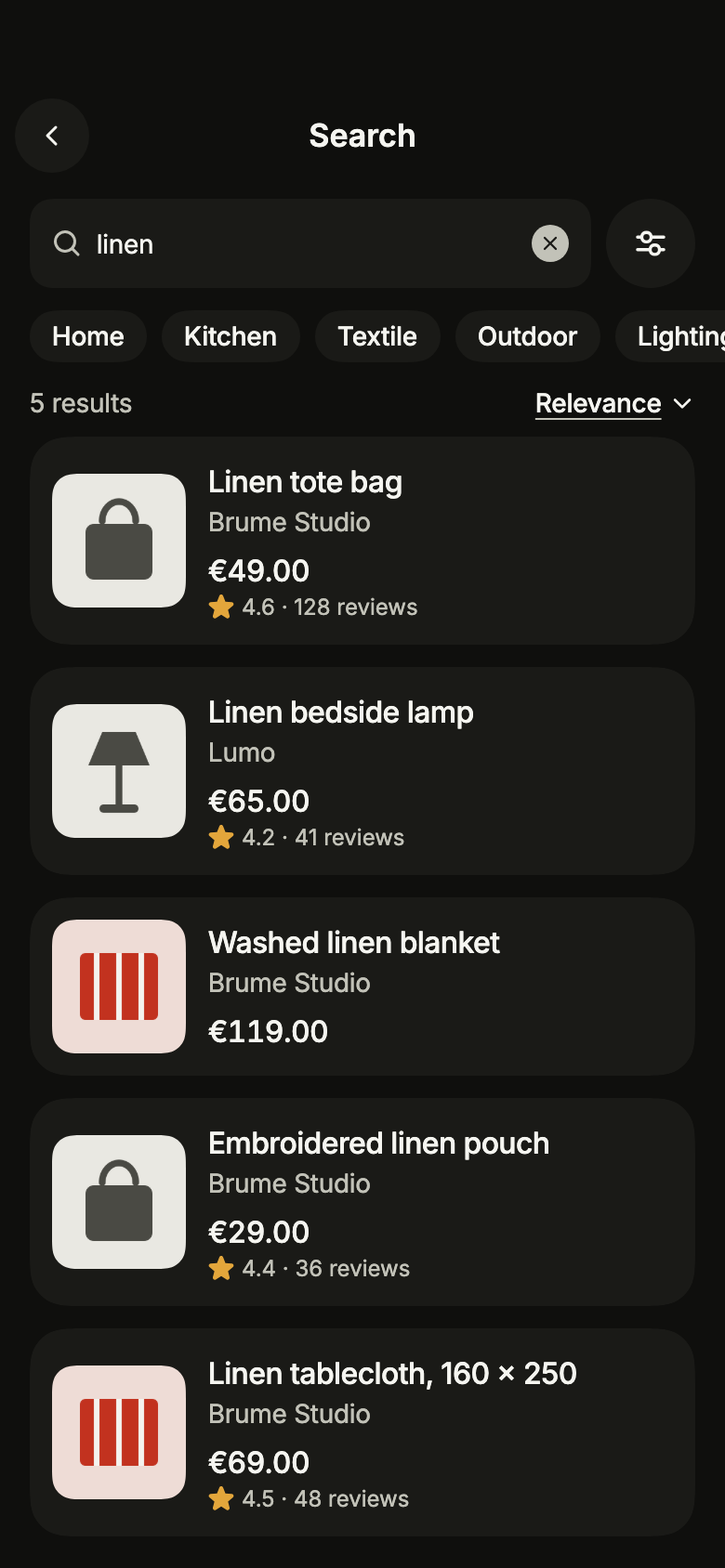
import 'package:your_app/ui/fliin/screens/search/search_controller.dart';
import 'package:your_app/ui/fliin/screens/search/search_data.dart';
import 'package:your_app/ui/fliin/screens/search/search_screen.dart';
import 'package:flutter/widgets.dart';

class SearchResultsExample extends StatelessWidget {
  const SearchResultsExample({super.key});

  @override
  Widget build(BuildContext context) {
    return SearchScreen.standalone(
      service: const SampleSearchService(latency: Duration(milliseconds: 600)),
      categories: sampleSearchCategories,
      text: 'linen',
      initial: SearchResults(
        sampleSearchPage('linen', const SearchFilters()).results,
        total: sampleSearchPage('linen', const SearchFilters()).total,
        more: switch (sampleSearchPage('linen', const SearchFilters()).next) {
          final next? => SearchMoreAvailable(next),
          null => const SearchMoreEnd(),
        },
      ),
      recent: const ['linen', 'bottle', 'bedside lamp'],
      onBack: () {},
      onOpen: (_) {},
    );
  }
}Loading more
The next page on its way: a spinner closes the list.
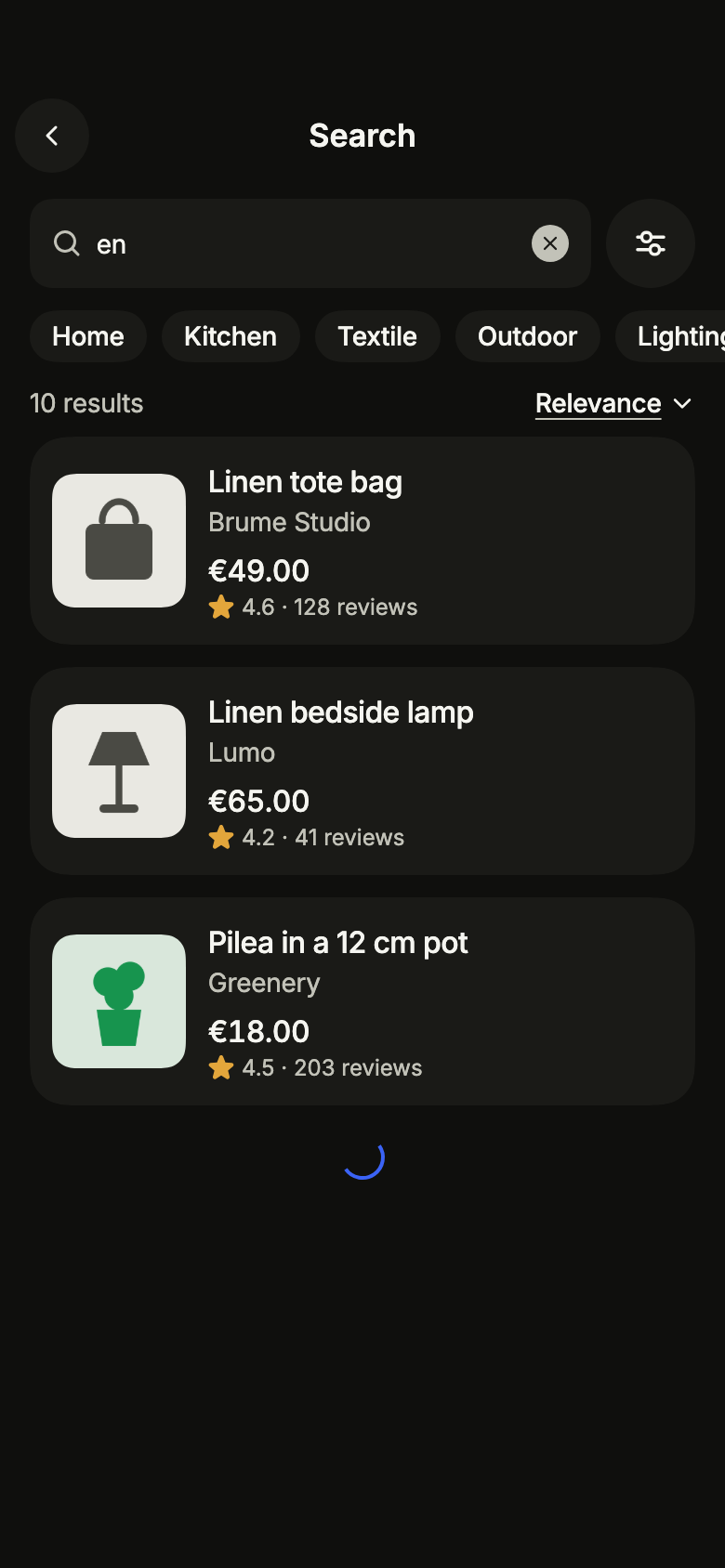
import 'package:your_app/ui/fliin/screens/search/search_controller.dart';
import 'package:your_app/ui/fliin/screens/search/search_data.dart';
import 'package:your_app/ui/fliin/screens/search/search_screen.dart';
import 'package:flutter/widgets.dart';

class SearchLoadingMoreExample extends StatelessWidget {
  const SearchLoadingMoreExample({super.key});

  @override
  Widget build(BuildContext context) {
    return SearchScreen.standalone(
      service: const SampleSearchService(latency: Duration(milliseconds: 600)),
      categories: sampleSearchCategories,
      text: 'en',
      initial: SearchResults(
        sampleSearchPage('en', const SearchFilters()).results.take(3).toList(),
        total: sampleSearchPage('en', const SearchFilters()).total,
        more: const SearchMoreLoading('3'),
      ),
      recent: const ['linen', 'bottle', 'bedside lamp'],
      onBack: () {},
      onOpen: (_) {},
    );
  }
}More failed
The next page could not load: the end of the list offers to try again, and the results shown stay.
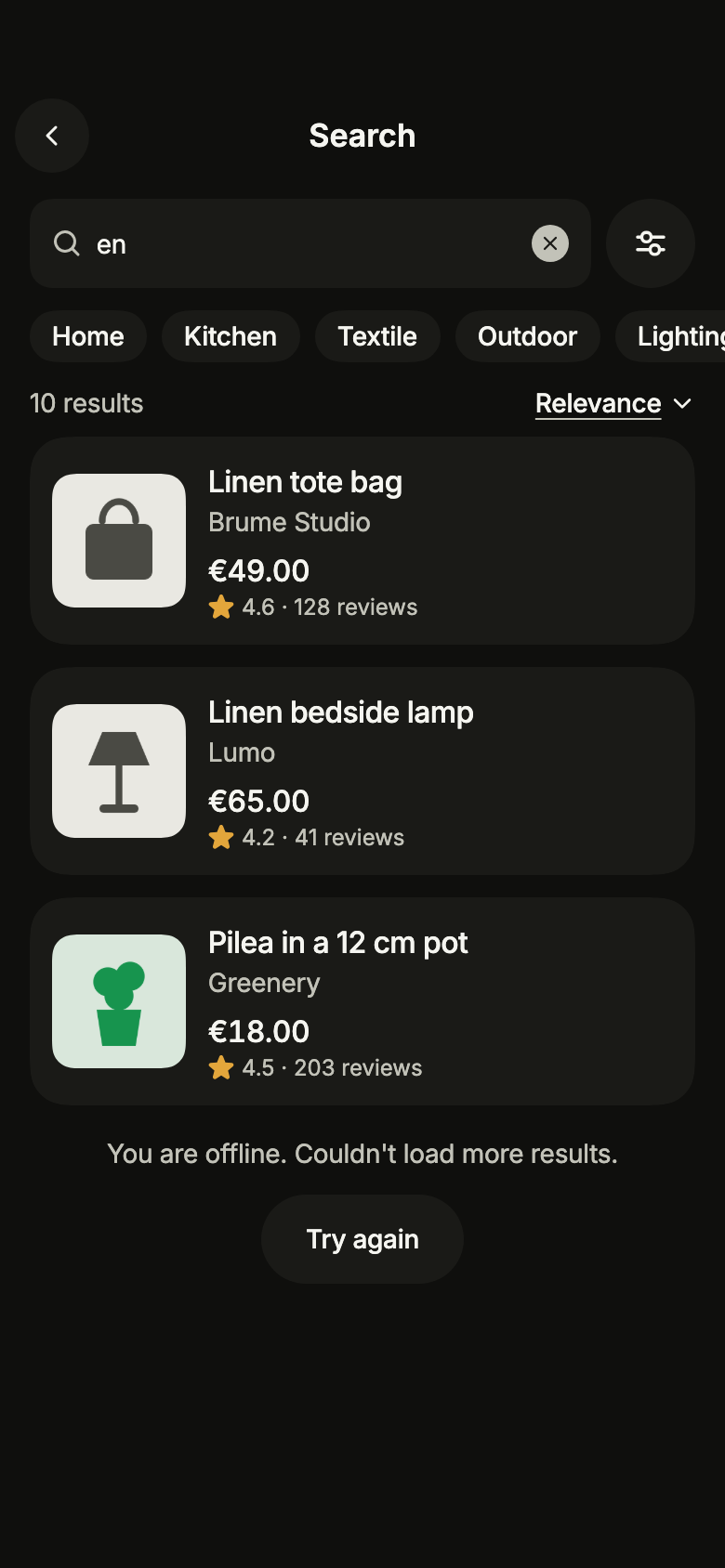
import 'package:your_app/ui/fliin/screens/search/search_controller.dart';
import 'package:your_app/ui/fliin/screens/search/search_data.dart';
import 'package:your_app/ui/fliin/screens/search/search_screen.dart';
import 'package:flutter/widgets.dart';

class SearchMoreFailedExample extends StatelessWidget {
  const SearchMoreFailedExample({super.key});

  @override
  Widget build(BuildContext context) {
    return SearchScreen.standalone(
      service: const SampleSearchService(latency: Duration(milliseconds: 600)),
      categories: sampleSearchCategories,
      text: 'en',
      initial: SearchResults(
        sampleSearchPage('en', const SearchFilters()).results.take(3).toList(),
        total: sampleSearchPage('en', const SearchFilters()).total,
        more: const SearchMoreFailed('3', offline: true),
      ),
      recent: const ['linen', 'bottle', 'bedside lamp'],
      onBack: () {},
      onOpen: (_) {},
    );
  }
}No results
Nothing matches the text and the filters: the screen suggests clearing them.
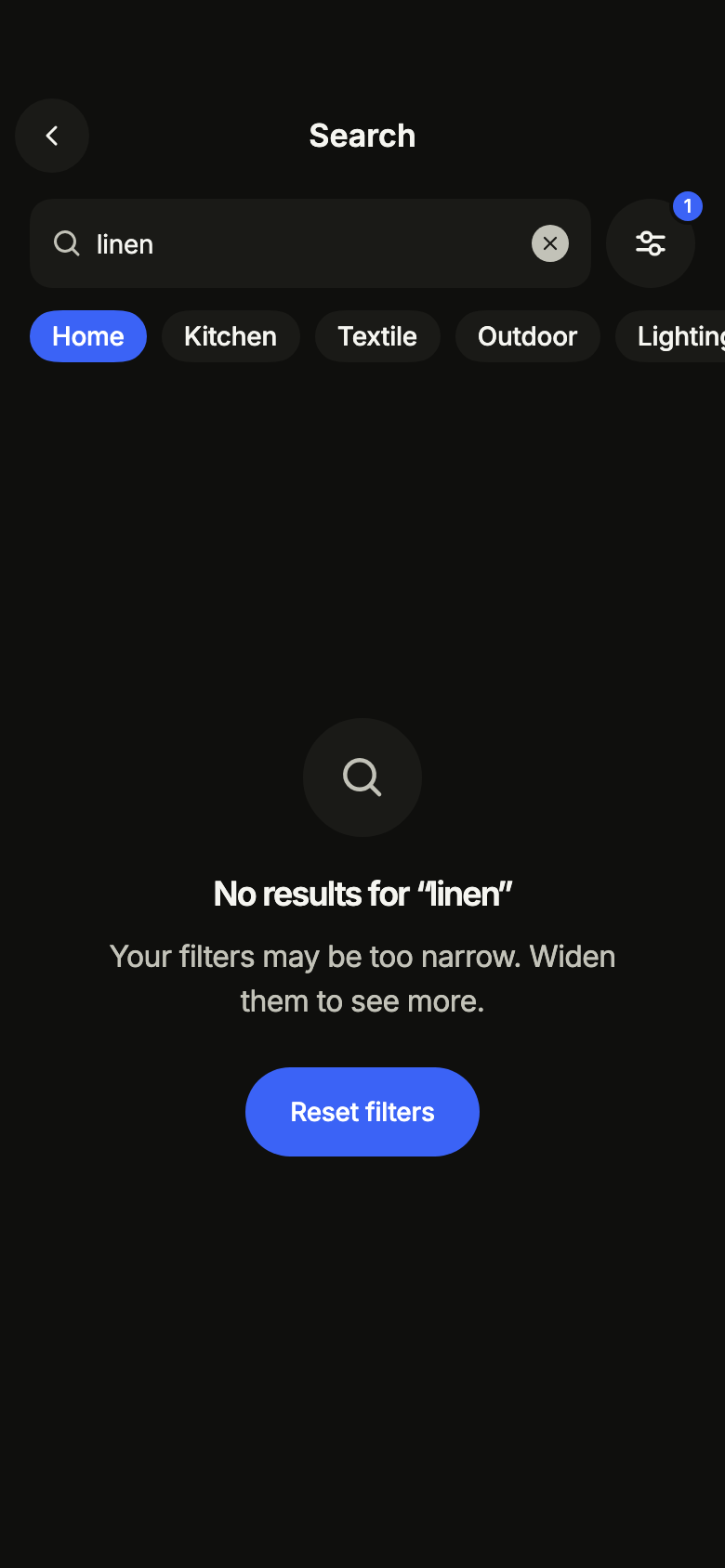
import 'package:your_app/ui/fliin/screens/search/search_controller.dart';
import 'package:your_app/ui/fliin/screens/search/search_data.dart';
import 'package:your_app/ui/fliin/screens/search/search_screen.dart';
import 'package:flutter/widgets.dart';

class SearchNoResultsExample extends StatelessWidget {
  const SearchNoResultsExample({super.key});

  @override
  Widget build(BuildContext context) {
    return SearchScreen.standalone(
      service: const SampleSearchService(latency: Duration(milliseconds: 600)),
      categories: sampleSearchCategories,
      text: 'linen',
      filters: const SearchFilters(categories: {'home'}),
      initial: const SearchNoResults(),
      recent: const ['linen', 'bottle', 'bedside lamp'],
      onBack: () {},
      onOpen: (_) {},
    );
  }
}Error
When the search fails, the screen says so and offers to try again.
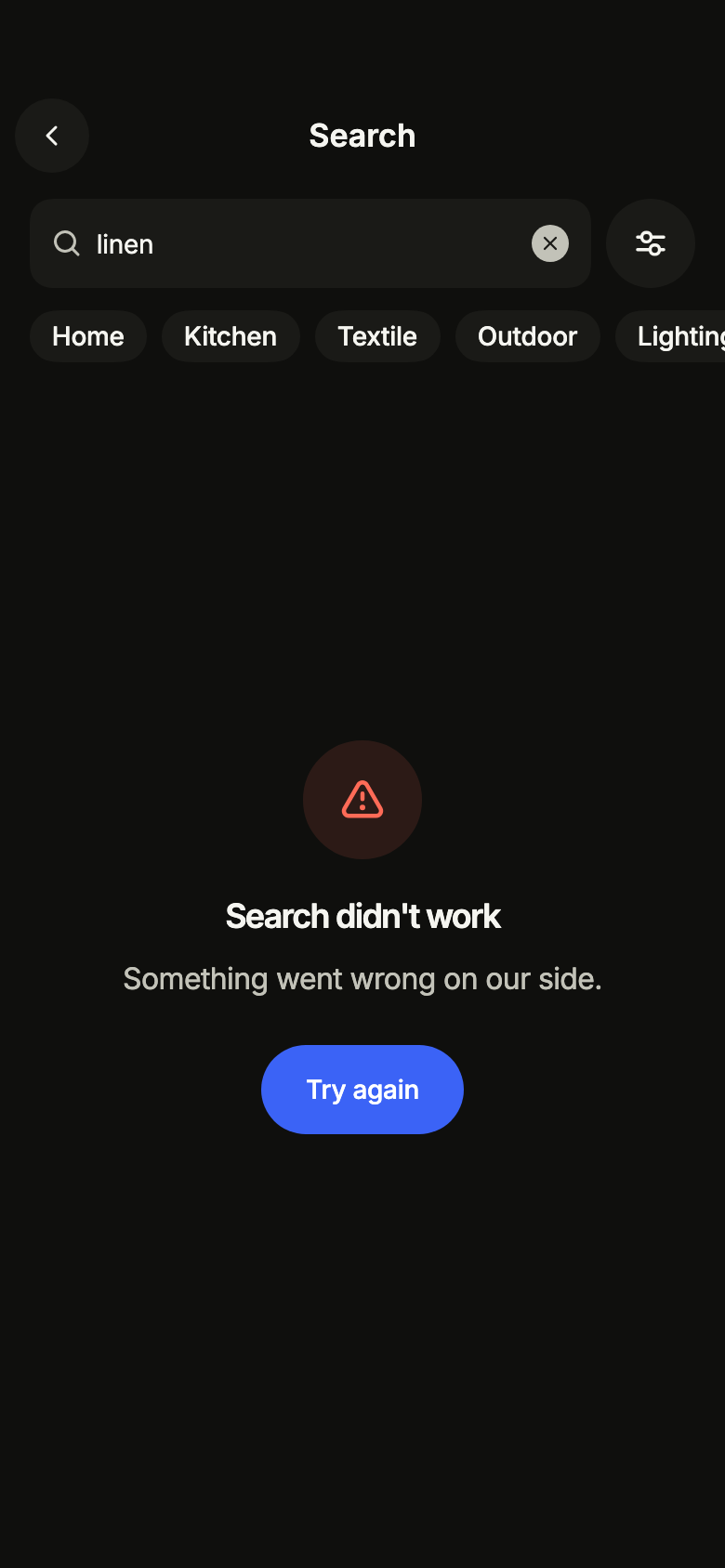
import 'package:your_app/ui/fliin/screens/search/search_controller.dart';
import 'package:your_app/ui/fliin/screens/search/search_data.dart';
import 'package:your_app/ui/fliin/screens/search/search_screen.dart';
import 'package:flutter/widgets.dart';

class SearchErrorExample extends StatelessWidget {
  const SearchErrorExample({super.key});

  @override
  Widget build(BuildContext context) {
    return SearchScreen.standalone(
      service: const SampleSearchService(latency: Duration(milliseconds: 600)),
      categories: sampleSearchCategories,
      text: 'linen',
      initial: const SearchFailed(),
      recent: const ['linen', 'bottle', 'bedside lamp'],
      onBack: () {},
      onOpen: (_) {},
    );
  }
}Offline
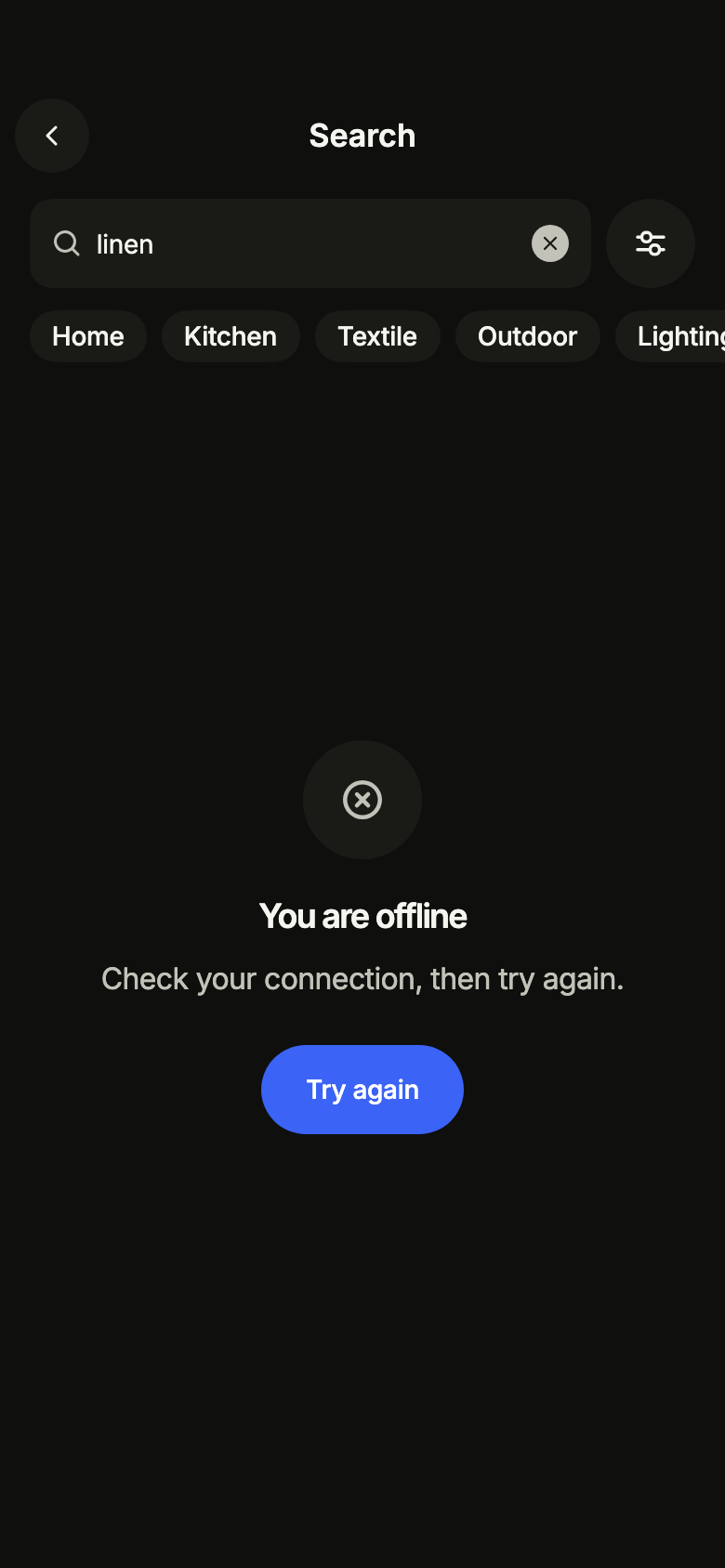
Without a connection, the screen asks to reconnect rather than showing an error.
import 'package:your_app/ui/fliin/screens/search/search_controller.dart';
import 'package:your_app/ui/fliin/screens/search/search_data.dart';
import 'package:your_app/ui/fliin/screens/search/search_screen.dart';
import 'package:flutter/widgets.dart';

class SearchOfflineExample extends StatelessWidget {
  const SearchOfflineExample({super.key});

  @override
  Widget build(BuildContext context) {
    return SearchScreen.standalone(
      service: const SampleSearchService(latency: Duration(milliseconds: 600)),
      categories: sampleSearchCategories,
      text: 'linen',
      initial: const SearchOffline(),
      recent: const ['linen', 'bottle', 'bedside lamp'],
      onBack: () {},
      onOpen: (_) {},
    );
  }
}Routing
fliin add search prints the route for the router it finds in your pubspec, a file next to the page that wires its navigation. Each of them:
go_router
// lib/search_route.dart, next to search_page.dart.
import 'package:go_router/go_router.dart';

import 'search_page.dart';

/// Add searchRoute to the routes of your GoRouter.
final searchRoute = GoRoute(
  path: '/search',
  builder: (context, state) => SearchPage(
    // Alone in the stack (deep link, go): your app's home.
    onBack: () => context.canPop() ? context.pop() : context.go('/'),
    onOpen: (result) => context.push('/product/${Uri.encodeComponent(result.id)}'),
  ),
);navigator
// lib/search_route.dart, next to search_page.dart.
import 'package:flutter/material.dart';

import 'product_route.dart';
import 'search_page.dart';

/// Opens “Filtered search”: `Navigator.of(context).push(searchRoute(cartPage: …))`.
/// [cartPage] builds the cart: the page of Fliin's checkout screen with its callbacks, or yours (checkoutRoute cannot come from here, checkout leads to order).
Route<void> searchRoute({required WidgetBuilder cartPage}) => MaterialPageRoute<void>(
  builder: (context) => SearchPage(
    onBack: () => Navigator.of(context).maybePop(),
    onOpen: (result) => Navigator.of(context).push(productRoute(result.id, cartPage: cartPage)),
  ),
);State
The controller is a ChangeNotifier from widgets.dart, with no package. fliin add search prints the page that holds it with the state management it finds, its imports written for your package; below they read your_app. Your backend implements the Service interface of the screen's _data.dart file:
none
// lib/search_page.dart
// Your backend: implement SearchService (search_data.dart) and pass it instead of the sample service.
import 'package:your_app/ui/fliin/screens/search/search_data.dart';
import 'package:your_app/ui/fliin/screens/search/search_screen.dart';
import 'package:flutter/widgets.dart';

class SearchPage extends StatelessWidget {
  const SearchPage({
    super.key,
    required this.onBack,
    required this.onOpen,
  });

  final VoidCallback onBack;
  final ValueChanged<SearchResult> onOpen;

  @override
  Widget build(BuildContext context) => SearchScreen.standalone(
    service: const SampleSearchService(),
    categories: sampleSearchCategories,
    onBack: onBack,
    onOpen: onOpen,
  );
}provider
// lib/search_page.dart
// Your backend: implement SearchService (search_data.dart) and pass it instead of the sample service.
import 'package:your_app/ui/fliin/screens/search/search_controller.dart';
import 'package:your_app/ui/fliin/screens/search/search_data.dart';
import 'package:your_app/ui/fliin/screens/search/search_screen.dart';
import 'package:flutter/widgets.dart';
import 'package:provider/provider.dart';

class SearchPage extends StatelessWidget {
  const SearchPage({
    super.key,
    required this.onBack,
    required this.onOpen,
  });

  final VoidCallback onBack;
  final ValueChanged<SearchResult> onOpen;

  @override
  Widget build(BuildContext context) => ChangeNotifierProvider(
    create: (_) => SearchScreenController(service: const SampleSearchService()),
    child: Builder(
      builder: (context) => SearchScreen(
        controller: context.read<SearchScreenController>(),
        categories: sampleSearchCategories,
        onBack: onBack,
        onOpen: onOpen,
      ),
    ),
  );
}riverpod
// lib/search_page.dart
// Your backend: implement SearchService (search_data.dart) and pass it instead of the sample service.
import 'package:your_app/ui/fliin/screens/search/search_controller.dart';
import 'package:your_app/ui/fliin/screens/search/search_data.dart';
import 'package:your_app/ui/fliin/screens/search/search_screen.dart';
import 'package:flutter/widgets.dart';
import 'package:flutter_riverpod/flutter_riverpod.dart';

final searchControllerProvider = Provider.autoDispose<SearchScreenController>((ref) {
  final controller = SearchScreenController(service: const SampleSearchService());
  ref.onDispose(controller.dispose);
  return controller;
});

class SearchPage extends ConsumerWidget {
  const SearchPage({
    super.key,
    required this.onBack,
    required this.onOpen,
  });

  final VoidCallback onBack;
  final ValueChanged<SearchResult> onOpen;

  @override
  Widget build(BuildContext context, WidgetRef ref) => SearchScreen(
    controller: ref.watch(searchControllerProvider),
    categories: sampleSearchCategories,
    onBack: onBack,
    onOpen: onOpen,
  );
}bloc
// lib/search_page.dart
// Your backend: implement SearchService (search_data.dart) and pass it instead of the sample service.
import 'package:your_app/ui/fliin/screens/search/search_controller.dart';
import 'package:your_app/ui/fliin/screens/search/search_data.dart';
import 'package:your_app/ui/fliin/screens/search/search_screen.dart';
import 'package:flutter/widgets.dart';
import 'package:flutter_bloc/flutter_bloc.dart';

/// The screen's controller as a bloc, for your BlocListener and BlocBuilder:
/// one emission per controller notification. `version` tells them apart
/// when `state` does not change (mode, filters, text…, read them on
/// `controller`). The screen listens to the controller itself.
class SearchScreenCubit extends Cubit<({SearchState state, int version})> {
  SearchScreenCubit(this.controller) : super((state: controller.state, version: 0)) {
    controller.addListener(_changed);
  }

  final SearchScreenController controller;

  void _changed() => emit((state: controller.state, version: state.version + 1));

  @override
  Future<void> close() {
    controller
      ..removeListener(_changed)
      ..dispose();
    return super.close();
  }
}

class SearchPage extends StatelessWidget {
  const SearchPage({
    super.key,
    required this.onBack,
    required this.onOpen,
  });

  final VoidCallback onBack;
  final ValueChanged<SearchResult> onOpen;

  @override
  Widget build(BuildContext context) => BlocProvider(
    create: (_) => SearchScreenCubit(SearchScreenController(service: const SampleSearchService())),
    child: Builder(
      builder: (context) => SearchScreen(
        controller: context.read<SearchScreenCubit>().controller,
        categories: sampleSearchCategories,
        onBack: onBack,
        onOpen: onOpen,
      ),
    ),
  );
}The snippets lead to product: install these screens too and paste their snippets.
API
SearchScreen: class extends StatefulWidget
SearchScreen.new: const new({super.key, required SearchScreenController controller, required List<SearchCategory> categories, VoidCallback? onBack, ValueChanged<SearchResult>? onOpen, String? title, String? placeholder, bool showFilters})
SearchScreen.standalone: const new({super.key, required SearchService service, required List<SearchCategory> categories, SearchState? initial, String text, SearchFilters filters, List<String> recent, ValueChanged<List<String>>? onRecentChanged, VoidCallback? onBack, ValueChanged<SearchResult>? onOpen, String? title, String? placeholder, bool showFilters})
SearchScreen.controller: get SearchScreenController?
SearchScreen.service: get SearchService?
SearchScreen.initial: get SearchState?
SearchScreen.text: get String
SearchScreen.filters: get SearchFilters
SearchScreen.recent: get List<String>
SearchScreen.onRecentChanged: get ValueChanged<List<String>>?
SearchScreen.categories: get List<SearchCategory>
SearchScreen.onBack: get VoidCallback?
SearchScreen.onOpen: get ValueChanged<SearchResult>?
SearchScreen.title: get String?
SearchScreen.placeholder: get String?
SearchScreen.showFilters: get bool
SearchScreen.createState: State<SearchScreen>()
SearchState: sealed class permits {SearchFailed, SearchIdle, SearchLoading, SearchNoResults, SearchOffline, SearchResults}
SearchState.new: const new()
SearchIdle: final class extends SearchState
SearchIdle.new: const new()
SearchLoading: final class extends SearchState
SearchLoading.new: const new()
SearchMore: sealed class permits {SearchMoreAvailable, SearchMoreEnd, SearchMoreFailed, SearchMoreLoading}
SearchMore.new: const new()
SearchMoreAvailable: final class extends SearchMore
SearchMoreAvailable.new: const new(String after)
SearchMoreAvailable.after: get String
SearchMoreLoading: final class extends SearchMore
SearchMoreLoading.new: const new(String after)
SearchMoreLoading.after: get String
SearchMoreFailed: final class extends SearchMore
SearchMoreFailed.new: const new(String after, {required bool offline})
SearchMoreFailed.after: get String
SearchMoreFailed.offline: get bool
SearchMoreEnd: final class extends SearchMore
SearchMoreEnd.new: const new()
SearchResults: final class extends SearchState
SearchResults.new: new(List<SearchResult> results, {required int total, SearchMore more})
SearchResults.results: get List<SearchResult>
SearchResults.total: get int
SearchResults.more: get SearchMore
SearchNoResults: final class extends SearchState
SearchNoResults.new: const new()
SearchFailed: final class extends SearchState
SearchFailed.new: const new()
SearchOffline: final class extends SearchState
SearchOffline.new: const new()
SearchScreenController: class extends ChangeNotifier
SearchScreenController.new: new({required SearchService service, String text, SearchFilters filters, List<String> recent, SearchState initial, Duration debounce})
SearchScreenController.service: get SearchService
SearchScreenController.debounce: get Duration
SearchScreenController.maxRecent: static const dynamic
SearchScreenController.state: get SearchState
SearchScreenController.text: get String
SearchScreenController.filters: get SearchFilters
SearchScreenController.recent: get List<String>
SearchScreenController.searchedText: get String?
SearchScreenController.setText: void(String text)
SearchScreenController.submit: bool()
SearchScreenController.searchRecent: void(String term)
SearchScreenController.remember: void(String term)
SearchScreenController.forget: void(String term)
SearchScreenController.clearRecent: void()
SearchScreenController.setFilters: void(SearchFilters filters)
SearchScreenController.toggleCategory: void(String id)
SearchScreenController.resetFilters: void()
SearchScreenController.retry: Future<void>()
SearchScreenController.loadMore: Future<bool>()
SearchScreenController.dispose: void()
SearchSort: enum {relevance, priceLowToHigh, priceHighToLow, rating}
SearchSort.relevance: static final SearchSort
SearchSort.priceLowToHigh: static final SearchSort
SearchSort.priceHighToLow: static final SearchSort
SearchSort.rating: static final SearchSort
SearchCategory: final class
SearchCategory.new: const new(String id, String label)
SearchCategory.id: get String
SearchCategory.label: get String
SearchCategory.operator ==: bool(Object other)
SearchCategory.hashCode: get int
SearchPriceRange: typedef = ({int min, int max})
SearchFilters: final class
SearchFilters.new: const new({Set<String> categories, SearchSort sort, SearchPriceRange? price, bool inStock, bool freeDelivery})
SearchFilters.categories: get Set<String>
SearchFilters.sort: get SearchSort
SearchFilters.price: get SearchPriceRange?
SearchFilters.inStock: get bool
SearchFilters.freeDelivery: get bool
SearchFilters.activeCount: get int
SearchFilters.copyWith: SearchFilters({Set<String>? categories, SearchSort? sort, SearchPriceRange? Function()? price, bool? inStock, bool? freeDelivery})
SearchFilters.operator ==: bool(Object other)
SearchFilters.hashCode: get int
SearchResult: final class
SearchResult.new: const new({required String id, required String title, required String price, String? brand, double? rating, int? reviews, ImageProvider? image})
SearchResult.id: get String
SearchResult.title: get String
SearchResult.price: get String
SearchResult.brand: get String?
SearchResult.rating: get double?
SearchResult.reviews: get int?
SearchResult.image: get ImageProvider?
SearchResultsPage: final class
SearchResultsPage.new: const new({required List<SearchResult> results, required int total, String? next})
SearchResultsPage.results: get List<SearchResult>
SearchResultsPage.total: get int
SearchResultsPage.next: get String?
SearchNoNetwork: final class implements Exception
SearchNoNetwork.new: const new()
SearchService: abstract interface class
SearchService.new: new()
SearchService.search: abstract Future<SearchResultsPage>(String text, SearchFilters filters, {String? after})
sampleSearchCategories: const dynamic
SampleSearchService: final class implements SearchService
SampleSearchService.new: const new({Duration latency})
SampleSearchService.latency: get Duration
SampleSearchService.search: Future<SearchResultsPage>(String text, SearchFilters filters, {String? after})
sampleSearchPage: SearchResultsPage(String text, SearchFilters filters, {String? after})
searchL10n: const Map<String, Map<String, String>>
SearchStrings: final class
SearchStrings.new: const new(String language)
SearchStrings.of: factory new(BuildContext context)
SearchStrings.language: get String
SearchStrings.title: get String
SearchStrings.back: get String
SearchStrings.fieldLabel: get String
SearchStrings.placeholder: get String
SearchStrings.clear: get String
SearchStrings.filters: get String
SearchStrings.filtersActive: String(int count)
SearchStrings.categories: get String
SearchStrings.reset: get String
SearchStrings.resetFilters: get String
SearchStrings.showResults: get String
SearchStrings.close: get String
SearchStrings.sort: get String
SearchStrings.sortLabel: String(SearchSort sort)
SearchStrings.price: get String
SearchStrings.amount: String(int amount)
SearchStrings.priceMin: get String
SearchStrings.priceMax: get String
SearchStrings.inStock: get String
SearchStrings.freeDelivery: get String
SearchStrings.recentTitle: get String
SearchStrings.recentClear: get String
SearchStrings.recentRemove: String(String term)
SearchStrings.idleTitle: get String
SearchStrings.idleMessage: get String
SearchStrings.loading: get String
SearchStrings.results: String(int count)
SearchStrings.rating: String(double rating)
SearchStrings.reviews: String(int count)
SearchStrings.loadingMore: get String
SearchStrings.moreFailed: get String
SearchStrings.moreOffline: get String
SearchStrings.end: get String
SearchStrings.noResultsTitle: String(String query)
SearchStrings.noResultsMessage: get String
SearchStrings.noResultsFiltered: get String
SearchStrings.errorTitle: get String
SearchStrings.errorMessage: get String
SearchStrings.offlineTitle: get String
SearchStrings.offlineMessage: get String
SearchStrings.retry: get StringStrings
Every label in English, French and Arabic. The screen follows the closest Localizations; the same table is in the manifest, ready for your ARB files.
| Key | en | fr | ar |
|---|---|---|---|
searchTitle | Search | Rechercher | بحث |
searchBack | Back | Retour | رجوع |
searchFieldLabel | Search products | Rechercher un produit | ابحث عن منتج |
searchPlaceholder | Bag, mug, lamp… | Sac, tasse, lampe… | حقيبة، كوب، مصباح… |
searchClear | Clear search | Effacer la recherche | امسح البحث |
searchFilters | Filters | Filtres | المرشحات |
searchFiltersActive | {count} active | {count} actifs | المفعّلة: {count} |
searchCategories | Categories | Catégories | الفئات |
searchReset | Reset | Réinitialiser | إعادة الضبط |
searchResetFilters | Reset filters | Réinitialiser les filtres | إعادة ضبط المرشحات |
searchShowResults | Show results | Afficher les résultats | عرض النتائج |
searchClose | Close | Fermer | إغلاق |
searchSort | Sort by | Trier par | الترتيب حسب |
searchSortRelevance | Relevance | Pertinence | الأكثر صلة |
searchSortPriceLow | Price: low to high | Prix croissant | السعر من الأقل إلى الأعلى |
searchSortPriceHigh | Price: high to low | Prix décroissant | السعر من الأعلى إلى الأقل |
searchSortRating | Top rated | Mieux notés | الأعلى تقييمًا |
searchPrice | Price | Prix | السعر |
searchPriceAmount | €{amount} | {amount} € | {amount} € |
searchPriceMin | Minimum price | Prix minimum | أدنى سعر |
searchPriceMax | Maximum price | Prix maximum | أعلى سعر |
searchInStock | In stock only | En stock uniquement | المتوفر فقط |
searchFreeDelivery | Free delivery | Livraison gratuite | توصيل مجاني |
searchRecentTitle | Recent searches | Recherches récentes | عمليات البحث الأخيرة |
searchRecentClear | Clear | Effacer | مسح |
searchRecentRemove | Remove {term} | Retirer {term} | إزالة {term} |
searchIdleTitle | Find a product | Trouver un produit | ابحث عن منتج |
searchIdleMessage | Search by name or brand, then narrow down with filters. | Cherchez par nom ou par marque, puis affinez avec les filtres. | ابحث بالاسم أو بالعلامة التجارية، ثم ضيّق النتائج بالمرشحات. |
searchLoading | Searching | Recherche en cours | جارٍ البحث |
searchResultsOne | 1 result | 1 résultat | نتيجة واحدة |
searchResultsMany | {count} results | {count} résultats | عدد النتائج: {count} |
searchReviews | {count} reviews | {count} avis | التقييمات: {count} |
searchDecimal | . | , | ٫ |
searchLoadingMore | Loading more results | Chargement de la suite | جارٍ تحميل المزيد من النتائج |
searchMoreFailed | Couldn't load more results. | Impossible de charger la suite. | تعذّر تحميل المزيد من النتائج. |
searchMoreOffline | You are offline. Couldn't load more results. | Vous êtes hors ligne. Impossible de charger la suite. | أنت غير متصل. تعذّر تحميل المزيد من النتائج. |
searchEnd | That's every result. | Vous avez tout vu. | هذه كل النتائج. |
searchNoResultsTitle | No results for “{query}” | Aucun résultat pour « {query} » | لا توجد نتائج لـ «{query}» |
searchNoResultsMessage | Check the spelling or try another word. | Vérifiez l’orthographe ou essayez un autre mot. | تحقق من الإملاء أو جرّب كلمة أخرى. |
searchNoResultsFiltered | Your filters may be too narrow. Widen them to see more. | Vos filtres sont peut-être trop stricts. Élargissez-les pour en voir plus. | قد تكون المرشحات ضيقة جدًا. وسّعها لترى المزيد. |
searchErrorTitle | Search didn't work | La recherche a échoué | تعذّر البحث |
searchErrorMessage | Something went wrong on our side. | Un problème est survenu de notre côté. | حدثت مشكلة من جهتنا. |
searchOfflineTitle | You are offline | Vous êtes hors ligne | أنت غير متصل |
searchOfflineMessage | Check your connection, then try again. | Vérifiez votre connexion, puis réessayez. | تحقق من اتصالك ثم أعد المحاولة. |
searchRetry | Try again | Réessayer | أعد المحاولة |
Reference renders
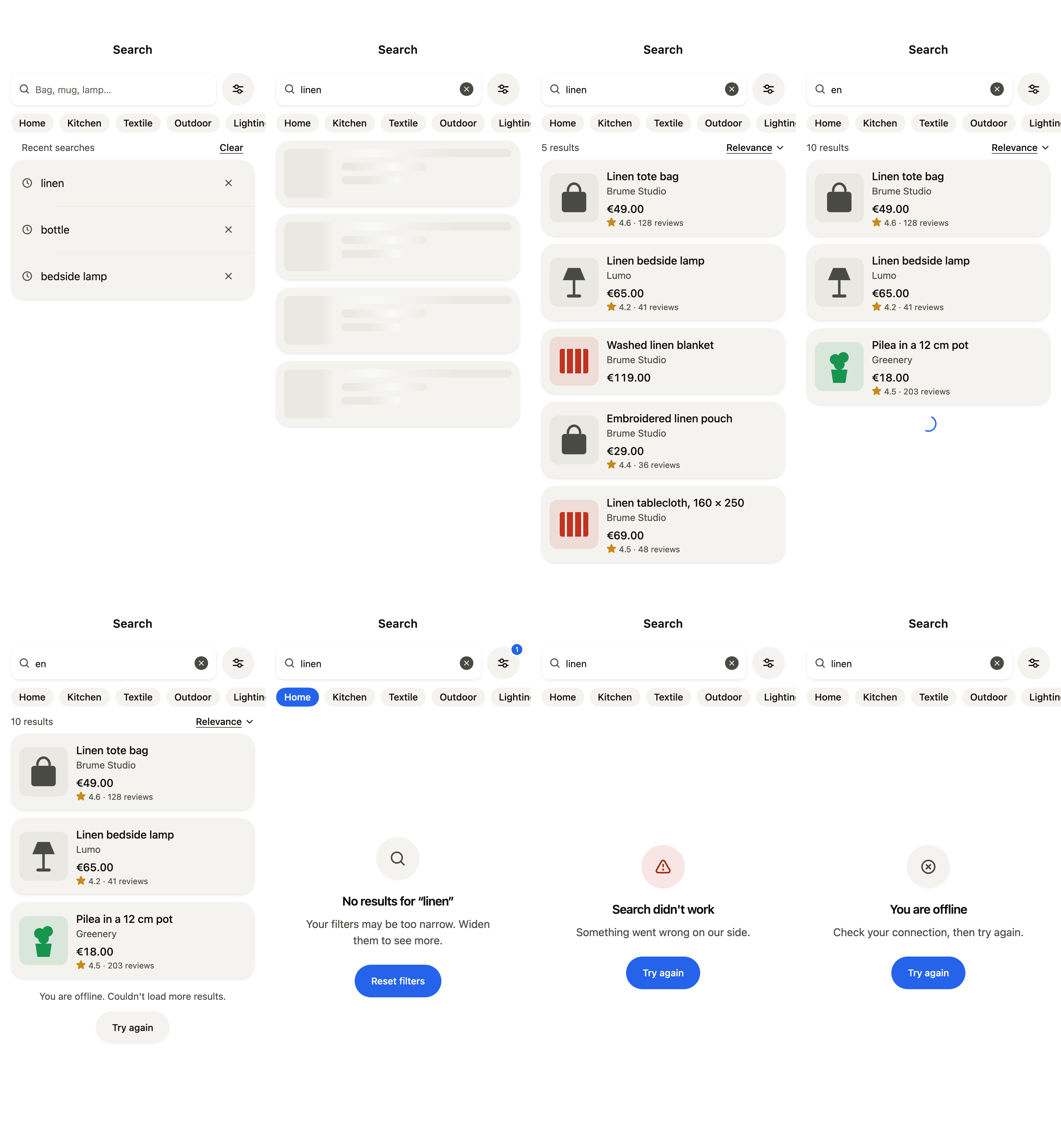
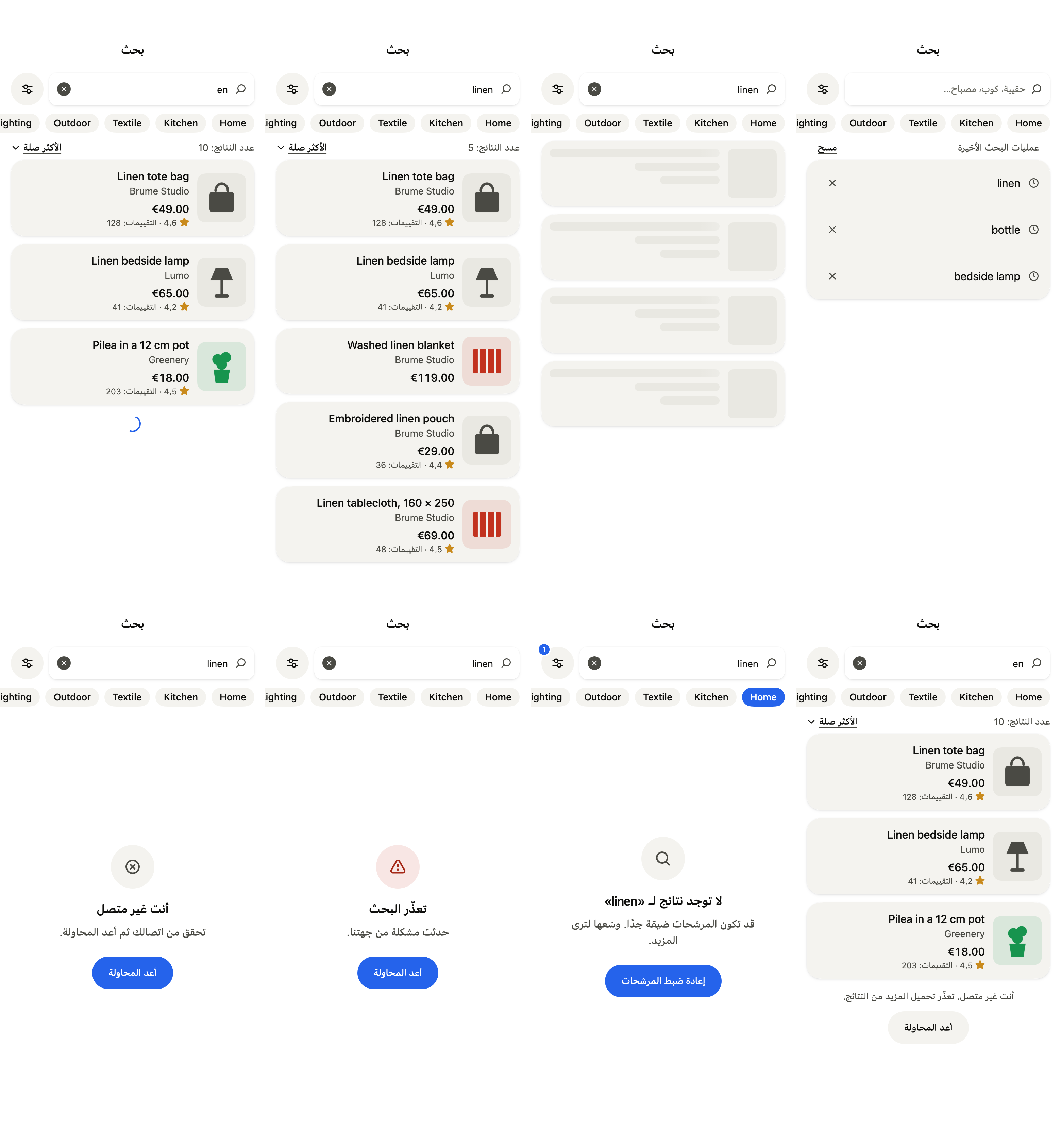
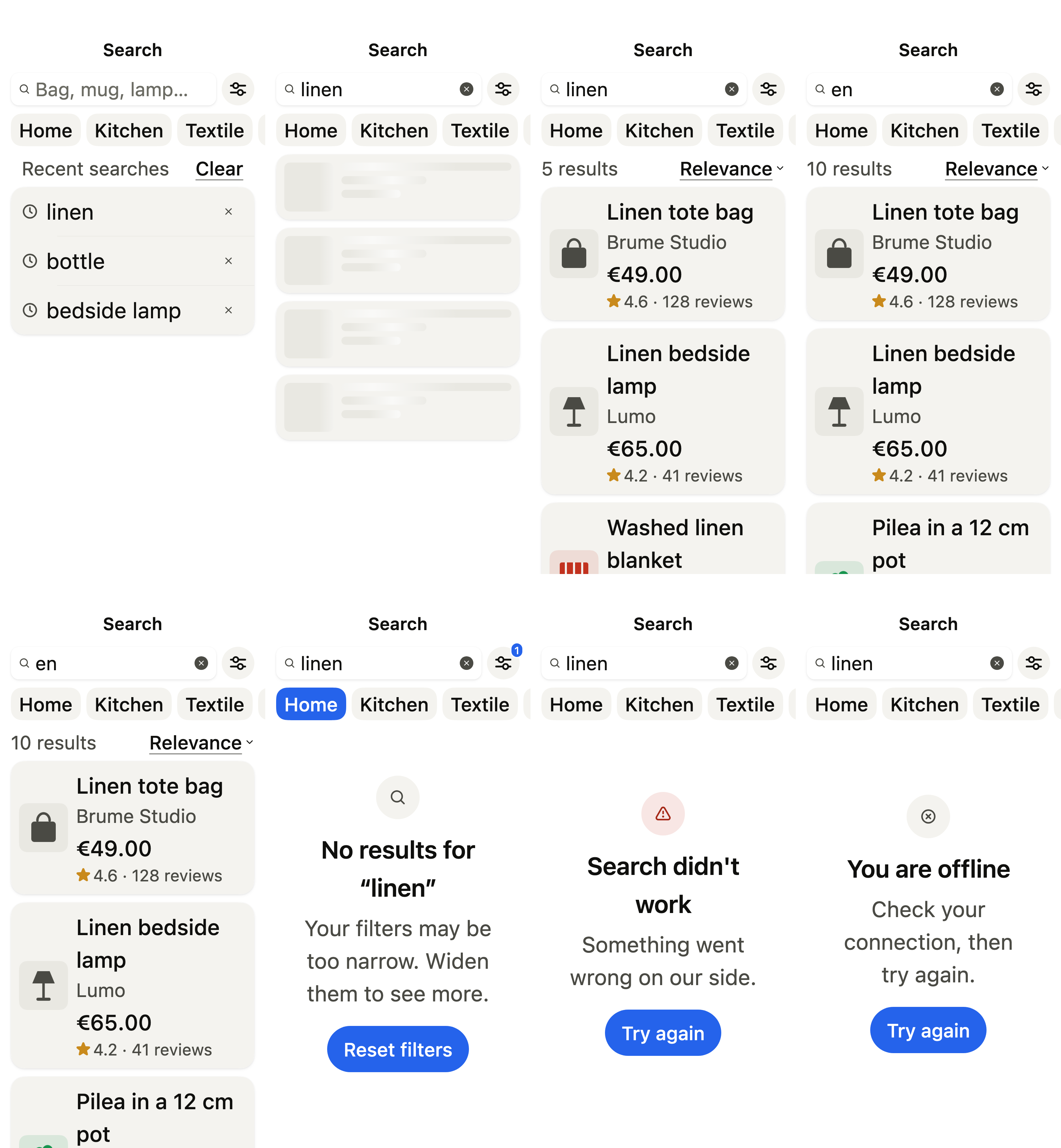
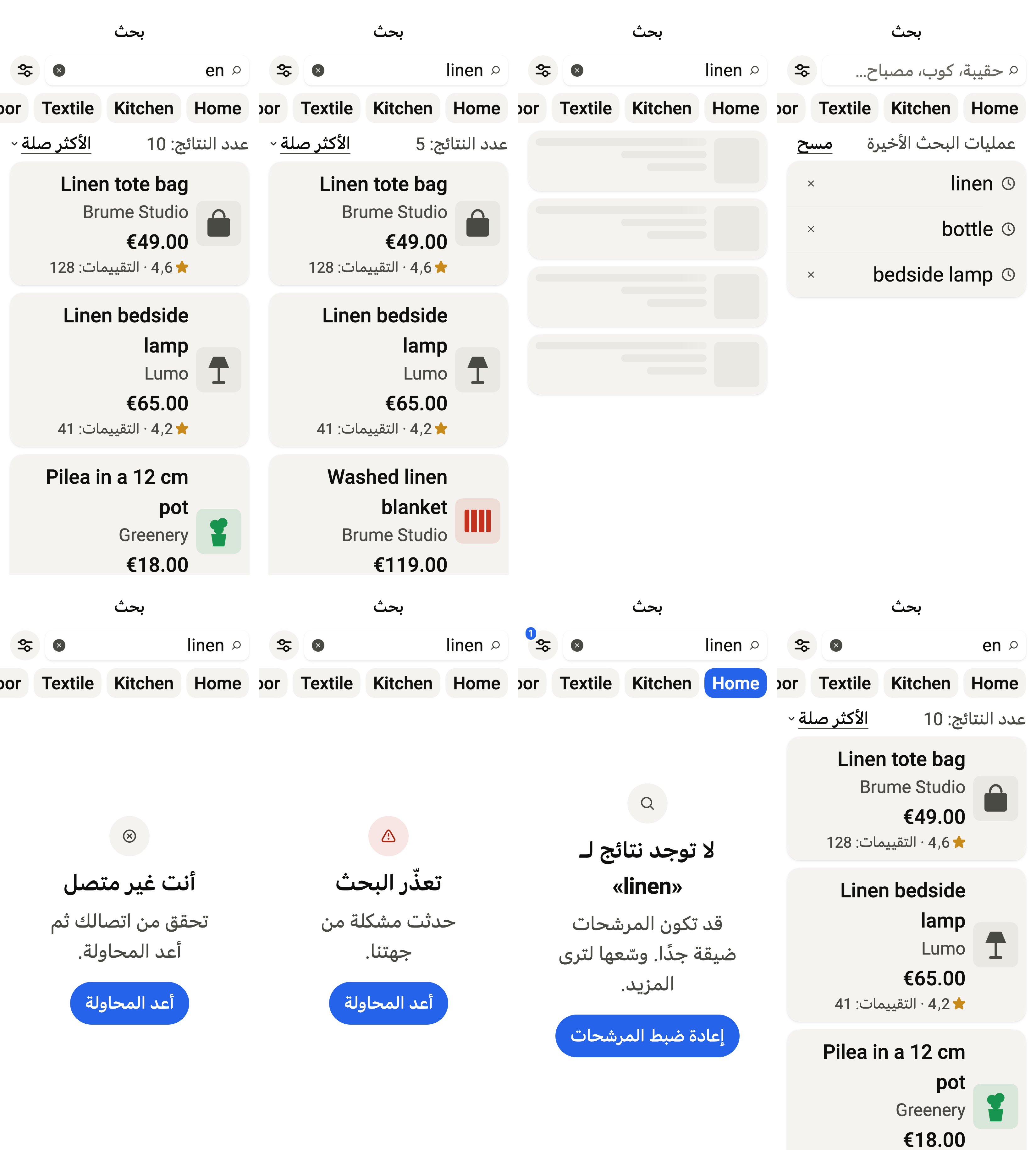
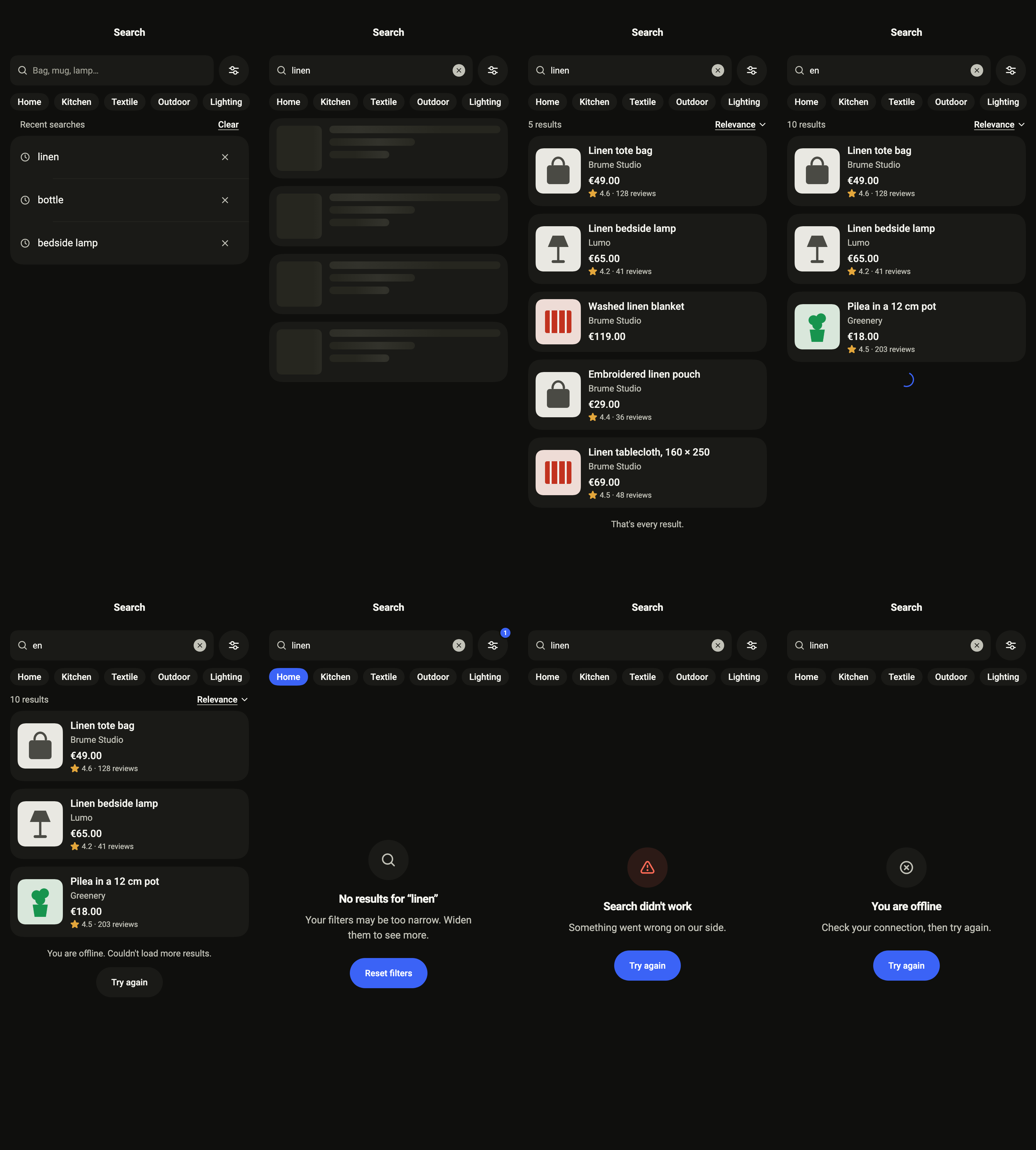
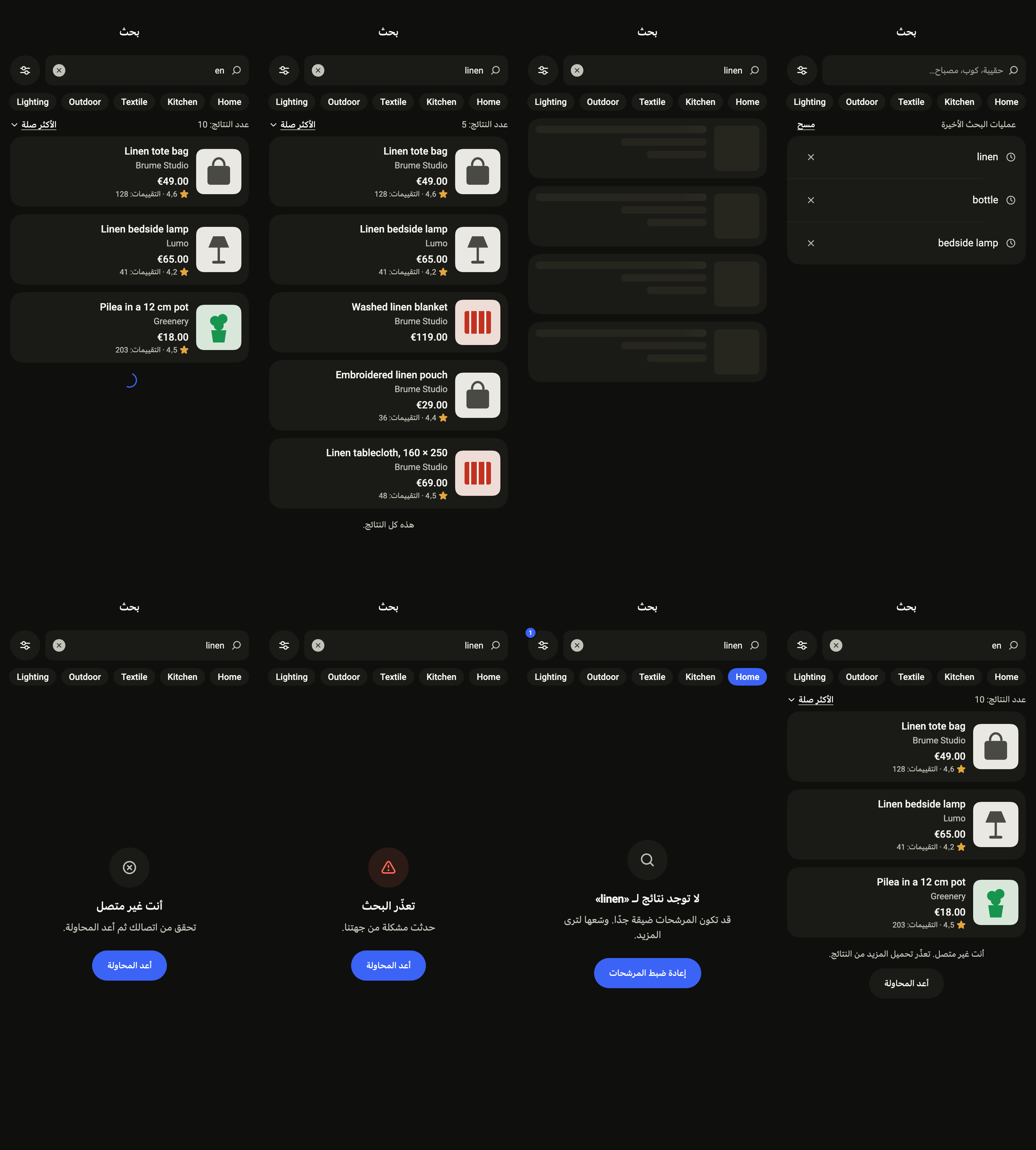
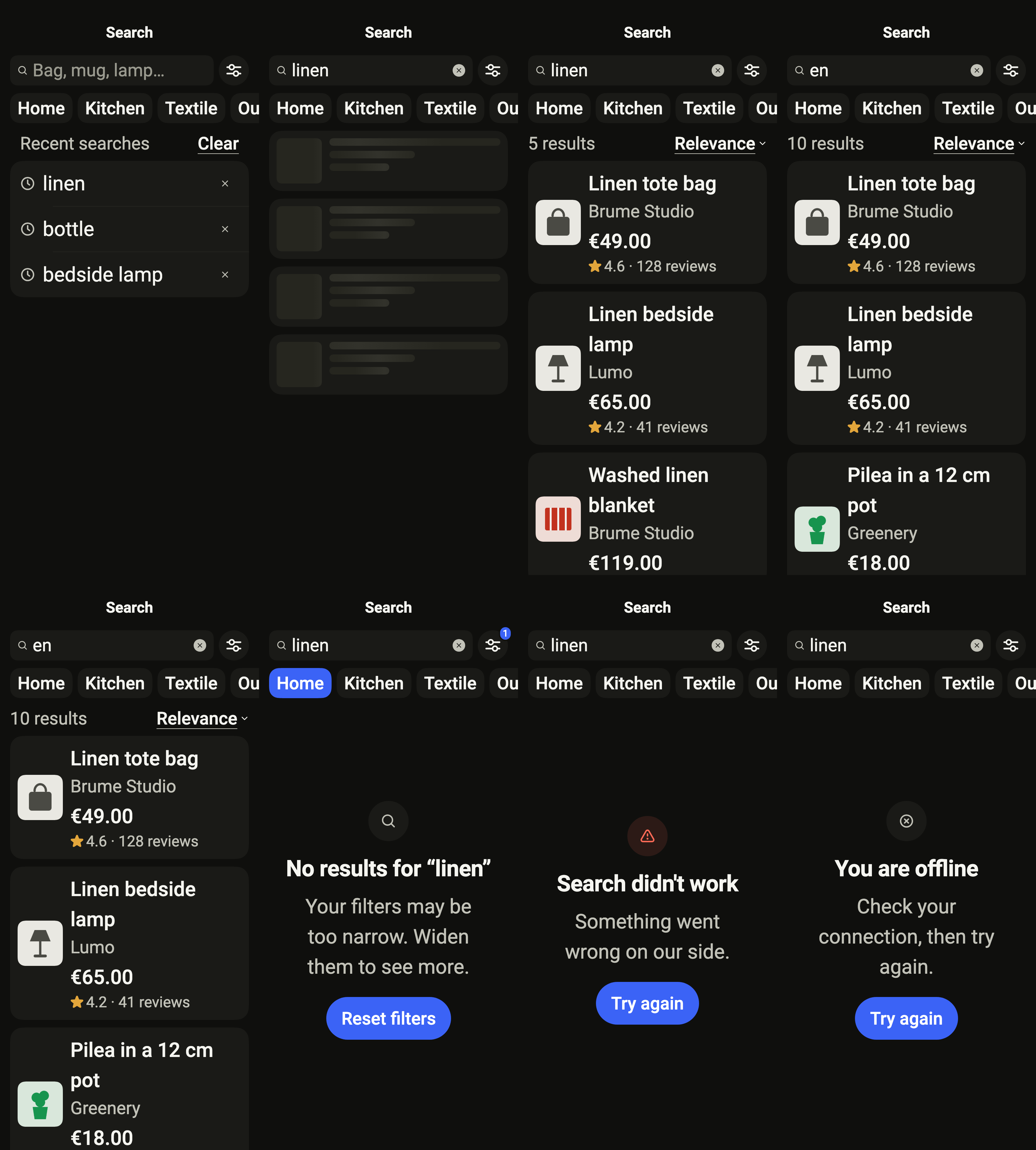
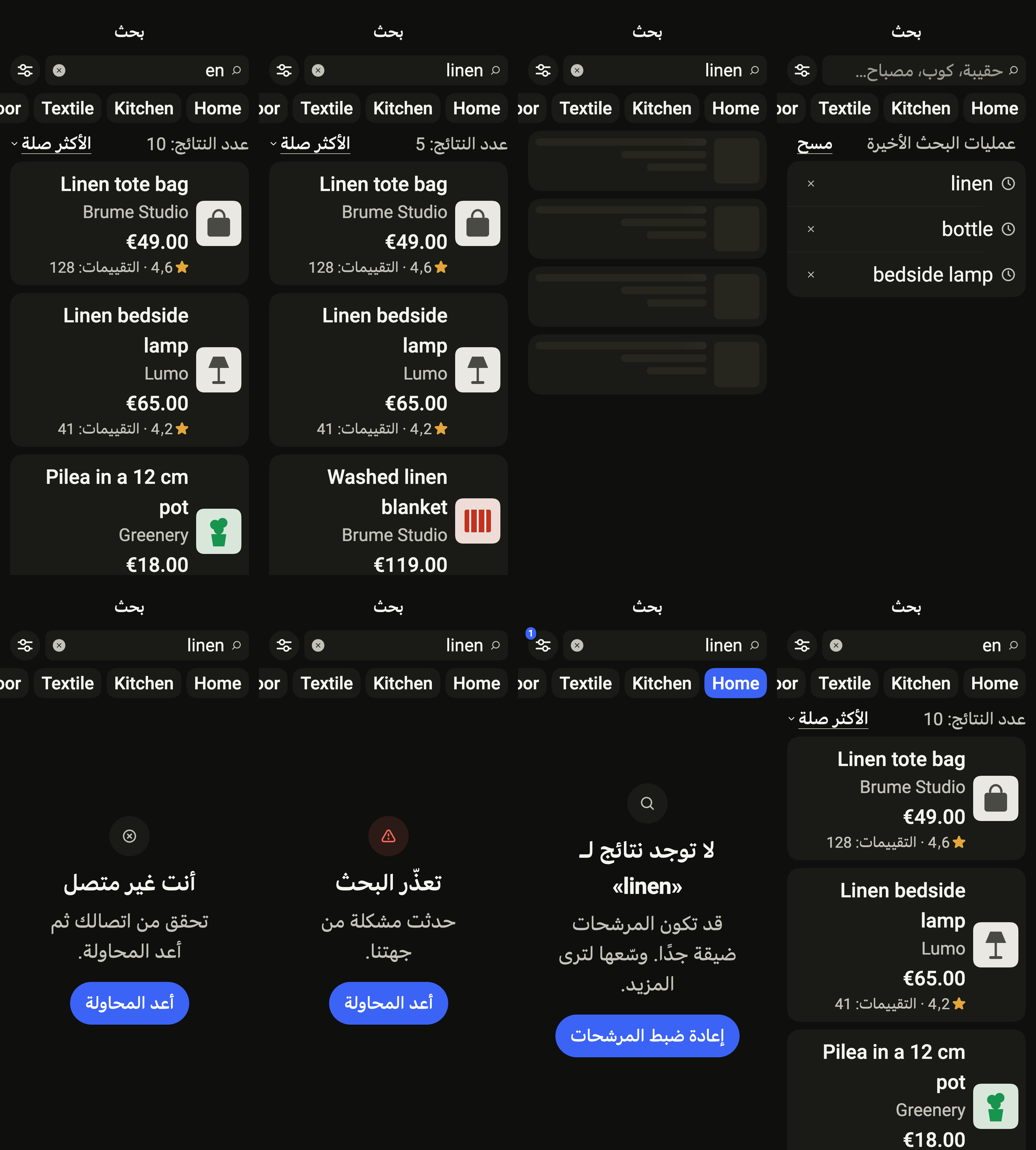
The 16 images published with version 0.2.5, rendered by the shared harness on macOS with Flutter 3.47.7. Each shows every state side by side, at the size of an iPhone (390 × 844) or of an Android phone (412 × 915). fliin verify search compares your copy to them.
Use it to
- show matching products by name while typing
- show only the products of a category, price and availability
- let the user bring back their last searches
- show the next results when reaching the end of the list
- offer to widen the filters when no product matches
- Not for
- a single search field in an existing screen: use a search field (search-field)
- a no-results message inside a list: use an empty state (empty-state)
- States