Screens / auth
Verification code
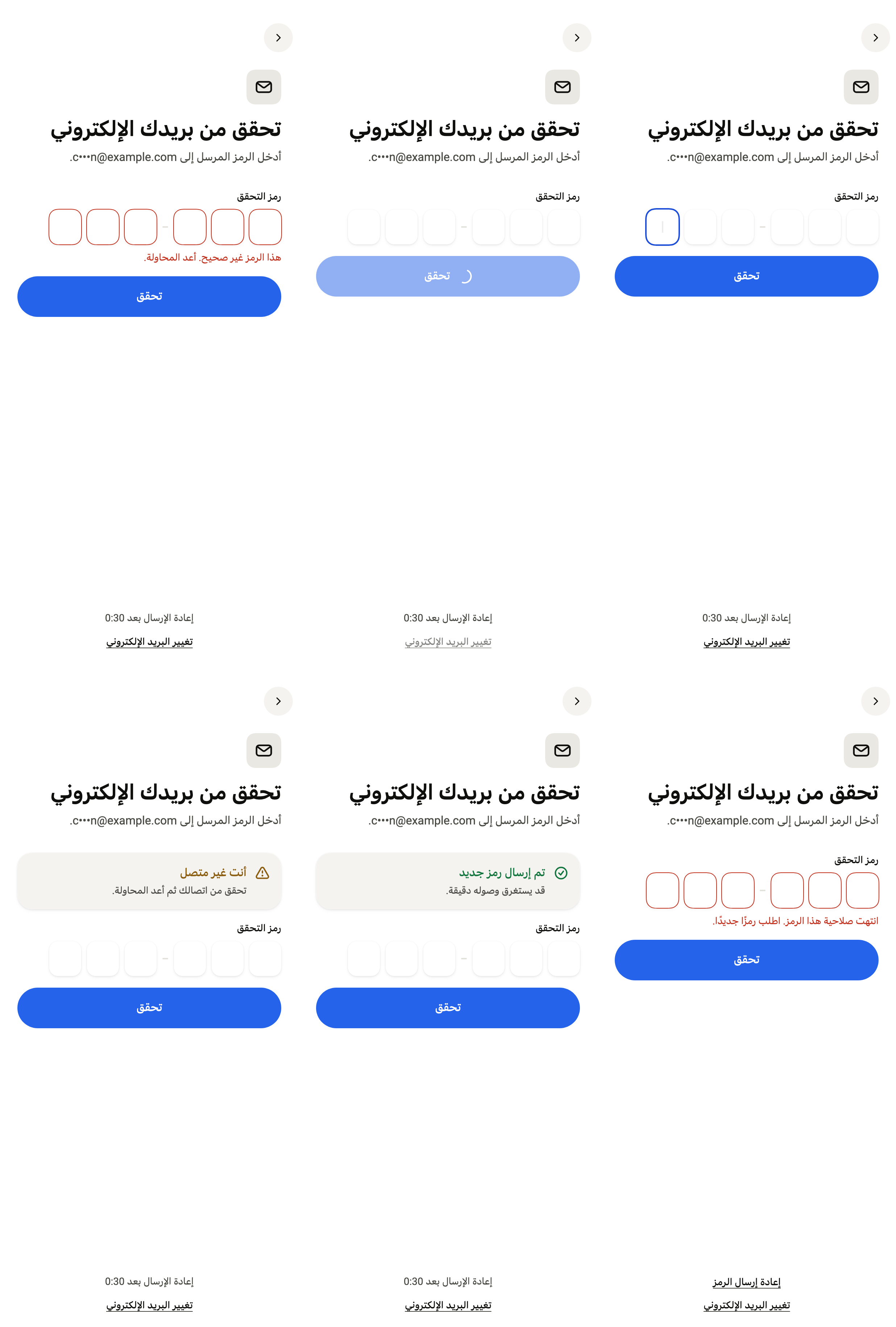
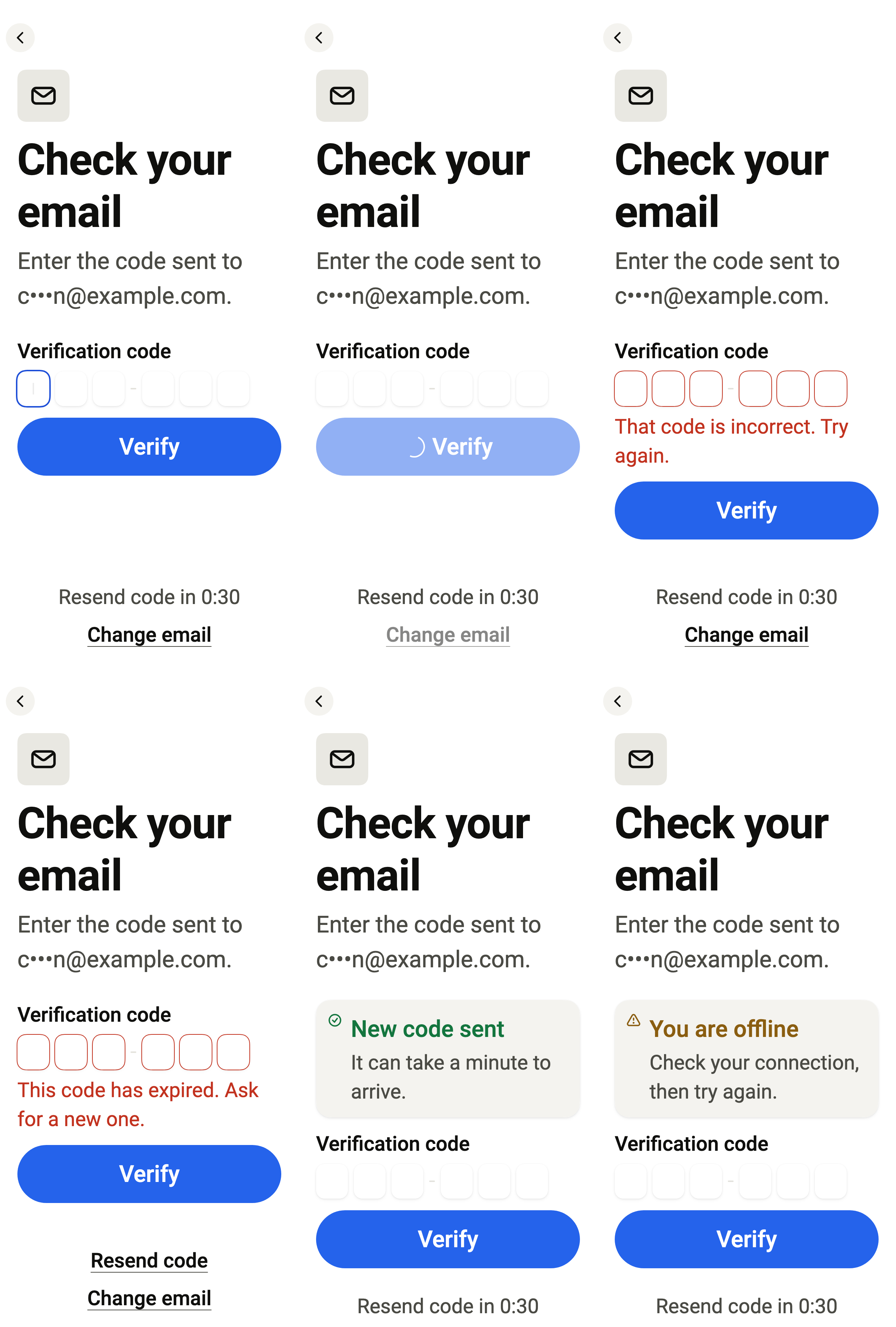
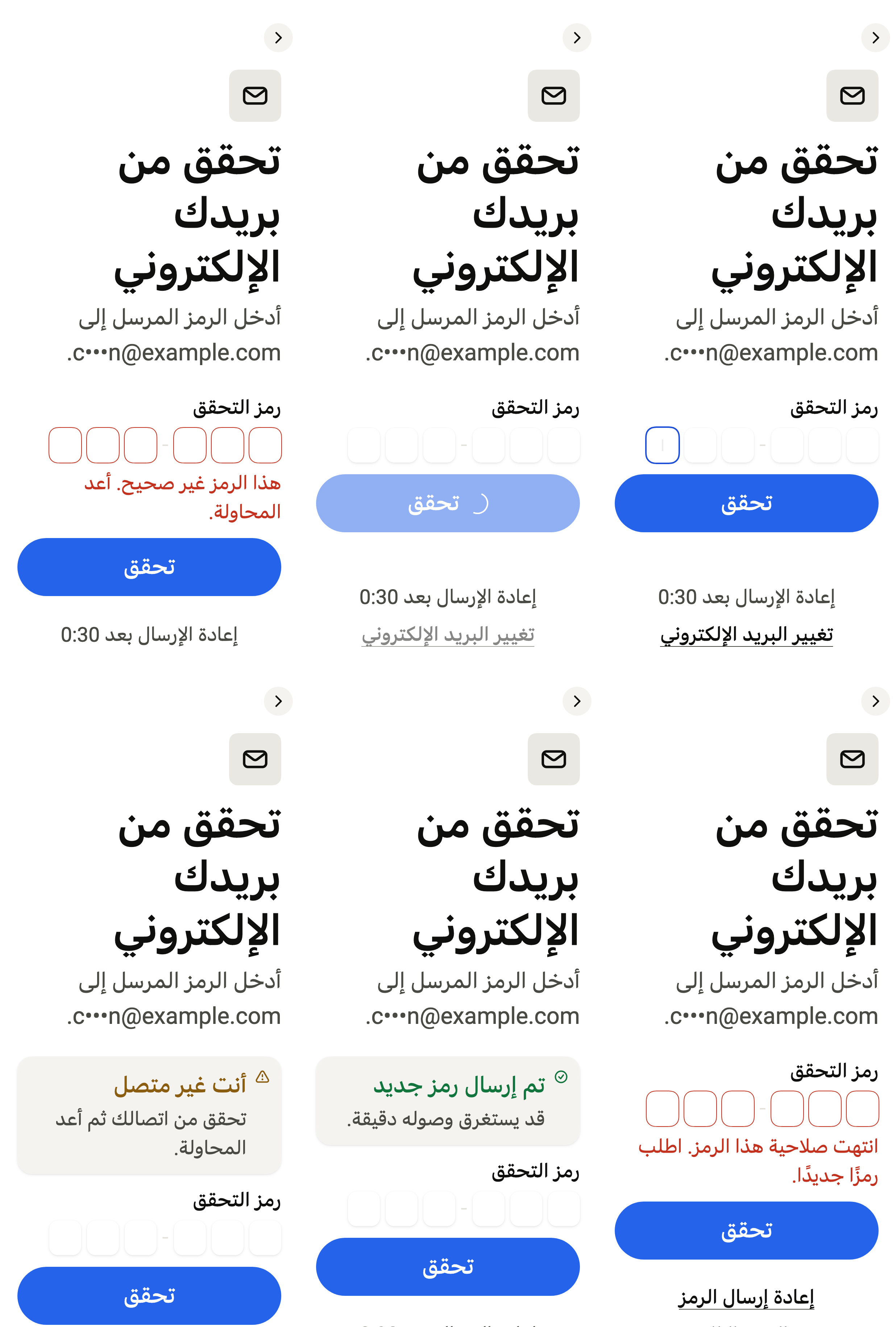
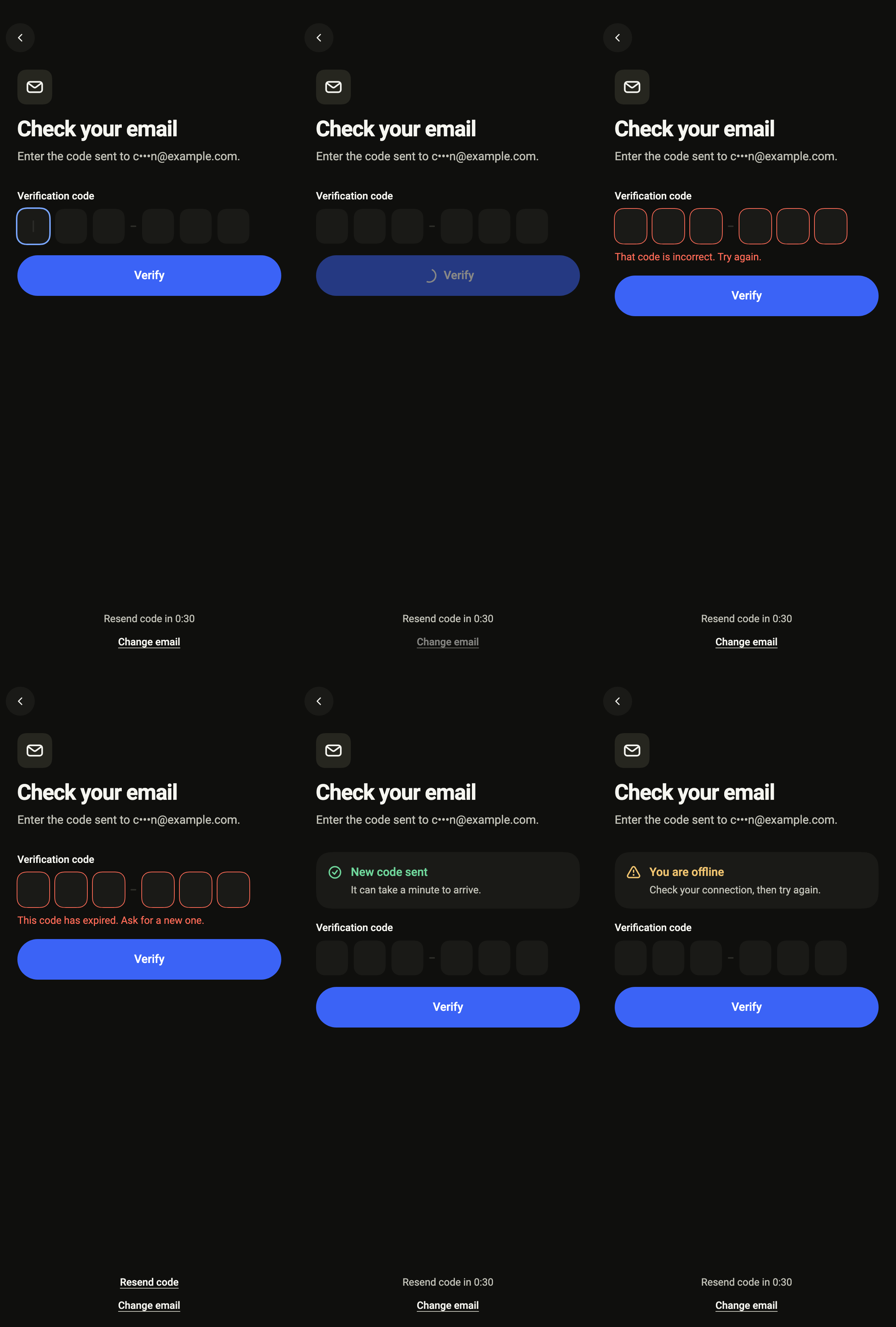
Lets people enter the six-digit code received by email or text message, with the masked destination, a resend countdown, a wrong or expired code and offline.
Import
Verification code is part of Fliin Pro. With a license key, sign in once with fliin login, then add it in a Flutter app where fliin init has run:
fliin login
fliin add verify-code
Also installs: core, alert, app-bar, auth-form, auth-header, button, field, icons, input-otp, link-button, page
Examples
Pin
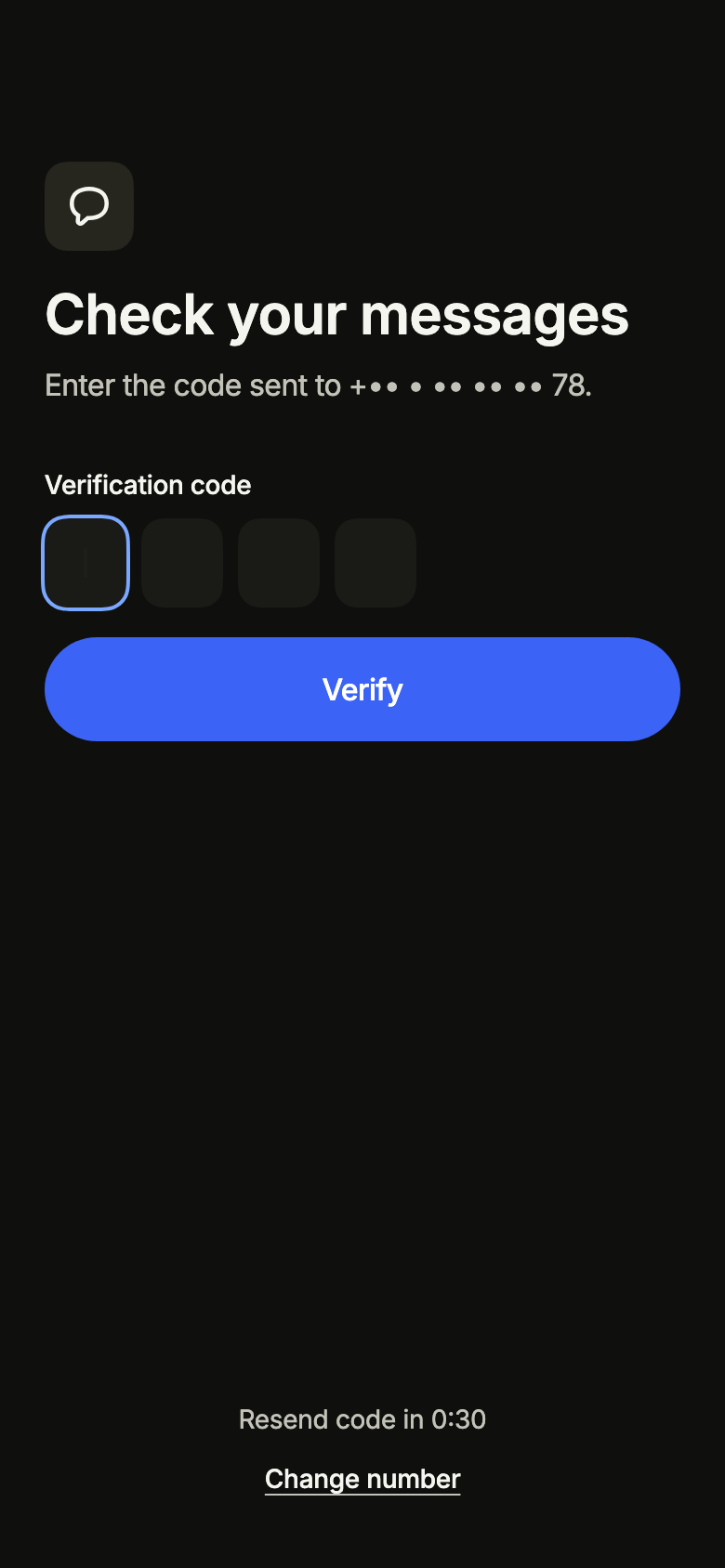
A four-digit code sent by text message: length sets the boxes, and the fourth digit submits it. The sample service accepts 1234 here.
import 'package:your_app/ui/fliin/screens/verify_code/verify_code_controller.dart';
import 'package:your_app/ui/fliin/screens/verify_code/verify_code_data.dart';
import 'package:your_app/ui/fliin/screens/verify_code/verify_code_screen.dart';
import 'package:flutter/widgets.dart';

class VerifyCodePinExample extends StatelessWidget {
  const VerifyCodePinExample({super.key});

  @override
  Widget build(BuildContext context) {
    return VerifyCodeScreen.standalone(
      service: const SampleVerifyCodeService(code: '1234', latency: Duration(milliseconds: 600)),
      destination: const VerifyCodePhone('+33 6 12 34 56 78'),
      length: 4,
      initial: const VerifyCodeEntering(),
      onChangeDestination: () {},
    );
  }
}Entering
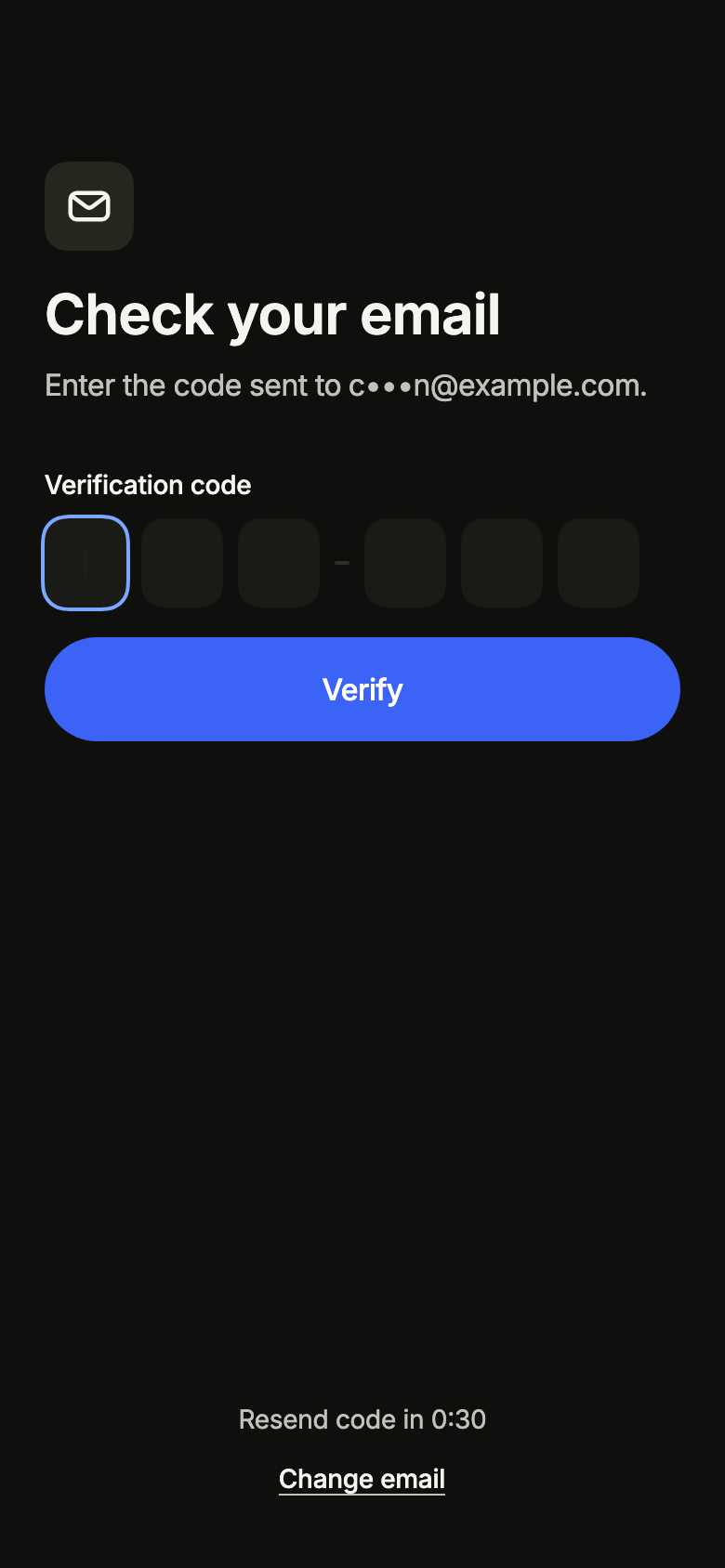
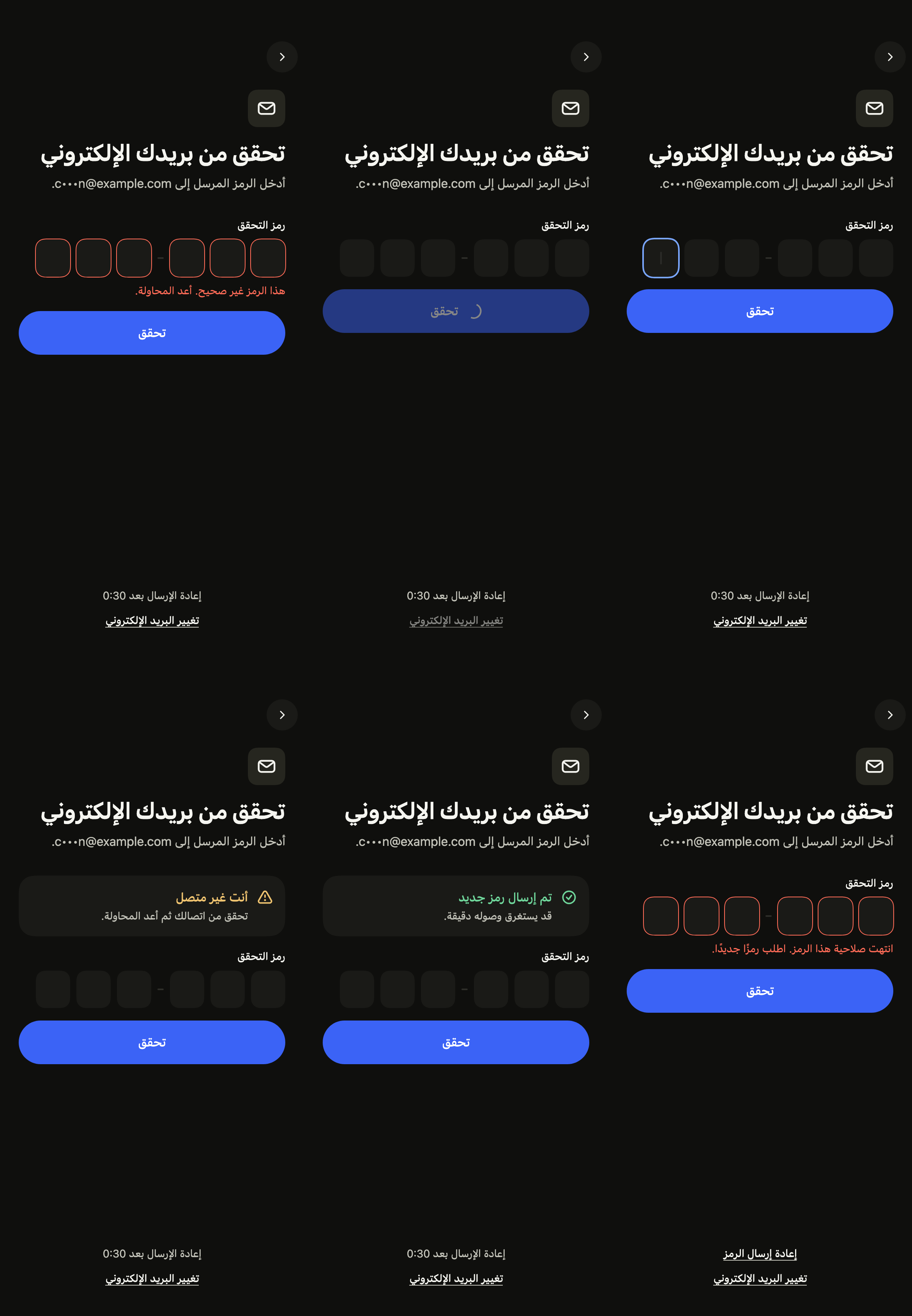
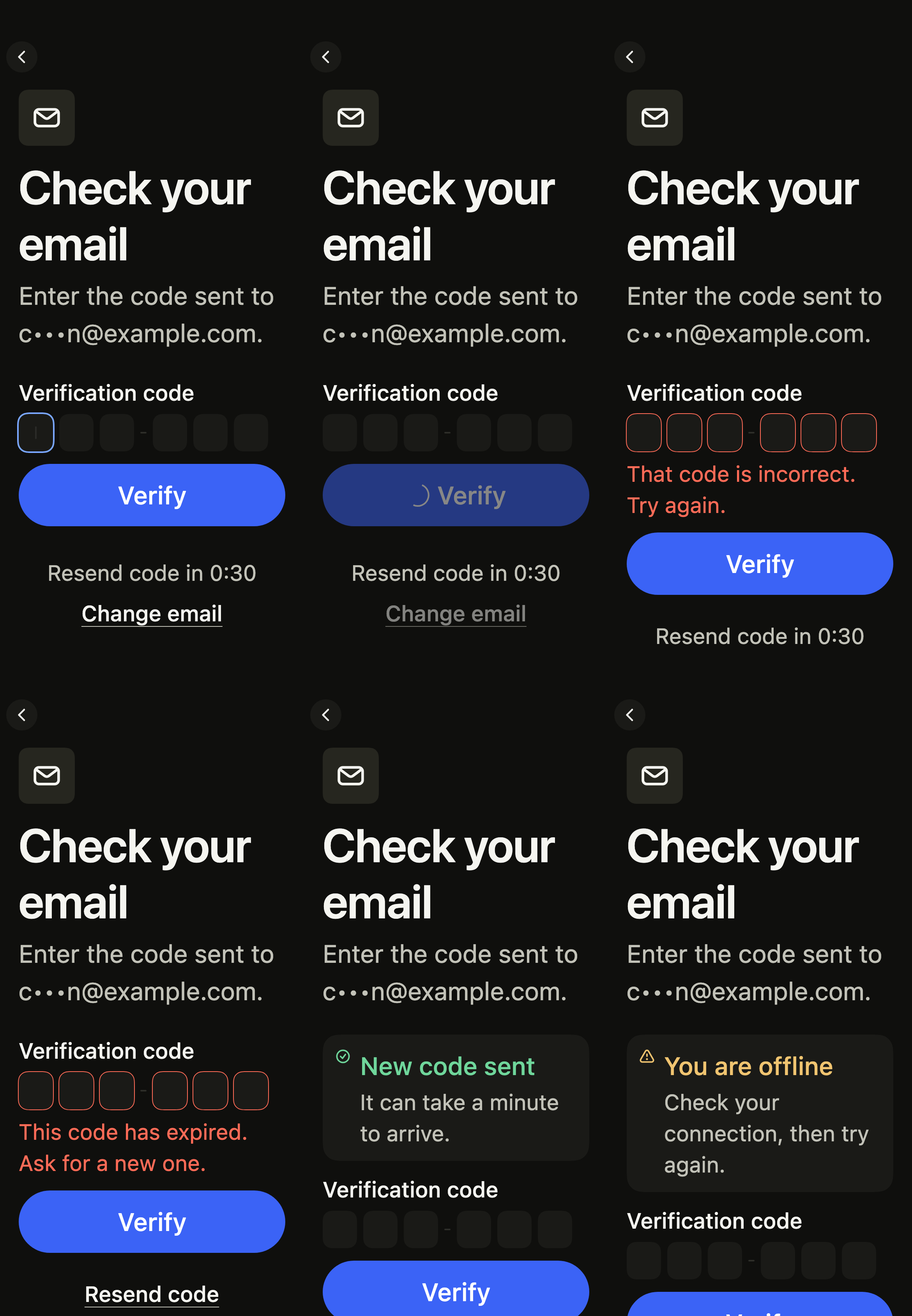
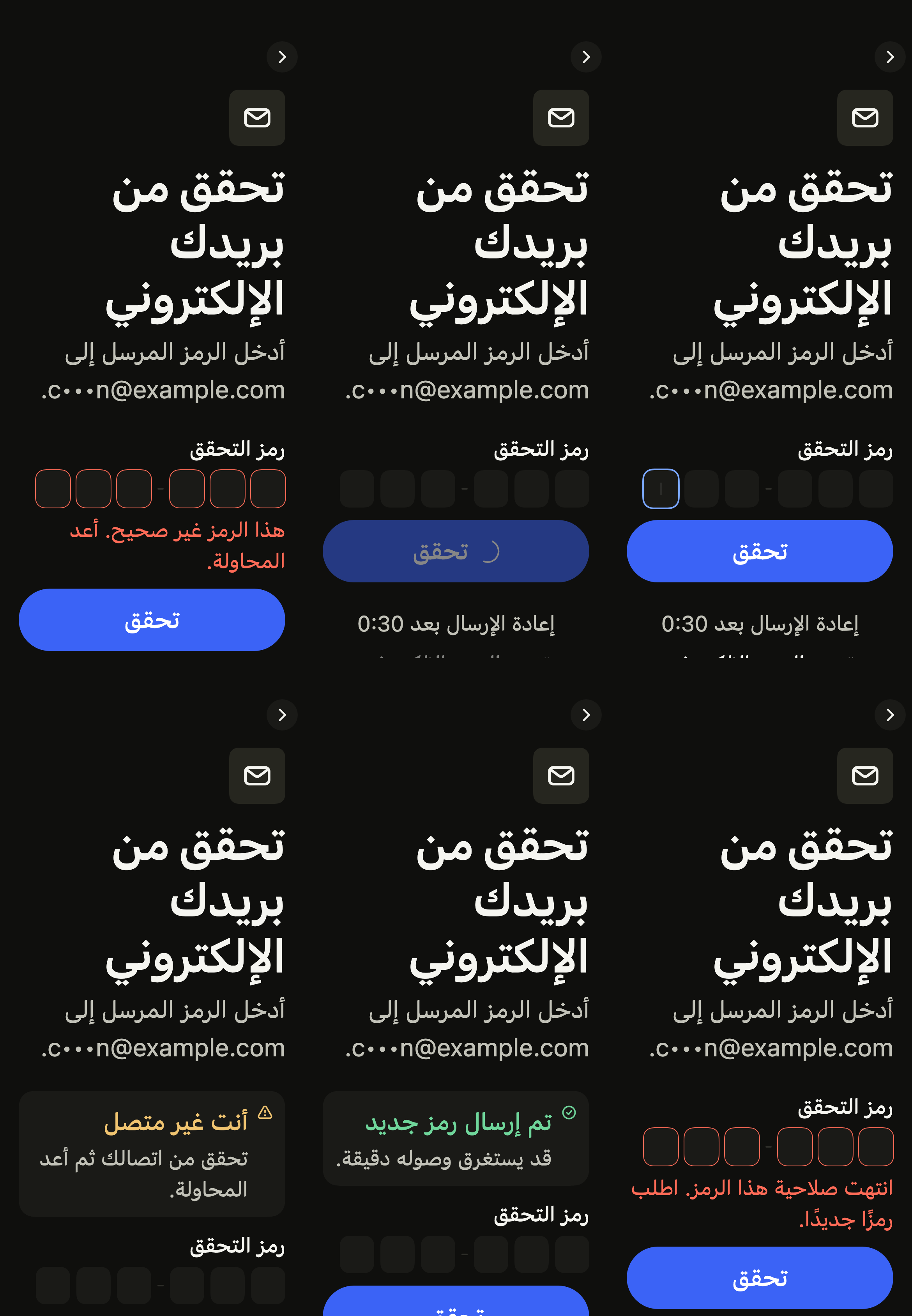
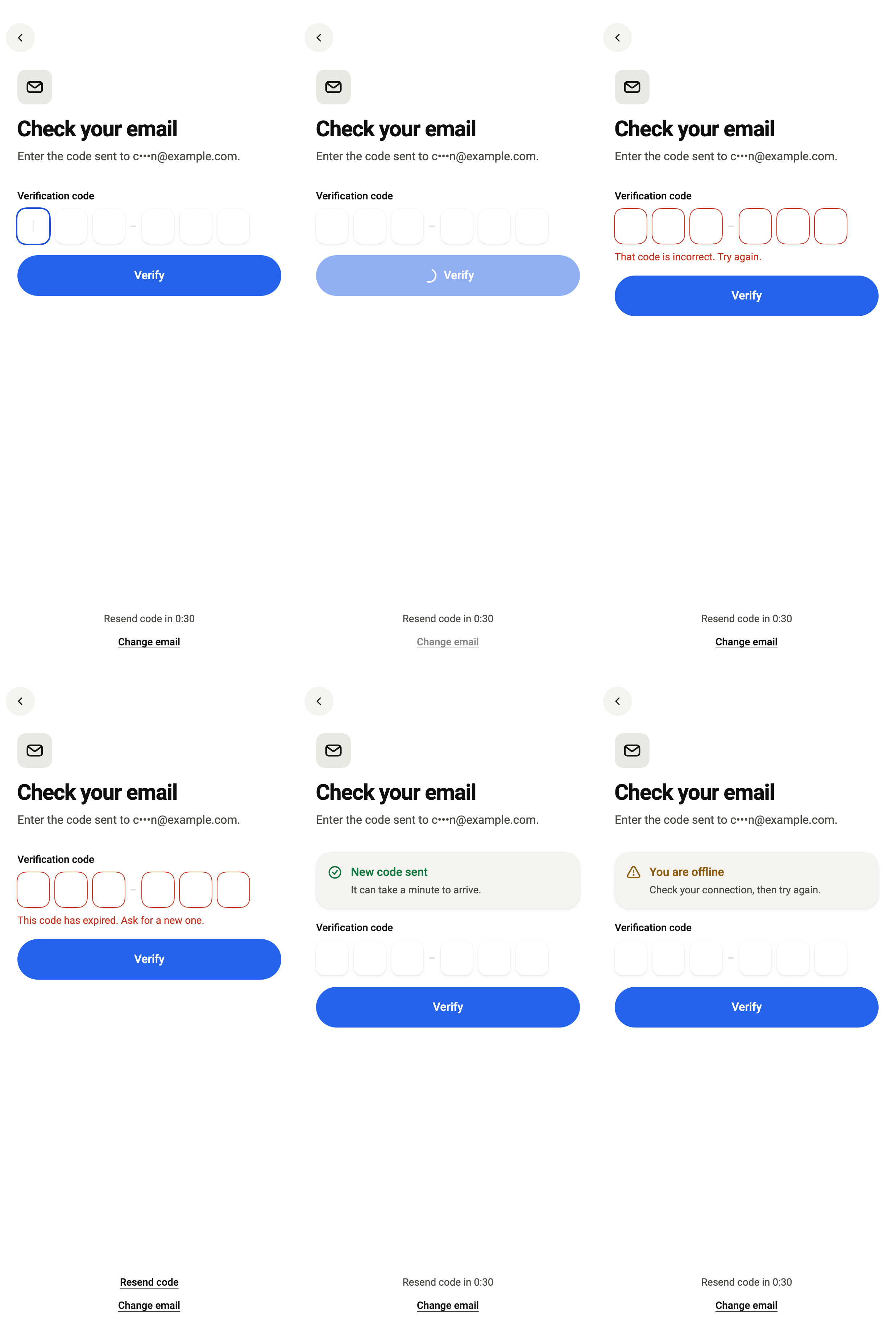
The code sent to the email, one box per digit; the last digit submits it. The sample service accepts 123456.
import 'package:your_app/ui/fliin/screens/verify_code/verify_code_controller.dart';
import 'package:your_app/ui/fliin/screens/verify_code/verify_code_data.dart';
import 'package:your_app/ui/fliin/screens/verify_code/verify_code_screen.dart';
import 'package:flutter/widgets.dart';

class VerifyCodeEnteringExample extends StatelessWidget {
  const VerifyCodeEnteringExample({super.key});

  @override
  Widget build(BuildContext context) {
    return VerifyCodeScreen.standalone(
      service: const SampleVerifyCodeService(latency: Duration(milliseconds: 600)),
      destination: sampleVerifyCodeDestination,
      initial: const VerifyCodeEntering(),
      onChangeDestination: () {},
    );
  }
}Checking
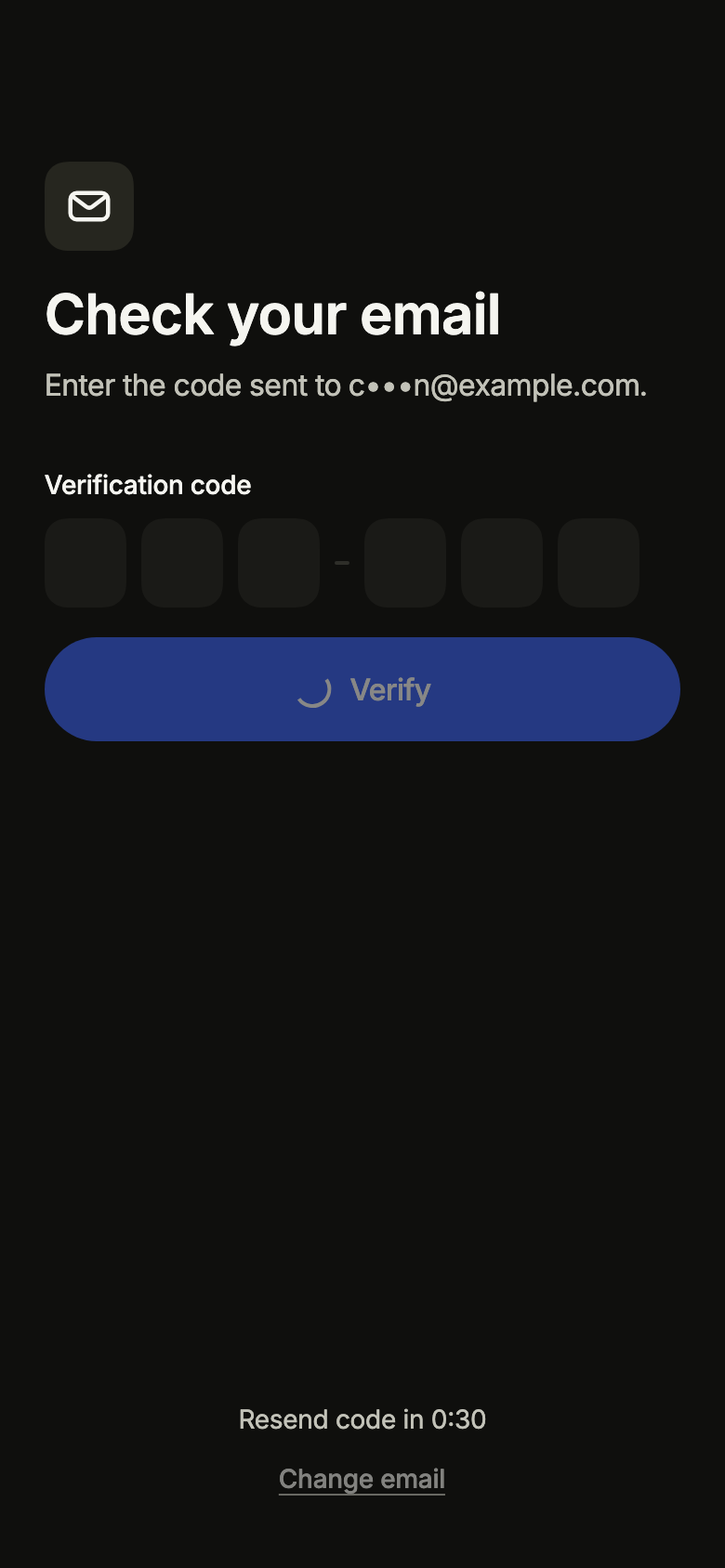
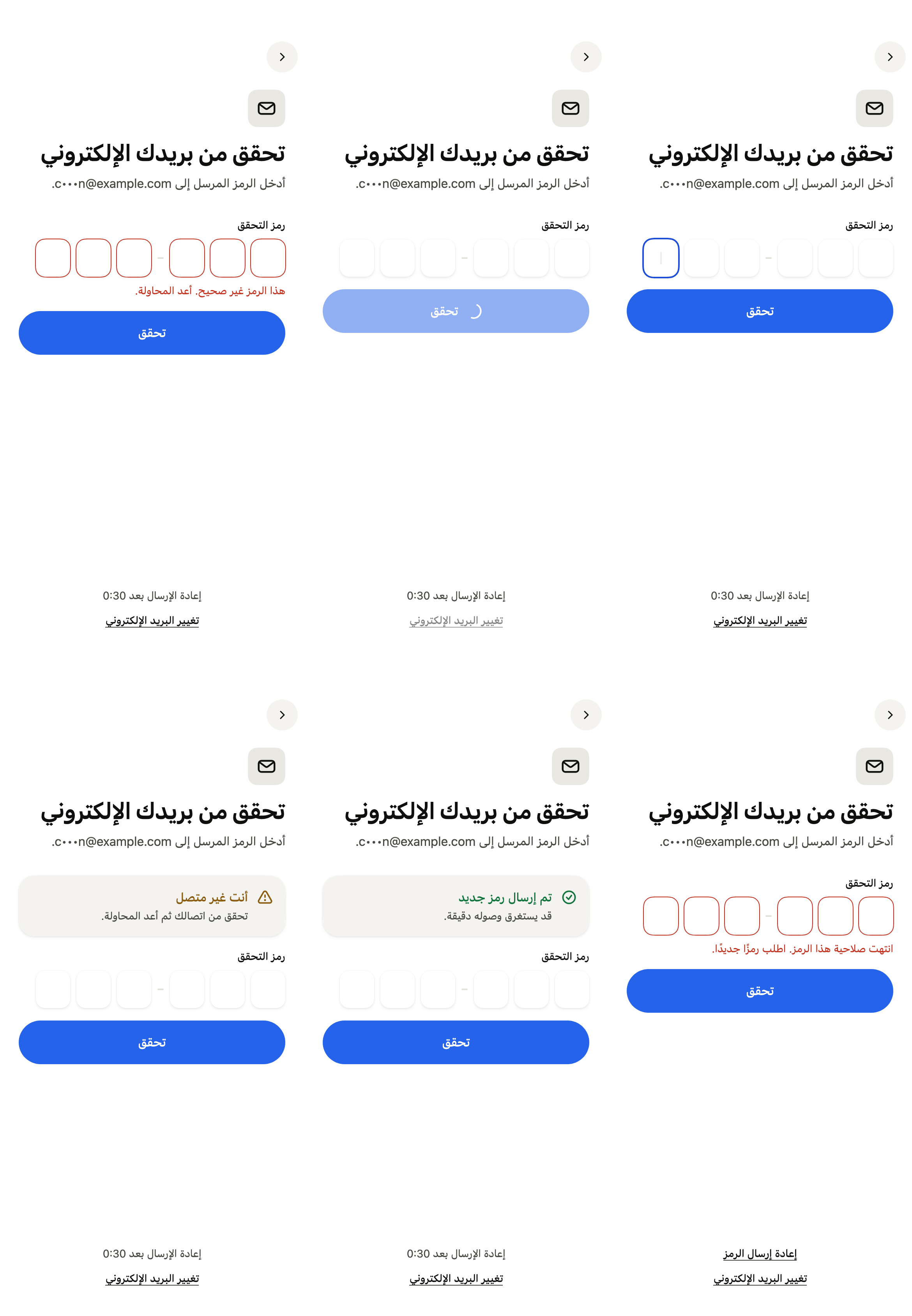
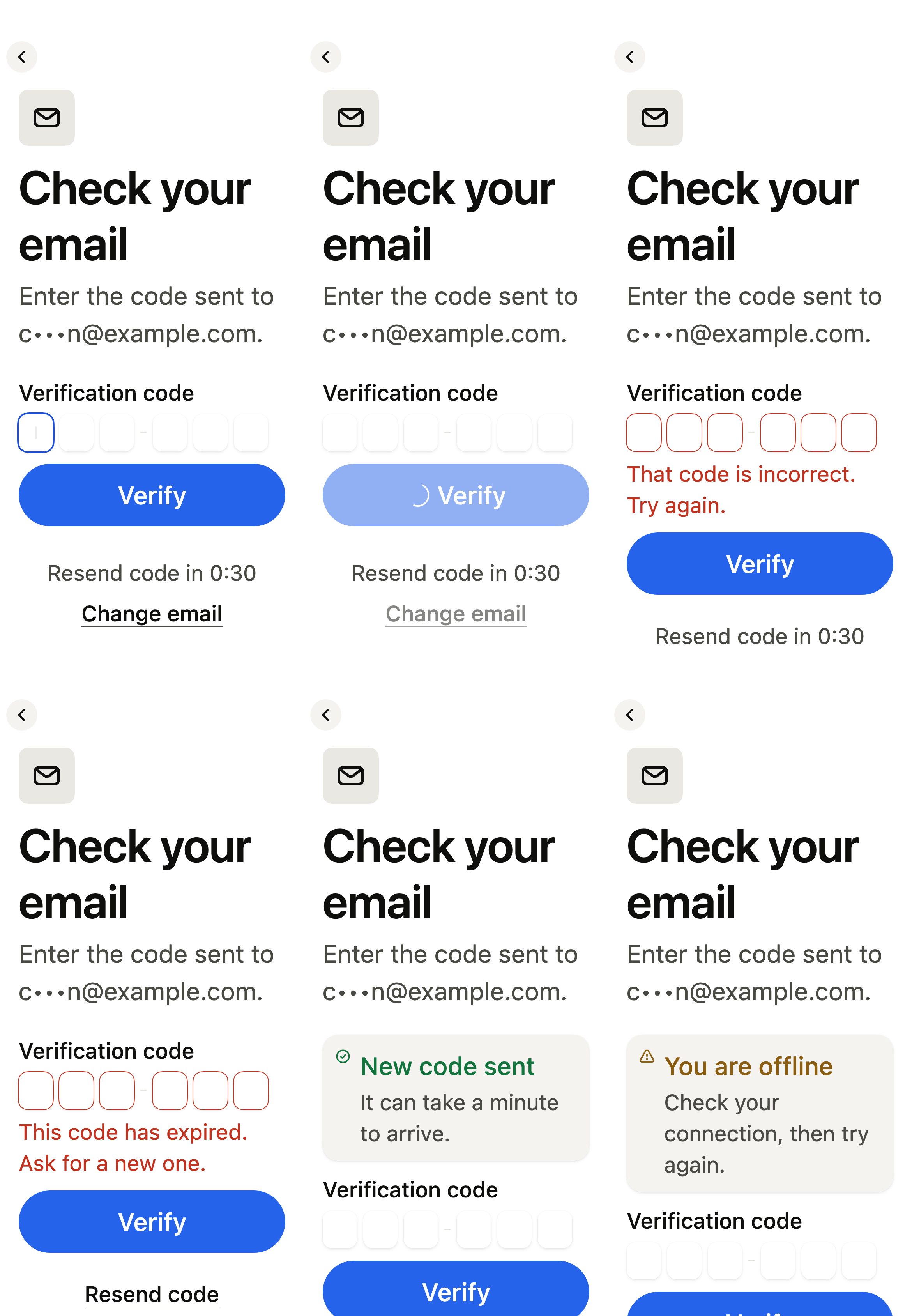
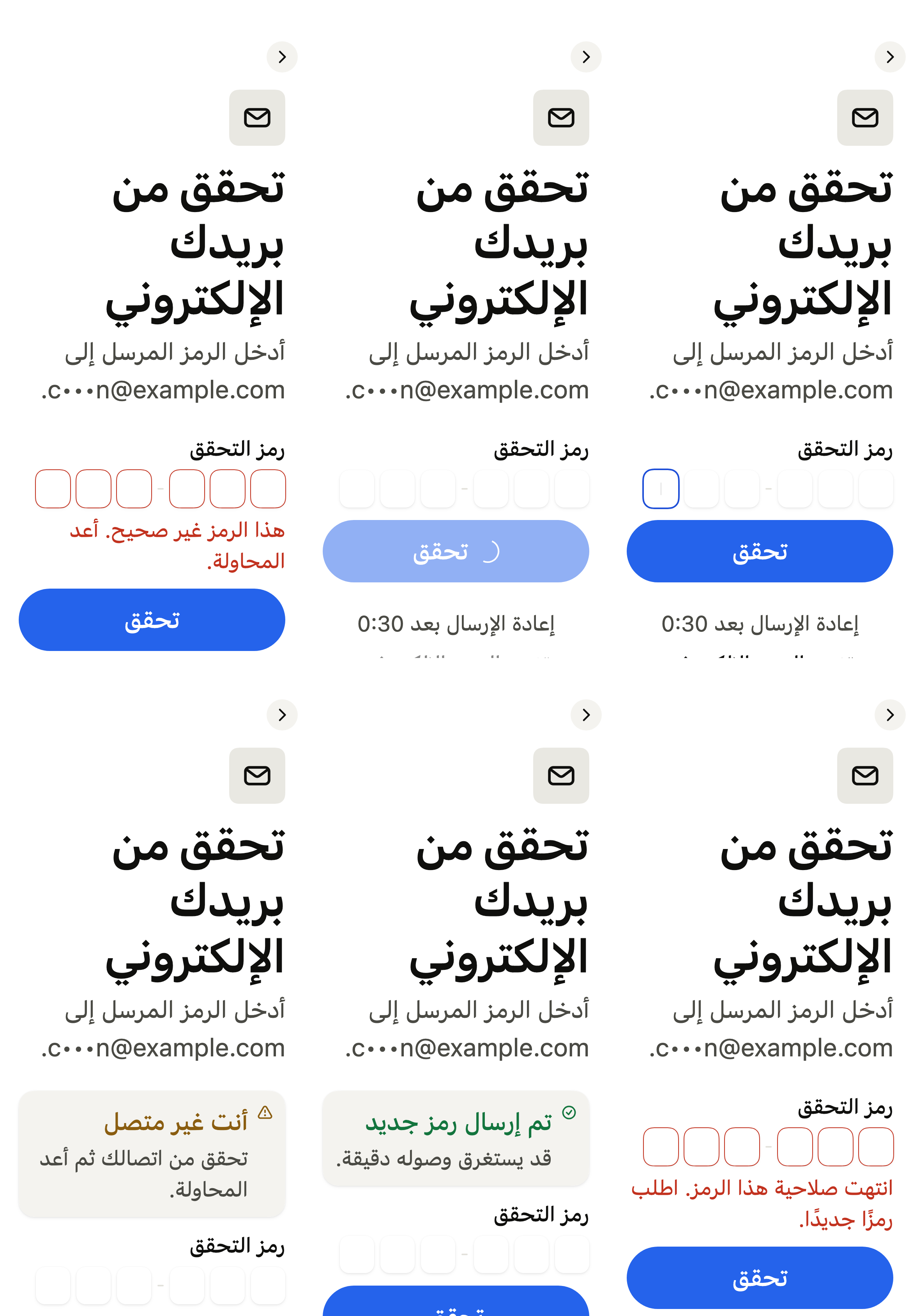
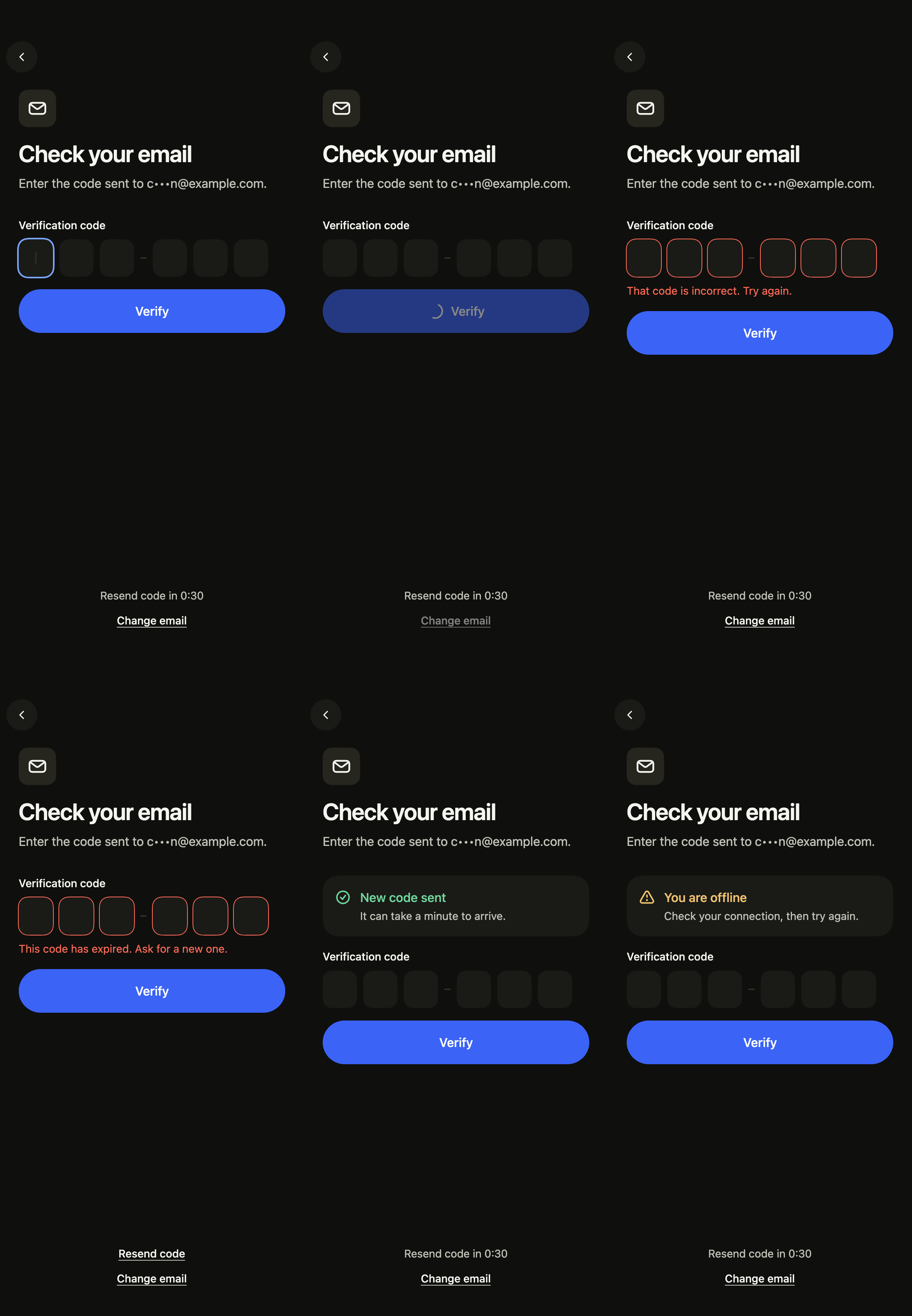
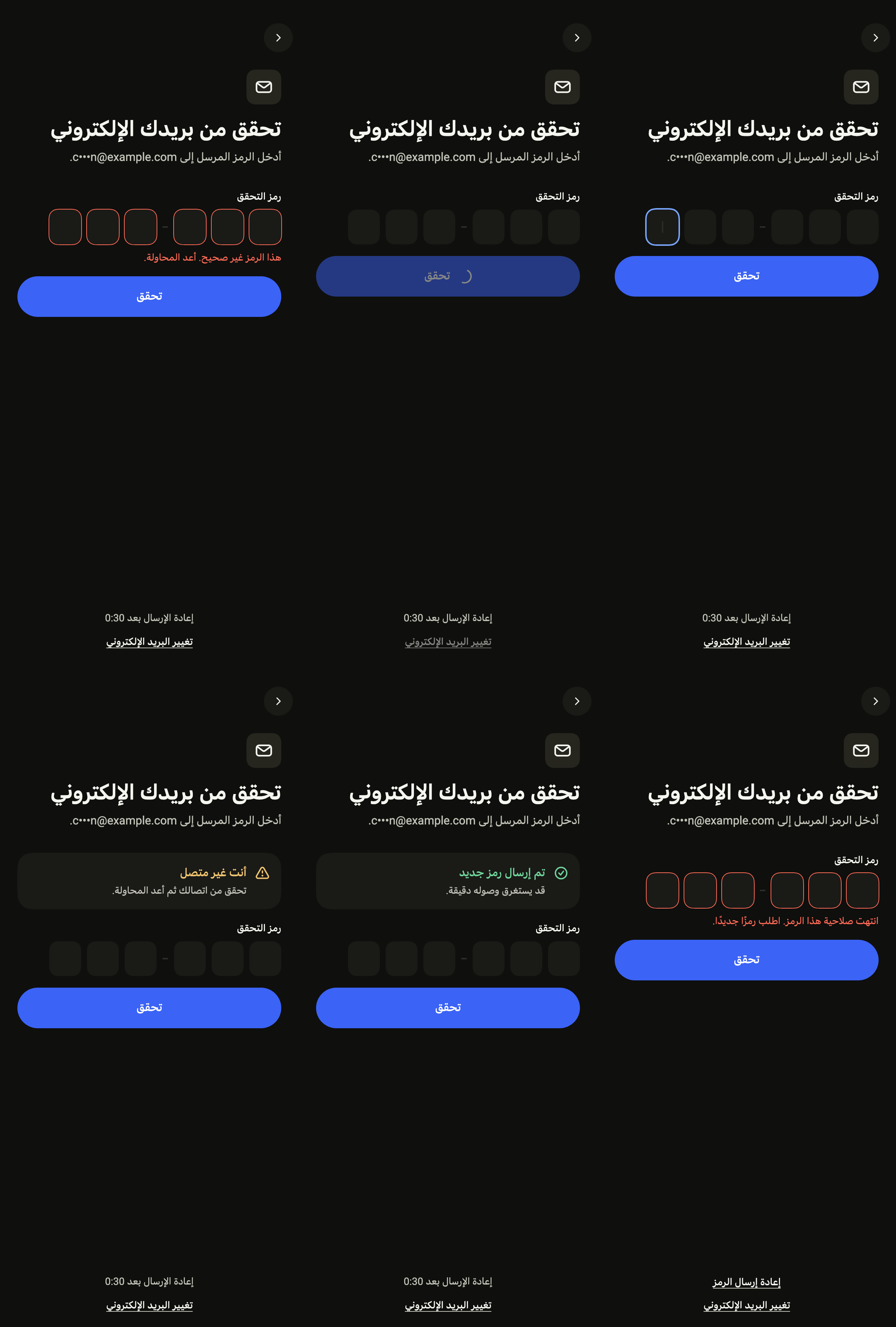
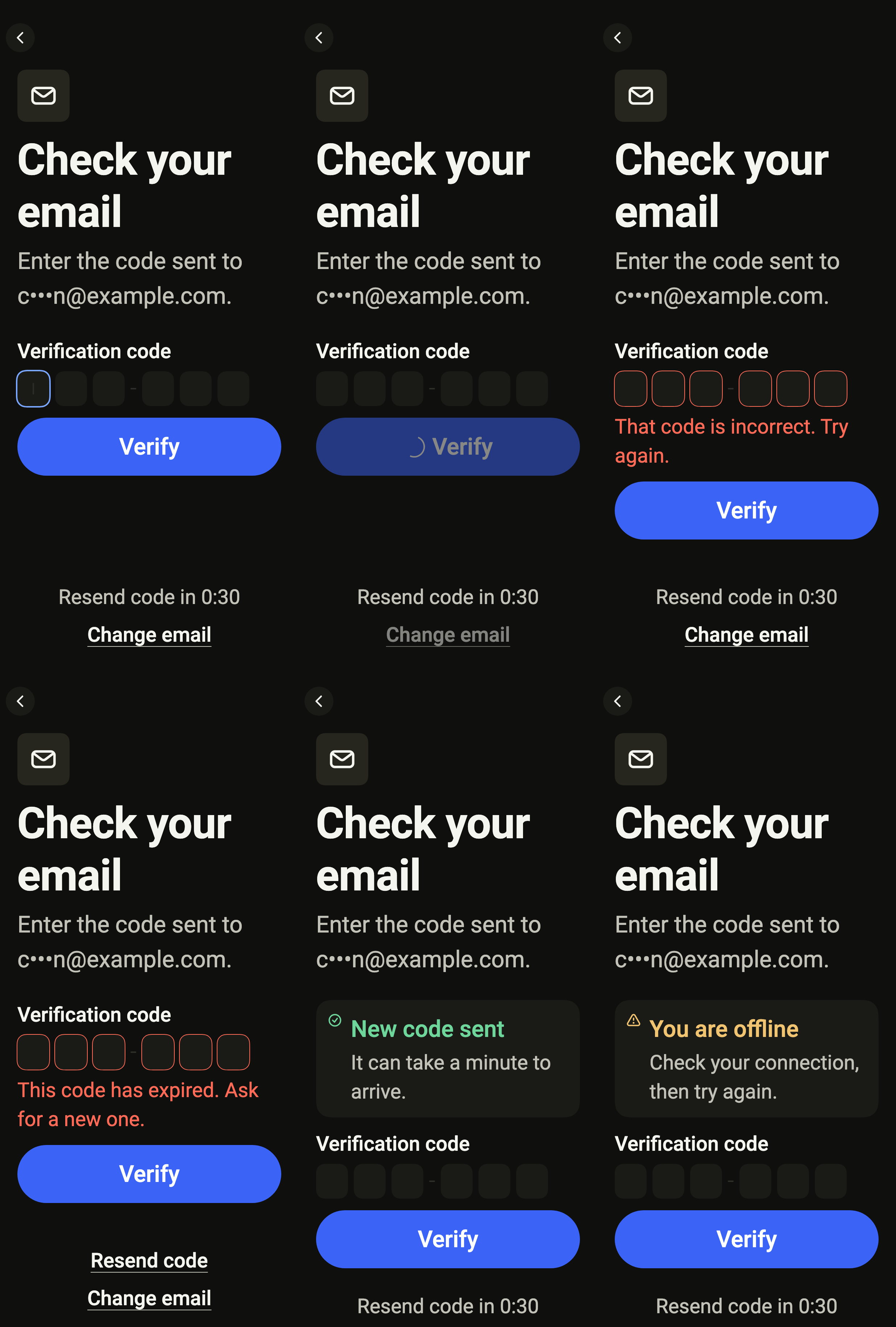
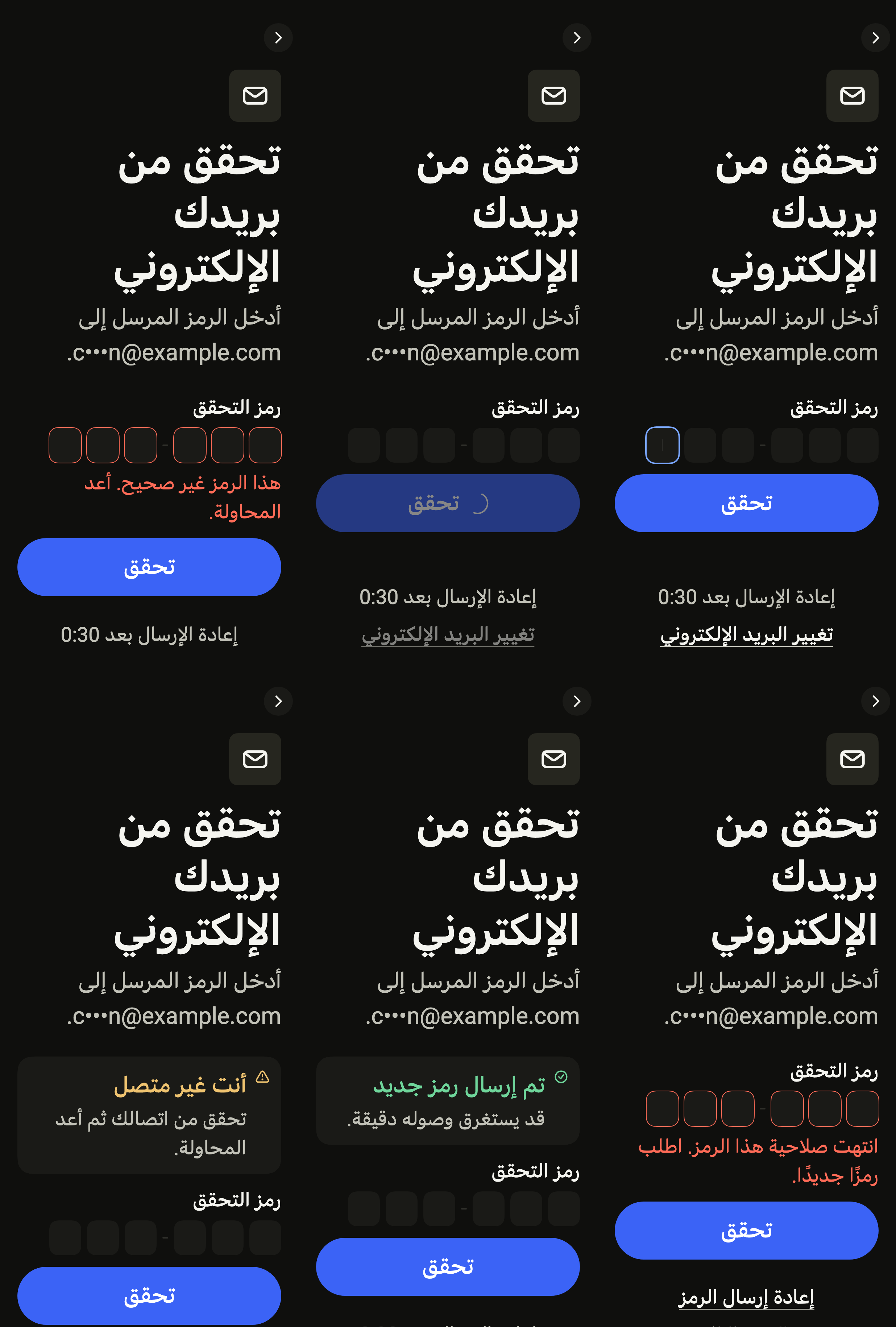
While the service checks the code, the boxes are locked and a spinner shows.
import 'package:your_app/ui/fliin/screens/verify_code/verify_code_controller.dart';
import 'package:your_app/ui/fliin/screens/verify_code/verify_code_data.dart';
import 'package:your_app/ui/fliin/screens/verify_code/verify_code_screen.dart';
import 'package:flutter/widgets.dart';

class VerifyCodeCheckingExample extends StatelessWidget {
  const VerifyCodeCheckingExample({super.key});

  @override
  Widget build(BuildContext context) {
    return VerifyCodeScreen.standalone(
      service: const SampleVerifyCodeService(latency: Duration(milliseconds: 600)),
      destination: sampleVerifyCodeDestination,
      initial: const VerifyCodeChecking(),
      onChangeDestination: () {},
    );
  }
}Wrong
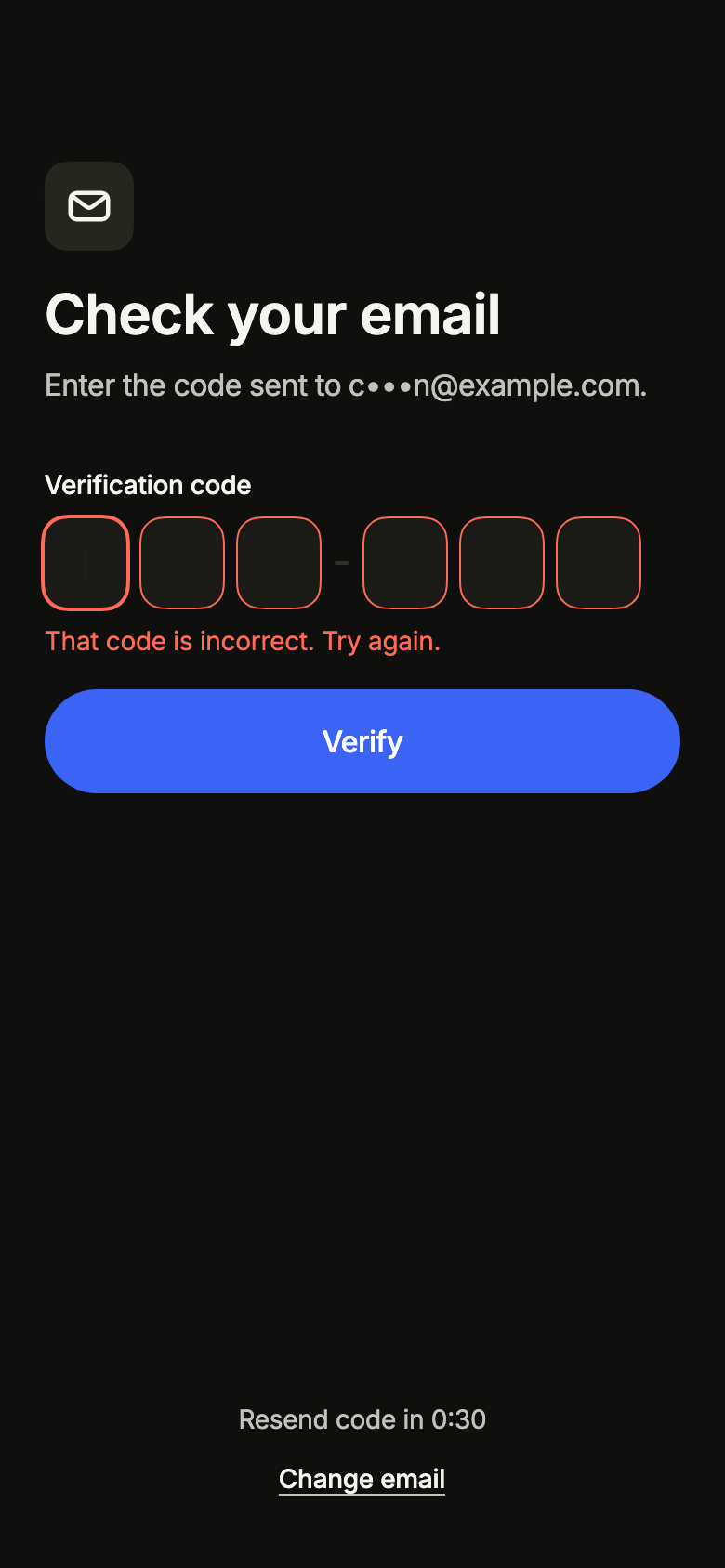
A wrong code: the boxes are cleared and a message asks for the right one.
import 'package:your_app/ui/fliin/screens/verify_code/verify_code_controller.dart';
import 'package:your_app/ui/fliin/screens/verify_code/verify_code_data.dart';
import 'package:your_app/ui/fliin/screens/verify_code/verify_code_screen.dart';
import 'package:flutter/widgets.dart';

class VerifyCodeWrongExample extends StatelessWidget {
  const VerifyCodeWrongExample({super.key});

  @override
  Widget build(BuildContext context) {
    return VerifyCodeScreen.standalone(
      service: const SampleVerifyCodeService(latency: Duration(milliseconds: 600)),
      destination: sampleVerifyCodeDestination,
      initial: const VerifyCodeEntering(notice: VerifyCodeNotice.wrong),
      onChangeDestination: () {},
    );
  }
}Expired
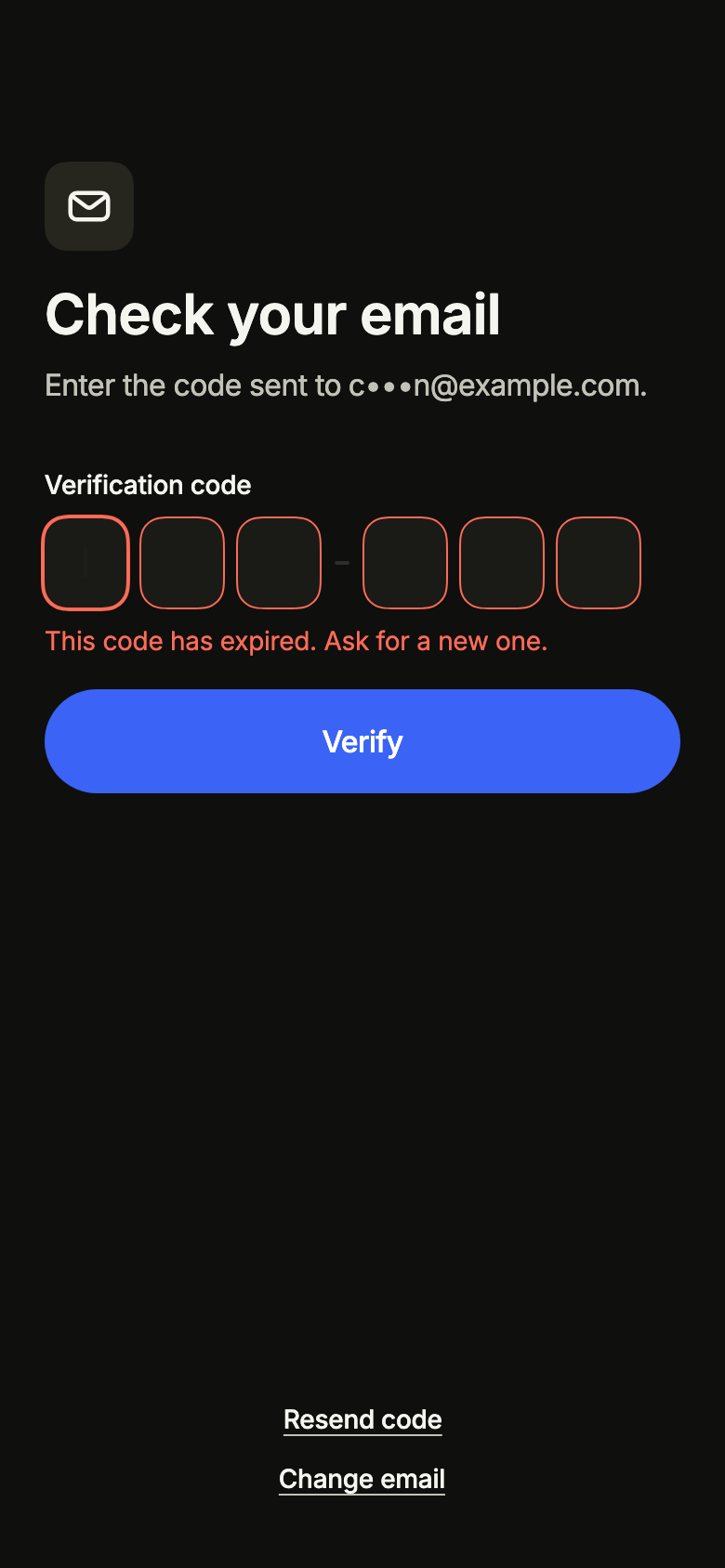
An expired code: the message offers to send a new one.
import 'package:your_app/ui/fliin/screens/verify_code/verify_code_controller.dart';
import 'package:your_app/ui/fliin/screens/verify_code/verify_code_data.dart';
import 'package:your_app/ui/fliin/screens/verify_code/verify_code_screen.dart';
import 'package:flutter/widgets.dart';

class VerifyCodeExpiredExample extends StatelessWidget {
  const VerifyCodeExpiredExample({super.key});

  @override
  Widget build(BuildContext context) {
    return VerifyCodeScreen.standalone(
      service: const SampleVerifyCodeService(latency: Duration(milliseconds: 600)),
      destination: sampleVerifyCodeDestination,
      initial: const VerifyCodeEntering(notice: VerifyCodeNotice.expired),
      onChangeDestination: () {},
    );
  }
}Resent
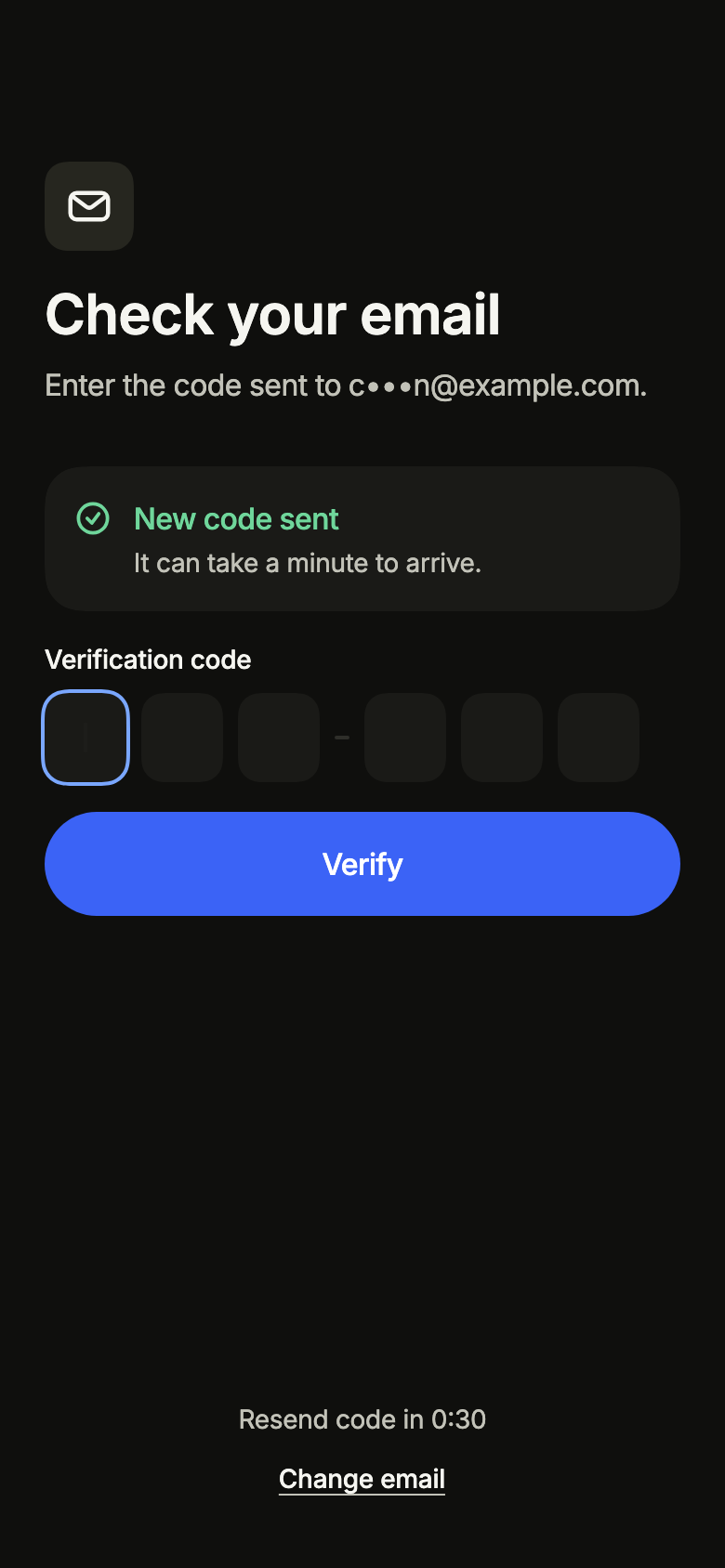
A new code was sent: the message confirms it, and resending waits before it is offered again.
import 'package:your_app/ui/fliin/screens/verify_code/verify_code_controller.dart';
import 'package:your_app/ui/fliin/screens/verify_code/verify_code_data.dart';
import 'package:your_app/ui/fliin/screens/verify_code/verify_code_screen.dart';
import 'package:flutter/widgets.dart';

class VerifyCodeResentExample extends StatelessWidget {
  const VerifyCodeResentExample({super.key});

  @override
  Widget build(BuildContext context) {
    return VerifyCodeScreen.standalone(
      service: const SampleVerifyCodeService(latency: Duration(milliseconds: 600)),
      destination: sampleVerifyCodeDestination,
      initial: const VerifyCodeEntering(notice: VerifyCodeNotice.resent),
      onChangeDestination: () {},
    );
  }
}Offline
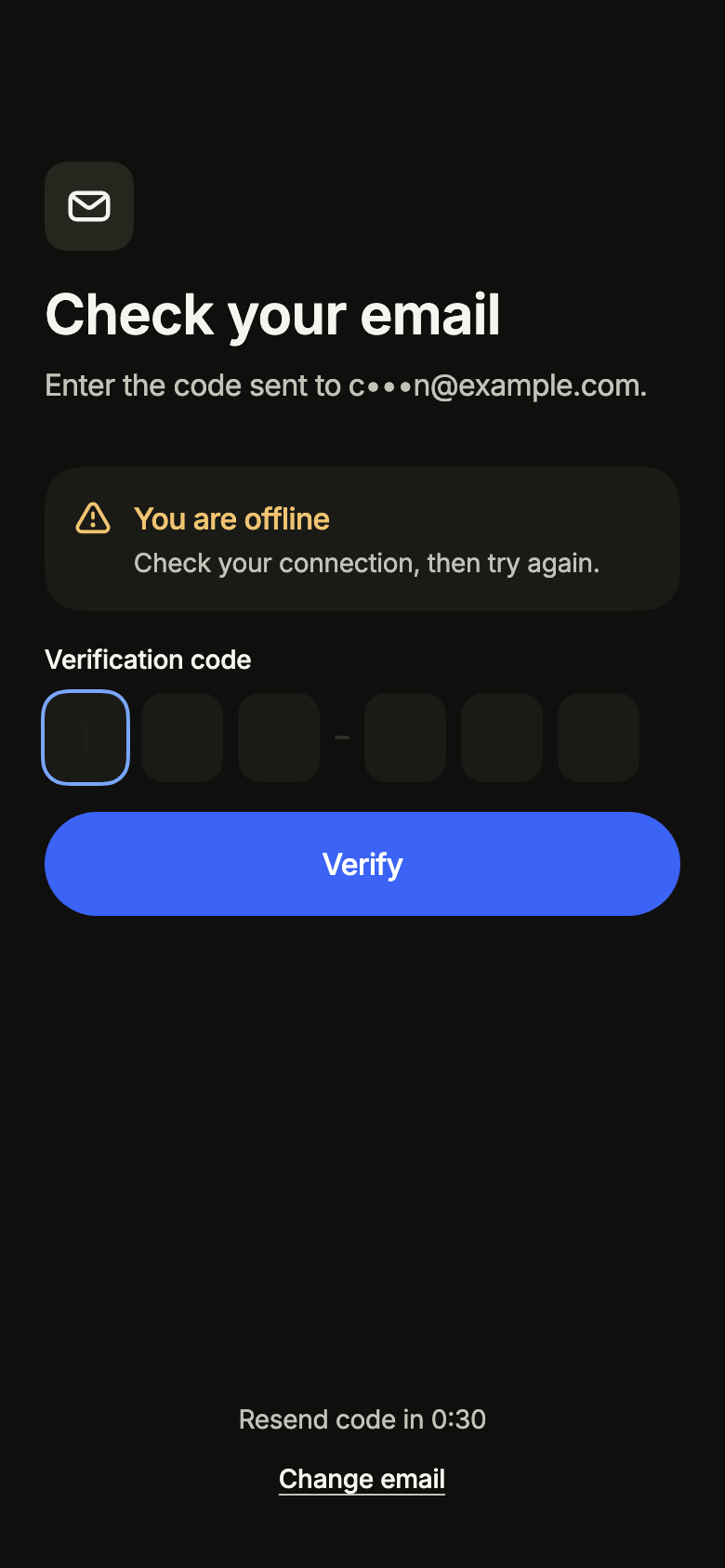
Without a connection, the message asks to reconnect before checking the code.
import 'package:your_app/ui/fliin/screens/verify_code/verify_code_controller.dart';
import 'package:your_app/ui/fliin/screens/verify_code/verify_code_data.dart';
import 'package:your_app/ui/fliin/screens/verify_code/verify_code_screen.dart';
import 'package:flutter/widgets.dart';

class VerifyCodeOfflineExample extends StatelessWidget {
  const VerifyCodeOfflineExample({super.key});

  @override
  Widget build(BuildContext context) {
    return VerifyCodeScreen.standalone(
      service: const SampleVerifyCodeService(latency: Duration(milliseconds: 600)),
      destination: sampleVerifyCodeDestination,
      initial: const VerifyCodeEntering(notice: VerifyCodeNotice.offline),
      onChangeDestination: () {},
    );
  }
}Routing
fliin add verify-code prints the route for the router it finds in your pubspec, a file next to the page that wires its navigation. Each of them:
go_router
// lib/verify_code_route.dart, next to verify_code_page.dart.
import 'package:your_app/ui/fliin/screens/verify_code/verify_code_data.dart';
import 'package:go_router/go_router.dart';

import 'verify_code_page.dart';

/// Add verifyCodeRoute to the routes of your GoRouter.
final verifyCodeRoute = GoRoute(
  path: '/verify-code',
  // Sans destination (lien profond, rechargement), l'inscription.
  redirect: (context, state) => state.extra is VerifyCodeDestination ? null : '/sign-up',
  builder: (context, state) => VerifyCodePage(
    destination: state.extra! as VerifyCodeDestination,
    // '/': your app's home.
    onVerified: () => context.go('/'),
    // Alone in the stack (deep link, go): your app's home.
    onChangeDestination: () => context.canPop() ? context.pop() : context.go('/'),
  ),
);navigator
// lib/verify_code_route.dart, next to verify_code_page.dart.
import 'package:your_app/ui/fliin/screens/verify_code/verify_code_data.dart';
import 'package:flutter/material.dart';

import 'verify_code_page.dart';

/// Opens “Verification code”: `Navigator.of(context).push(verifyCodeRoute(destination: …, homePage: …))`.
/// [homePage] builds your app's home.
Route<void> verifyCodeRoute({
  required VerifyCodeDestination destination,
  required WidgetBuilder homePage,
}) => MaterialPageRoute<void>(
  builder: (context) => VerifyCodePage(
    destination: destination,
    onVerified: () => Navigator.of(context).pushAndRemoveUntil(MaterialPageRoute<void>(builder: homePage), (_) => false),
    onChangeDestination: () => Navigator.of(context).maybePop(),
  ),
);State
The controller is a ChangeNotifier from widgets.dart, with no package. fliin add verify-code prints the page that holds it with the state management it finds, its imports written for your package; below they read your_app. Your backend implements the Service interface of the screen's _data.dart file:
none
// lib/verify_code_page.dart
// Your backend: implement VerifyCodeService (verify_code_data.dart) and pass it instead of the sample service.
import 'package:your_app/ui/fliin/screens/verify_code/verify_code_data.dart';
import 'package:your_app/ui/fliin/screens/verify_code/verify_code_screen.dart';
import 'package:flutter/widgets.dart';

class VerifyCodePage extends StatelessWidget {
  const VerifyCodePage({
    super.key,
    required this.destination,
    required this.onVerified,
    required this.onChangeDestination,
  });

  final VerifyCodeDestination destination;
  final VoidCallback onVerified;
  final VoidCallback onChangeDestination;

  @override
  Widget build(BuildContext context) => VerifyCodeScreen.standalone(
    service: const SampleVerifyCodeService(),
    destination: destination,
    onVerified: onVerified,
    onChangeDestination: onChangeDestination,
  );
}provider
// lib/verify_code_page.dart
// Your backend: implement VerifyCodeService (verify_code_data.dart) and pass it instead of the sample service.
import 'package:your_app/ui/fliin/screens/verify_code/verify_code_controller.dart';
import 'package:your_app/ui/fliin/screens/verify_code/verify_code_data.dart';
import 'package:your_app/ui/fliin/screens/verify_code/verify_code_screen.dart';
import 'package:flutter/widgets.dart';
import 'package:provider/provider.dart';

class VerifyCodePage extends StatelessWidget {
  const VerifyCodePage({
    super.key,
    required this.destination,
    required this.onVerified,
    required this.onChangeDestination,
  });

  final VerifyCodeDestination destination;
  final VoidCallback onVerified;
  final VoidCallback onChangeDestination;

  @override
  Widget build(BuildContext context) => ChangeNotifierProvider(
    create: (_) => VerifyCodeController(service: const SampleVerifyCodeService()),
    child: Builder(
      builder: (context) => VerifyCodeScreen(
        controller: context.read<VerifyCodeController>(),
        destination: destination,
        onVerified: onVerified,
        onChangeDestination: onChangeDestination,
      ),
    ),
  );
}riverpod
// lib/verify_code_page.dart
// Your backend: implement VerifyCodeService (verify_code_data.dart) and pass it instead of the sample service.
import 'package:your_app/ui/fliin/screens/verify_code/verify_code_controller.dart';
import 'package:your_app/ui/fliin/screens/verify_code/verify_code_data.dart';
import 'package:your_app/ui/fliin/screens/verify_code/verify_code_screen.dart';
import 'package:flutter/widgets.dart';
import 'package:flutter_riverpod/flutter_riverpod.dart';

final verifyCodeControllerProvider = Provider.autoDispose<VerifyCodeController>((ref) {
  final controller = VerifyCodeController(service: const SampleVerifyCodeService());
  ref.onDispose(controller.dispose);
  return controller;
});

class VerifyCodePage extends ConsumerWidget {
  const VerifyCodePage({
    super.key,
    required this.destination,
    required this.onVerified,
    required this.onChangeDestination,
  });

  final VerifyCodeDestination destination;
  final VoidCallback onVerified;
  final VoidCallback onChangeDestination;

  @override
  Widget build(BuildContext context, WidgetRef ref) => VerifyCodeScreen(
    controller: ref.watch(verifyCodeControllerProvider),
    destination: destination,
    onVerified: onVerified,
    onChangeDestination: onChangeDestination,
  );
}bloc
// lib/verify_code_page.dart
// Your backend: implement VerifyCodeService (verify_code_data.dart) and pass it instead of the sample service.
import 'package:your_app/ui/fliin/screens/verify_code/verify_code_controller.dart';
import 'package:your_app/ui/fliin/screens/verify_code/verify_code_data.dart';
import 'package:your_app/ui/fliin/screens/verify_code/verify_code_screen.dart';
import 'package:flutter/widgets.dart';
import 'package:flutter_bloc/flutter_bloc.dart';

/// The screen's controller as a bloc, for your BlocListener and BlocBuilder:
/// one emission per controller notification. `version` tells them apart
/// when `state` does not change (mode, filters, text…, read them on
/// `controller`). The screen listens to the controller itself.
class VerifyCodeCubit extends Cubit<({VerifyCodeState state, int version})> {
  VerifyCodeCubit(this.controller) : super((state: controller.state, version: 0)) {
    controller.addListener(_changed);
  }

  final VerifyCodeController controller;

  void _changed() => emit((state: controller.state, version: state.version + 1));

  @override
  Future<void> close() {
    controller
      ..removeListener(_changed)
      ..dispose();
    return super.close();
  }
}

class VerifyCodePage extends StatelessWidget {
  const VerifyCodePage({
    super.key,
    required this.destination,
    required this.onVerified,
    required this.onChangeDestination,
  });

  final VerifyCodeDestination destination;
  final VoidCallback onVerified;
  final VoidCallback onChangeDestination;

  @override
  Widget build(BuildContext context) => BlocProvider(
    create: (_) => VerifyCodeCubit(VerifyCodeController(service: const SampleVerifyCodeService())),
    child: Builder(
      builder: (context) => VerifyCodeScreen(
        controller: context.read<VerifyCodeCubit>().controller,
        destination: destination,
        onVerified: onVerified,
        onChangeDestination: onChangeDestination,
      ),
    ),
  );
}API
VerifyCodeScreen: class extends StatefulWidget
VerifyCodeScreen.new: const new({super.key, required VerifyCodeController controller, required VerifyCodeDestination destination, Widget? mark, int length, String? title, String? subtitle, VoidCallback? onVerified, VoidCallback? onChangeDestination, VoidCallback? onBack})
VerifyCodeScreen.standalone: const new({super.key, required VerifyCodeService service, required VerifyCodeDestination destination, VerifyCodeState? initial, DateTime Function()? now, Widget? mark, int length, String? title, String? subtitle, VoidCallback? onVerified, VoidCallback? onChangeDestination, VoidCallback? onBack})
VerifyCodeScreen.controller: get VerifyCodeController?
VerifyCodeScreen.service: get VerifyCodeService?
VerifyCodeScreen.initial: get VerifyCodeState?
VerifyCodeScreen.now: get DateTime Function()?
VerifyCodeScreen.destination: get VerifyCodeDestination
VerifyCodeScreen.mark: get Widget?
VerifyCodeScreen.length: get int
VerifyCodeScreen.title: get String?
VerifyCodeScreen.subtitle: get String?
VerifyCodeScreen.onVerified: get VoidCallback?
VerifyCodeScreen.onChangeDestination: get VoidCallback?
VerifyCodeScreen.onBack: get VoidCallback?
VerifyCodeScreen.createState: State<VerifyCodeScreen>()
VerifyCodeNotice: enum {wrong, expired, offline, failed, resent}
VerifyCodeNotice.wrong: static final VerifyCodeNotice
VerifyCodeNotice.expired: static final VerifyCodeNotice
VerifyCodeNotice.offline: static final VerifyCodeNotice
VerifyCodeNotice.failed: static final VerifyCodeNotice
VerifyCodeNotice.resent: static final VerifyCodeNotice
VerifyCodeState: sealed class permits {VerifyCodeChecking, VerifyCodeEntering, VerifyCodeResending, VerifyCodeVerified}
VerifyCodeState.new: const new()
VerifyCodeEntering: final class extends VerifyCodeState
VerifyCodeEntering.new: const new({VerifyCodeNotice? notice})
VerifyCodeEntering.notice: get VerifyCodeNotice?
VerifyCodeChecking: final class extends VerifyCodeState
VerifyCodeChecking.new: const new()
VerifyCodeResending: final class extends VerifyCodeState
VerifyCodeResending.new: const new()
VerifyCodeVerified: final class extends VerifyCodeState
VerifyCodeVerified.new: const new()
VerifyCodeController: class extends ChangeNotifier
VerifyCodeController.new: new({required VerifyCodeService service, VerifyCodeState initial, Duration resendAfter, DateTime? resendAt, DateTime Function()? now})
VerifyCodeController.service: get VerifyCodeService
VerifyCodeController.resendAfter: get Duration
VerifyCodeController.state: get VerifyCodeState
VerifyCodeController.resendWait: get Duration?
VerifyCodeController.dismissNotice: void()
VerifyCodeController.verify: Future<bool>(String code)
VerifyCodeController.resend: Future<bool>()
VerifyCodeController.dispose: void()
VerifyCodeDestination: sealed class permits {VerifyCodeEmail, VerifyCodePhone}
VerifyCodeDestination.new: const new()
VerifyCodeDestination.masked: abstract get String
VerifyCodeEmail: final class extends VerifyCodeDestination
VerifyCodeEmail.new: const new(String address)
VerifyCodeEmail.address: get String
VerifyCodeEmail.masked: get String
VerifyCodeEmail.toString: String()
VerifyCodePhone: final class extends VerifyCodeDestination
VerifyCodePhone.new: const new(String number)
VerifyCodePhone.number: get String
VerifyCodePhone.masked: get String
VerifyCodePhone.toString: String()
VerifyCodeWrong: final class implements Exception
VerifyCodeWrong.new: const new()
VerifyCodeExpired: final class implements Exception
VerifyCodeExpired.new: const new()
VerifyCodeNoNetwork: final class implements Exception
VerifyCodeNoNetwork.new: const new()
VerifyCodeService: abstract interface class
VerifyCodeService.new: new()
VerifyCodeService.verify: abstract Future<void>(String code)
VerifyCodeService.resend: abstract Future<void>()
sampleVerifyCodeDestination: const dynamic
SampleVerifyCodeService: final class implements VerifyCodeService
SampleVerifyCodeService.new: const new({String code, Duration latency})
SampleVerifyCodeService.code: get String
SampleVerifyCodeService.latency: get Duration
SampleVerifyCodeService.verify: Future<void>(String code)
SampleVerifyCodeService.resend: Future<void>()
verifyCodeL10n: const Map<String, Map<String, String>>
VerifyCodeStrings: final class
VerifyCodeStrings.new: const new(String language)
VerifyCodeStrings.of: factory new(BuildContext context)
VerifyCodeStrings.language: get String
VerifyCodeStrings.title: String(VerifyCodeDestination destination)
VerifyCodeStrings.subtitle: String(VerifyCodeDestination destination)
VerifyCodeStrings.label: get String
VerifyCodeStrings.submit: get String
VerifyCodeStrings.resend: get String
VerifyCodeStrings.resendIn: String(Duration wait)
VerifyCodeStrings.change: String(VerifyCodeDestination destination)
VerifyCodeStrings.incomplete: get String
VerifyCodeStrings.wrong: get String
VerifyCodeStrings.expired: get String
VerifyCodeStrings.resentTitle: get String
VerifyCodeStrings.resentMessage: get String
VerifyCodeStrings.offlineTitle: get String
VerifyCodeStrings.offlineMessage: get String
VerifyCodeStrings.failedTitle: get String
VerifyCodeStrings.failedMessage: get String
VerifyCodeStrings.back: get StringStrings
Every label in English, French and Arabic. The screen follows the closest Localizations; the same table is in the manifest, ready for your ARB files.
| Key | en | fr | ar |
|---|---|---|---|
verifyCodeTitleEmail | Check your email | Vérifiez vos e-mails | تحقق من بريدك الإلكتروني |
verifyCodeTitlePhone | Check your messages | Vérifiez vos messages | تحقق من رسائلك |
verifyCodeSubtitle | Enter the code sent to {destination}. | Saisissez le code envoyé à {destination}. | أدخل الرمز المرسل إلى {destination}. |
verifyCodeLabel | Verification code | Code de vérification | رمز التحقق |
verifyCodeSubmit | Verify | Vérifier | تحقق |
verifyCodeResend | Resend code | Renvoyer le code | إعادة إرسال الرمز |
verifyCodeResendIn | Resend code in {time} | Renvoyer le code dans {time} | إعادة الإرسال بعد {time} |
verifyCodeChangeEmail | Change email | Changer d’adresse | تغيير البريد الإلكتروني |
verifyCodeChangePhone | Change number | Changer de numéro | تغيير الرقم |
verifyCodeIncomplete | Enter every digit of the code. | Saisissez tous les chiffres du code. | أدخل جميع أرقام الرمز. |
verifyCodeWrong | That code is incorrect. Try again. | Ce code est incorrect. Réessayez. | هذا الرمز غير صحيح. أعد المحاولة. |
verifyCodeExpired | This code has expired. Ask for a new one. | Ce code a expiré. Demandez-en un nouveau. | انتهت صلاحية هذا الرمز. اطلب رمزًا جديدًا. |
verifyCodeResentTitle | New code sent | Nouveau code envoyé | تم إرسال رمز جديد |
verifyCodeResentMessage | It can take a minute to arrive. | Il peut mettre une minute à arriver. | قد يستغرق وصوله دقيقة. |
verifyCodeOfflineTitle | You are offline | Vous êtes hors ligne | أنت غير متصل |
verifyCodeOfflineMessage | Check your connection, then try again. | Vérifiez votre connexion, puis réessayez. | تحقق من اتصالك ثم أعد المحاولة. |
verifyCodeFailedTitle | Something went wrong | Un problème est survenu | حدثت مشكلة |
verifyCodeFailedMessage | Try again in a moment. | Réessayez dans un instant. | أعد المحاولة بعد قليل. |
verifyCodeBack | Back | Retour | رجوع |
Reference renders
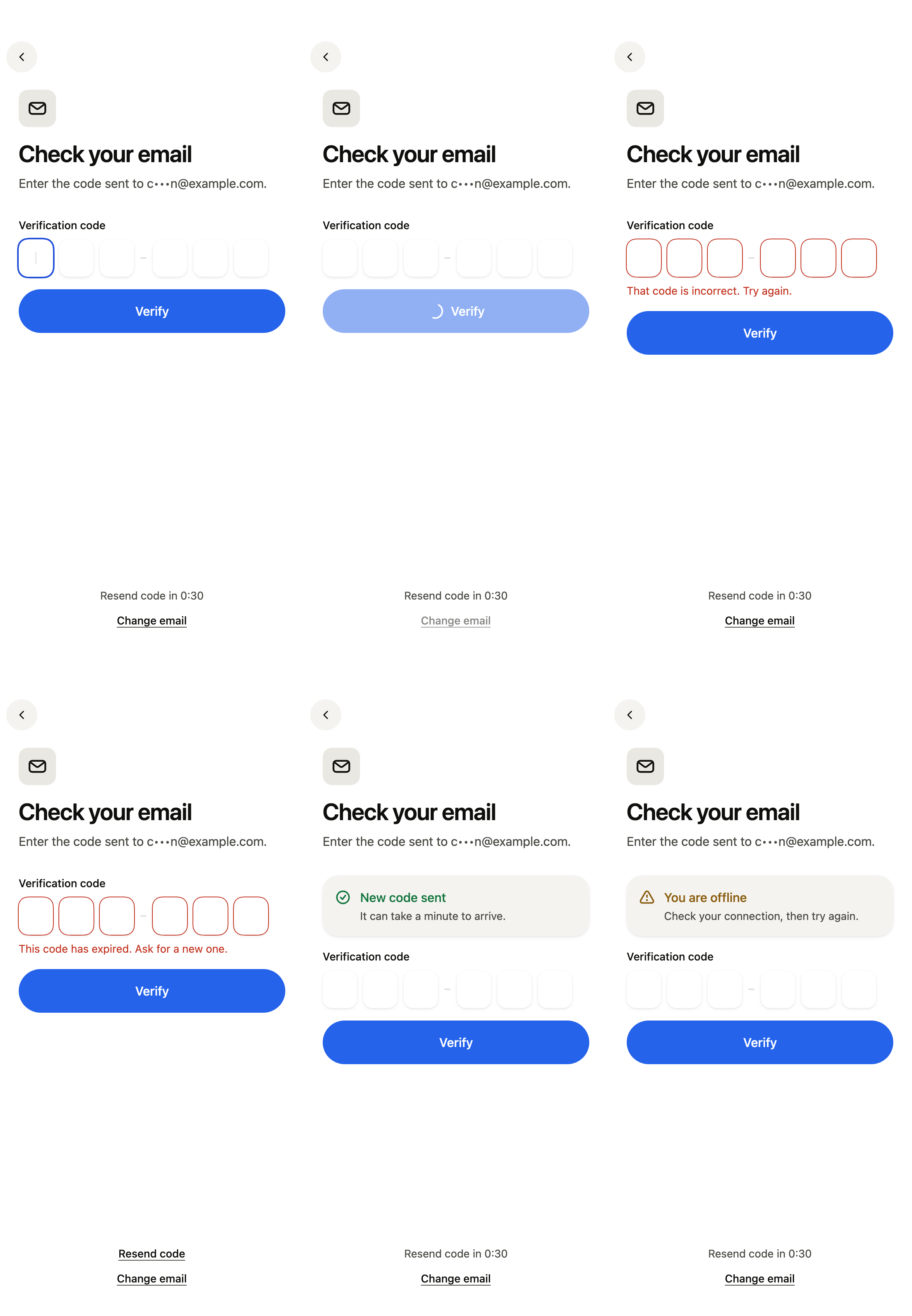
The 16 images published with version 0.2.5, rendered by the shared harness on macOS with Flutter 3.47.7. Each shows every state side by side, at the size of an iPhone (390 × 844) or of an Android phone (412 × 915). fliin verify verify-code compares your copy to them.
Use it to
- let users type the verification code received by email or text message
- send the verification code again after a countdown
- show the masked email address the code was sent to
- show that a code is wrong or expired and clear the field
- let the system autofill the code from a text message
- confirm an email address with a one time code and a resend timer
- Not for
- entering only a two-factor code in an existing form: use a one-time code (input-otp)
- creating an account before verifying its address: use the sign-up screen (sign-up)
- States