Screens / dashboard
Finance dashboard
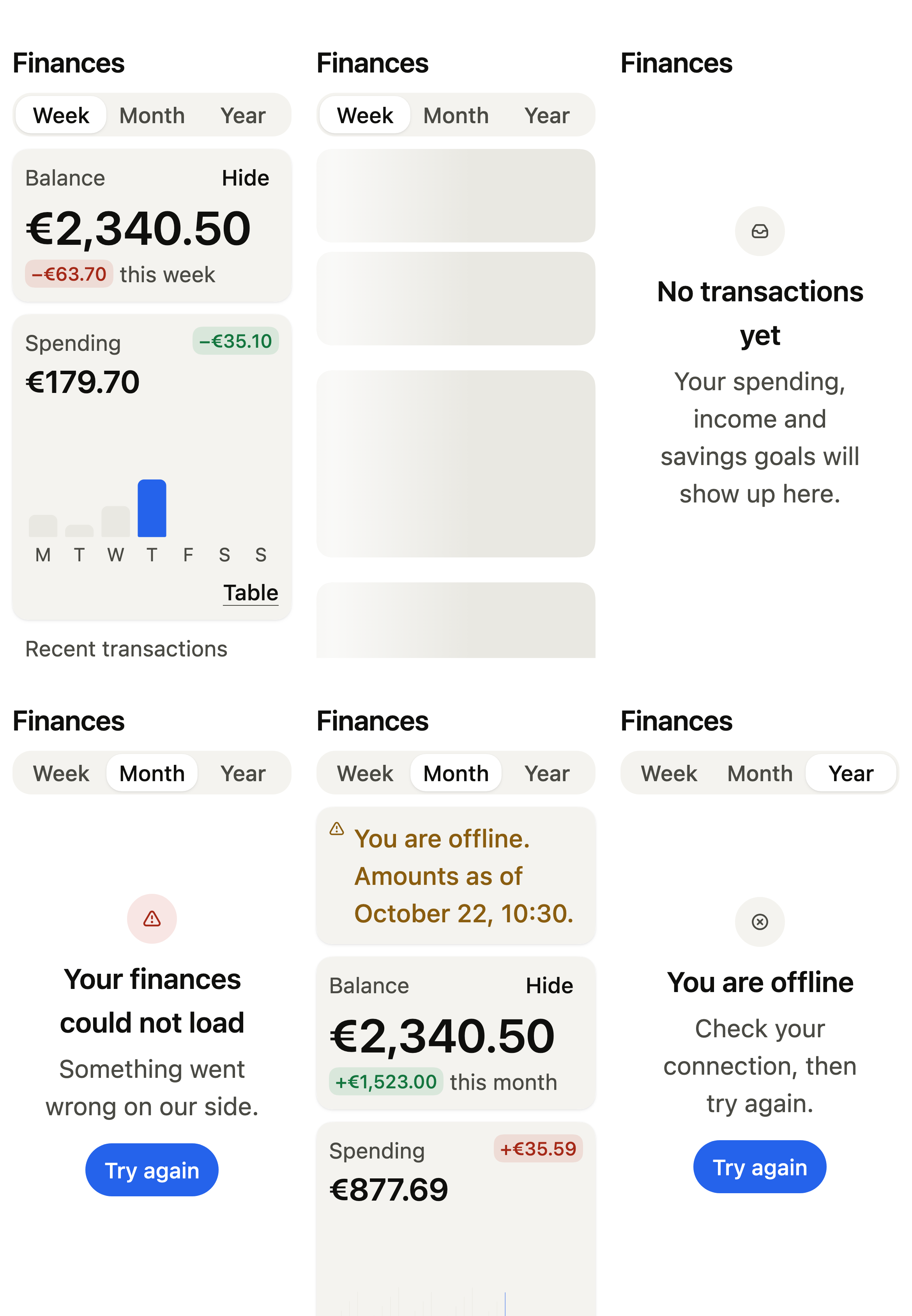
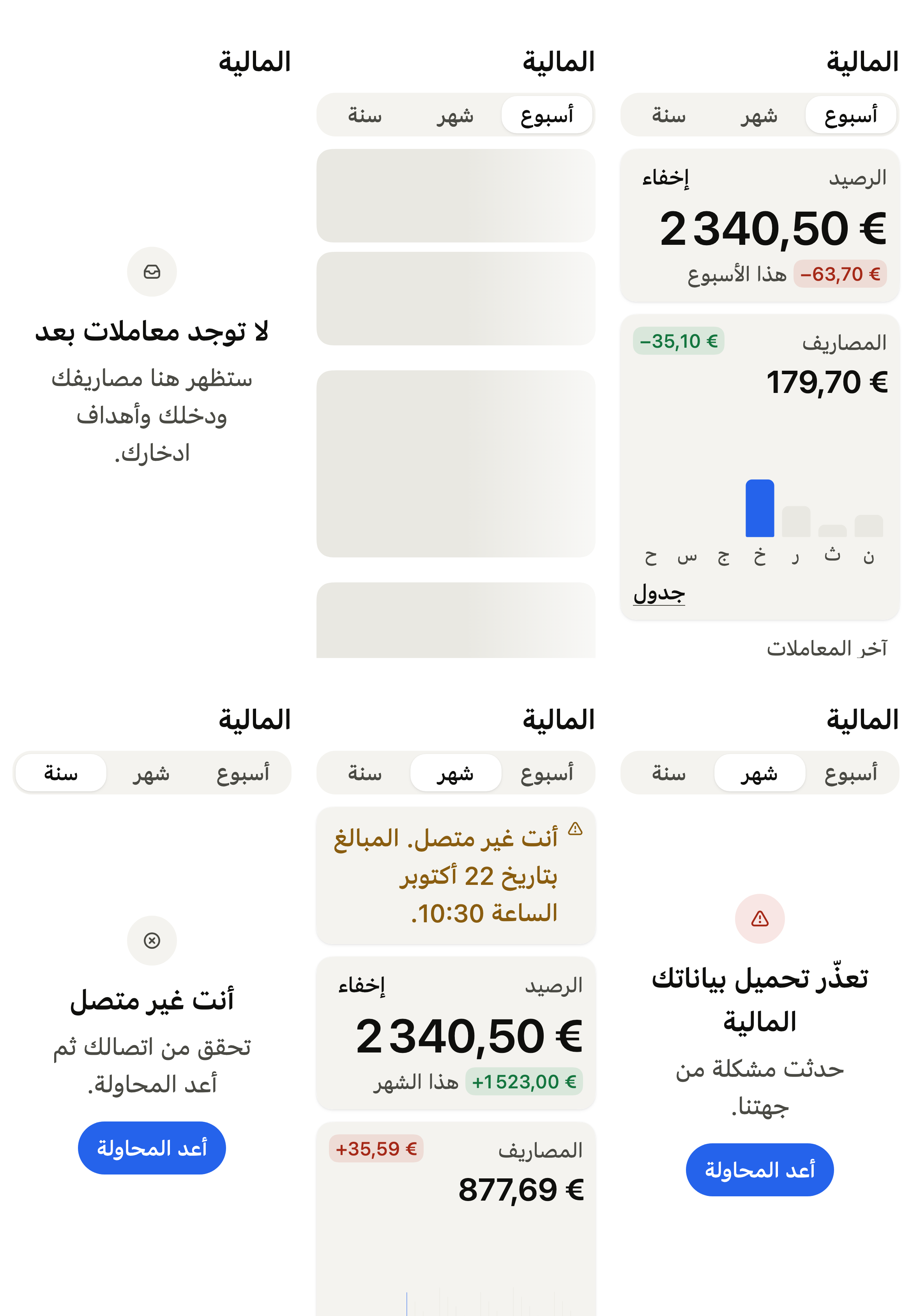
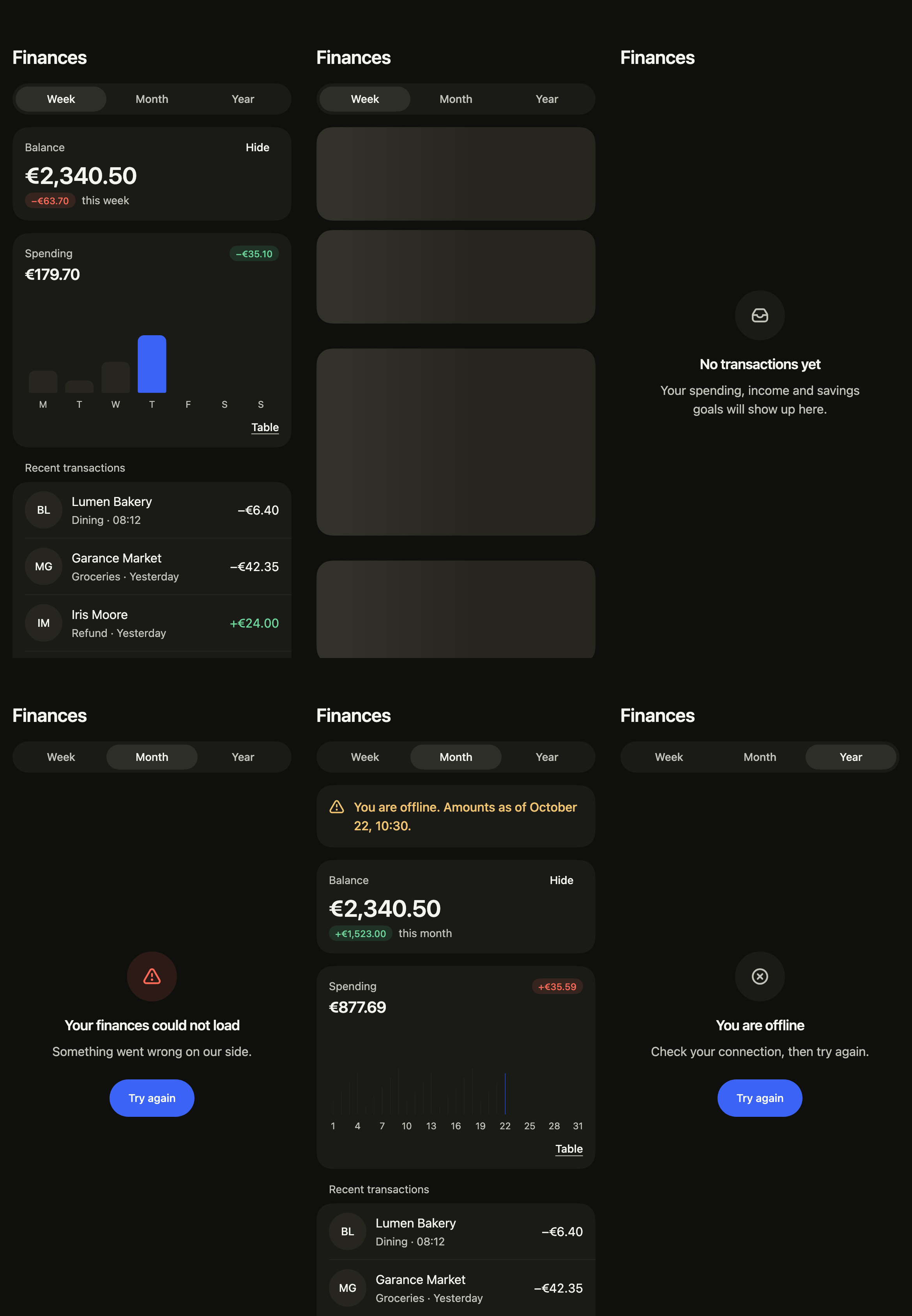
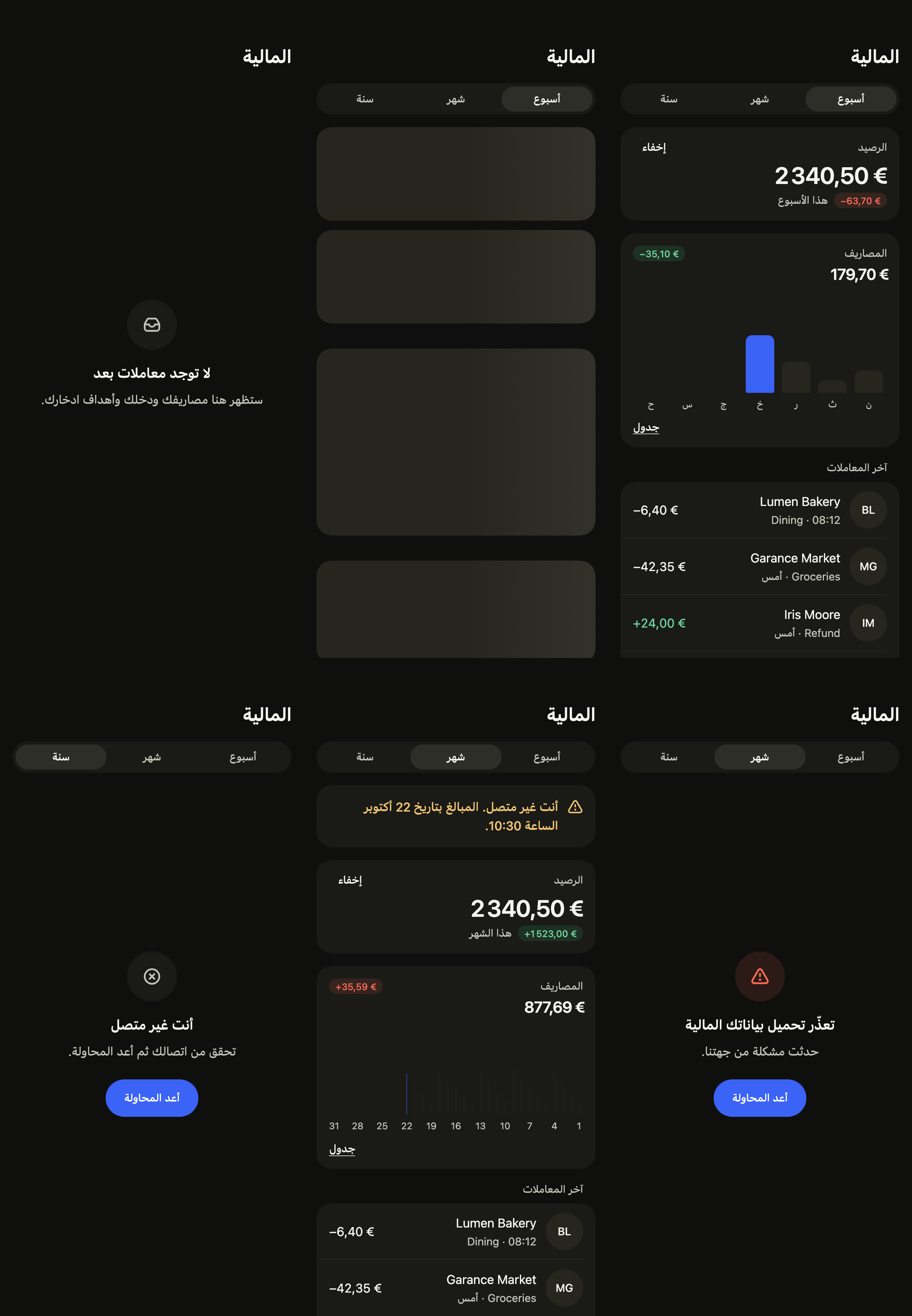
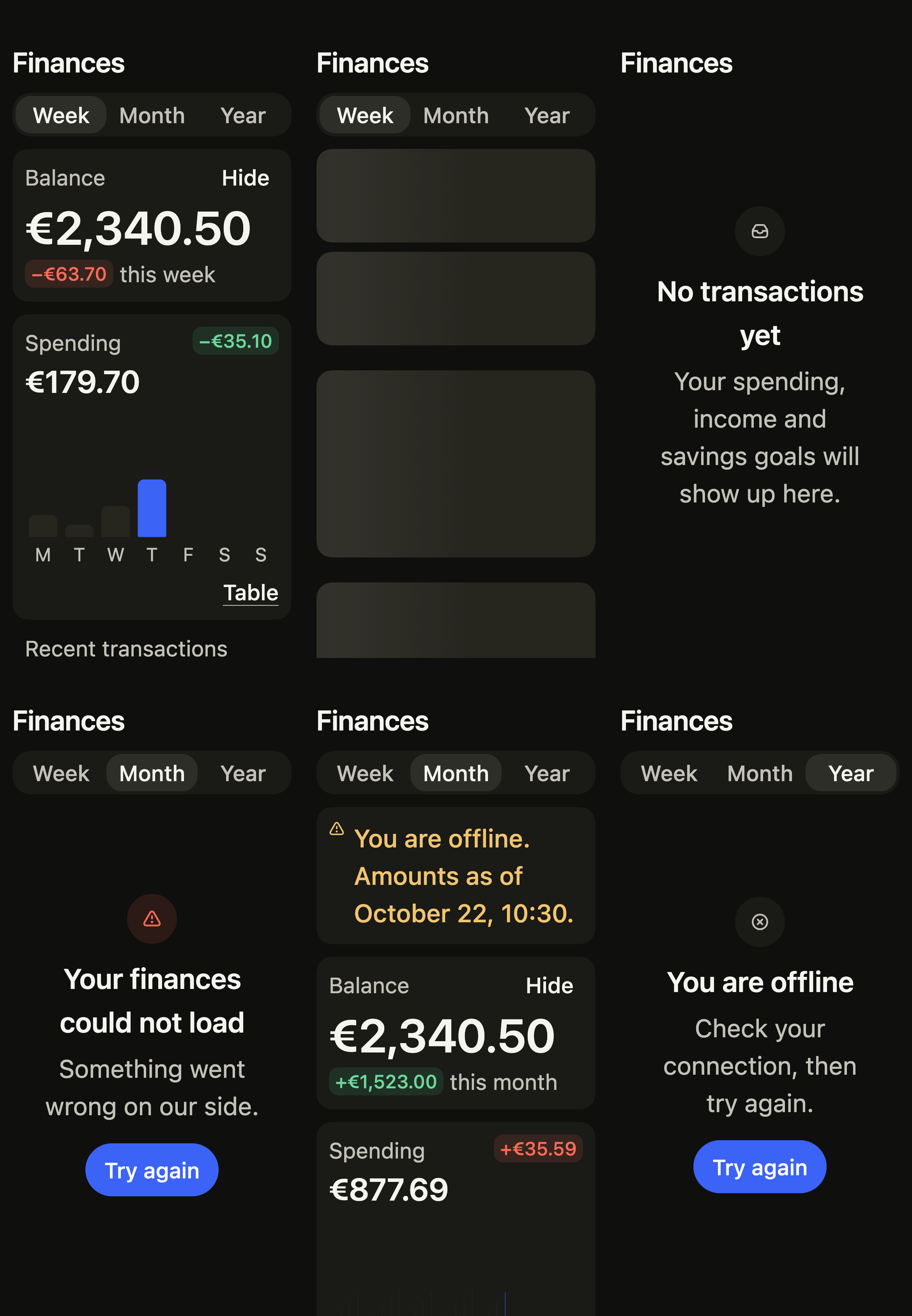
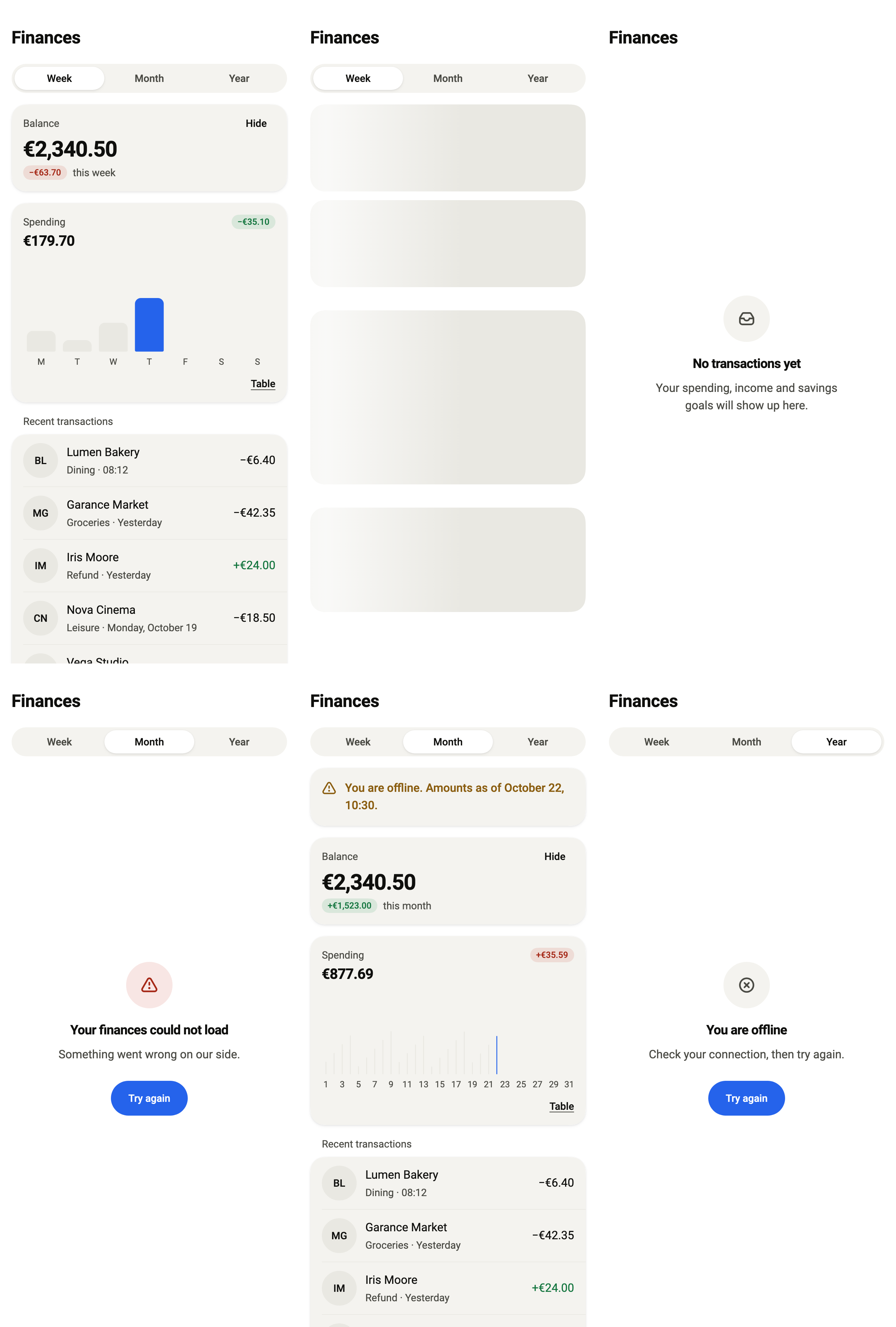
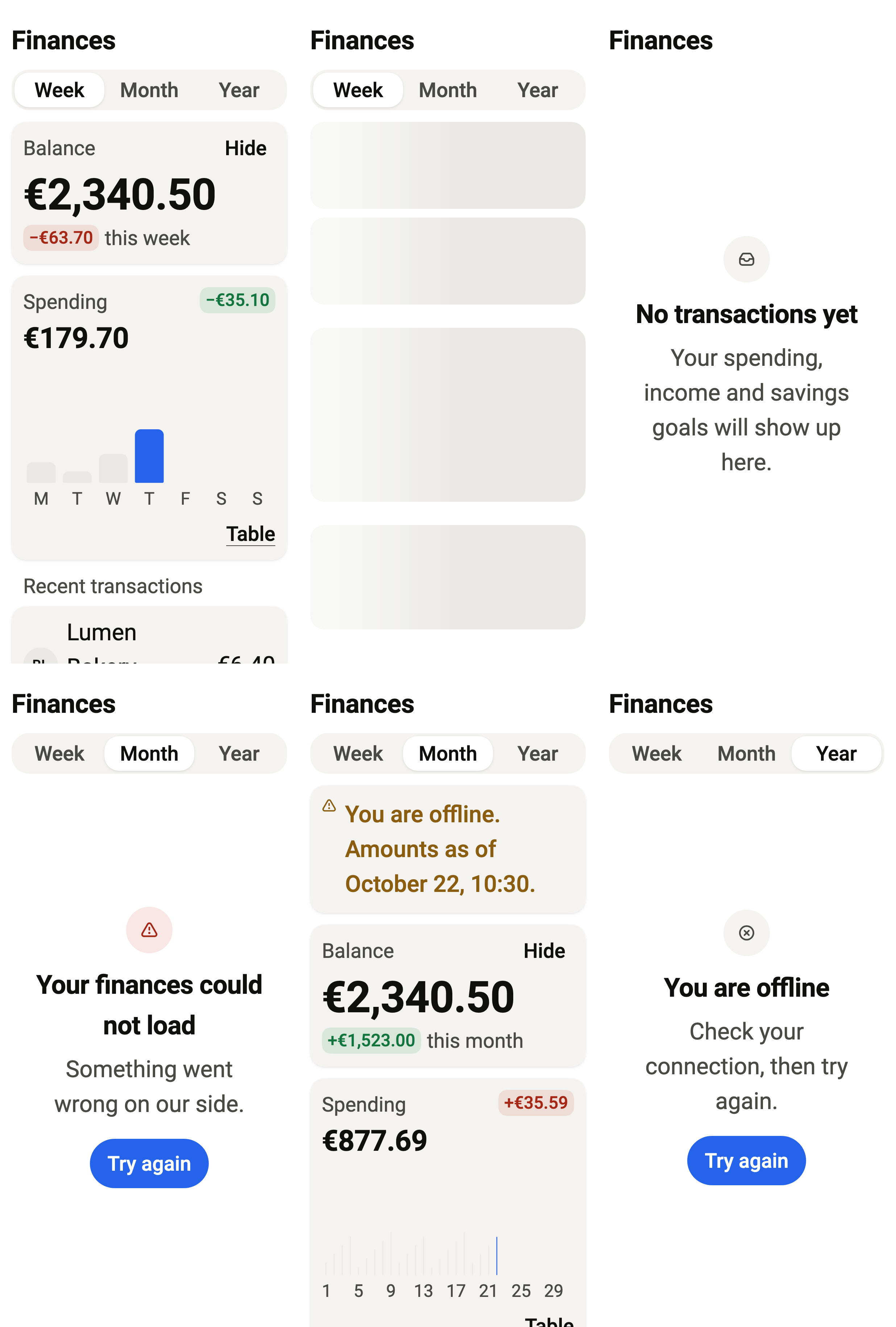
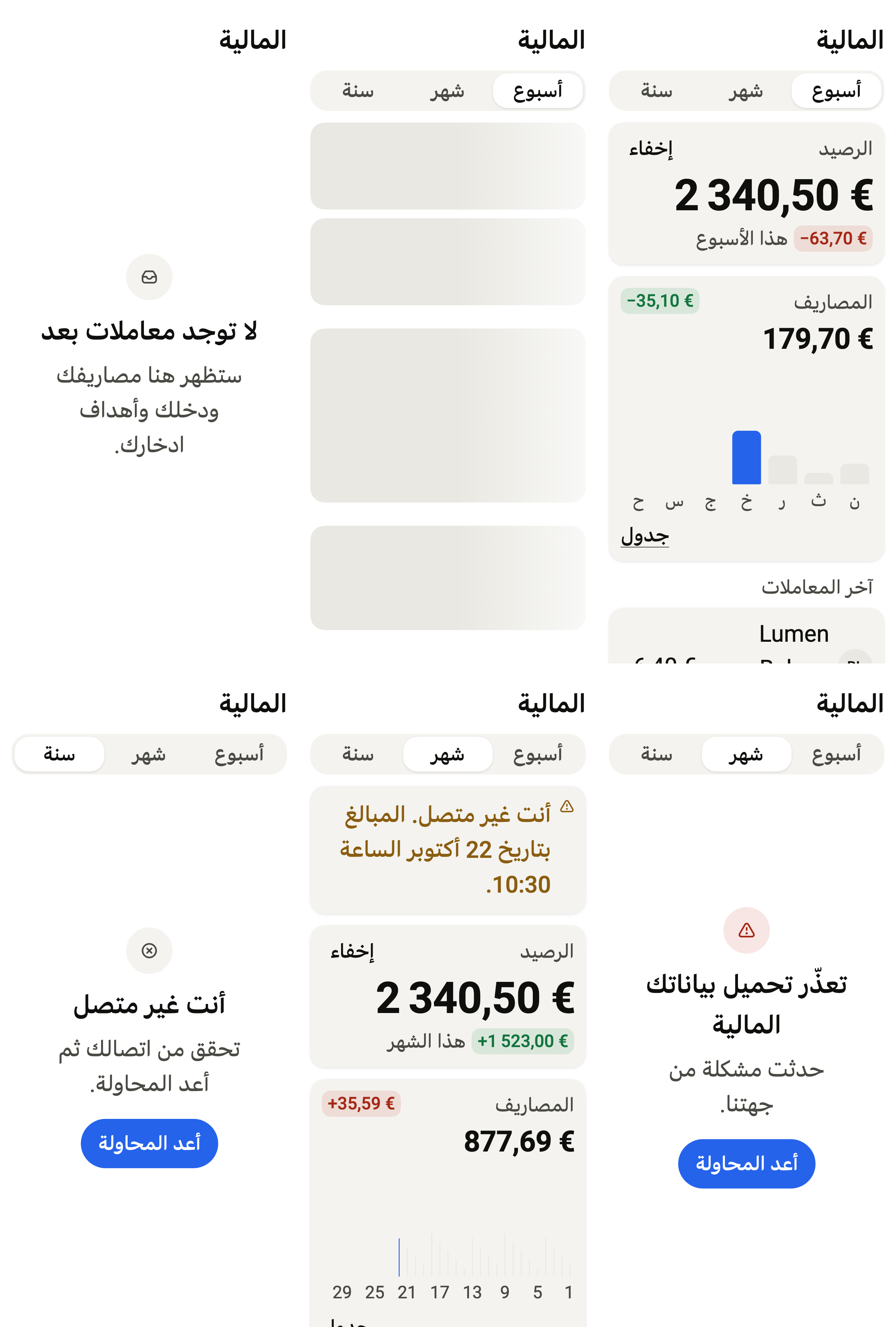
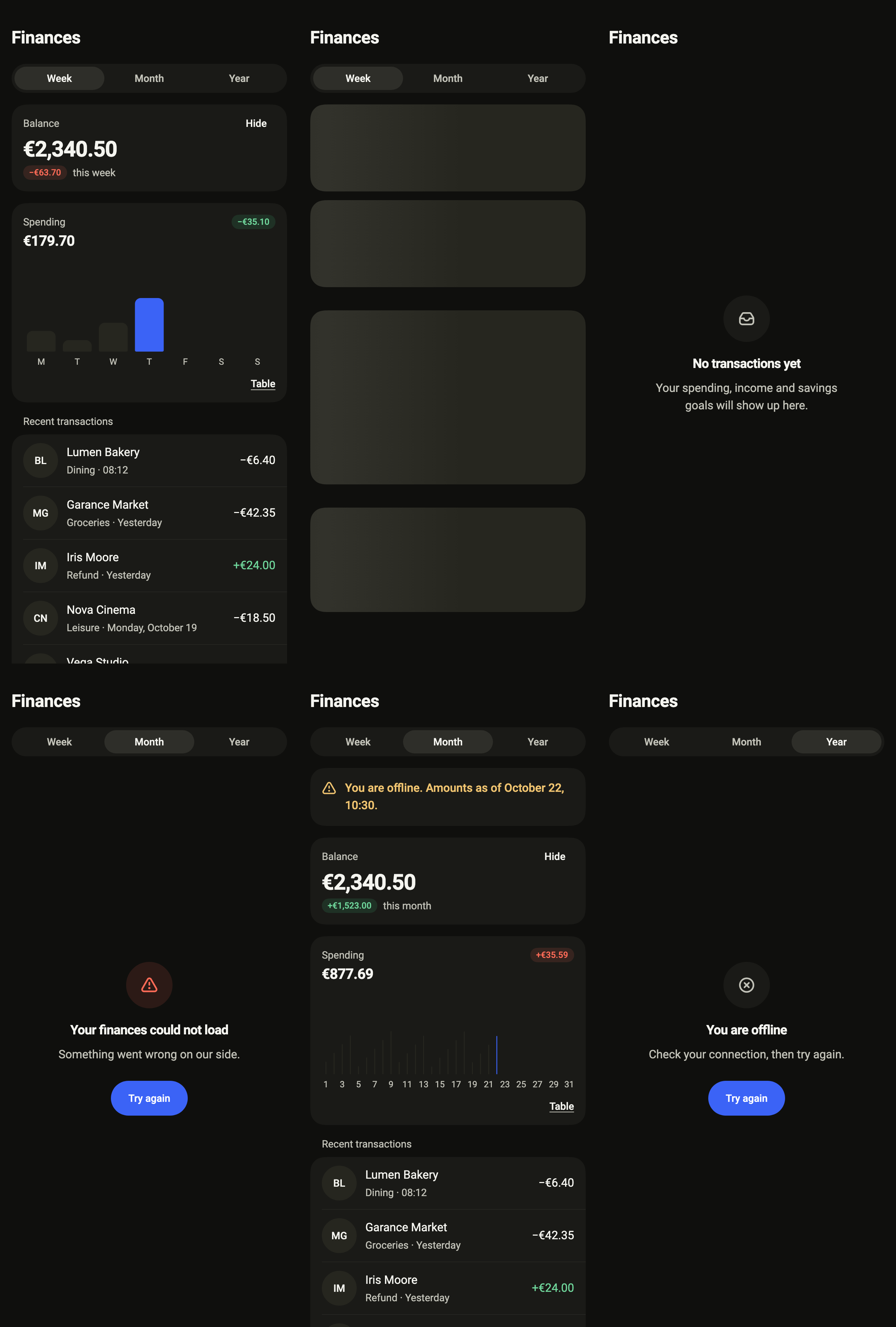
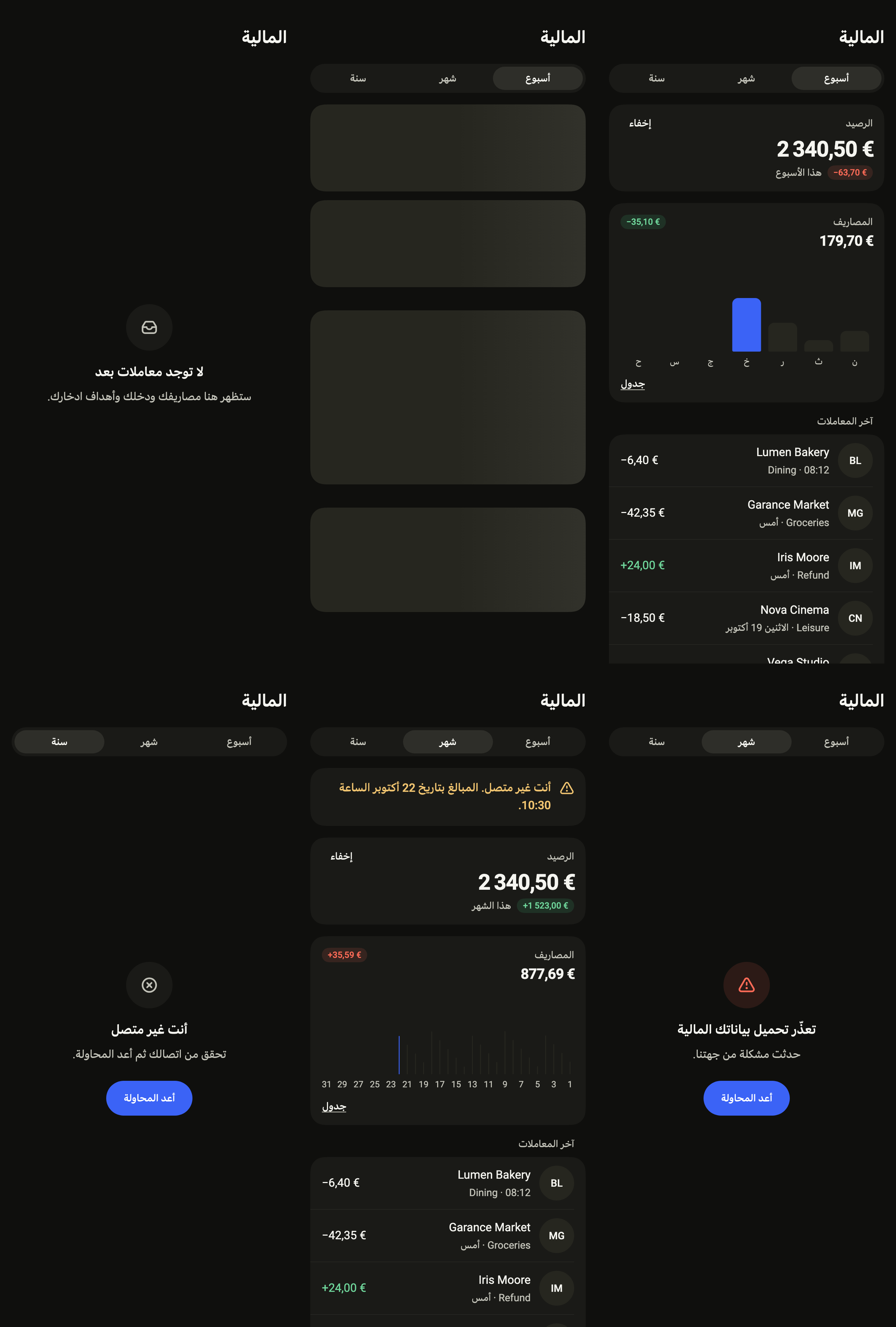
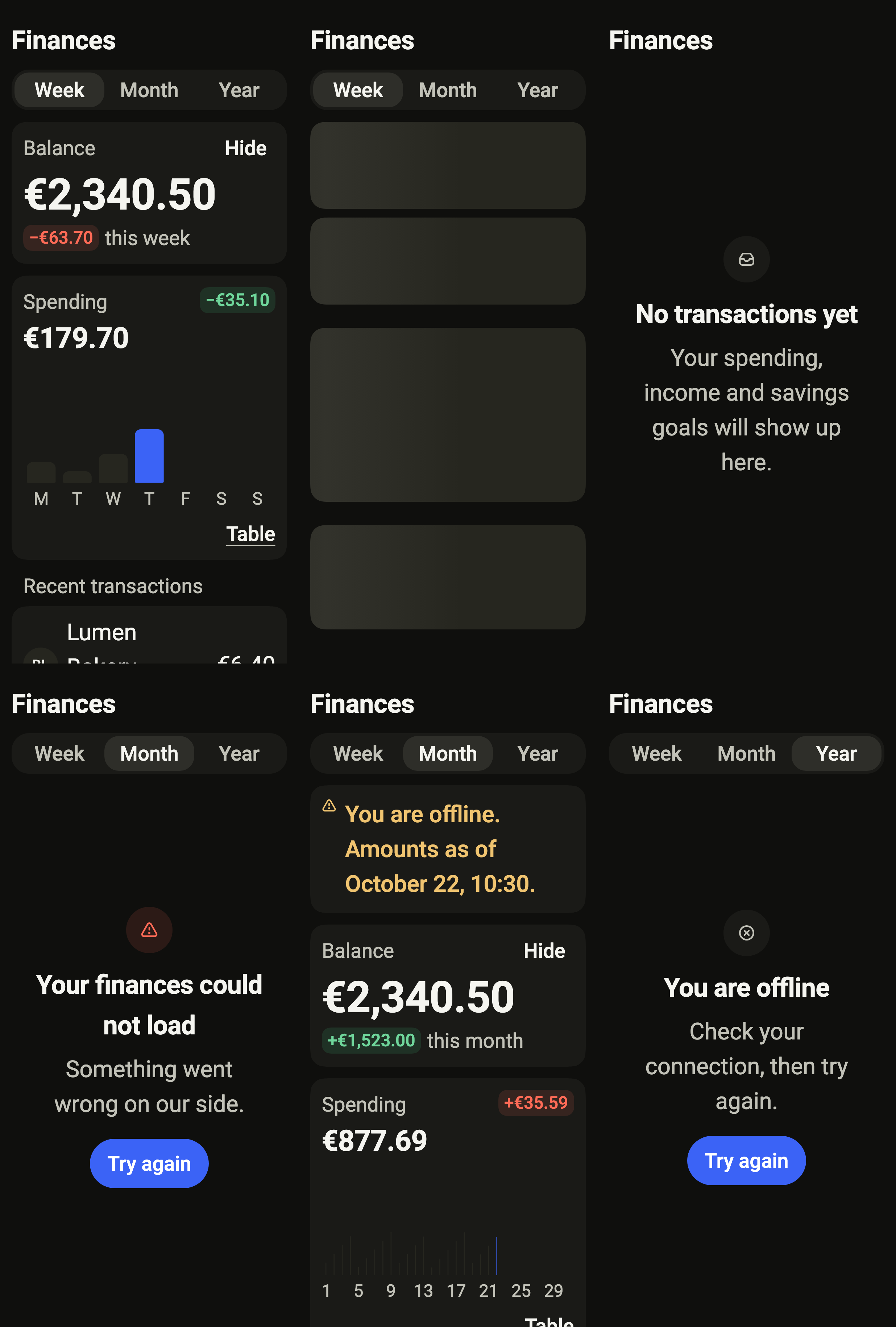
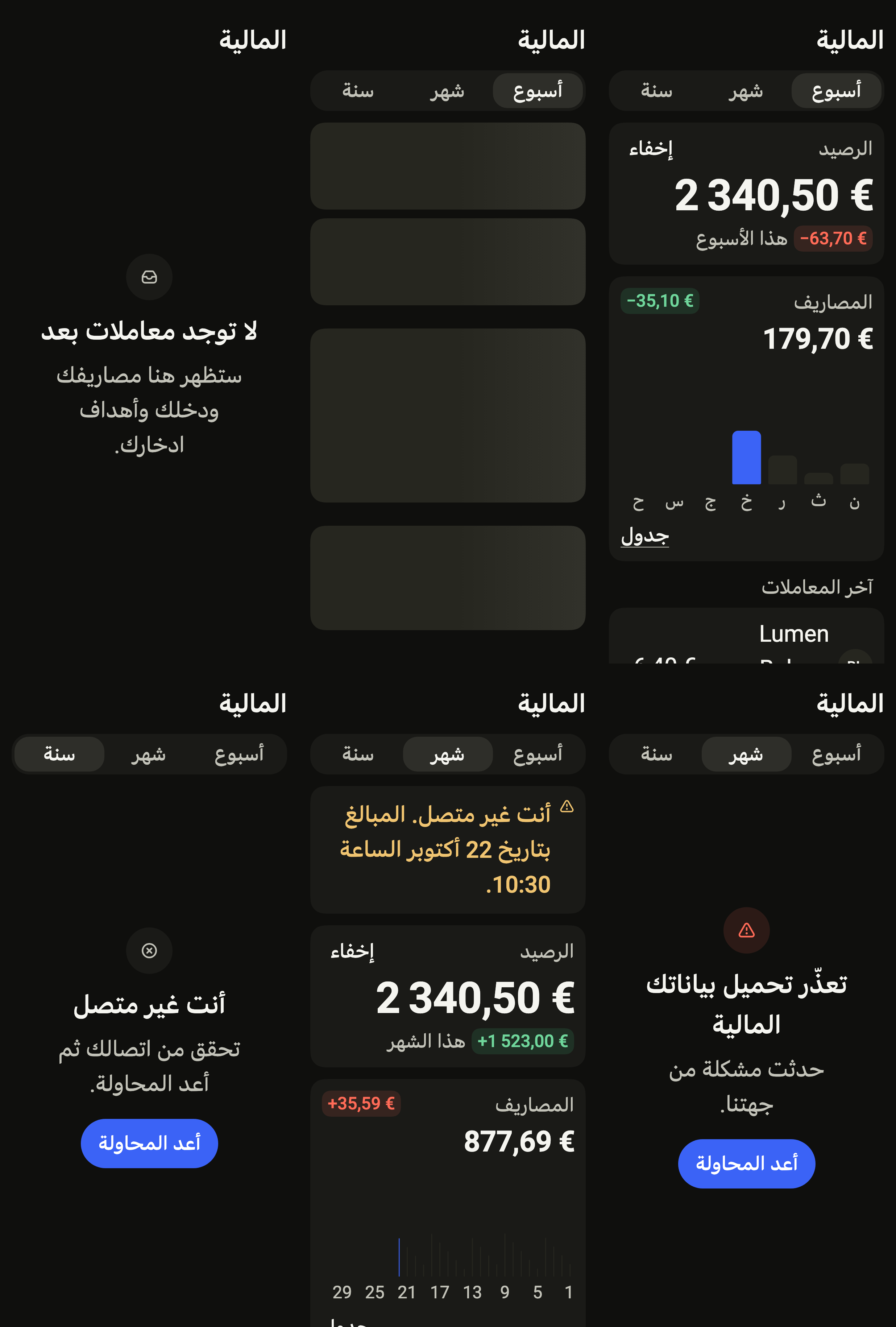
Shows the balance that can be hidden, spending for the week, month or year as a chart or a table, savings goals and the latest transactions by day, with loading, empty, error and offline states.
Import
Finance dashboard is part of Fliin Pro. With a license key, sign in once with fliin login, then add it in a Flutter app where fliin init has run:
fliin login
fliin add finance-dashboard
Also installs: alert, app-bar, avatar, button, card, chart, chip, core, empty-state, link-button, page, progress, section-header, segmented, settings-section, skeleton, stat-card, transaction-row
Examples
Ready
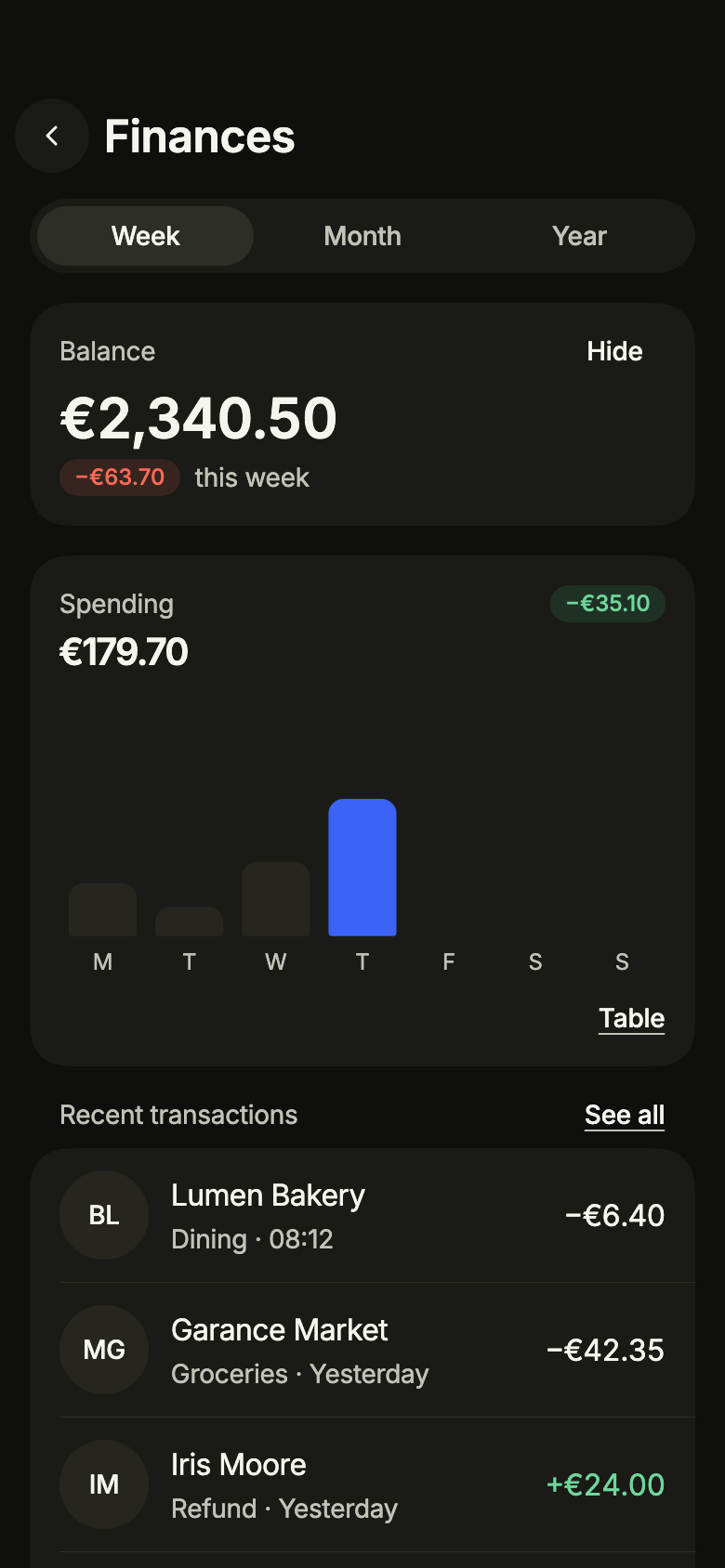
The week at a glance: balance, spending chart and the latest transactions. standalone holds the dashboard over the FinanceService you pass.
import 'package:your_app/ui/fliin/screens/finance_dashboard/finance_dashboard_controller.dart';
import 'package:your_app/ui/fliin/screens/finance_dashboard/finance_dashboard_data.dart';
import 'package:your_app/ui/fliin/screens/finance_dashboard/finance_dashboard_screen.dart';
import 'package:flutter/widgets.dart';

class FinanceDashboardReadyExample extends StatelessWidget {
  const FinanceDashboardReadyExample({super.key});

  @override
  Widget build(BuildContext context) {
    return FinanceDashboardScreen.standalone(
      service: const SampleFinanceService(latency: Duration(milliseconds: 900)),
      initial: FinanceLoaded(sampleFinanceSnapshot(FinancePeriod.week)),
      onBack: () {},
      onSeeAllTransactions: () {},
      onOpenTransaction: (_) {},
      now: sampleFinanceNow,
    );
  }
}Loading
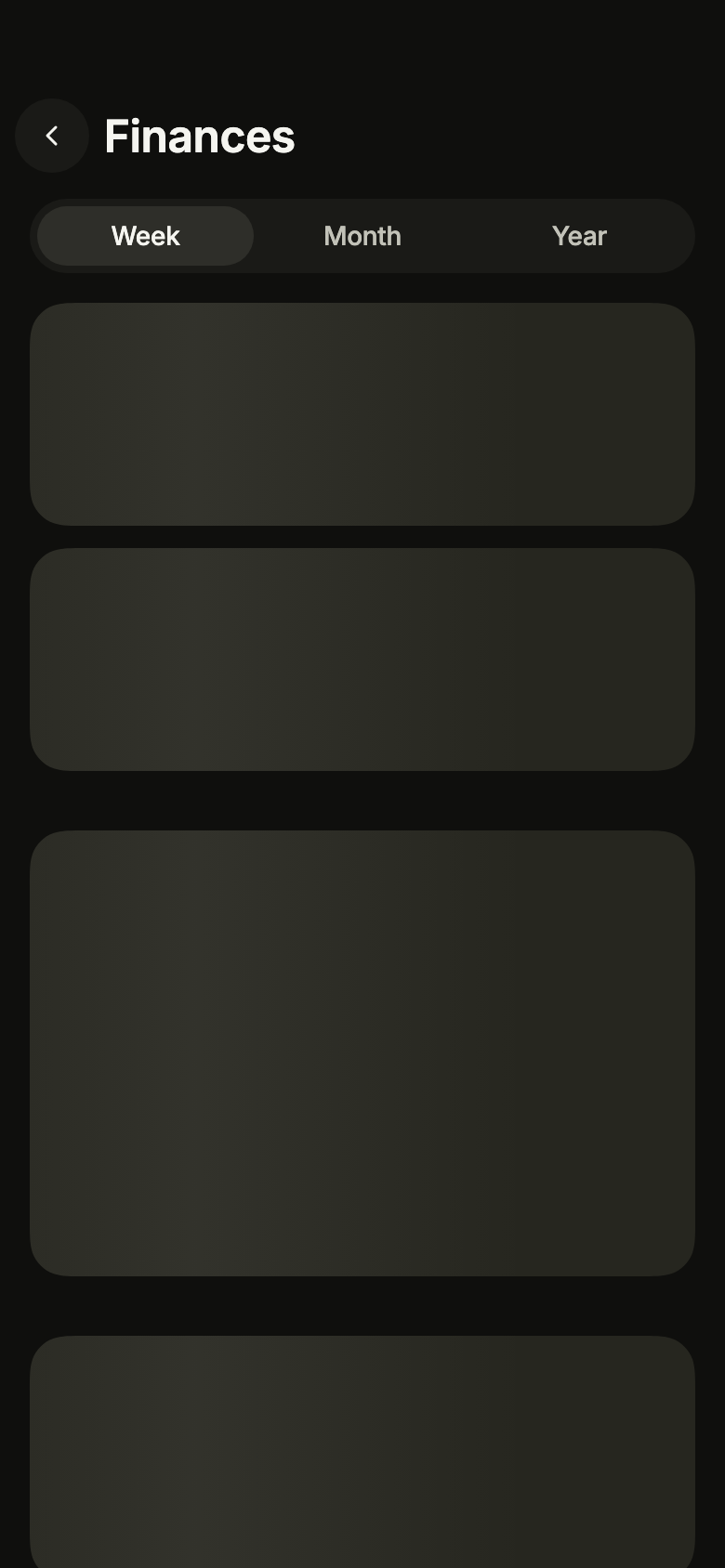
While the period loads, skeletons keep the place of the balance, the chart and the list.
import 'package:your_app/ui/fliin/screens/finance_dashboard/finance_dashboard_controller.dart';
import 'package:your_app/ui/fliin/screens/finance_dashboard/finance_dashboard_data.dart';
import 'package:your_app/ui/fliin/screens/finance_dashboard/finance_dashboard_screen.dart';
import 'package:flutter/widgets.dart';

class FinanceDashboardLoadingExample extends StatelessWidget {
  const FinanceDashboardLoadingExample({super.key});

  @override
  Widget build(BuildContext context) {
    return FinanceDashboardScreen.standalone(
      service: const SampleFinanceService(latency: Duration(milliseconds: 900)),
      initial: const FinanceLoading(FinancePeriod.week),
      onBack: () {},
      onSeeAllTransactions: () {},
      onOpenTransaction: (_) {},
      now: sampleFinanceNow,
    );
  }
}Empty
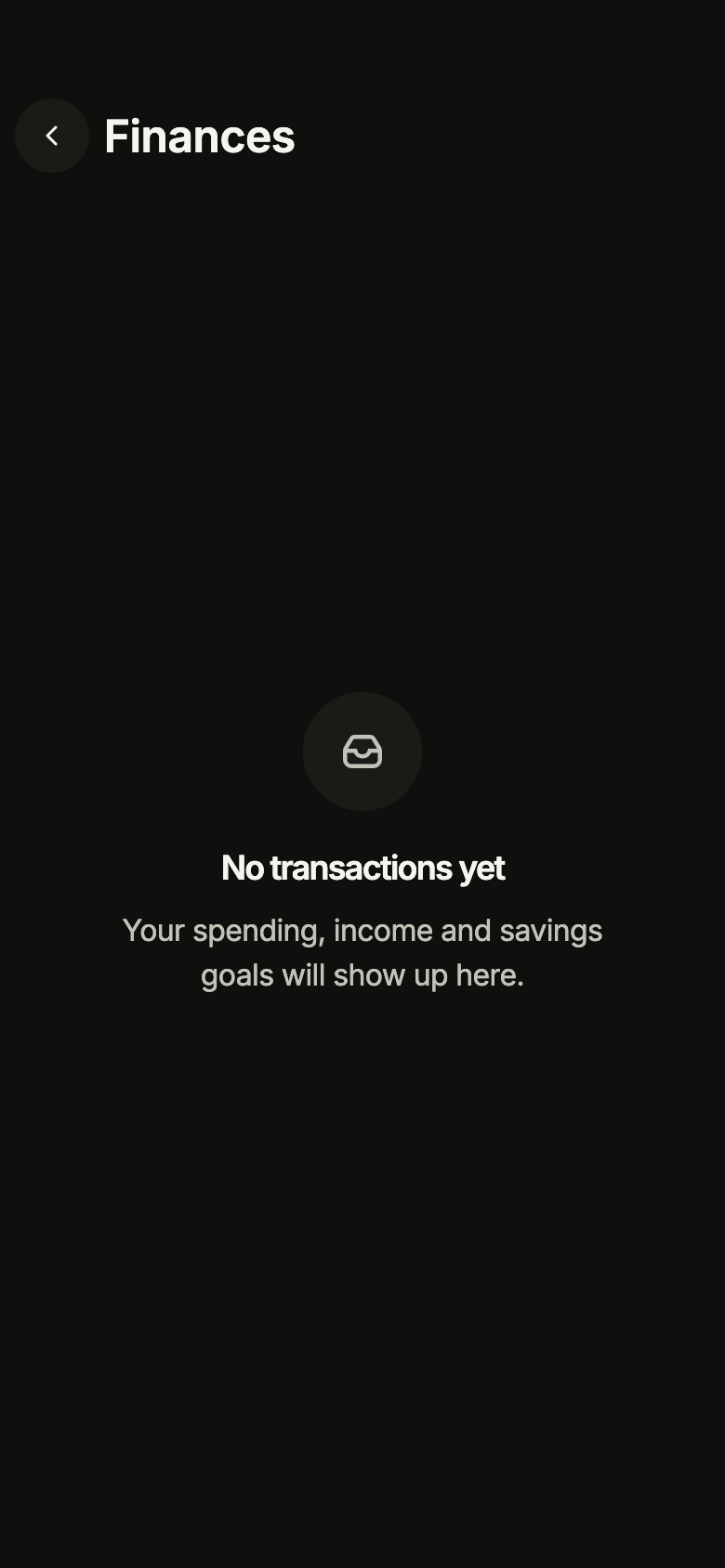
A period without any transaction: the dashboard says so rather than drawing an empty chart.
import 'package:your_app/ui/fliin/screens/finance_dashboard/finance_dashboard_controller.dart';
import 'package:your_app/ui/fliin/screens/finance_dashboard/finance_dashboard_data.dart';
import 'package:your_app/ui/fliin/screens/finance_dashboard/finance_dashboard_screen.dart';
import 'package:flutter/widgets.dart';

class FinanceDashboardEmptyExample extends StatelessWidget {
  const FinanceDashboardEmptyExample({super.key});

  @override
  Widget build(BuildContext context) {
    return FinanceDashboardScreen.standalone(
      service: const SampleFinanceService(latency: Duration(milliseconds: 900)),
      initial: const FinanceEmpty(FinancePeriod.week),
      onBack: () {},
      onSeeAllTransactions: () {},
      onOpenTransaction: (_) {},
      now: sampleFinanceNow,
    );
  }
}Error
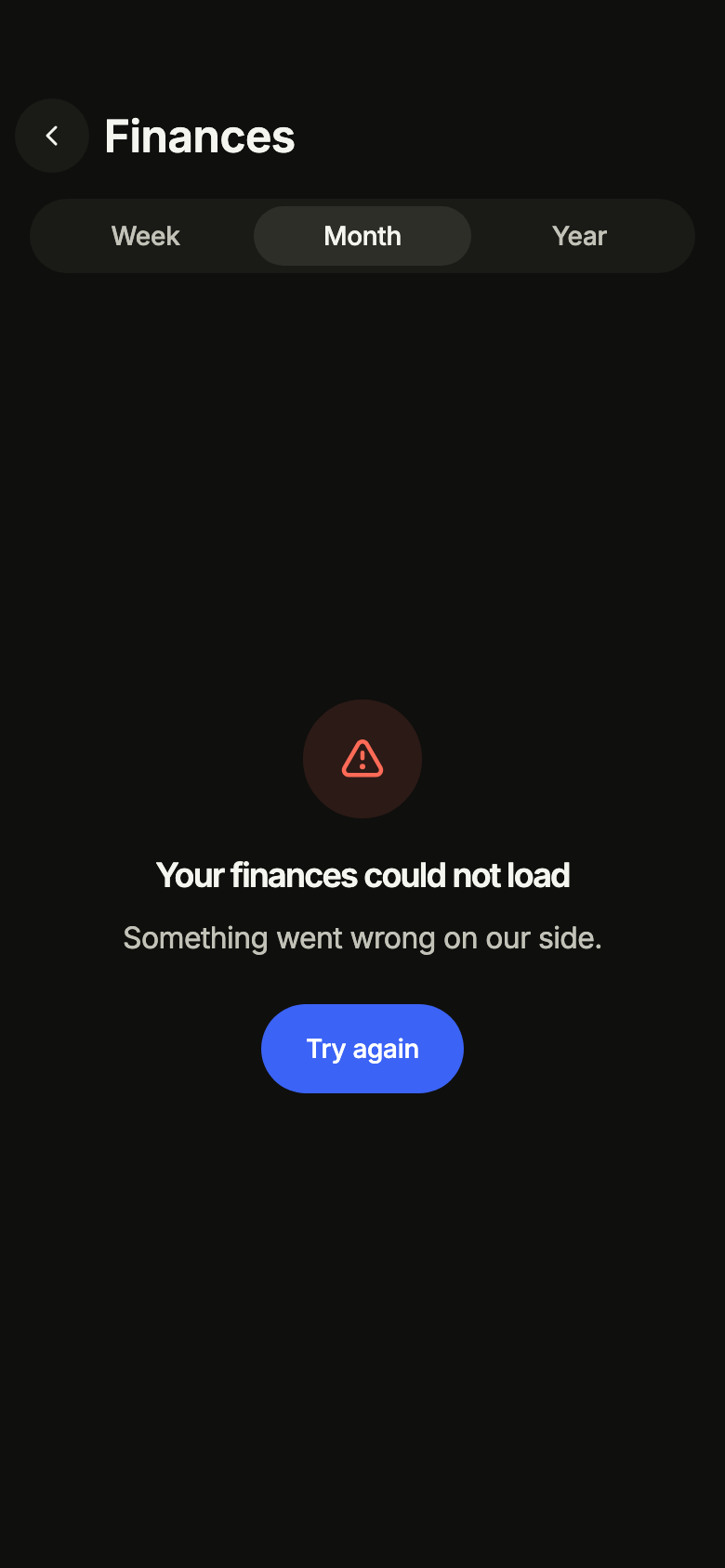
When loading fails, the screen says so and offers to try again.
import 'package:your_app/ui/fliin/screens/finance_dashboard/finance_dashboard_controller.dart';
import 'package:your_app/ui/fliin/screens/finance_dashboard/finance_dashboard_data.dart';
import 'package:your_app/ui/fliin/screens/finance_dashboard/finance_dashboard_screen.dart';
import 'package:flutter/widgets.dart';

class FinanceDashboardErrorExample extends StatelessWidget {
  const FinanceDashboardErrorExample({super.key});

  @override
  Widget build(BuildContext context) {
    return FinanceDashboardScreen.standalone(
      service: const SampleFinanceService(latency: Duration(milliseconds: 900)),
      initial: const FinanceFailed(FinancePeriod.month),
      onBack: () {},
      onSeeAllTransactions: () {},
      onOpenTransaction: (_) {},
      now: sampleFinanceNow,
    );
  }
}Offline
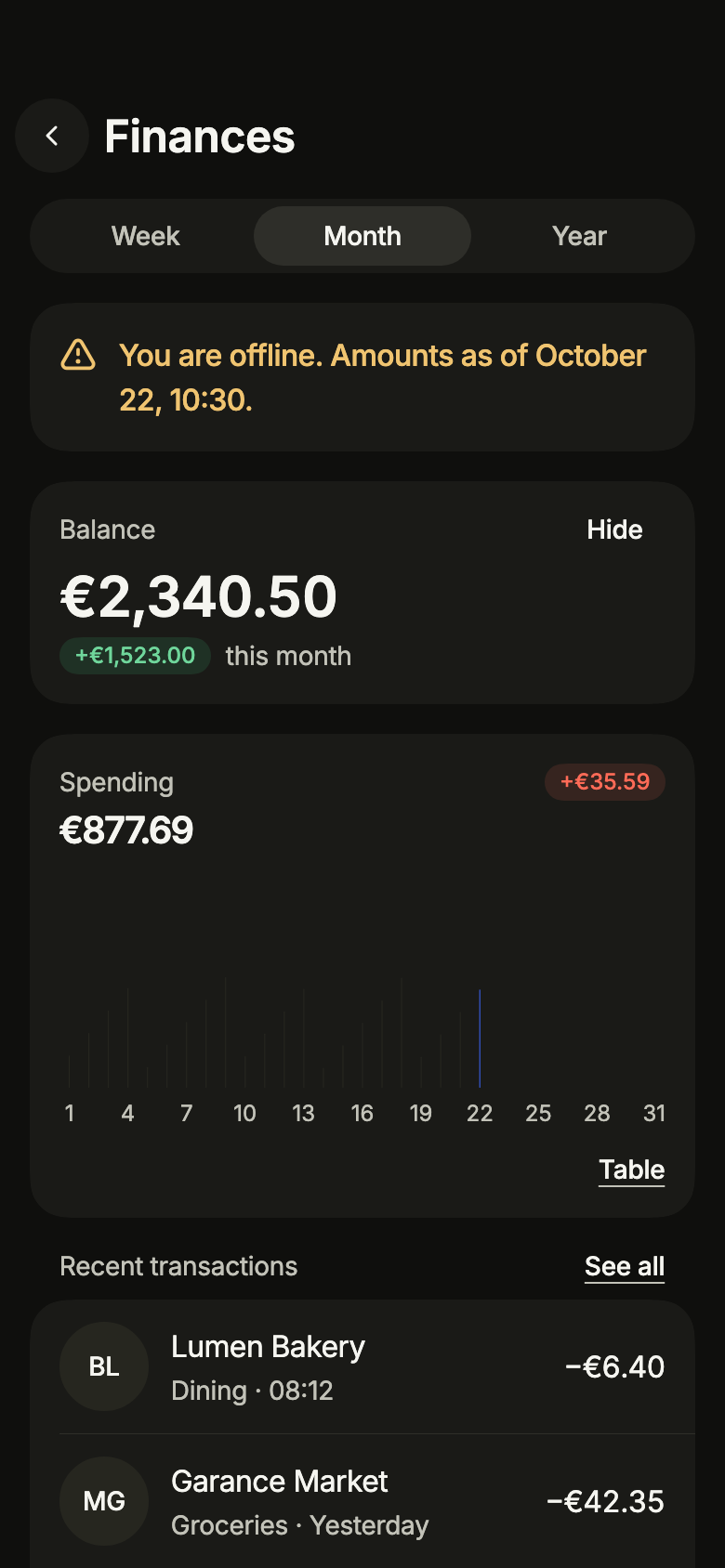
Offline with data already loaded: the figures stay, under a notice that they may be out of date.
import 'package:your_app/ui/fliin/screens/finance_dashboard/finance_dashboard_controller.dart';
import 'package:your_app/ui/fliin/screens/finance_dashboard/finance_dashboard_data.dart';
import 'package:your_app/ui/fliin/screens/finance_dashboard/finance_dashboard_screen.dart';
import 'package:flutter/widgets.dart';

class FinanceDashboardOfflineExample extends StatelessWidget {
  const FinanceDashboardOfflineExample({super.key});

  @override
  Widget build(BuildContext context) {
    return FinanceDashboardScreen.standalone(
      service: const SampleFinanceService(latency: Duration(milliseconds: 900)),
      initial: FinanceLoaded(sampleFinanceSnapshot(FinancePeriod.month), notice: FinanceNotice.offline),
      onBack: () {},
      onSeeAllTransactions: () {},
      onOpenTransaction: (_) {},
      now: sampleFinanceNow,
    );
  }
}Offline empty
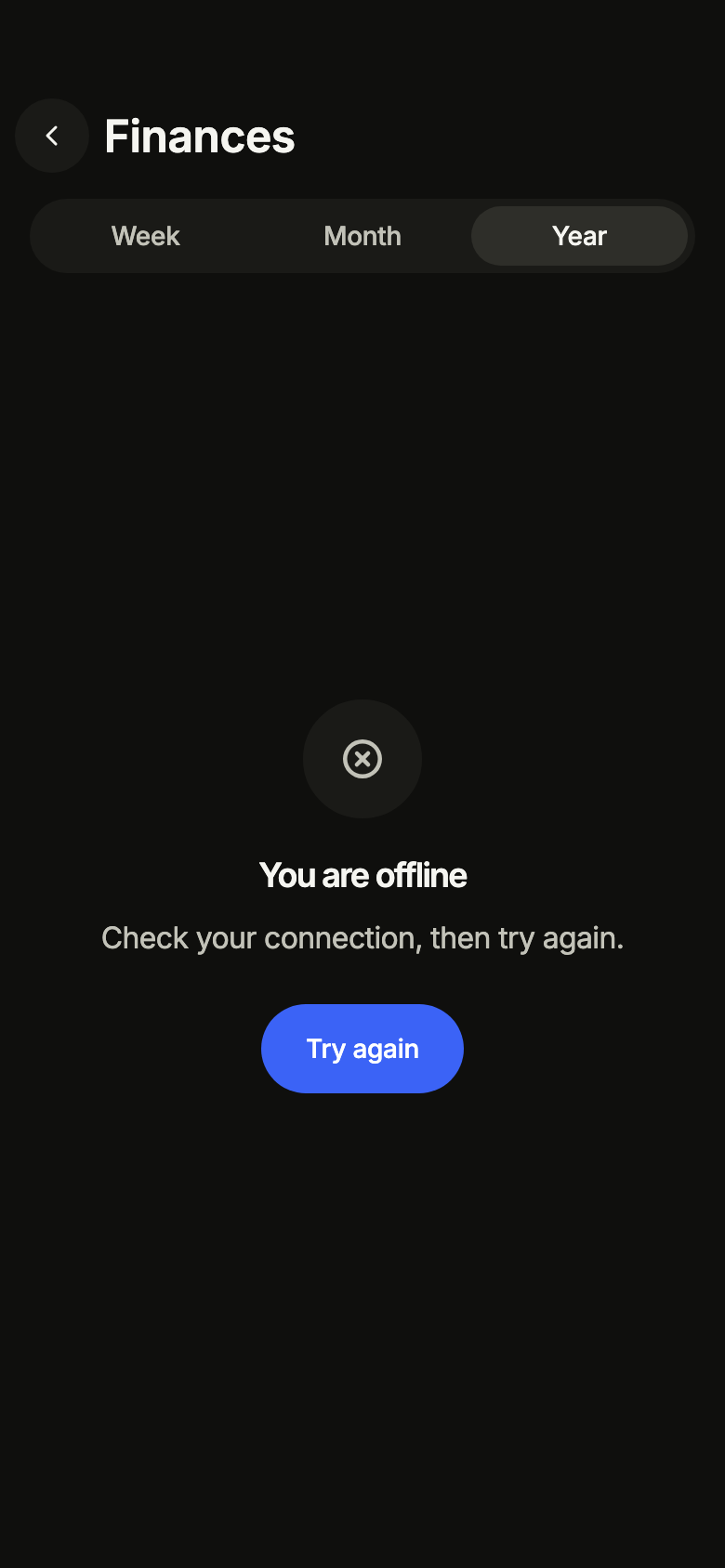
Offline with nothing loaded yet: the screen asks to reconnect.
import 'package:your_app/ui/fliin/screens/finance_dashboard/finance_dashboard_controller.dart';
import 'package:your_app/ui/fliin/screens/finance_dashboard/finance_dashboard_data.dart';
import 'package:your_app/ui/fliin/screens/finance_dashboard/finance_dashboard_screen.dart';
import 'package:flutter/widgets.dart';

class FinanceDashboardOfflineEmptyExample extends StatelessWidget {
  const FinanceDashboardOfflineEmptyExample({super.key});

  @override
  Widget build(BuildContext context) {
    return FinanceDashboardScreen.standalone(
      service: const SampleFinanceService(latency: Duration(milliseconds: 900)),
      initial: const FinanceOffline(FinancePeriod.year),
      onBack: () {},
      onSeeAllTransactions: () {},
      onOpenTransaction: (_) {},
      now: sampleFinanceNow,
    );
  }
}Routing
fliin add finance-dashboard prints the route for the router it finds in your pubspec, a file next to the page that wires its navigation. Each of them:
go_router
// lib/finance_dashboard_route.dart, next to finance_dashboard_page.dart.
import 'package:go_router/go_router.dart';

import 'finance_dashboard_page.dart';

/// Add financeDashboardRoute to the routes of your GoRouter.
final financeDashboardRoute = GoRoute(
  path: '/finances',
  builder: (context, state) => FinanceDashboardPage(
    // Alone in the stack (deep link, go): your app's home.
    onBack: () => context.canPop() ? context.pop() : context.go('/'),
  ),
);navigator
// lib/finance_dashboard_route.dart, next to finance_dashboard_page.dart.
import 'package:flutter/material.dart';

import 'finance_dashboard_page.dart';

/// Opens “Finance dashboard”: `Navigator.of(context).push(financeDashboardRoute())`.
Route<void> financeDashboardRoute() => MaterialPageRoute<void>(
  builder: (context) => FinanceDashboardPage(
    onBack: () => Navigator.of(context).maybePop(),
  ),
);State
The controller is a ChangeNotifier from widgets.dart, with no package. fliin add finance-dashboard prints the page that holds it with the state management it finds, its imports written for your package; below they read your_app. Your backend implements the Service interface of the screen's _data.dart file:
none
// lib/finance_dashboard_page.dart
// Your backend: implement FinanceService (finance_dashboard_data.dart) and pass it instead of the sample service.
import 'package:your_app/ui/fliin/screens/finance_dashboard/finance_dashboard_data.dart';
import 'package:your_app/ui/fliin/screens/finance_dashboard/finance_dashboard_screen.dart';
import 'package:flutter/widgets.dart';

class FinanceDashboardPage extends StatelessWidget {
  const FinanceDashboardPage({
    super.key,
    required this.onBack,
  });

  final VoidCallback onBack;

  @override
  Widget build(BuildContext context) => FinanceDashboardScreen.standalone(
    service: const SampleFinanceService(),
    onBack: onBack,
  );
}provider
// lib/finance_dashboard_page.dart
// Your backend: implement FinanceService (finance_dashboard_data.dart) and pass it instead of the sample service.
import 'package:your_app/ui/fliin/screens/finance_dashboard/finance_dashboard_controller.dart';
import 'package:your_app/ui/fliin/screens/finance_dashboard/finance_dashboard_data.dart';
import 'package:your_app/ui/fliin/screens/finance_dashboard/finance_dashboard_screen.dart';
import 'package:flutter/widgets.dart';
import 'package:provider/provider.dart';

class FinanceDashboardPage extends StatelessWidget {
  const FinanceDashboardPage({
    super.key,
    required this.onBack,
  });

  final VoidCallback onBack;

  @override
  Widget build(BuildContext context) => ChangeNotifierProvider(
    create: (_) => FinanceDashboardController(service: const SampleFinanceService())..load(),
    child: Builder(
      builder: (context) => FinanceDashboardScreen(
        controller: context.read<FinanceDashboardController>(),
        onBack: onBack,
      ),
    ),
  );
}riverpod
// lib/finance_dashboard_page.dart
// Your backend: implement FinanceService (finance_dashboard_data.dart) and pass it instead of the sample service.
import 'package:your_app/ui/fliin/screens/finance_dashboard/finance_dashboard_controller.dart';
import 'package:your_app/ui/fliin/screens/finance_dashboard/finance_dashboard_data.dart';
import 'package:your_app/ui/fliin/screens/finance_dashboard/finance_dashboard_screen.dart';
import 'package:flutter/widgets.dart';
import 'package:flutter_riverpod/flutter_riverpod.dart';

final financeDashboardProvider = Provider.autoDispose<FinanceDashboardController>((ref) {
  final controller = FinanceDashboardController(service: const SampleFinanceService())..load();
  ref.onDispose(controller.dispose);
  return controller;
});

class FinanceDashboardPage extends ConsumerWidget {
  const FinanceDashboardPage({
    super.key,
    required this.onBack,
  });

  final VoidCallback onBack;

  @override
  Widget build(BuildContext context, WidgetRef ref) => FinanceDashboardScreen(
    controller: ref.watch(financeDashboardProvider),
    onBack: onBack,
  );
}bloc
// lib/finance_dashboard_page.dart
// Your backend: implement FinanceService (finance_dashboard_data.dart) and pass it instead of the sample service.
import 'package:your_app/ui/fliin/screens/finance_dashboard/finance_dashboard_controller.dart';
import 'package:your_app/ui/fliin/screens/finance_dashboard/finance_dashboard_data.dart';
import 'package:your_app/ui/fliin/screens/finance_dashboard/finance_dashboard_screen.dart';
import 'package:flutter/widgets.dart';
import 'package:flutter_bloc/flutter_bloc.dart';

/// The screen's controller as a bloc, for your BlocListener and BlocBuilder:
/// one emission per controller notification. `version` tells them apart
/// when `state` does not change (mode, filters, text…, read them on
/// `controller`). The screen listens to the controller itself.
class FinanceDashboardCubit extends Cubit<({FinanceDashboardState state, int version})> {
  FinanceDashboardCubit(this.controller) : super((state: controller.state, version: 0)) {
    controller.addListener(_changed);
  }

  final FinanceDashboardController controller;

  void _changed() => emit((state: controller.state, version: state.version + 1));

  @override
  Future<void> close() {
    controller
      ..removeListener(_changed)
      ..dispose();
    return super.close();
  }
}

class FinanceDashboardPage extends StatelessWidget {
  const FinanceDashboardPage({
    super.key,
    required this.onBack,
  });

  final VoidCallback onBack;

  @override
  Widget build(BuildContext context) => BlocProvider(
    create: (_) => FinanceDashboardCubit(FinanceDashboardController(service: const SampleFinanceService())..load()),
    child: Builder(
      builder: (context) => FinanceDashboardScreen(
        controller: context.read<FinanceDashboardCubit>().controller,
        onBack: onBack,
      ),
    ),
  );
}API
FinanceDashboardScreen: class extends StatefulWidget
FinanceDashboardScreen.new: const new({super.key, required FinanceDashboardController controller, VoidCallback? onBack, VoidCallback? onSeeAllTransactions, ValueChanged<FinanceTransaction>? onOpenTransaction, ValueChanged<bool>? onBalanceHiddenChanged, FinanceFormat? format, DateTime? now})
FinanceDashboardScreen.standalone: const new({super.key, required FinanceService service, FinanceDashboardState? initial, bool balanceHidden, VoidCallback? onBack, VoidCallback? onSeeAllTransactions, ValueChanged<FinanceTransaction>? onOpenTransaction, ValueChanged<bool>? onBalanceHiddenChanged, FinanceFormat? format, DateTime? now})
FinanceDashboardScreen.controller: get FinanceDashboardController?
FinanceDashboardScreen.service: get FinanceService?
FinanceDashboardScreen.initial: get FinanceDashboardState?
FinanceDashboardScreen.balanceHidden: get bool
FinanceDashboardScreen.onBack: get VoidCallback?
FinanceDashboardScreen.onSeeAllTransactions: get VoidCallback?
FinanceDashboardScreen.onOpenTransaction: get ValueChanged<FinanceTransaction>?
FinanceDashboardScreen.onBalanceHiddenChanged: get ValueChanged<bool>?
FinanceDashboardScreen.format: get FinanceFormat?
FinanceDashboardScreen.now: get DateTime?
FinanceDashboardScreen.createState: State<FinanceDashboardScreen>()
FinanceDashboardState: sealed class permits {FinanceEmpty, FinanceFailed, FinanceLoaded, FinanceLoading, FinanceOffline}
FinanceDashboardState.new: const new()
FinanceDashboardState.period: abstract get FinancePeriod
FinanceLoading: final class extends FinanceDashboardState
FinanceLoading.new: const new(FinancePeriod period)
FinanceLoading.period: get FinancePeriod
FinanceNotice: enum {refreshFailed, offline}
FinanceNotice.refreshFailed: static final FinanceNotice
FinanceNotice.offline: static final FinanceNotice
FinanceLoaded: final class extends FinanceDashboardState
FinanceLoaded.new: const new(FinanceSnapshot snapshot, {FinanceNotice? notice})
FinanceLoaded.snapshot: get FinanceSnapshot
FinanceLoaded.notice: get FinanceNotice?
FinanceLoaded.period: get FinancePeriod
FinanceEmpty: final class extends FinanceDashboardState
FinanceEmpty.new: const new(FinancePeriod period, {FinanceNotice? notice})
FinanceEmpty.period: get FinancePeriod
FinanceEmpty.notice: get FinanceNotice?
FinanceFailed: final class extends FinanceDashboardState
FinanceFailed.new: const new(FinancePeriod period)
FinanceFailed.period: get FinancePeriod
FinanceOffline: final class extends FinanceDashboardState
FinanceOffline.new: const new(FinancePeriod period)
FinanceOffline.period: get FinancePeriod
FinanceDashboardController: class extends ChangeNotifier
FinanceDashboardController.new: new({required FinanceService service, FinanceDashboardState initial, bool balanceHidden})
FinanceDashboardController.service: get FinanceService
FinanceDashboardController.state: get FinanceDashboardState
FinanceDashboardController.balanceHidden: get bool
FinanceDashboardController.load: Future<void>([FinancePeriod? period])
FinanceDashboardController.setPeriod: Future<void>(FinancePeriod period)
FinanceDashboardController.refresh: Future<bool>()
FinanceDashboardController.setBalanceHidden: void(bool hidden)
FinanceDashboardController.dispose: void()
FinancePeriod: enum {week, month, year}
FinancePeriod.week: static final FinancePeriod
FinancePeriod.month: static final FinancePeriod
FinancePeriod.year: static final FinancePeriod
SpendingBucket: final class
SpendingBucket.new: const new({required DateTime start, required int amount})
SpendingBucket.start: get DateTime
SpendingBucket.amount: get int
SavingsGoal: final class
SavingsGoal.new: const new({required String id, required String name, required int saved, required int target})
SavingsGoal.id: get String
SavingsGoal.name: get String
SavingsGoal.saved: get int
SavingsGoal.target: get int
SavingsGoal.progress: get double
FinanceTransaction: final class
FinanceTransaction.new: const new({required String id, required String title, required String category, required DateTime at, required int amount, required String initials, ImageProvider? image})
FinanceTransaction.id: get String
FinanceTransaction.title: get String
FinanceTransaction.category: get String
FinanceTransaction.at: get DateTime
FinanceTransaction.amount: get int
FinanceTransaction.initials: get String
FinanceTransaction.image: get ImageProvider?
FinanceSnapshot: final class
FinanceSnapshot.new: const new({required FinancePeriod period, required int balance, required int balanceChange, required List<SpendingBucket> spending, required int previousSpent, required List<SavingsGoal> goals, required List<FinanceTransaction> transactions, required DateTime updatedAt})
FinanceSnapshot.period: get FinancePeriod
FinanceSnapshot.balance: get int
FinanceSnapshot.balanceChange: get int
FinanceSnapshot.spending: get List<SpendingBucket>
FinanceSnapshot.previousSpent: get int
FinanceSnapshot.goals: get List<SavingsGoal>
FinanceSnapshot.transactions: get List<FinanceTransaction>
FinanceSnapshot.updatedAt: get DateTime
FinanceSnapshot.spent: get int
FinanceSnapshot.isNewAccount: get bool
TransactionDay: sealed class permits {TransactionOn, TransactionToday, TransactionYesterday}
TransactionDay.new: const new()
TransactionToday: final class extends TransactionDay
TransactionToday.new: const new()
TransactionYesterday: final class extends TransactionDay
TransactionYesterday.new: const new()
TransactionOn: final class extends TransactionDay
TransactionOn.new: const new(DateTime date)
TransactionOn.date: get DateTime
groupTransactionsByDay: List<(TransactionDay, List<FinanceTransaction>)>(List<FinanceTransaction> transactions, DateTime now)
FinanceNoNetwork: final class implements Exception
FinanceNoNetwork.new: const new({FinanceSnapshot? lastKnown})
FinanceNoNetwork.lastKnown: get FinanceSnapshot?
FinanceService: abstract interface class
FinanceService.new: new()
FinanceService.load: abstract Future<FinanceSnapshot>(FinancePeriod period)
FinanceFormat: abstract interface class
FinanceFormat.new: new()
FinanceFormat.amount: abstract String(int cents)
FinanceFormat.signed: abstract String(int cents)
FinanceFormat.axis: abstract String(int cents)
SampleFinanceFormat: final class implements FinanceFormat
SampleFinanceFormat.new: const new(String language)
SampleFinanceFormat.language: get String
SampleFinanceFormat.amount: String(int cents)
SampleFinanceFormat.signed: String(int cents)
SampleFinanceFormat.axis: String(int cents)
sampleFinanceNow: get dynamic
sampleTransactions: get dynamic
sampleGoals: const dynamic
sampleFinanceSnapshot: FinanceSnapshot(FinancePeriod period)
sampleNewAccount: FinanceSnapshot(FinancePeriod period)
SampleFinanceService: final class implements FinanceService
SampleFinanceService.new: const new({FinanceSnapshot Function(FinancePeriod period)? snapshot, Duration latency})
SampleFinanceService.snapshot: get FinanceSnapshot Function(FinancePeriod period)?
SampleFinanceService.latency: get Duration
SampleFinanceService.load: Future<FinanceSnapshot>(FinancePeriod period)
financeDashboardL10n: const Map<String, Map<String, String>>
FinanceDashboardStrings: final class
FinanceDashboardStrings.new: const new(String language)
FinanceDashboardStrings.of: factory new(BuildContext context)
FinanceDashboardStrings.language: get String
FinanceDashboardStrings.title: get String
FinanceDashboardStrings.back: get String
FinanceDashboardStrings.refresh: get String
FinanceDashboardStrings.loading: get String
FinanceDashboardStrings.periodLabel: get String
FinanceDashboardStrings.period: String(FinancePeriod period)
FinanceDashboardStrings.balance: get String
FinanceDashboardStrings.hide: get String
FinanceDashboardStrings.balanceHidden: get String
FinanceDashboardStrings.over: String(FinancePeriod period)
FinanceDashboardStrings.change: String(int cents, String amount)
FinanceDashboardStrings.spending: get String
FinanceDashboardStrings.versus: String(FinancePeriod period)
FinanceDashboardStrings.perBucket: String(FinancePeriod period)
FinanceDashboardStrings.chart: String(FinancePeriod period)
FinanceDashboardStrings.peak: String(FinancePeriod period, String? point, String amount)
FinanceDashboardStrings.showTable: get String
FinanceDashboardStrings.showChart: get String
FinanceDashboardStrings.tableHeader: String(FinancePeriod period)
FinanceDashboardStrings.goals: get String
FinanceDashboardStrings.goalOf: String(String saved, String target)
FinanceDashboardStrings.transactions: get String
FinanceDashboardStrings.seeAll: get String
FinanceDashboardStrings.day: String(TransactionDay day)
FinanceDashboardStrings.detail: String(String category, DateTime at)
FinanceDashboardStrings.detailOn: String(String category, String day)
FinanceDashboardStrings.direction: String(int cents, String amount)
FinanceDashboardStrings.time: String(DateTime at)
FinanceDashboardStrings.weekday: String(DateTime at)
FinanceDashboardStrings.weekdayShort: String(DateTime at)
FinanceDashboardStrings.month: String(DateTime at)
FinanceDashboardStrings.monthShort: String(DateTime at)
FinanceDashboardStrings.dayMonth: String(DateTime at)
FinanceDashboardStrings.weekdayDate: String(DateTime at)
FinanceDashboardStrings.monthYear: String(DateTime at)
FinanceDashboardStrings.emptyTitle: get String
FinanceDashboardStrings.emptyMessage: get String
FinanceDashboardStrings.errorTitle: get String
FinanceDashboardStrings.errorMessage: get String
FinanceDashboardStrings.offlineTitle: get String
FinanceDashboardStrings.offlineMessage: get String
FinanceDashboardStrings.retry: get String
FinanceDashboardStrings.refreshFailed: get String
FinanceDashboardStrings.offlineSince: String(DateTime at)Strings
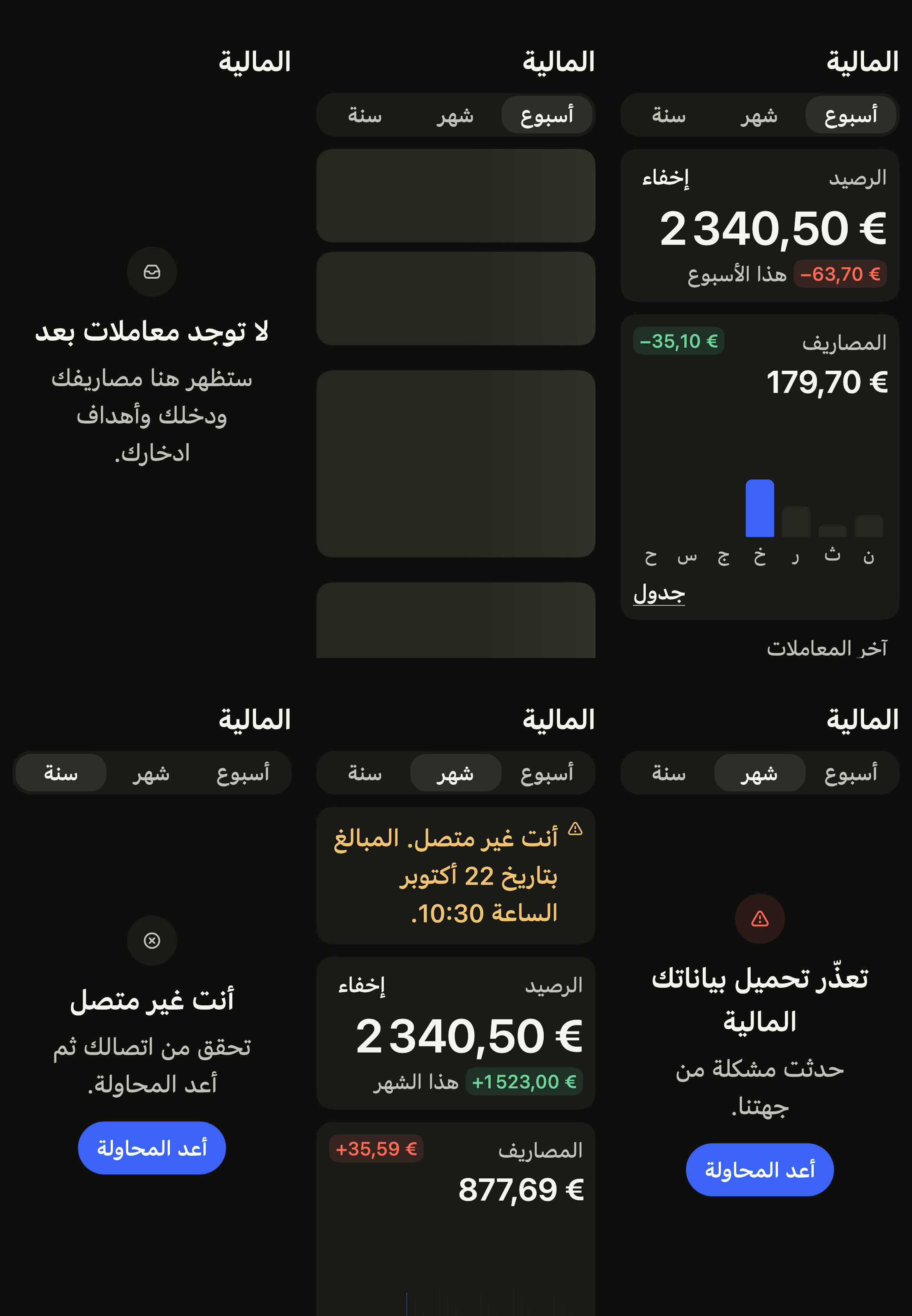
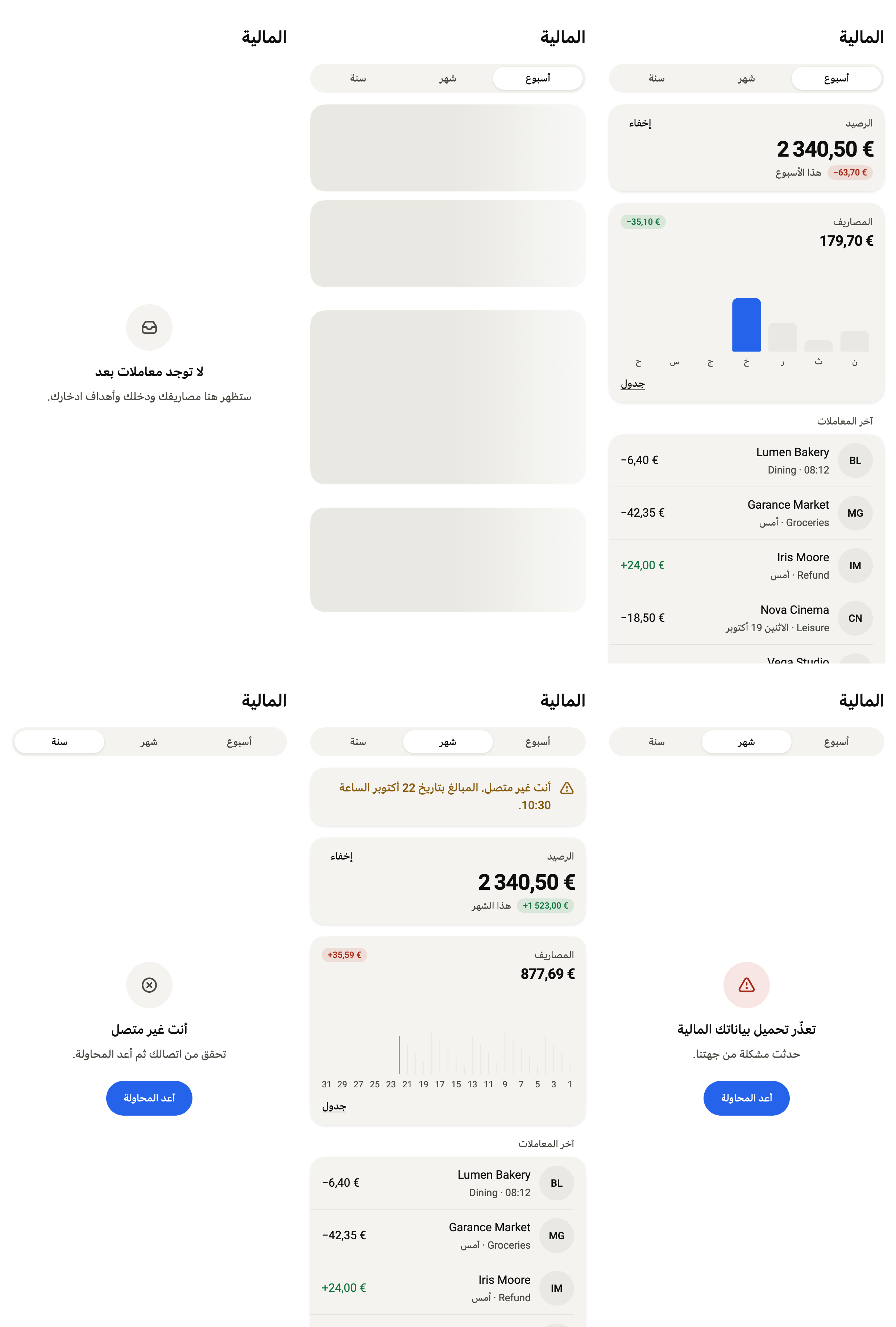
Every label in English, French and Arabic. The screen follows the closest Localizations; the same table is in the manifest, ready for your ARB files.
| Key | en | fr | ar |
|---|---|---|---|
financeTitle | Finances | Finances | المالية |
financeBack | Back | Retour | رجوع |
financeRefresh | Refresh | Actualiser | تحديث |
financeLoading | Loading your finances | Chargement de vos finances | جارٍ تحميل بياناتك المالية |
financePeriod | Period | Période | الفترة |
financeWeek | Week | Semaine | أسبوع |
financeMonth | Month | Mois | شهر |
financeYear | Year | Année | سنة |
financeBalance | Balance | Solde | الرصيد |
financeHide | Hide | Masquer | إخفاء |
financeBalanceHidden | Balance hidden | Solde masqué | الرصيد مخفي |
financeOverWeek | this week | sur la semaine | هذا الأسبوع |
financeOverMonth | this month | sur le mois | هذا الشهر |
financeOverYear | this year | sur l’année | هذه السنة |
financeUp | up {amount} | en hausse de {amount} | بزيادة {amount} |
financeDown | down {amount} | en baisse de {amount} | بانخفاض {amount} |
financeFlat | unchanged | stable | دون تغيير |
financeSpending | Spending | Dépenses | المصاريف |
financeVsWeek | vs last week | par rapport à la semaine dernière | مقارنةً بالأسبوع الماضي |
financeVsMonth | vs last month | par rapport au mois dernier | مقارنةً بالشهر الماضي |
financeVsYear | vs last year | par rapport à l’année dernière | مقارنةً بالسنة الماضية |
financePerDay | Spending per day | Dépenses par jour | المصاريف اليومية |
financePerMonth | Spending per month | Dépenses par mois | المصاريف الشهرية |
financeChartWeek | Spending this week | Dépenses de la semaine | مصاريف الأسبوع |
financeChartMonth | Spending this month | Dépenses du mois | مصاريف الشهر |
financeChartYear | Spending this year | Dépenses de l’année | مصاريف السنة |
financeChartPeak | highest on {point}, {amount} | plus fortes le {point}, {amount} | الأعلى يوم {point}، {amount} |
financeChartPeakMonth | highest in {point}, {amount} | plus fortes en {point}, {amount} | الأعلى في {point}، {amount} |
financeChartNone | no spending | aucune dépense | لا مصاريف |
financeShowTable | Table | Tableau | جدول |
financeShowChart | Chart | Graphique | رسم بياني |
financeDay | Day | Jour | اليوم |
financeMonthColumn | Month | Mois | الشهر |
financeGoals | Savings goals | Objectifs d’épargne | أهداف الادخار |
financeGoalOf | {saved} of {target} | {saved} sur {target} | {saved} من {target} |
financeTransactions | Recent transactions | Dernières transactions | آخر المعاملات |
financeSeeAll | See all | Tout voir | عرض الكل |
financeToday | Today | Aujourd’hui | اليوم |
financeYesterday | Yesterday | Hier | أمس |
financeDetail | {category} · {time} | {category} · {time} | {category} · {time} |
financeDebit | Debit of {amount} | Débit de {amount} | خصم {amount} |
financeCredit | Credit of {amount} | Crédit de {amount} | إيداع {amount} |
financeWeekdays | Monday,Tuesday,Wednesday,Thursday,Friday,Saturday,Sunday | lundi,mardi,mercredi,jeudi,vendredi,samedi,dimanche | الاثنين,الثلاثاء,الأربعاء,الخميس,الجمعة,السبت,الأحد |
financeWeekdaysShort | M,T,W,T,F,S,S | L,M,M,J,V,S,D | ن,ث,ر,خ,ج,س,ح |
financeMonths | January,February,March,April,May,June,July,August,September,October,November,December | janvier,février,mars,avril,mai,juin,juillet,août,septembre,octobre,novembre,décembre | يناير,فبراير,مارس,أبريل,مايو,يونيو,يوليو,أغسطس,سبتمبر,أكتوبر,نوفمبر,ديسمبر |
financeMonthsShort | Jan,Feb,Mar,Apr,May,Jun,Jul,Aug,Sep,Oct,Nov,Dec | janv.,févr.,mars,avr.,mai,juin,juil.,août,sept.,oct.,nov.,déc. | يناير,فبراير,مارس,أبريل,مايو,يونيو,يوليو,أغسطس,سبتمبر,أكتوبر,نوفمبر,ديسمبر |
financeDayMonth | {month} {day} | {day} {month} | {day} {month} |
financeWeekdayDate | {weekday}, {date} | {weekday} {date} | {weekday} {date} |
financeMonthYear | {month} {year} | {month} {year} | {month} {year} |
financeEmptyTitle | No transactions yet | Aucune transaction pour l’instant | لا توجد معاملات بعد |
financeEmptyMessage | Your spending, income and savings goals will show up here. | Vos dépenses, vos revenus et vos objectifs d’épargne apparaîtront ici. | ستظهر هنا مصاريفك ودخلك وأهداف ادخارك. |
financeErrorTitle | Your finances could not load | Impossible de charger vos finances | تعذّر تحميل بياناتك المالية |
financeErrorMessage | Something went wrong on our side. | Un problème est survenu de notre côté. | حدثت مشكلة من جهتنا. |
financeOfflineTitle | You are offline | Vous êtes hors ligne | أنت غير متصل |
financeOfflineMessage | Check your connection, then try again. | Vérifiez votre connexion, puis réessayez. | تحقق من اتصالك ثم أعد المحاولة. |
financeRetry | Try again | Réessayer | أعد المحاولة |
financeRefreshFailed | Couldn’t refresh. Amounts may be out of date. | Actualisation impossible. Les montants ne sont peut-être plus à jour. | تعذّر التحديث. قد لا تكون المبالغ محدّثة. |
financeOfflineSince | You are offline. Amounts as of {date}, {time}. | Vous êtes hors ligne. Montants du {date} à {time}. | أنت غير متصل. المبالغ بتاريخ {date} الساعة {time}. |
Reference renders
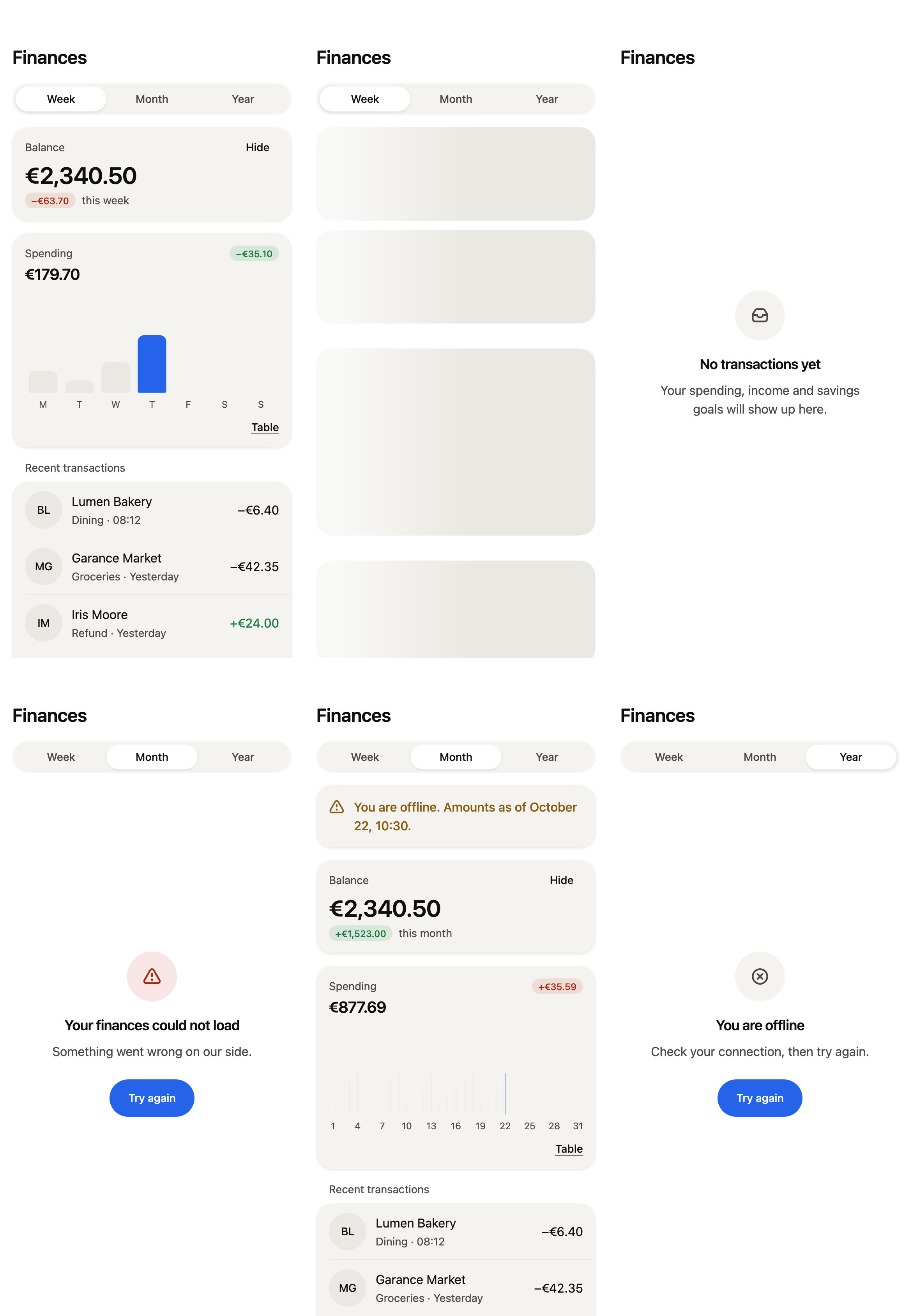
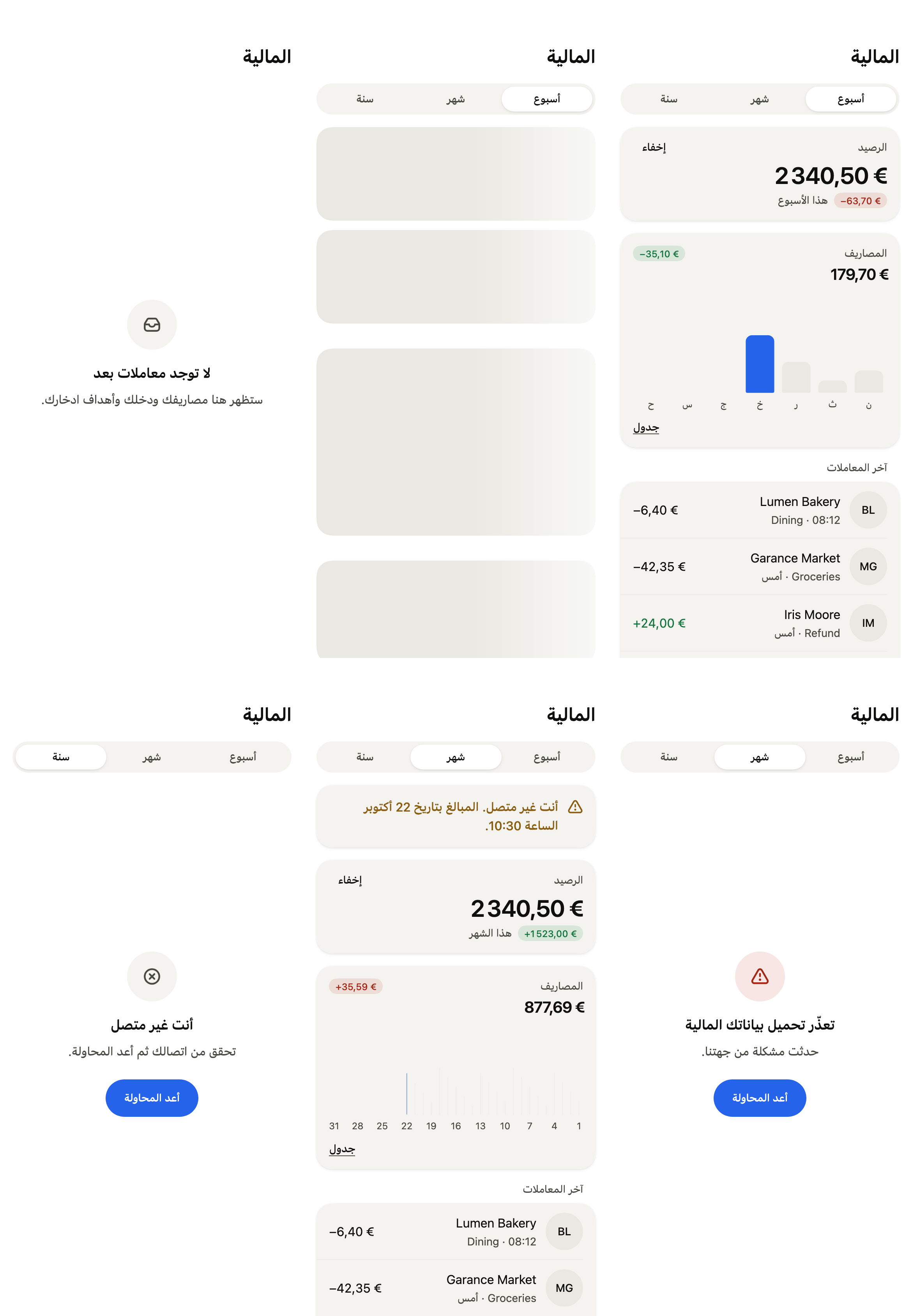
The 16 images published with version 0.2.5, rendered by the shared harness on macOS with Flutter 3.47.7. Each shows every state side by side, at the size of an iPhone (390 × 844) or of an Android phone (412 × 915). fliin verify finance-dashboard compares your copy to them.
Use it to
- show a bank balance and how it moved over a period
- hide the balance behind dots in a banking app
- show spending per day of the week in a chart
- show money set aside toward goals and how far along it is
- show the latest payments grouped by day
- keep the last known amounts offline, with their date
- Not for
- a single key figure card: use a stat card (stat-card)
- a chart alone: use a chart (chart)
- States