Screens / dashboard
Crypto wallet
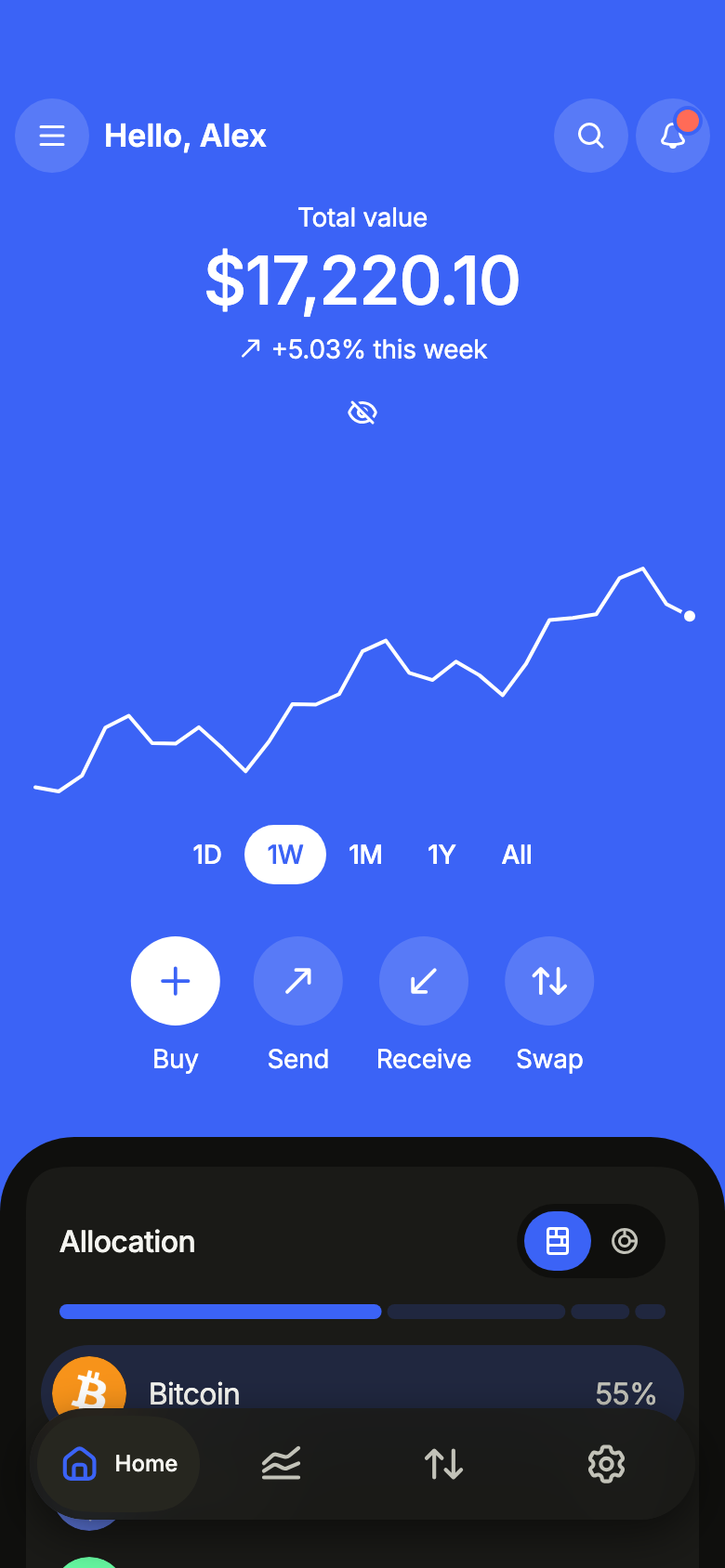
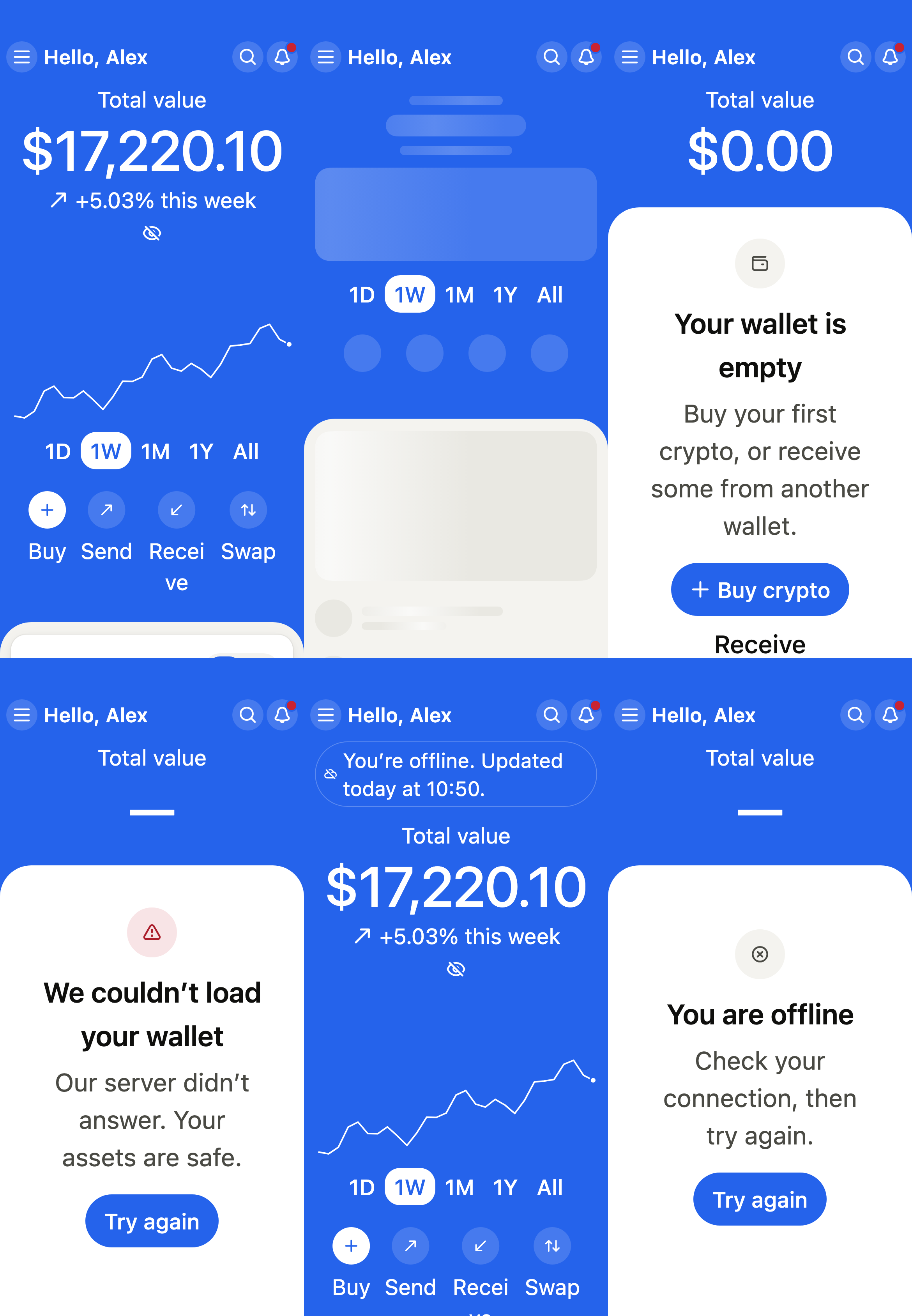
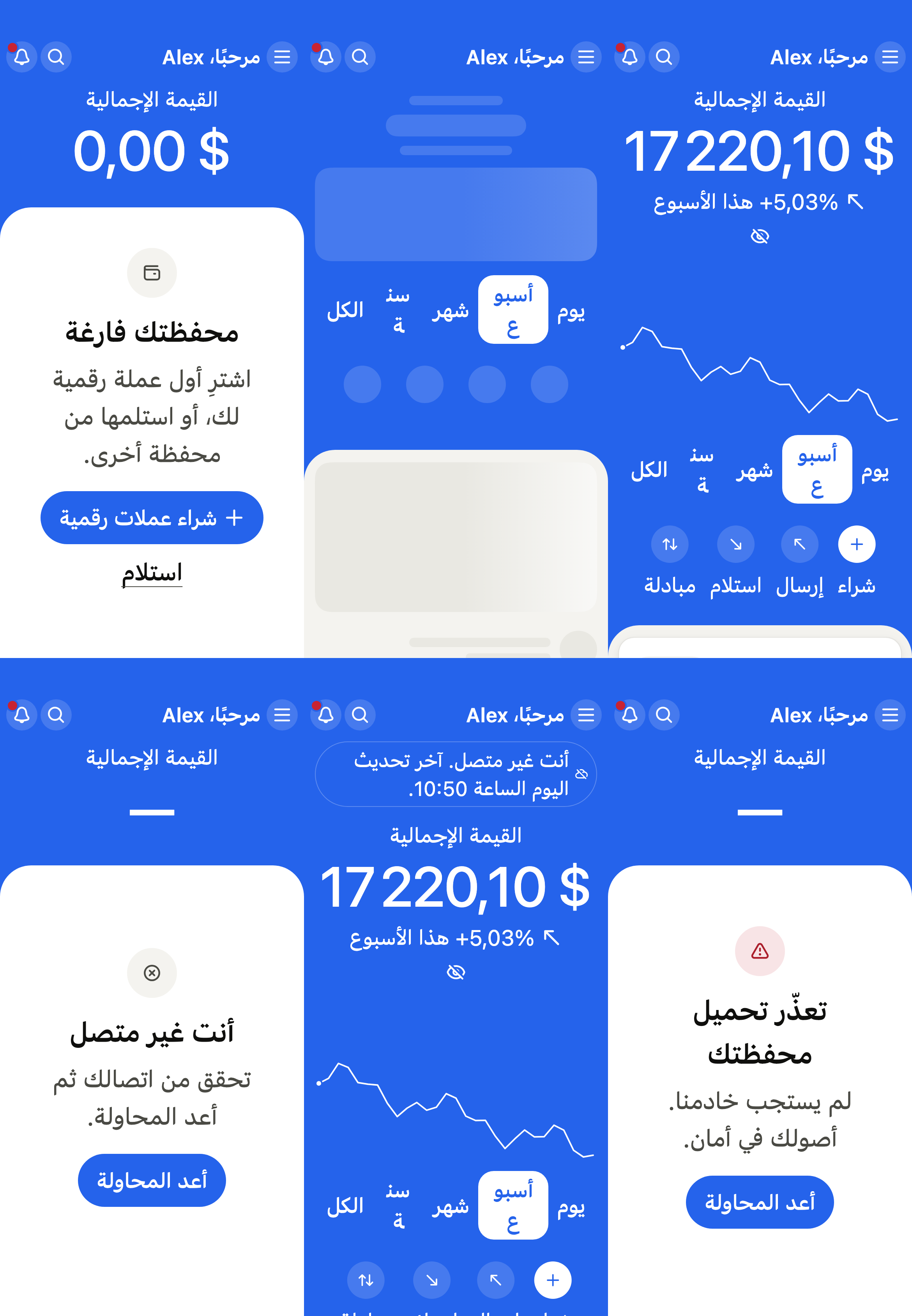
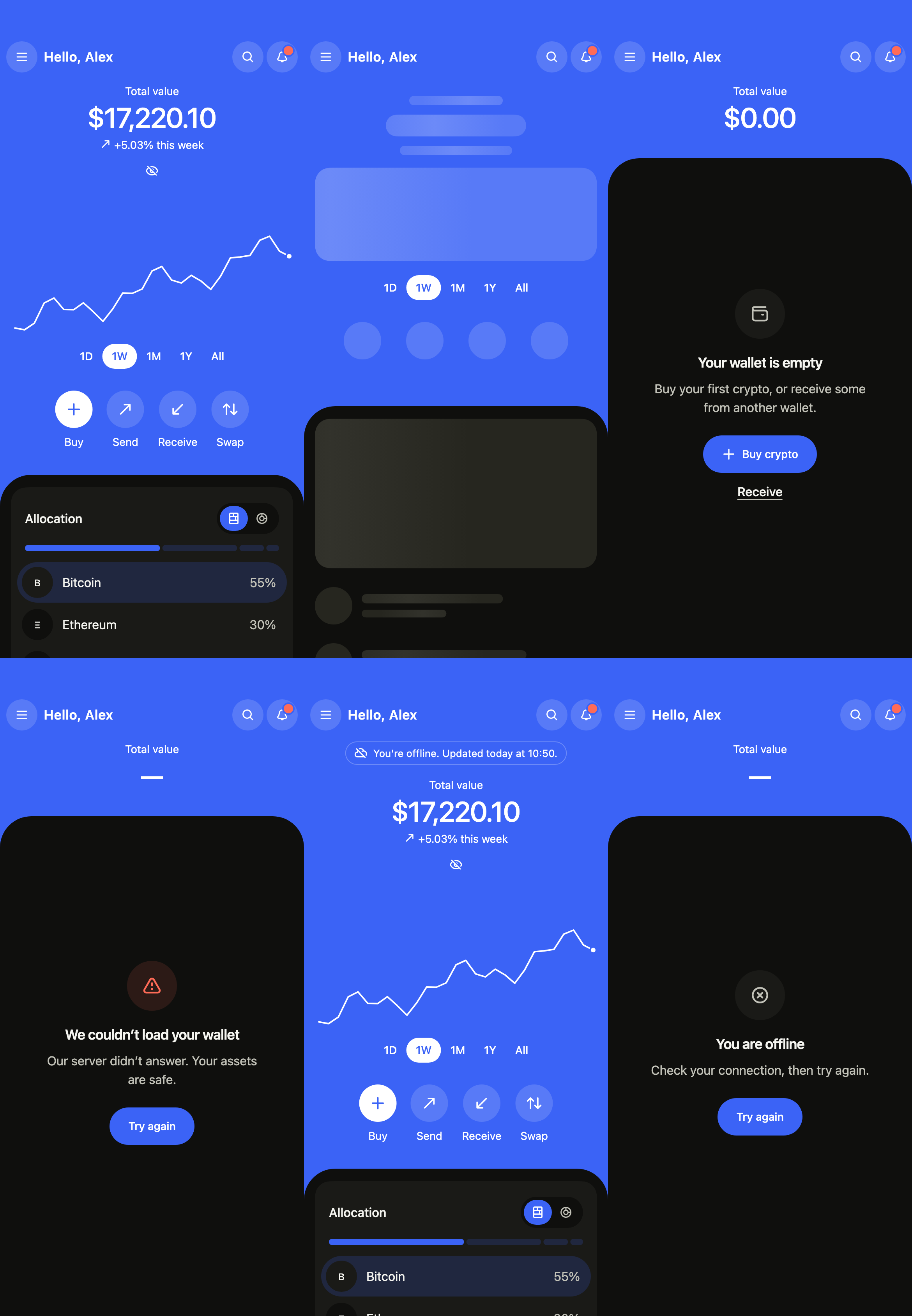
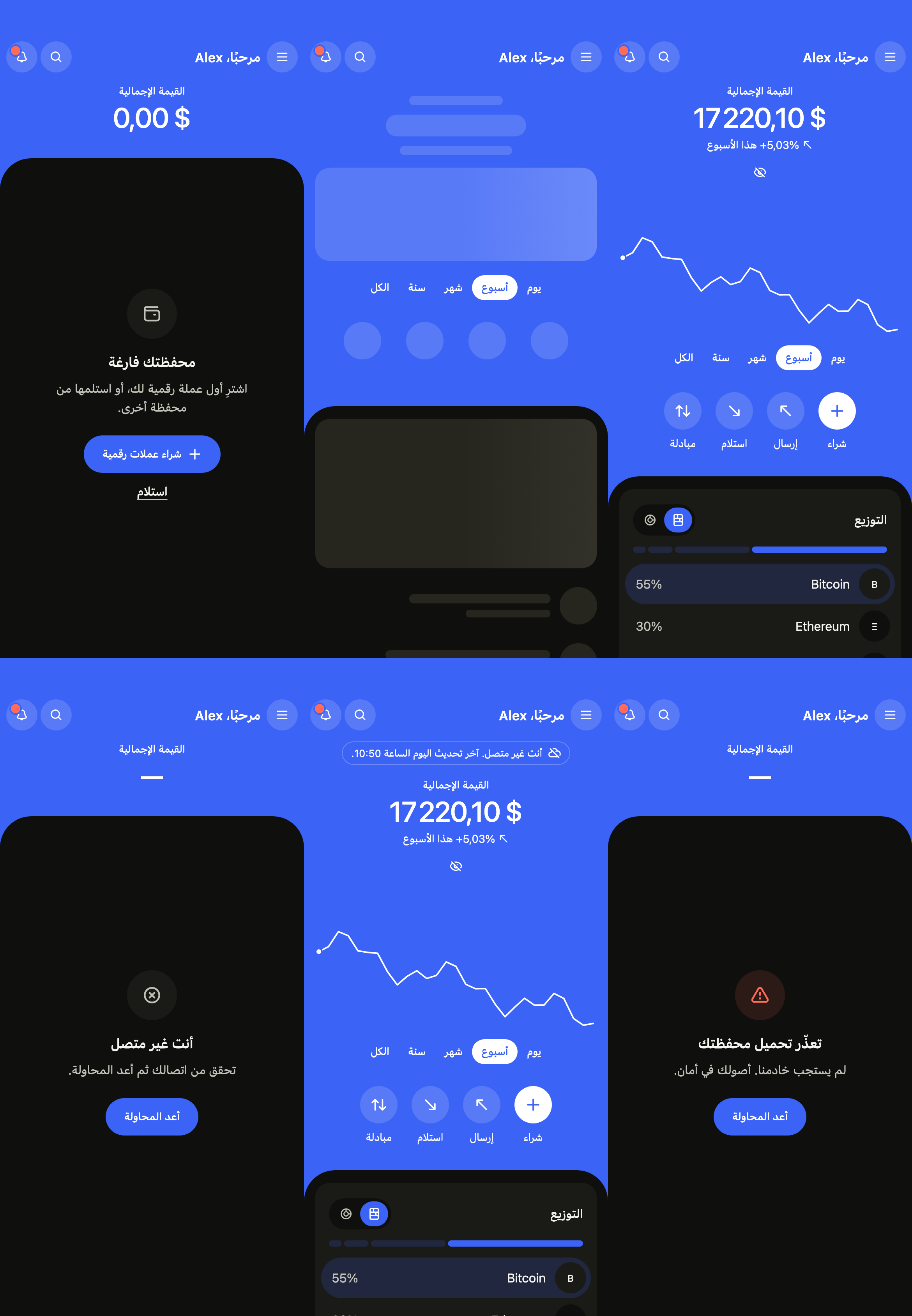
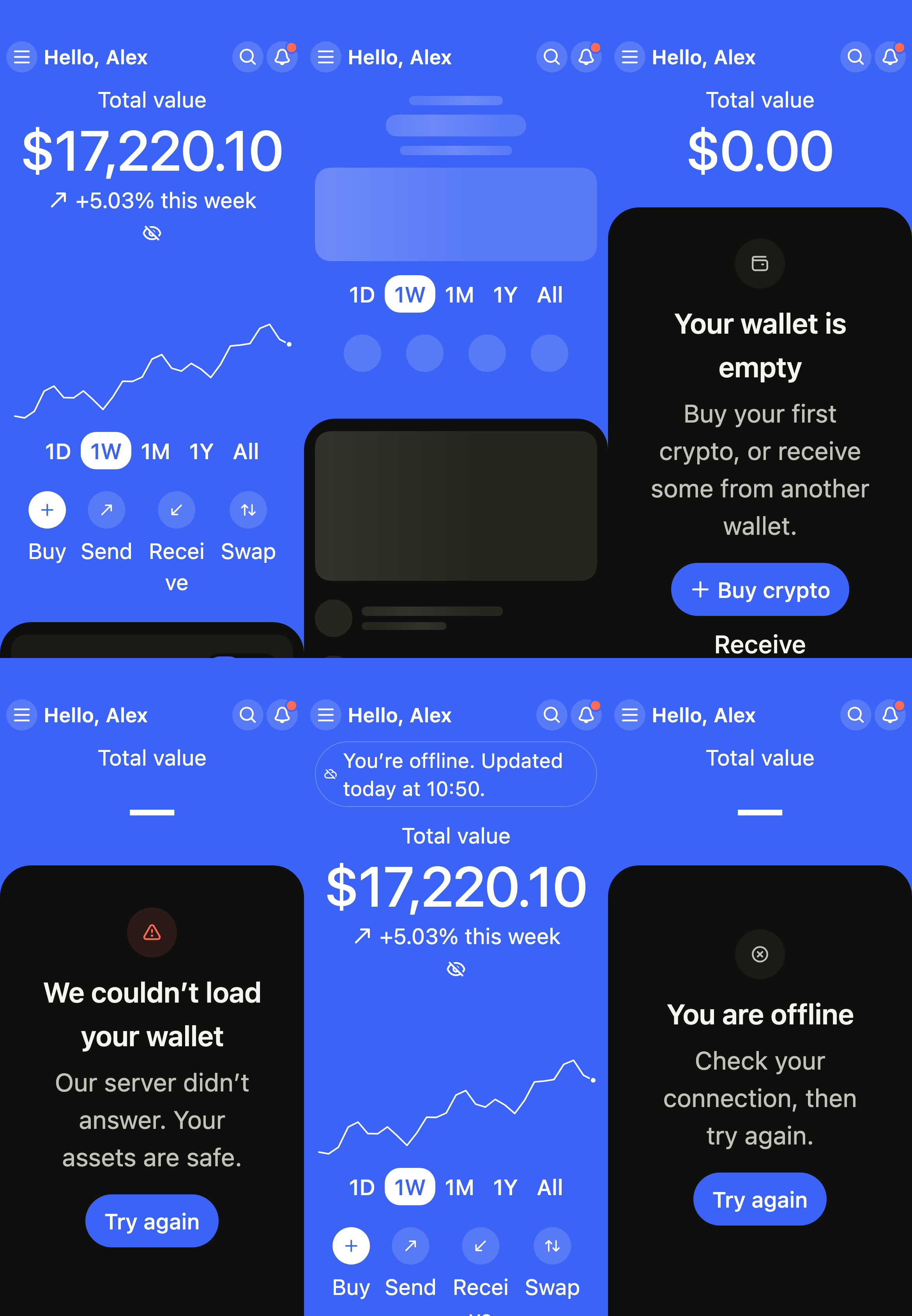
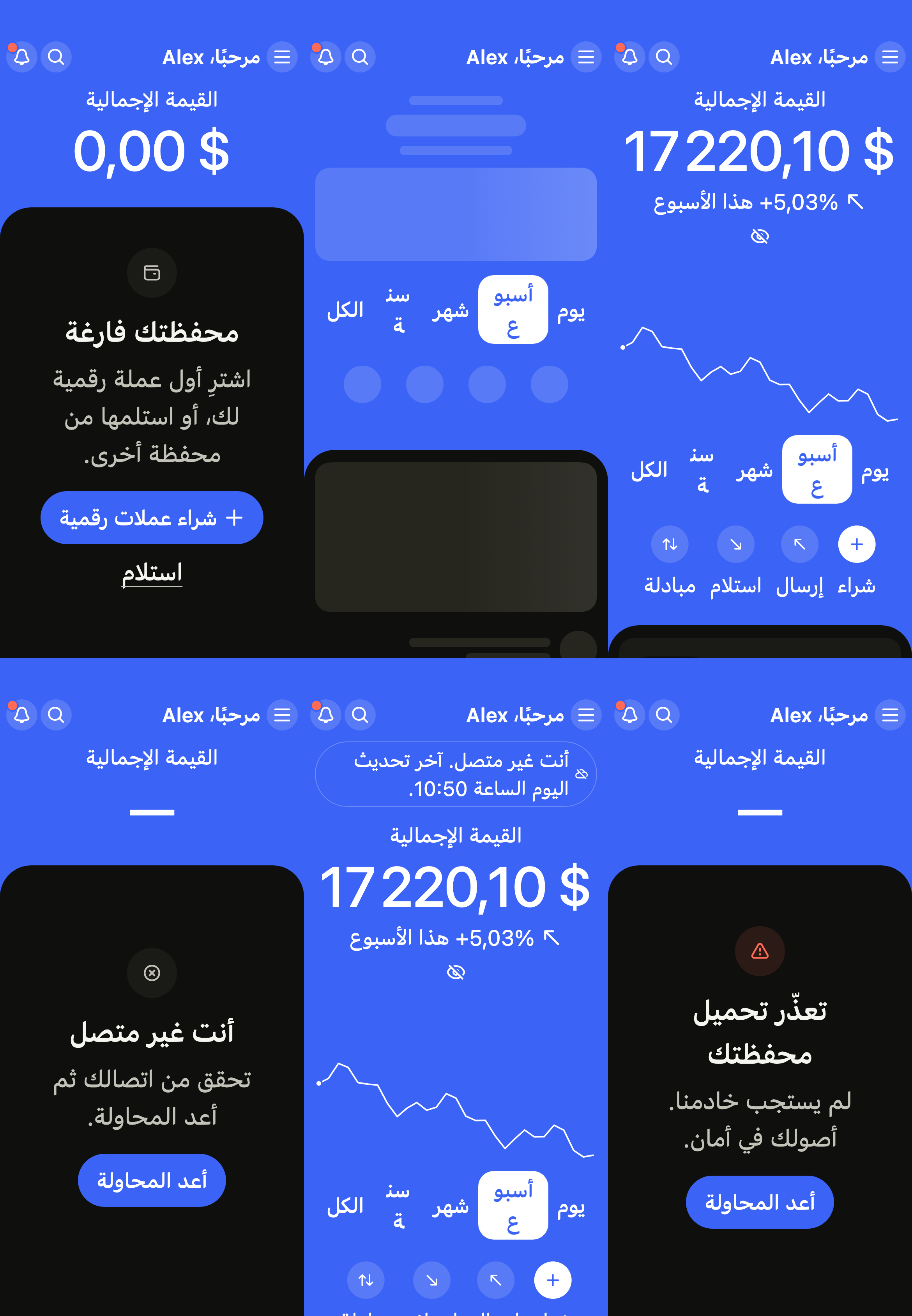
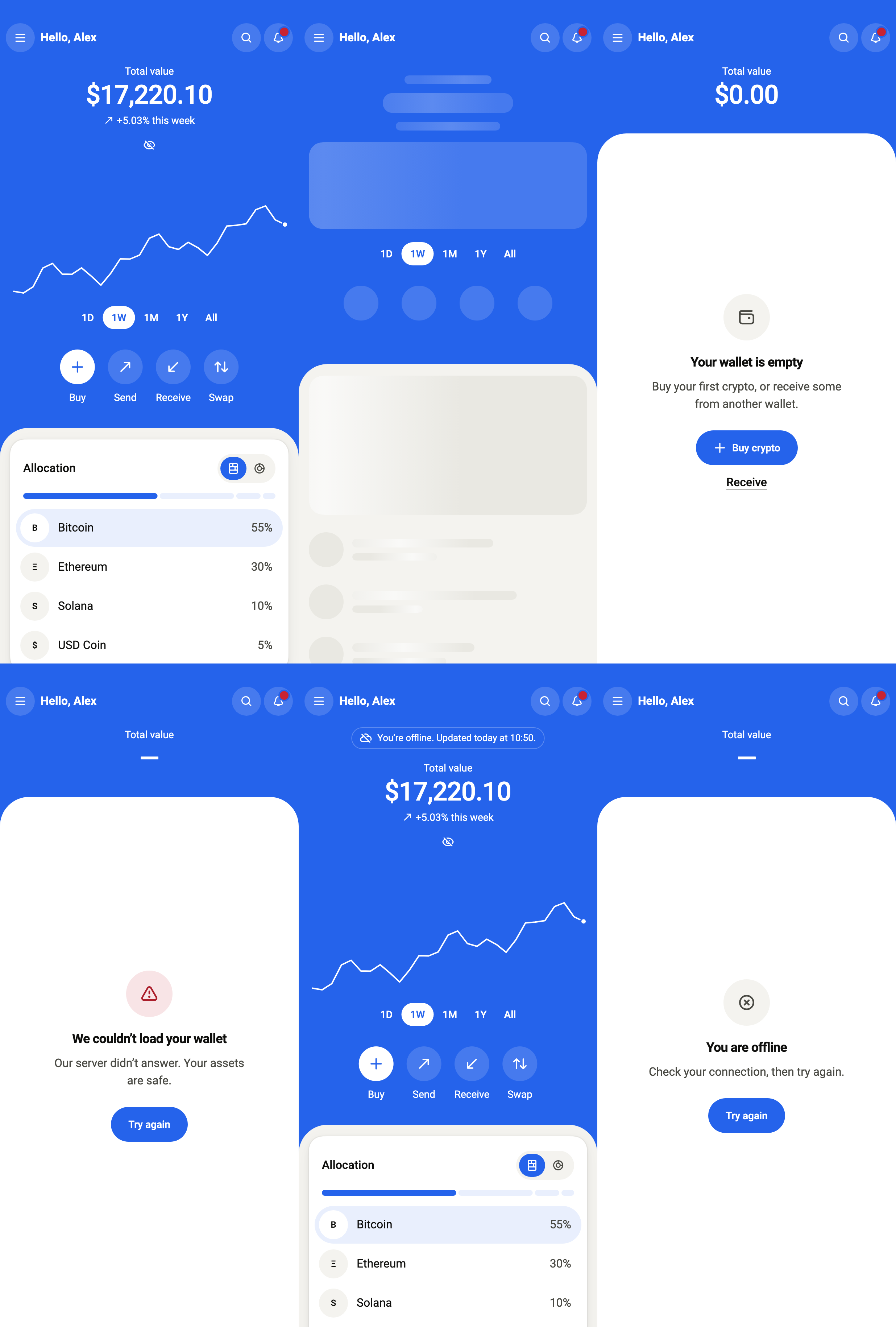
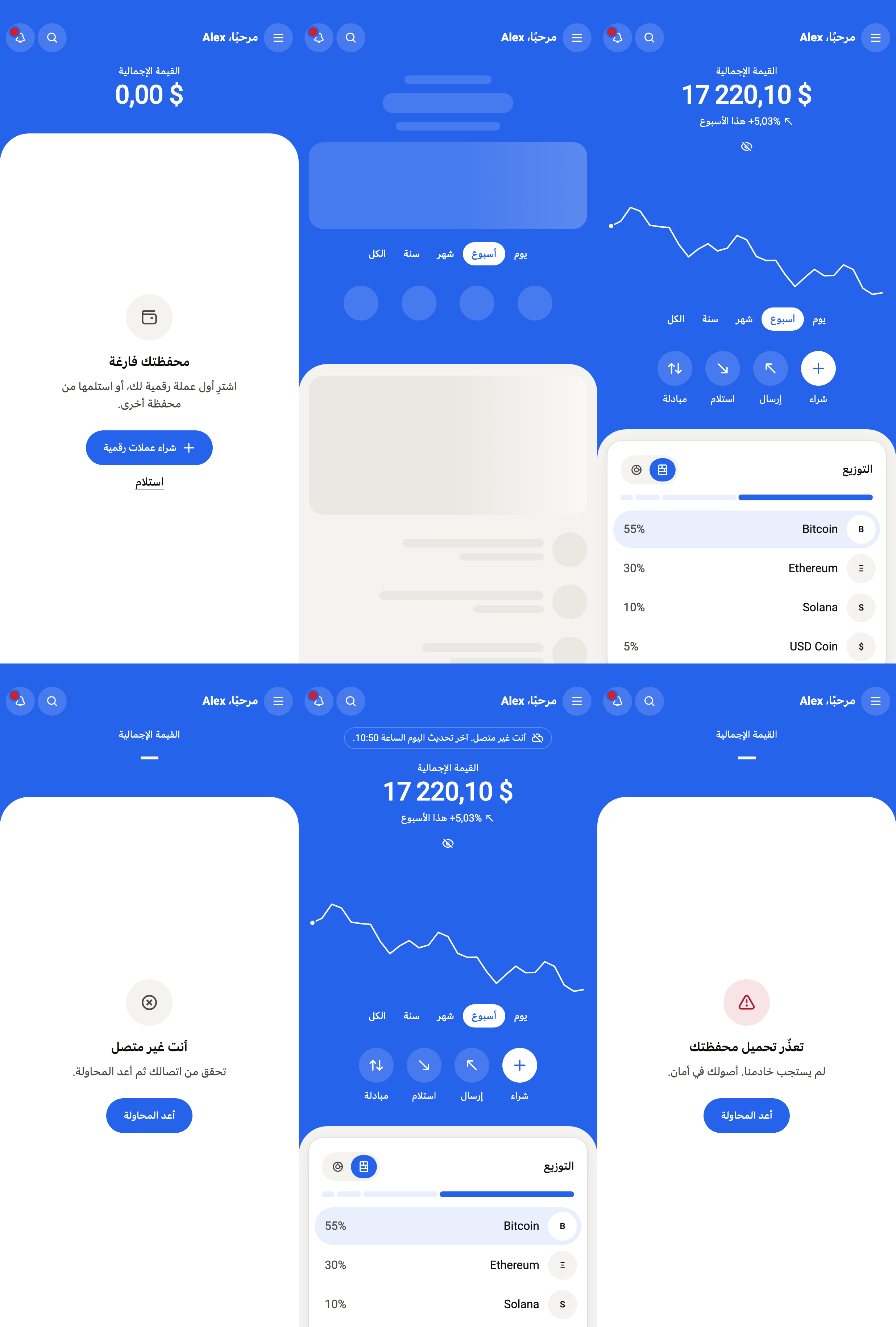
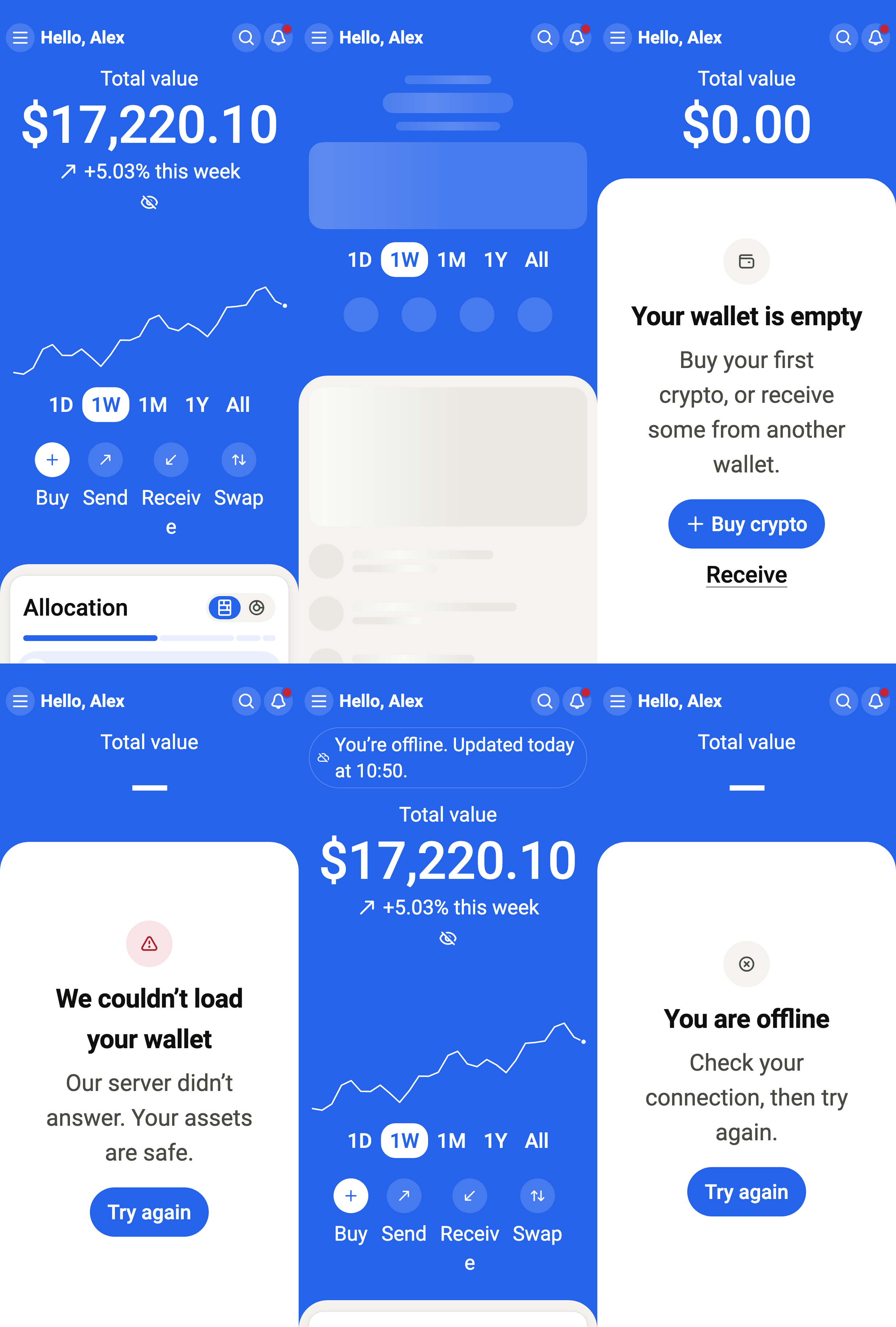
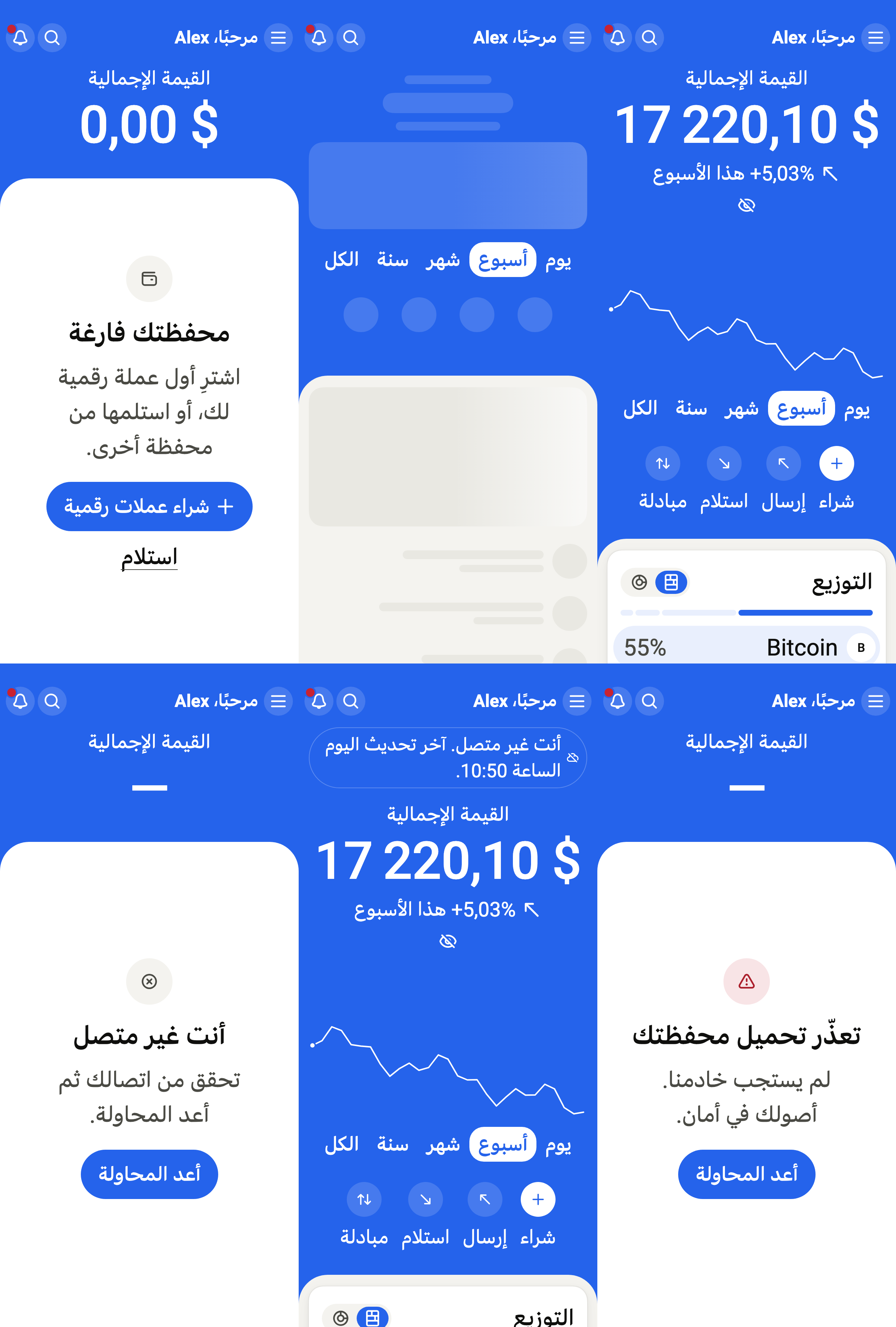
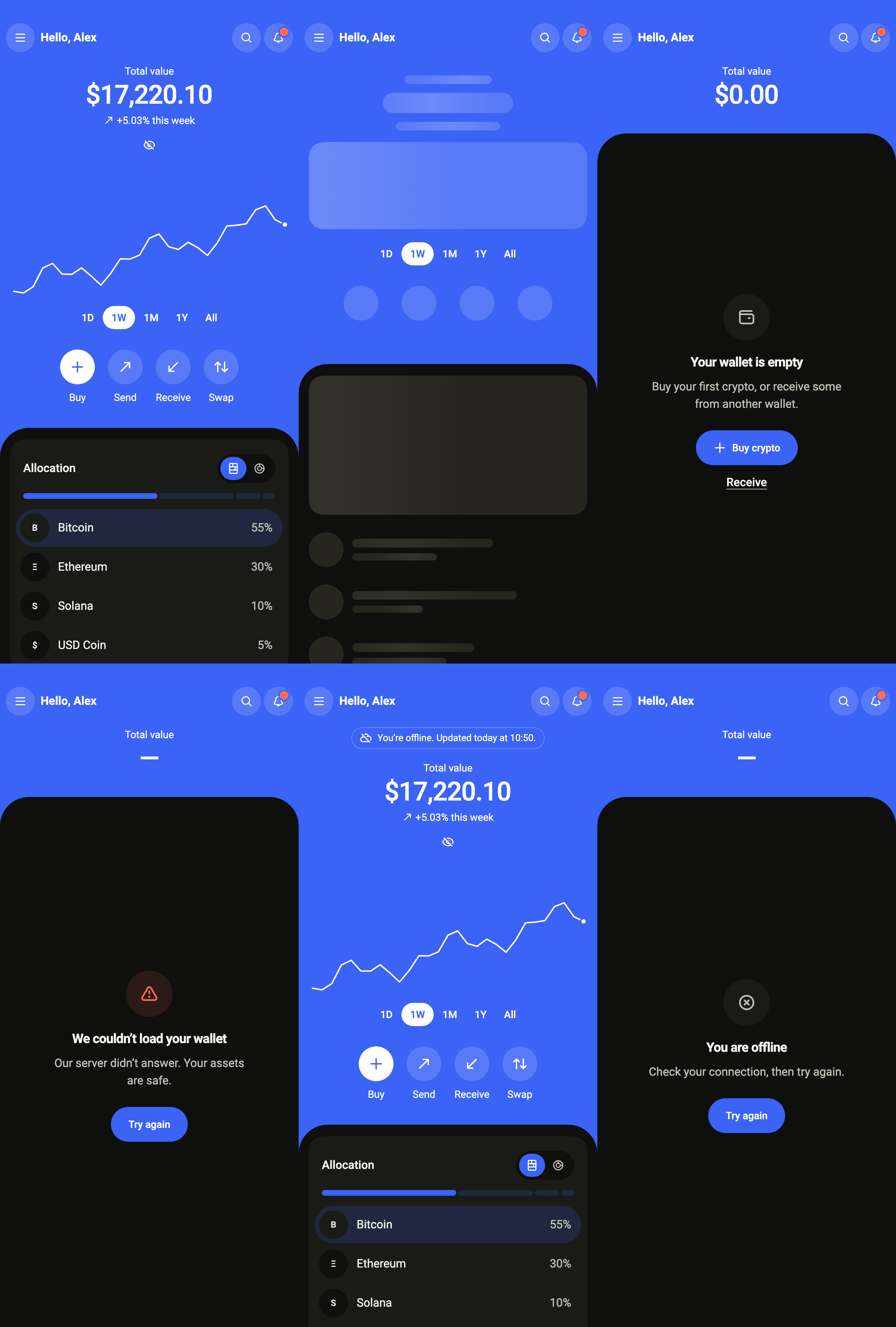
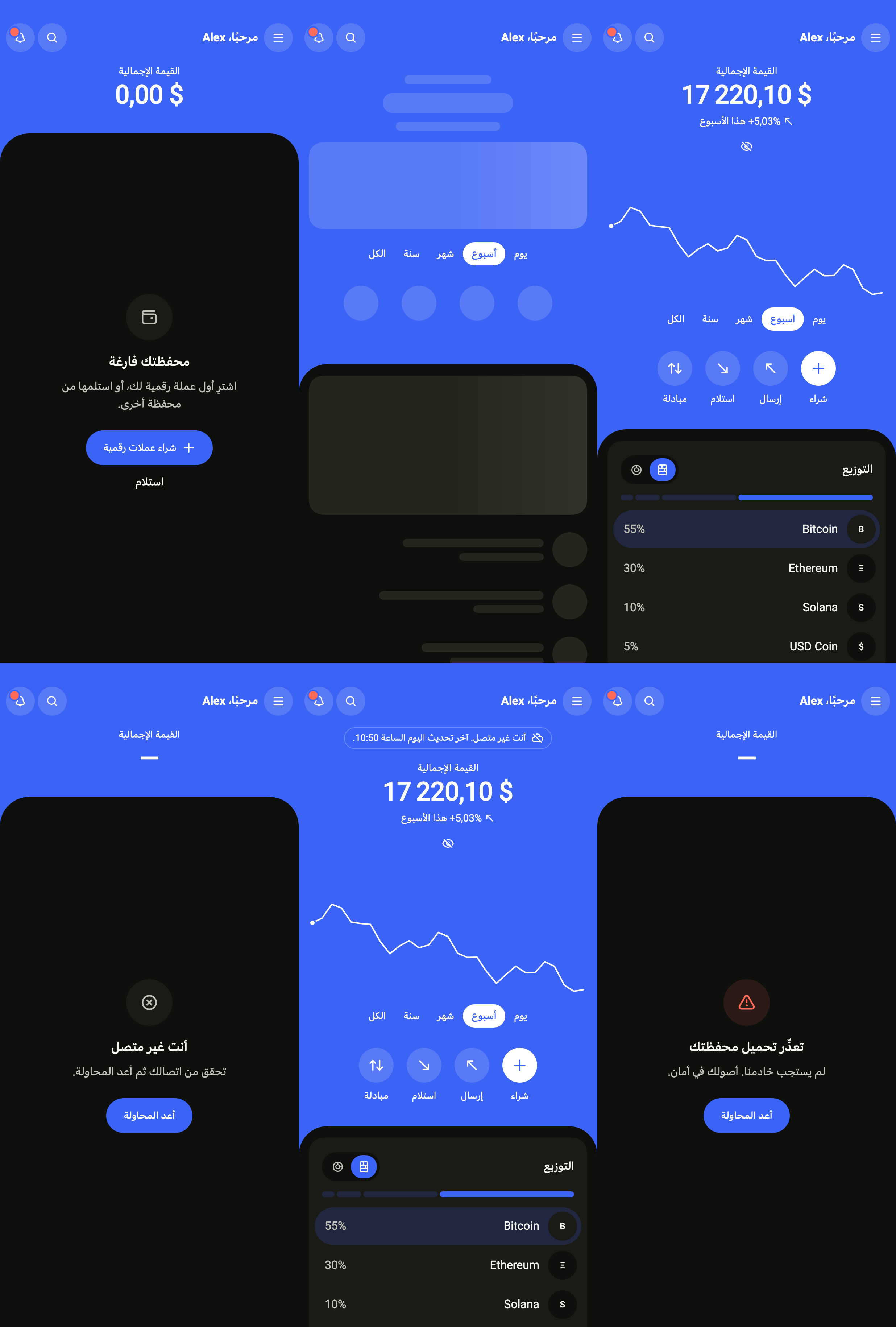
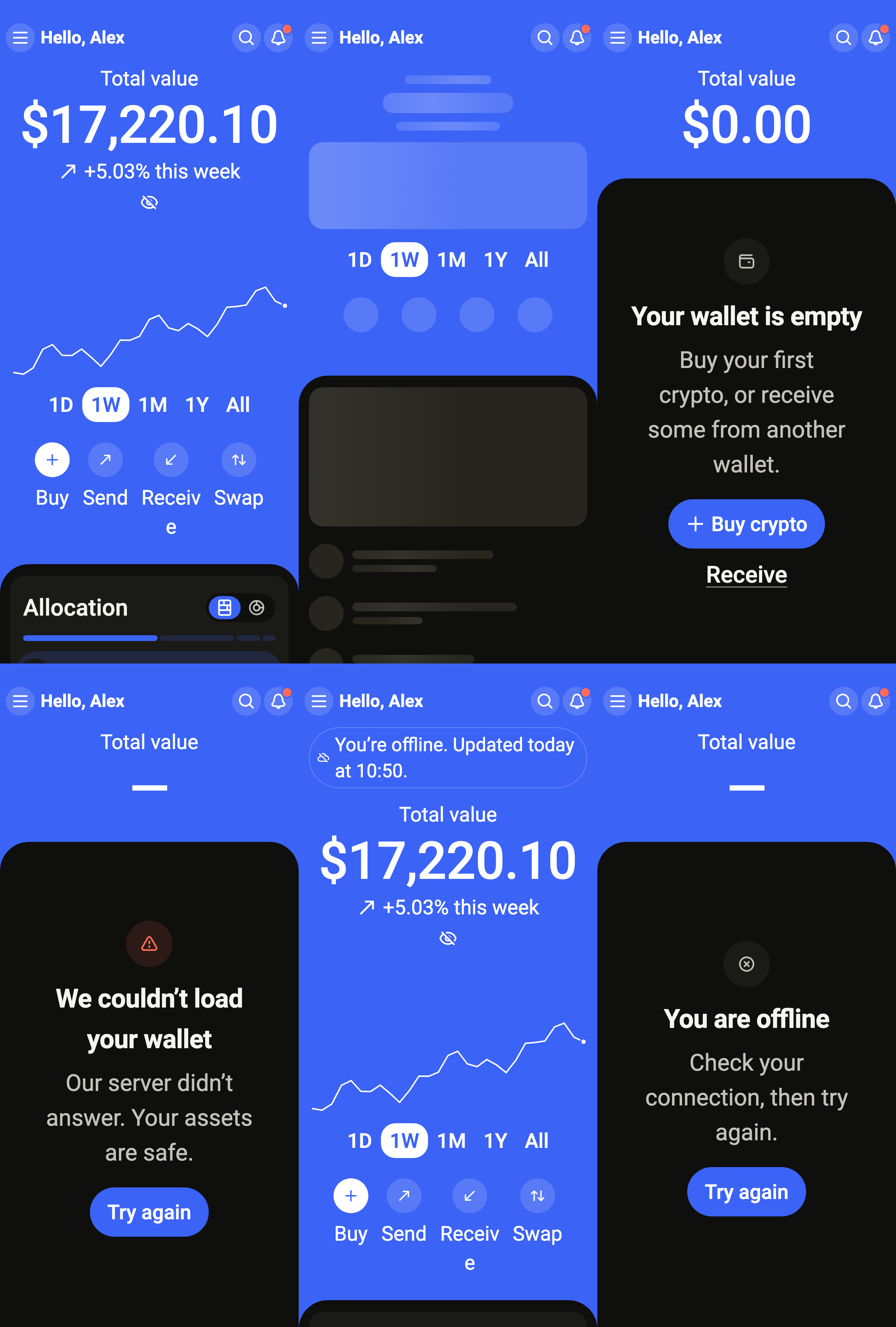
Shows a crypto wallet: the total that can be hidden and its change, its value over a day to all time, Send, Receive, Swap and Buy, the allocation, the top movers and the assets held or watched.
Import
Crypto wallet is part of Fliin Pro. With a license key, sign in once with fliin login, then add it in a Flutter app where fliin init has run:
fliin login
fliin add crypto-wallet
Also installs: app-bar, avatar, badge, button, chart, core, empty-state, icons, link-button, page, segmented, sheet, skeleton, surface, text-field
Examples
Ready
The home of a crypto app: the wallet's total, its line and Buy, Send, Receive and Swap on the accent, then the allocation, the top movers and the assets, under the app's floating tab bar. standalone holds the wallet over the WalletService you pass; the eye hides every amount.
import 'package:your_app/ui/fliin/components/tab_bar/fl_tab_bar.dart';
import 'package:your_app/ui/fliin/core/fliin.dart';
import 'package:your_app/ui/fliin/icons/fl_icons.dart';
import 'package:your_app/ui/fliin/screens/crypto_wallet/crypto_wallet_controller.dart';
import 'package:your_app/ui/fliin/screens/crypto_wallet/crypto_wallet_data.dart';
import 'package:your_app/ui/fliin/screens/crypto_wallet/crypto_wallet_screen.dart';
import 'package:flutter/widgets.dart';

class CryptoWalletReadyExample extends StatefulWidget {
  const CryptoWalletReadyExample({super.key});

  @override
  State<CryptoWalletReadyExample> createState() => _CryptoWalletReadyExampleState();
}

class _CryptoWalletReadyExampleState extends State<CryptoWalletReadyExample> {
  int _tab = 0;

  @override
  Widget build(BuildContext context) {
    return CryptoWalletScreen.standalone(
      service: const SampleWalletService(latency: Duration(milliseconds: 900), logo: _logo),
      initial: WalletLoaded(sampleWalletSnapshot(WalletRange.week, logo: _logo)),
      name: 'Alex',
      onMenu: () {},
      onSearch: () {},
      onNotifications: () {},
      unreadNotifications: 2,
      onSend: () {},
      onReceive: () {},
      onSwap: () {},
      onOpenAsset: (_) {},
      onSeeAll: (_) {},
      onCustomize: () {},
      now: sampleWalletNow,
      tabBar: FlBottomTabBar(
        floating: true,
        translucent: true,
        labels: FlBottomTabLabels.beside,
        indicator: FlBottomTabIndicator.capsule,
        index: _tab,
        onSelected: (index) => setState(() => _tab = index),
        tabs: [
          FlBottomTab(icon: FlIcon(FlIcons.house), label: 'Home'),
          FlBottomTab(icon: FlIcon(FlIcons.chartLine), label: 'Markets'),
          FlBottomTab(icon: FlIcon(FlIcons.arrowUpArrowDown), label: 'Swap'),
          FlBottomTab(icon: FlIcon(FlIcons.gear), label: 'Settings'),
        ],
      ),
    );
  }
}

/// The sample's logos, from the app's assets, by symbol.
ImageProvider _logo(String symbol) => AssetImage('images/crypto/${symbol.toLowerCase()}.png');Loading
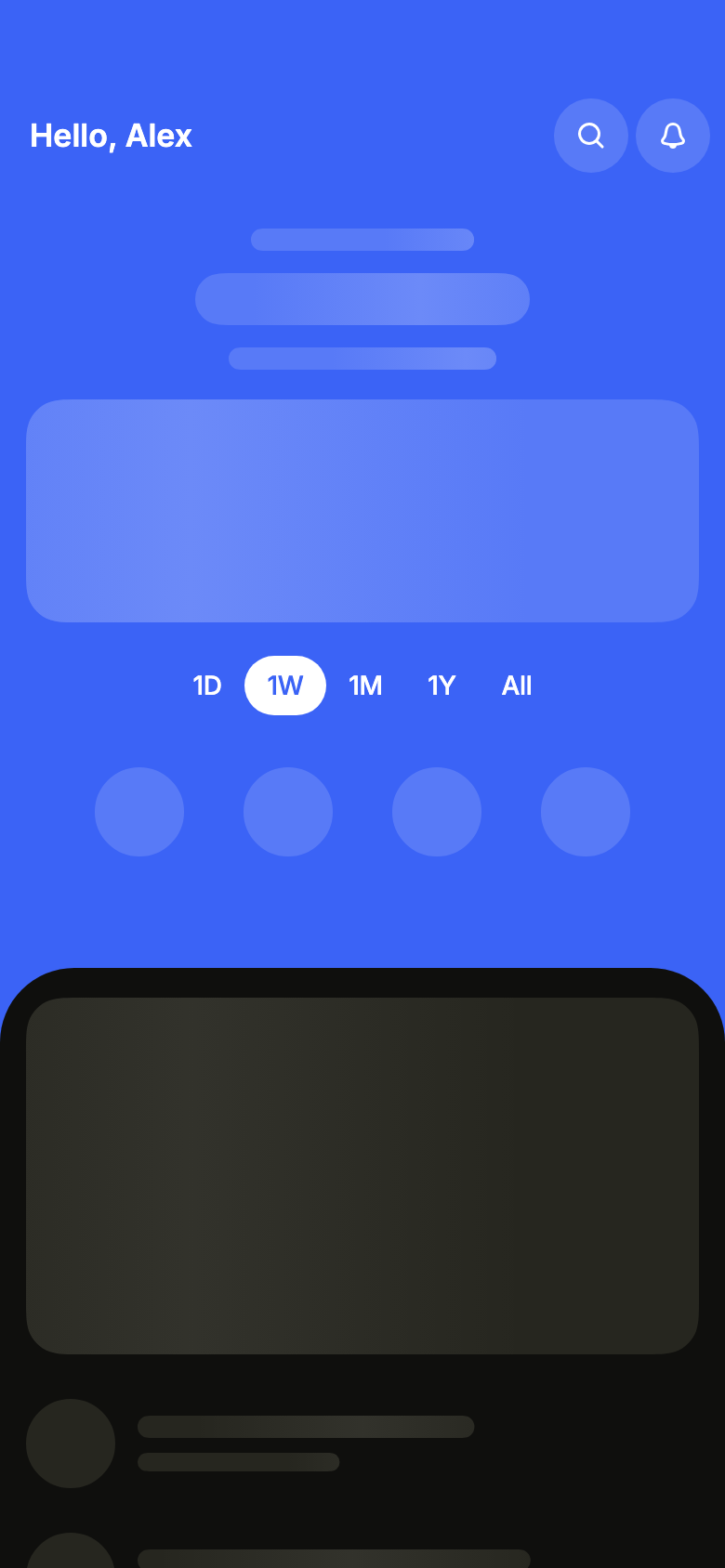
While the wallet loads, the greeting and the actions are already there, skeletons keep the place of the total, the chart and the lists.
import 'package:your_app/ui/fliin/screens/crypto_wallet/crypto_wallet_controller.dart';
import 'package:your_app/ui/fliin/screens/crypto_wallet/crypto_wallet_data.dart';
import 'package:your_app/ui/fliin/screens/crypto_wallet/crypto_wallet_screen.dart';
import 'package:flutter/widgets.dart';

class CryptoWalletLoadingExample extends StatelessWidget {
  const CryptoWalletLoadingExample({super.key});

  @override
  Widget build(BuildContext context) {
    return CryptoWalletScreen.standalone(
      service: const SampleWalletService(latency: Duration(milliseconds: 900), logo: _logo),
      initial: const WalletLoading(WalletRange.week),
      name: 'Alex',
      onSearch: () {},
      onNotifications: () {},
      onSend: () {},
      onReceive: () {},
      onSwap: () {},
      onOpenAsset: (_) {},
      now: sampleWalletNow,
    );
  }
}

/// The sample's logos, from the app's assets, by symbol.
ImageProvider _logo(String symbol) => AssetImage('images/crypto/${symbol.toLowerCase()}.png');Empty
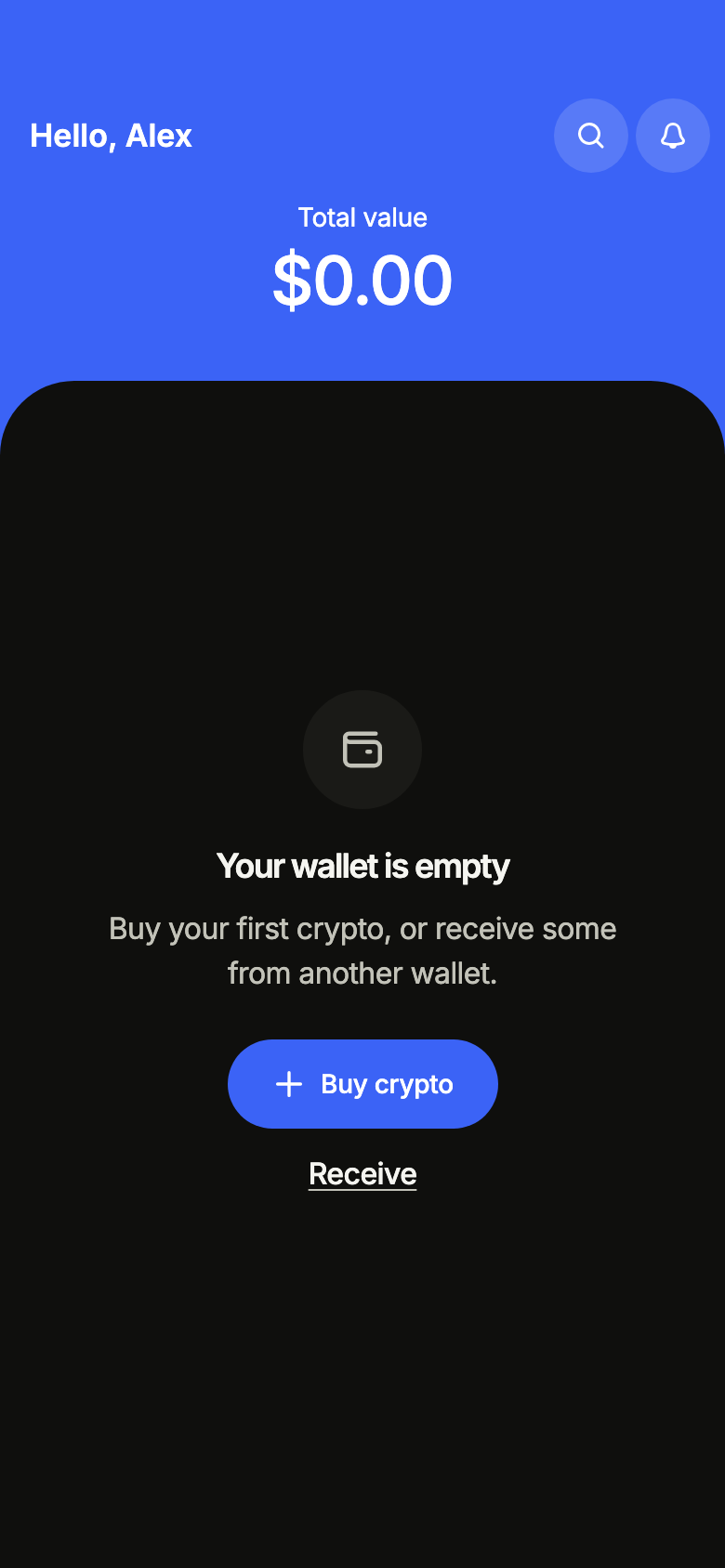
A wallet that holds nothing yet: the screen invites to buy a first crypto or to receive some.
import 'package:your_app/ui/fliin/screens/crypto_wallet/crypto_wallet_controller.dart';
import 'package:your_app/ui/fliin/screens/crypto_wallet/crypto_wallet_data.dart';
import 'package:your_app/ui/fliin/screens/crypto_wallet/crypto_wallet_screen.dart';
import 'package:flutter/widgets.dart';

class CryptoWalletEmptyExample extends StatelessWidget {
  const CryptoWalletEmptyExample({super.key});

  @override
  Widget build(BuildContext context) {
    return CryptoWalletScreen.standalone(
      service: const SampleWalletService(latency: Duration(milliseconds: 900), logo: _logo),
      initial: const WalletEmpty(WalletRange.week),
      name: 'Alex',
      onSearch: () {},
      onNotifications: () {},
      onReceive: () {},
      now: sampleWalletNow,
    );
  }
}

/// The sample's logos, from the app's assets, by symbol.
ImageProvider _logo(String symbol) => AssetImage('images/crypto/${symbol.toLowerCase()}.png');Error
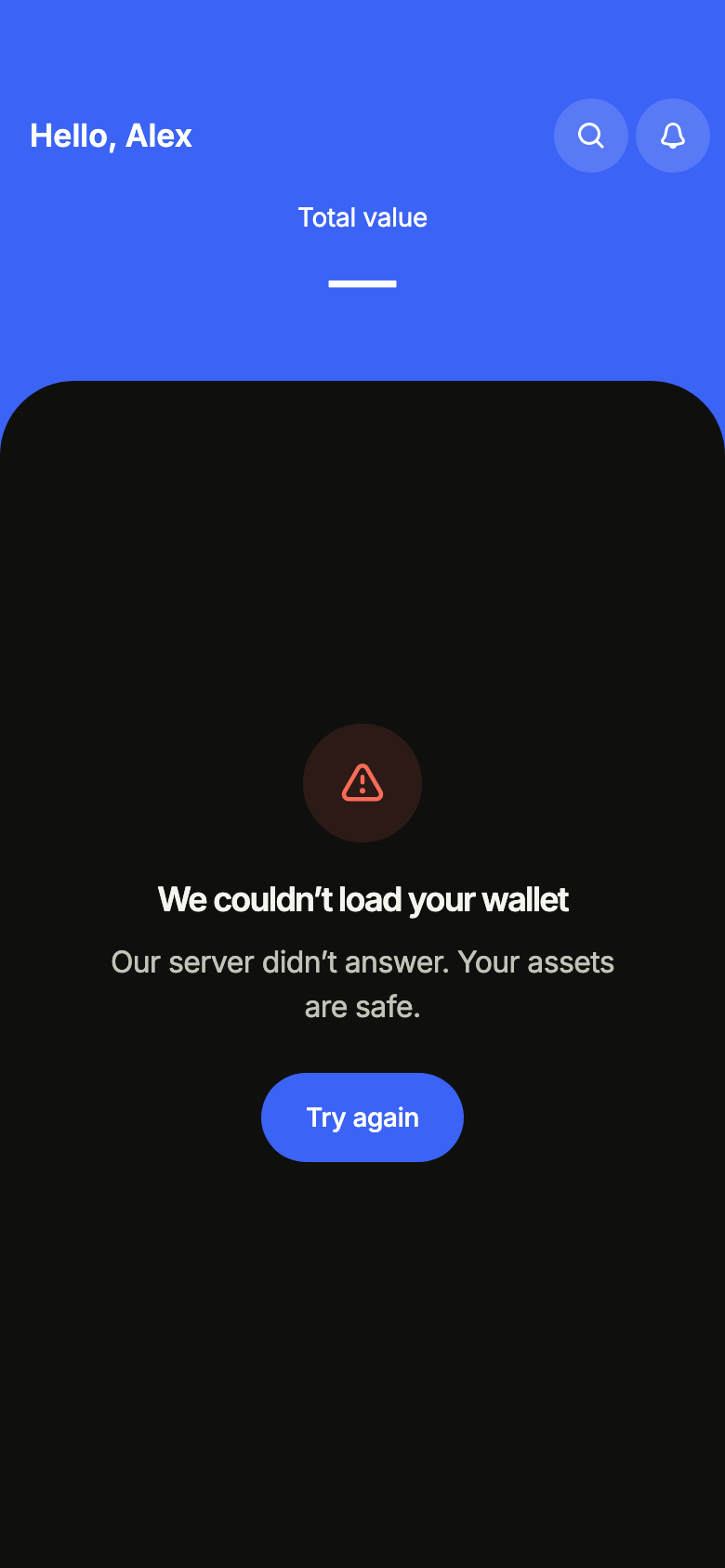
When loading fails, the screen says so and offers to try again.
import 'package:your_app/ui/fliin/screens/crypto_wallet/crypto_wallet_controller.dart';
import 'package:your_app/ui/fliin/screens/crypto_wallet/crypto_wallet_data.dart';
import 'package:your_app/ui/fliin/screens/crypto_wallet/crypto_wallet_screen.dart';
import 'package:flutter/widgets.dart';

class CryptoWalletErrorExample extends StatelessWidget {
  const CryptoWalletErrorExample({super.key});

  @override
  Widget build(BuildContext context) {
    return CryptoWalletScreen.standalone(
      service: const SampleWalletService(latency: Duration(milliseconds: 900), logo: _logo),
      initial: const WalletFailed(WalletRange.week),
      name: 'Alex',
      onSearch: () {},
      onNotifications: () {},
      now: sampleWalletNow,
    );
  }
}

/// The sample's logos, from the app's assets, by symbol.
ImageProvider _logo(String symbol) => AssetImage('images/crypto/${symbol.toLowerCase()}.png');Offline
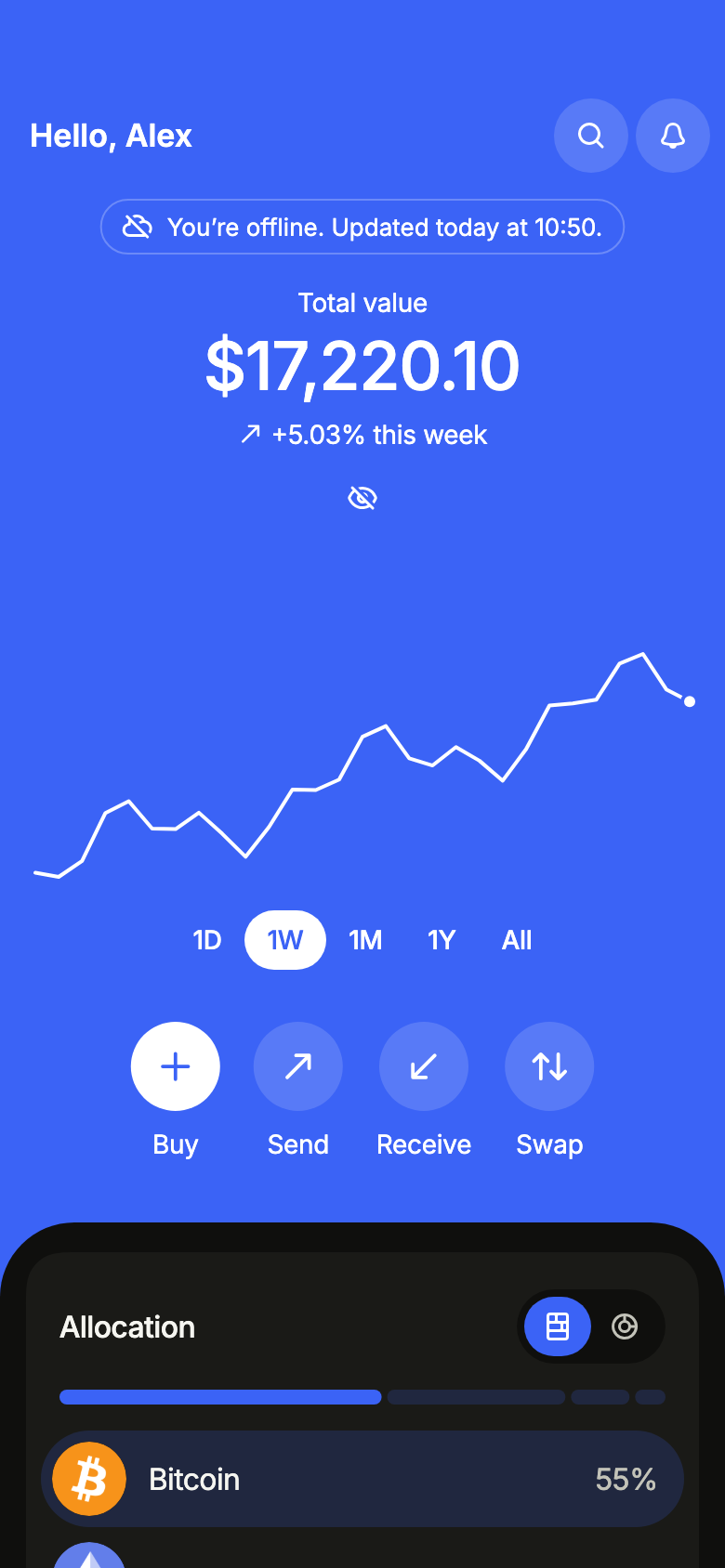
Offline with data already loaded: the wallet stays, its total greyed, under a notice that gives the time of the last prices.
import 'package:your_app/ui/fliin/screens/crypto_wallet/crypto_wallet_controller.dart';
import 'package:your_app/ui/fliin/screens/crypto_wallet/crypto_wallet_data.dart';
import 'package:your_app/ui/fliin/screens/crypto_wallet/crypto_wallet_screen.dart';
import 'package:flutter/widgets.dart';

class CryptoWalletOfflineExample extends StatelessWidget {
  const CryptoWalletOfflineExample({super.key});

  @override
  Widget build(BuildContext context) {
    return CryptoWalletScreen.standalone(
      service: const SampleWalletService(latency: Duration(milliseconds: 900), logo: _logo),
      initial: WalletLoaded(sampleWalletSnapshot(WalletRange.week, logo: _logo), notice: WalletNotice.offline),
      name: 'Alex',
      onSearch: () {},
      onNotifications: () {},
      onSend: () {},
      onReceive: () {},
      onSwap: () {},
      onOpenAsset: (_) {},
      now: sampleWalletNow,
    );
  }
}

/// The sample's logos, from the app's assets, by symbol.
ImageProvider _logo(String symbol) => AssetImage('images/crypto/${symbol.toLowerCase()}.png');Offline empty
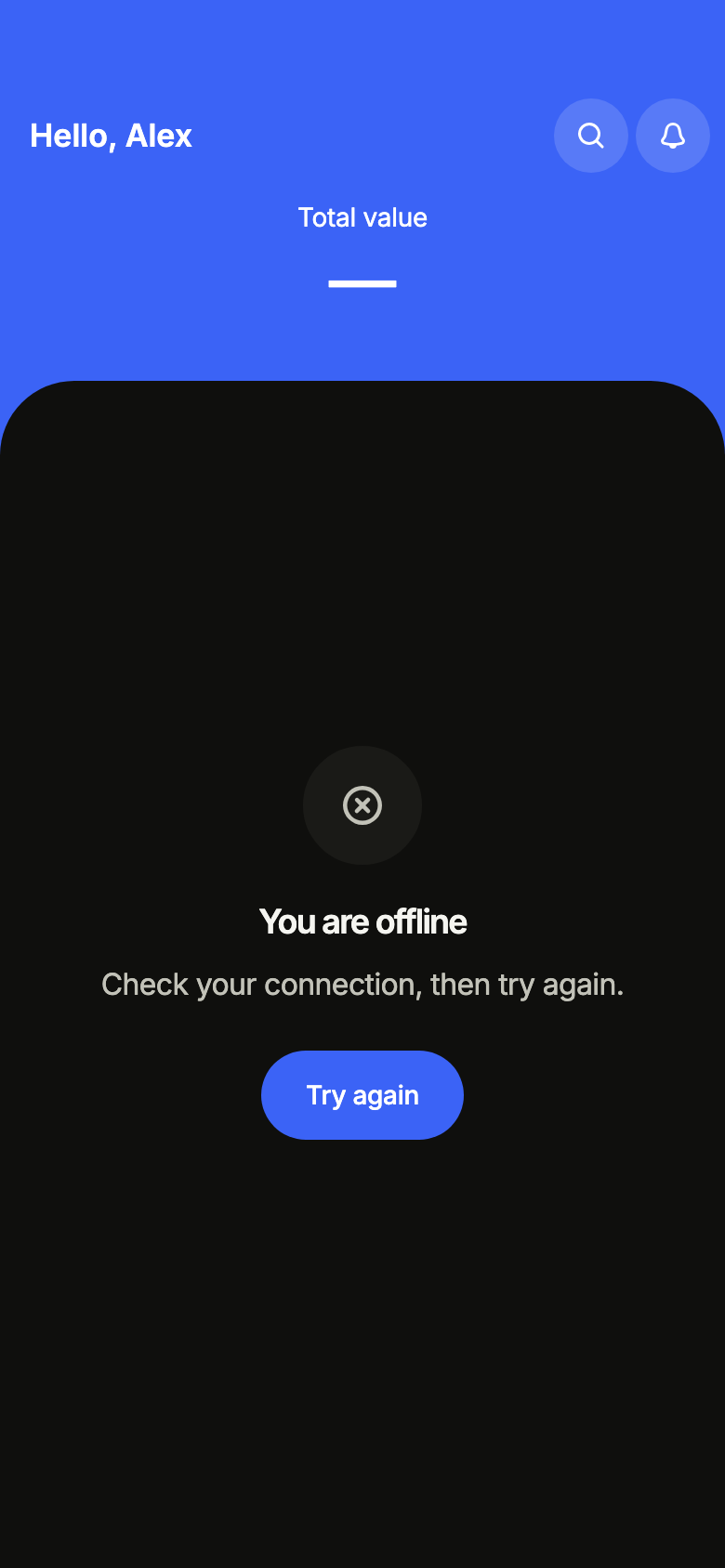
Offline with nothing loaded yet: the screen asks to reconnect.
import 'package:your_app/ui/fliin/screens/crypto_wallet/crypto_wallet_controller.dart';
import 'package:your_app/ui/fliin/screens/crypto_wallet/crypto_wallet_data.dart';
import 'package:your_app/ui/fliin/screens/crypto_wallet/crypto_wallet_screen.dart';
import 'package:flutter/widgets.dart';

class CryptoWalletOfflineEmptyExample extends StatelessWidget {
  const CryptoWalletOfflineEmptyExample({super.key});

  @override
  Widget build(BuildContext context) {
    return CryptoWalletScreen.standalone(
      service: const SampleWalletService(latency: Duration(milliseconds: 900), logo: _logo),
      initial: const WalletOffline(WalletRange.week),
      name: 'Alex',
      onSearch: () {},
      onNotifications: () {},
      now: sampleWalletNow,
    );
  }
}

/// The sample's logos, from the app's assets, by symbol.
ImageProvider _logo(String symbol) => AssetImage('images/crypto/${symbol.toLowerCase()}.png');Routing
fliin add crypto-wallet prints the route for the router it finds in your pubspec, a file next to the page that wires its navigation. Each of them:
go_router
// lib/crypto_wallet_route.dart, next to crypto_wallet_page.dart.
import 'package:go_router/go_router.dart';

import 'crypto_wallet_page.dart';

/// Add cryptoWalletRoute to the routes of your GoRouter.
final cryptoWalletRoute = GoRoute(
  path: '/wallet',
  builder: (context, state) => CryptoWalletPage(
    // Your asset screen's route.
    onOpenAsset: (asset) => context.push('/wallet/assets/${Uri.encodeComponent(asset.id)}'),
  ),
);navigator
// lib/crypto_wallet_route.dart, next to crypto_wallet_page.dart.
import 'package:your_app/ui/fliin/screens/crypto_wallet/crypto_wallet_data.dart';
import 'package:flutter/material.dart';

import 'crypto_wallet_page.dart';

/// Opens “Crypto wallet”: `Navigator.of(context).push(cryptoWalletRoute(assetPage: …))`.
/// [assetPage] builds the page of an asset of your app.
Route<void> cryptoWalletRoute({required Widget Function(BuildContext context, WalletAsset asset) assetPage}) =>
    MaterialPageRoute<void>(
      builder: (context) => CryptoWalletPage(
        onOpenAsset: (asset) => Navigator.of(context).push(
          MaterialPageRoute<void>(builder: (context) => assetPage(context, asset)),
        ),
      ),
);State
The controller is a ChangeNotifier from widgets.dart, with no package. fliin add crypto-wallet prints the page that holds it with the state management it finds, its imports written for your package; below they read your_app. Your backend implements the Service interface of the screen's _data.dart file:
none
// lib/crypto_wallet_page.dart
// Your backend: implement WalletService (crypto_wallet_data.dart) and pass it instead of the sample service.
import 'package:your_app/ui/fliin/screens/crypto_wallet/crypto_wallet_data.dart';
import 'package:your_app/ui/fliin/screens/crypto_wallet/crypto_wallet_screen.dart';
import 'package:flutter/widgets.dart';

class CryptoWalletPage extends StatelessWidget {
  const CryptoWalletPage({
    super.key,
    required this.onOpenAsset,
  });

  final ValueChanged<WalletAsset> onOpenAsset;

  @override
  Widget build(BuildContext context) => CryptoWalletScreen.standalone(
    service: const SampleWalletService(),
    onOpenAsset: onOpenAsset,
  );
}provider
// lib/crypto_wallet_page.dart
// Your backend: implement WalletService (crypto_wallet_data.dart) and pass it instead of the sample service.
import 'package:your_app/ui/fliin/screens/crypto_wallet/crypto_wallet_controller.dart';
import 'package:your_app/ui/fliin/screens/crypto_wallet/crypto_wallet_data.dart';
import 'package:your_app/ui/fliin/screens/crypto_wallet/crypto_wallet_screen.dart';
import 'package:flutter/widgets.dart';
import 'package:provider/provider.dart';

class CryptoWalletPage extends StatelessWidget {
  const CryptoWalletPage({
    super.key,
    required this.onOpenAsset,
  });

  final ValueChanged<WalletAsset> onOpenAsset;

  @override
  Widget build(BuildContext context) => ChangeNotifierProvider(
    create: (_) => CryptoWalletController(service: const SampleWalletService())..load(),
    child: Builder(
      builder: (context) => CryptoWalletScreen(
        controller: context.read<CryptoWalletController>(),
        onOpenAsset: onOpenAsset,
      ),
    ),
  );
}riverpod
// lib/crypto_wallet_page.dart
// Your backend: implement WalletService (crypto_wallet_data.dart) and pass it instead of the sample service.
import 'package:your_app/ui/fliin/screens/crypto_wallet/crypto_wallet_controller.dart';
import 'package:your_app/ui/fliin/screens/crypto_wallet/crypto_wallet_data.dart';
import 'package:your_app/ui/fliin/screens/crypto_wallet/crypto_wallet_screen.dart';
import 'package:flutter/widgets.dart';
import 'package:flutter_riverpod/flutter_riverpod.dart';

final cryptoWalletProvider = Provider.autoDispose<CryptoWalletController>((ref) {
  final controller = CryptoWalletController(service: const SampleWalletService())..load();
  ref.onDispose(controller.dispose);
  return controller;
});

class CryptoWalletPage extends ConsumerWidget {
  const CryptoWalletPage({
    super.key,
    required this.onOpenAsset,
  });

  final ValueChanged<WalletAsset> onOpenAsset;

  @override
  Widget build(BuildContext context, WidgetRef ref) => CryptoWalletScreen(
    controller: ref.watch(cryptoWalletProvider),
    onOpenAsset: onOpenAsset,
  );
}bloc
// lib/crypto_wallet_page.dart
// Your backend: implement WalletService (crypto_wallet_data.dart) and pass it instead of the sample service.
import 'package:your_app/ui/fliin/screens/crypto_wallet/crypto_wallet_controller.dart';
import 'package:your_app/ui/fliin/screens/crypto_wallet/crypto_wallet_data.dart';
import 'package:your_app/ui/fliin/screens/crypto_wallet/crypto_wallet_screen.dart';
import 'package:flutter/widgets.dart';
import 'package:flutter_bloc/flutter_bloc.dart';

/// The screen's controller as a bloc, for your BlocListener and BlocBuilder:
/// one emission per controller notification. `version` tells them apart
/// when `state` does not change (mode, filters, text…, read them on
/// `controller`). The screen listens to the controller itself.
class CryptoWalletCubit extends Cubit<({WalletState state, int version})> {
  CryptoWalletCubit(this.controller) : super((state: controller.state, version: 0)) {
    controller.addListener(_changed);
  }

  final CryptoWalletController controller;

  void _changed() => emit((state: controller.state, version: state.version + 1));

  @override
  Future<void> close() {
    controller
      ..removeListener(_changed)
      ..dispose();
    return super.close();
  }
}

class CryptoWalletPage extends StatelessWidget {
  const CryptoWalletPage({
    super.key,
    required this.onOpenAsset,
  });

  final ValueChanged<WalletAsset> onOpenAsset;

  @override
  Widget build(BuildContext context) => BlocProvider(
    create: (_) => CryptoWalletCubit(CryptoWalletController(service: const SampleWalletService())..load()),
    child: Builder(
      builder: (context) => CryptoWalletScreen(
        controller: context.read<CryptoWalletCubit>().controller,
        onOpenAsset: onOpenAsset,
      ),
    ),
  );
}API
WalletAllocationStyle: enum {blocks, ring}
WalletAllocationStyle.blocks: static final WalletAllocationStyle
WalletAllocationStyle.ring: static final WalletAllocationStyle
WalletList: enum {assets, watchlist}
WalletList.assets: static final WalletList
WalletList.watchlist: static final WalletList
CryptoWalletScreen: class extends StatefulWidget
CryptoWalletScreen.new: const new({super.key, required CryptoWalletController controller, String? name, VoidCallback? onMenu, VoidCallback? onSearch, VoidCallback? onNotifications, int unreadNotifications, VoidCallback? onSend, VoidCallback? onReceive, VoidCallback? onSwap, VoidCallback? onBuy, ValueChanged<WalletAsset>? onOpenAsset, ValueChanged<WalletList>? onSeeAll, ValueChanged<bool>? onAmountsHiddenChanged, VoidCallback? onCustomize, Widget? tabBar, WalletFormat? format, DateTime? now})
CryptoWalletScreen.standalone: const new({super.key, required WalletService service, WalletState? initial, bool amountsHidden, String? name, VoidCallback? onMenu, VoidCallback? onSearch, VoidCallback? onNotifications, int unreadNotifications, VoidCallback? onSend, VoidCallback? onReceive, VoidCallback? onSwap, VoidCallback? onBuy, ValueChanged<WalletAsset>? onOpenAsset, ValueChanged<WalletList>? onSeeAll, ValueChanged<bool>? onAmountsHiddenChanged, VoidCallback? onCustomize, Widget? tabBar, WalletFormat? format, DateTime? now})
CryptoWalletScreen.controller: get CryptoWalletController?
CryptoWalletScreen.service: get WalletService?
CryptoWalletScreen.initial: get WalletState?
CryptoWalletScreen.amountsHidden: get bool
CryptoWalletScreen.name: get String?
CryptoWalletScreen.onMenu: get VoidCallback?
CryptoWalletScreen.onSearch: get VoidCallback?
CryptoWalletScreen.onNotifications: get VoidCallback?
CryptoWalletScreen.unreadNotifications: get int
CryptoWalletScreen.onSend: get VoidCallback?
CryptoWalletScreen.onReceive: get VoidCallback?
CryptoWalletScreen.onSwap: get VoidCallback?
CryptoWalletScreen.onBuy: get VoidCallback?
CryptoWalletScreen.onOpenAsset: get ValueChanged<WalletAsset>?
CryptoWalletScreen.onSeeAll: get ValueChanged<WalletList>?
CryptoWalletScreen.onAmountsHiddenChanged: get ValueChanged<bool>?
CryptoWalletScreen.onCustomize: get VoidCallback?
CryptoWalletScreen.tabBar: get Widget?
CryptoWalletScreen.format: get WalletFormat?
CryptoWalletScreen.now: get DateTime?
CryptoWalletScreen.createState: State<CryptoWalletScreen>()
WalletState: sealed class permits {WalletEmpty, WalletFailed, WalletLoaded, WalletLoading, WalletOffline}
WalletState.new: const new()
WalletState.range: abstract get WalletRange
WalletLoading: final class extends WalletState
WalletLoading.new: const new(WalletRange range)
WalletLoading.range: get WalletRange
WalletNotice: enum {refreshFailed, offline}
WalletNotice.refreshFailed: static final WalletNotice
WalletNotice.offline: static final WalletNotice
WalletLoaded: final class extends WalletState
WalletLoaded.new: const new(WalletSnapshot snapshot, {WalletNotice? notice, WalletRange? pending})
WalletLoaded.snapshot: get WalletSnapshot
WalletLoaded.notice: get WalletNotice?
WalletLoaded.pending: get WalletRange?
WalletLoaded.range: get WalletRange
WalletEmpty: final class extends WalletState
WalletEmpty.new: const new(WalletRange range, {WalletNotice? notice})
WalletEmpty.range: get WalletRange
WalletEmpty.notice: get WalletNotice?
WalletFailed: final class extends WalletState
WalletFailed.new: const new(WalletRange range)
WalletFailed.range: get WalletRange
WalletOffline: final class extends WalletState
WalletOffline.new: const new(WalletRange range)
WalletOffline.range: get WalletRange
WalletBuyResult: enum {bought, offline, failed}
WalletBuyResult.bought: static final WalletBuyResult
WalletBuyResult.offline: static final WalletBuyResult
WalletBuyResult.failed: static final WalletBuyResult
CryptoWalletController: class extends ChangeNotifier
CryptoWalletController.new: new({required WalletService service, WalletState initial, bool amountsHidden})
CryptoWalletController.service: get WalletService
CryptoWalletController.state: get WalletState
CryptoWalletController.amountsHidden: get bool
CryptoWalletController.load: Future<void>([WalletRange? range])
CryptoWalletController.setRange: Future<void>(WalletRange range)
CryptoWalletController.refresh: Future<bool>()
CryptoWalletController.buyable: get List<WalletAsset>
CryptoWalletController.buy: Future<WalletBuyResult>(String assetId, int cents)
CryptoWalletController.setAmountsHidden: void(bool hidden)
CryptoWalletController.dispose: void()
WalletRange: enum {day, week, month, year, all}
WalletRange.day: static final WalletRange
WalletRange.week: static final WalletRange
WalletRange.month: static final WalletRange
WalletRange.year: static final WalletRange
WalletRange.all: static final WalletRange
WalletAsset: final class
WalletAsset.new: const new({required String id, required String name, required String symbol, required int price, required double change, double quantity, String? glyph, ImageProvider? image, List<double> trend})
WalletAsset.id: get String
WalletAsset.name: get String
WalletAsset.symbol: get String
WalletAsset.price: get int
WalletAsset.change: get double
WalletAsset.quantity: get double
WalletAsset.glyph: get String?
WalletAsset.image: get ImageProvider?
WalletAsset.trend: get List<double>
WalletAsset.held: get bool
WalletAsset.value: get int
WalletAsset.withImage: WalletAsset(ImageProvider? image)
WalletAsset.buying: WalletAsset(int cents)
WalletAsset.initial: get String
WalletPoint: final class
WalletPoint.new: const new(DateTime at, int value)
WalletPoint.at: get DateTime
WalletPoint.value: get int
WalletSnapshot: final class
WalletSnapshot.new: const new({required WalletRange range, required List<WalletPoint> history, required List<WalletAsset> holdings, required DateTime updatedAt, List<WalletAsset> watchlist, List<WalletAsset> movers})
WalletSnapshot.range: get WalletRange
WalletSnapshot.history: get List<WalletPoint>
WalletSnapshot.holdings: get List<WalletAsset>
WalletSnapshot.watchlist: get List<WalletAsset>
WalletSnapshot.movers: get List<WalletAsset>
WalletSnapshot.updatedAt: get DateTime
WalletSnapshot.total: get int
WalletSnapshot.change: get double?
WalletSnapshot.isEmpty: get bool
WalletSnapshot.buying: WalletSnapshot(String assetId, int cents)
WalletNoNetwork: final class implements Exception
WalletNoNetwork.new: const new({WalletSnapshot? lastKnown})
WalletNoNetwork.lastKnown: get WalletSnapshot?
WalletService: abstract interface class
WalletService.new: new()
WalletService.load: abstract Future<WalletSnapshot>(WalletRange range)
WalletService.buy: abstract Future<void>(String assetId, int cents)
WalletFormat: abstract interface class
WalletFormat.new: new()
WalletFormat.currency: abstract get String
WalletFormat.amount: abstract String(int cents)
WalletFormat.quantity: abstract String(double quantity)
SampleWalletFormat: final class implements WalletFormat
SampleWalletFormat.new: const new(String language)
SampleWalletFormat.language: get String
SampleWalletFormat.currency: get String
SampleWalletFormat.amount: String(int cents)
SampleWalletFormat.quantity: String(double quantity)
sampleWalletNow: get dynamic
sampleHoldings: get dynamic
sampleWatchlist: get dynamic
walletPointTimes: List<DateTime>(WalletRange range, DateTime now)
sampleWalletLogo: ImageProvider(String symbol)
sampleWalletSnapshot: WalletSnapshot(WalletRange range, {ImageProvider Function(String symbol)? logo})
sampleEmptyWallet: WalletSnapshot(WalletRange range)
SampleWalletService: final class implements WalletService
SampleWalletService.new: const new({WalletSnapshot Function(WalletRange range)? snapshot, Duration latency, ImageProvider Function(String symbol)? logo})
SampleWalletService.snapshot: get WalletSnapshot Function(WalletRange range)?
SampleWalletService.logo: get ImageProvider Function(String symbol)?
SampleWalletService.latency: get Duration
SampleWalletService.load: Future<WalletSnapshot>(WalletRange range)
SampleWalletService.buy: Future<void>(String assetId, int cents)
cryptoWalletL10n: const Map<String, Map<String, String>>
CryptoWalletStrings: final class
CryptoWalletStrings.new: const new(String language)
CryptoWalletStrings.of: factory new(BuildContext context)
CryptoWalletStrings.language: get String
CryptoWalletStrings.title: get String
CryptoWalletStrings.refresh: get String
CryptoWalletStrings.loading: get String
CryptoWalletStrings.hello: String(String? name)
CryptoWalletStrings.search: get String
CryptoWalletStrings.notifications: String(int unread)
CryptoWalletStrings.menu: get String
CryptoWalletStrings.totalValue: get String
CryptoWalletStrings.eye: String({required bool hidden})
CryptoWalletStrings.amountsHidden: get String
CryptoWalletStrings.rangeLabel: get String
CryptoWalletStrings.range: String(WalletRange range)
CryptoWalletStrings.over: String(WalletRange range)
CryptoWalletStrings.change: String(double change, WalletRange range)
CryptoWalletStrings.value: get String
CryptoWalletStrings.chart: String(WalletRange range)
CryptoWalletStrings.chartSummary: String(String start, String end, String low, String high)
CryptoWalletStrings.send: get String
CryptoWalletStrings.receive: get String
CryptoWalletStrings.swap: get String
CryptoWalletStrings.buy: get String
CryptoWalletStrings.quickActions: get String
CryptoWalletStrings.allocation: get String
CryptoWalletStrings.allocationStyle: get String
CryptoWalletStrings.blocks: get String
CryptoWalletStrings.ring: get String
CryptoWalletStrings.allocationReading: String(List<String> parts)
CryptoWalletStrings.shareOfWallet: String(String name, String share)
CryptoWalletStrings.movers: get String
CryptoWalletStrings.hours: get String
CryptoWalletStrings.lists: get String
CryptoWalletStrings.assets: get String
CryptoWalletStrings.watchlist: get String
CryptoWalletStrings.seeAll: get String
CryptoWalletStrings.quantity: String(String quantity, String symbol)
CryptoWalletStrings.watching: get String
CryptoWalletStrings.watchlistEmpty: get String
CryptoWalletStrings.moverReading: String(String name, String change)
CryptoWalletStrings.assetReading: String(String name, String price, String change)
CryptoWalletStrings.holding: String(String quantity, String symbol, String value)
CryptoWalletStrings.customize: get String
CryptoWalletStrings.emptyTitle: get String
CryptoWalletStrings.emptyMessage: get String
CryptoWalletStrings.buyCrypto: get String
CryptoWalletStrings.buyAsset: get String
CryptoWalletStrings.buyAmount: get String
CryptoWalletStrings.plus: String(String amount)
CryptoWalletStrings.buyEstimate: String(String quantity, String symbol, String price)
CryptoWalletStrings.buyAmountOf: String(String amount, String symbol)
CryptoWalletStrings.buyFailed: get String
CryptoWalletStrings.buyOffline: get String
CryptoWalletStrings.close: get String
CryptoWalletStrings.errorTitle: get String
CryptoWalletStrings.errorMessage: get String
CryptoWalletStrings.offlineTitle: get String
CryptoWalletStrings.offlineMessage: get String
CryptoWalletStrings.retry: get String
CryptoWalletStrings.refreshFailed: get String
CryptoWalletStrings.offlineSince: String(DateTime at, DateTime now)
CryptoWalletStrings.time: String(DateTime at)
CryptoWalletStrings.point: String(DateTime at, WalletRange range)
CryptoWalletStrings.percent: String(double share)
CryptoWalletStrings.rate: String(double share)
CryptoWalletStrings.signedRate: String(double share)Strings
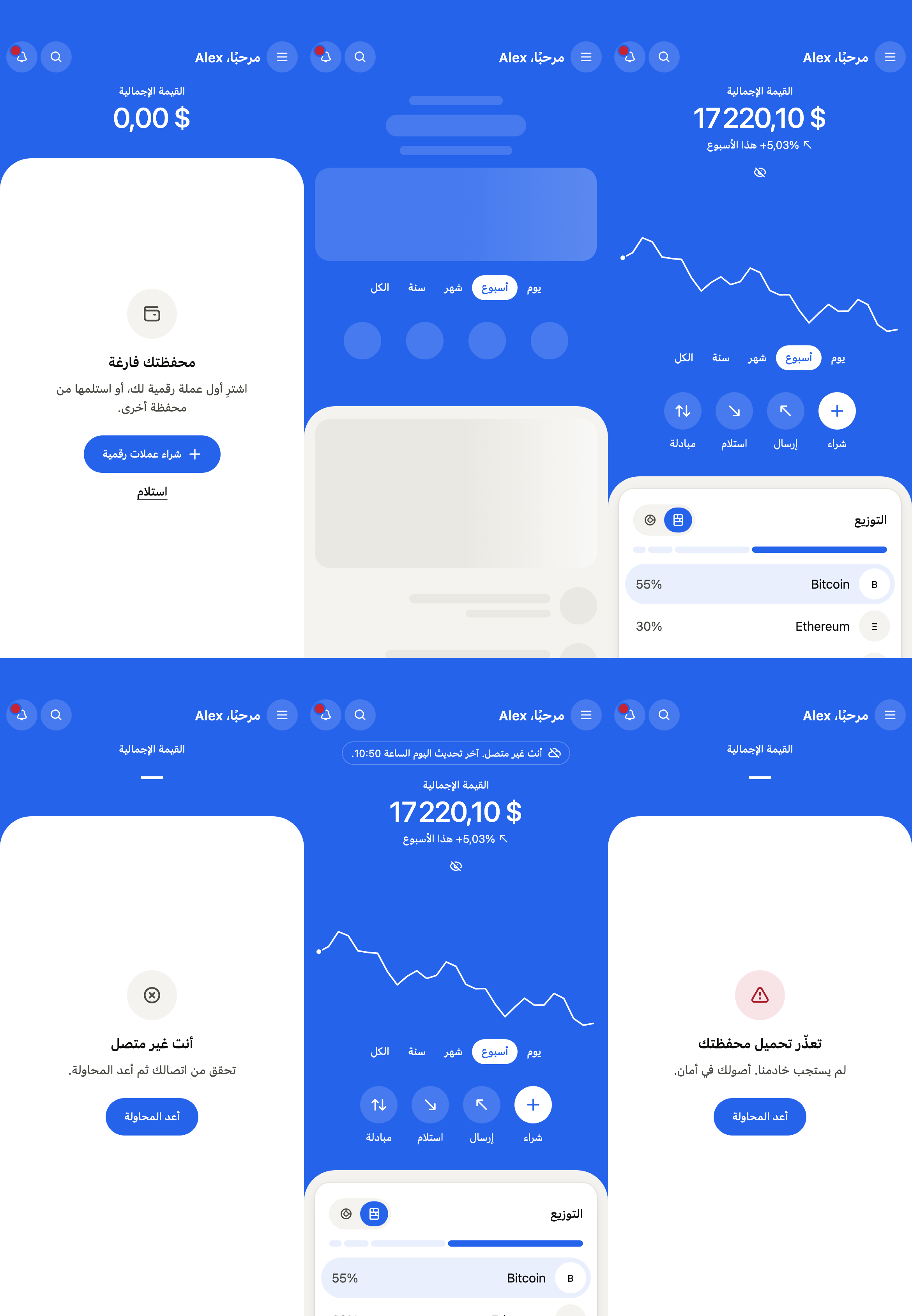
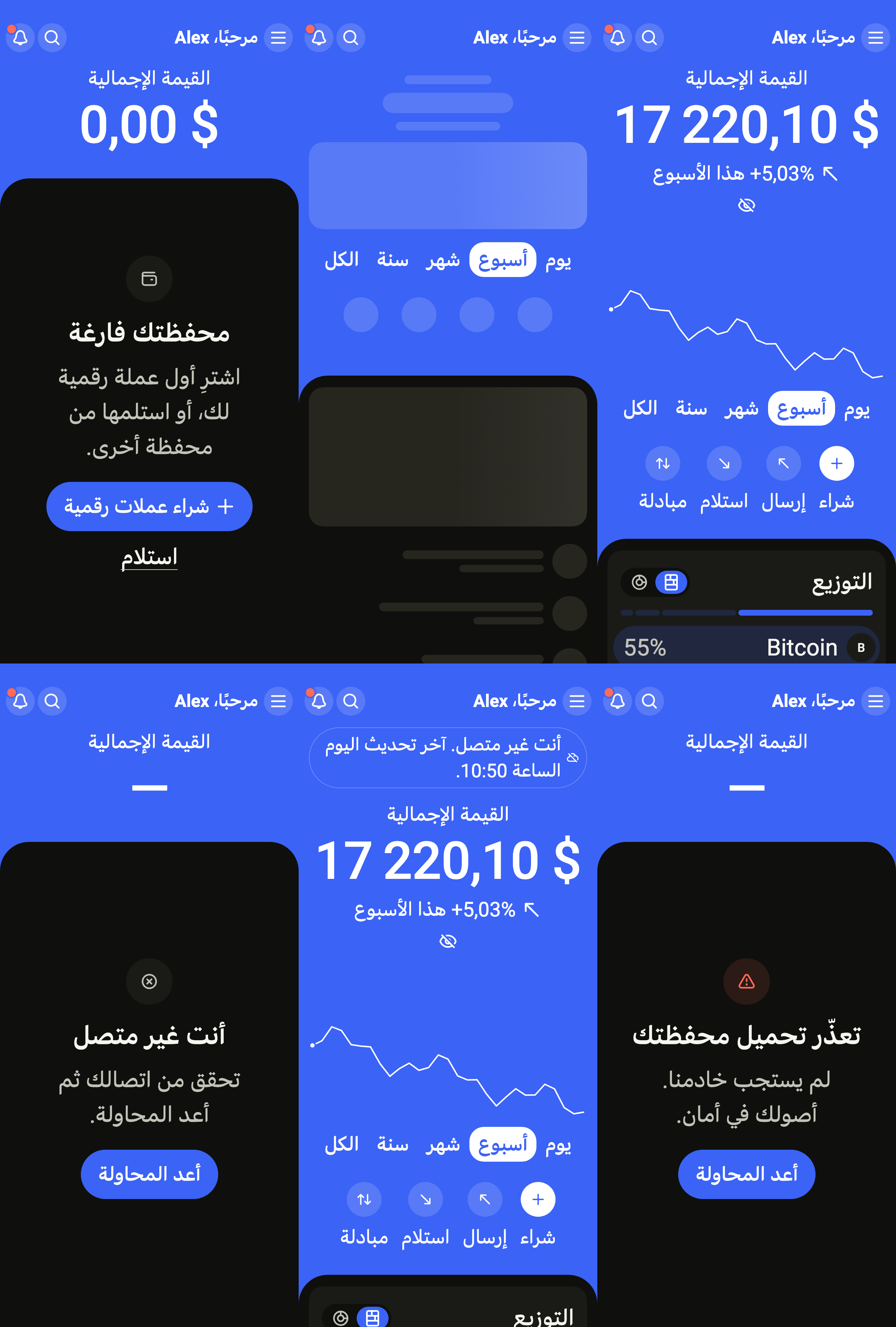
Every label in English, French and Arabic. The screen follows the closest Localizations; the same table is in the manifest, ready for your ARB files.
| Key | en | fr | ar |
|---|---|---|---|
cryptoWalletTitle | Wallet | Portefeuille | المحفظة |
cryptoWalletRefresh | Refresh | Actualiser | تحديث |
cryptoWalletLoading | Loading your wallet | Chargement de votre portefeuille | جارٍ تحميل محفظتك |
cryptoWalletHello | Hello, {name} | Bonjour, {name} | مرحبًا، {name} |
cryptoWalletHelloAlone | Hello | Bonjour | مرحبًا |
cryptoWalletSearch | Search assets | Rechercher un actif | البحث عن أصل |
cryptoWalletNotifications | Notifications | Notifications | الإشعارات |
cryptoWalletNotificationsNew | Notifications, {count} new | Notifications, {count} nouvelles | الإشعارات، {count} جديدة |
cryptoWalletMenu | Menu | Menu | القائمة |
cryptoWalletTotalValue | Total value | Valeur totale | القيمة الإجمالية |
cryptoWalletHideAmounts | Hide amounts | Masquer les montants | إخفاء المبالغ |
cryptoWalletShowAmounts | Show amounts | Afficher les montants | إظهار المبالغ |
cryptoWalletAmountsHidden | Amounts hidden | Montants masqués | المبالغ مخفية |
cryptoWalletRange | Chart period | Période du graphique | فترة الرسم البياني |
cryptoWalletDay | 1D | 1J | يوم |
cryptoWalletWeek | 1W | 1S | أسبوع |
cryptoWalletMonth | 1M | 1M | شهر |
cryptoWalletYear | 1Y | 1A | سنة |
cryptoWalletAll | All | Tout | الكل |
cryptoWalletOverDay | today | aujourd’hui | اليوم |
cryptoWalletOverWeek | this week | cette semaine | هذا الأسبوع |
cryptoWalletOverMonth | this month | ce mois-ci | هذا الشهر |
cryptoWalletOverYear | this year | cette année | هذه السنة |
cryptoWalletOverAll | all time | depuis le début | منذ البداية |
cryptoWalletUp | Up {rate} {period} | En hausse de {rate} {period} | بارتفاع {rate} {period} |
cryptoWalletDown | Down {rate} {period} | En baisse de {rate} {period} | بانخفاض {rate} {period} |
cryptoWalletFlat | Unchanged {period} | Stable {period} | دون تغيير {period} |
cryptoWalletValue | Wallet value | Valeur du portefeuille | قيمة المحفظة |
cryptoWalletChart | Wallet value {period} | Valeur du portefeuille {period} | قيمة المحفظة {period} |
cryptoWalletChartSummary | from {start} to {end}, low {low}, high {high} | de {start} à {end}, au plus bas {low}, au plus haut {high} | من {start} إلى {end}، الأدنى {low}، الأعلى {high} |
cryptoWalletSend | Send | Envoyer | إرسال |
cryptoWalletReceive | Receive | Recevoir | استلام |
cryptoWalletSwap | Swap | Échanger | مبادلة |
cryptoWalletBuy | Buy | Acheter | شراء |
cryptoWalletQuickActions | Quick actions | Actions rapides | إجراءات سريعة |
cryptoWalletAllocation | Allocation | Répartition | التوزيع |
cryptoWalletAllocationStyle | Allocation chart | Graphique de répartition | رسم التوزيع |
cryptoWalletBlocks | Split bar | Barre des parts | شريط الحصص |
cryptoWalletRing | Ring chart | Anneau | رسم حلقي |
cryptoWalletAllocationReading | Allocation: {parts}. | Répartition : {parts}. | التوزيع: {parts}. |
cryptoWalletShareOfWallet | {name}, {share} of wallet | {name}, {share} du portefeuille | {name}، {share} من المحفظة |
cryptoWalletMovers | Top movers | Plus fortes variations | الأكثر تحركًا |
cryptoWalletHours | 24h | 24 h | 24 ساعة |
cryptoWalletLists | Lists | Listes | القوائم |
cryptoWalletAssets | Assets | Actifs | الأصول |
cryptoWalletWatchlist | Watchlist | Suivis | المتابَعة |
cryptoWalletSeeAll | See all | Tout voir | عرض الكل |
cryptoWalletQuantity | {quantity} {symbol} | {quantity} {symbol} | {quantity} {symbol} |
cryptoWalletWatching | Watching | Suivi | متابَع |
cryptoWalletWatchlistEmpty | Nothing on your watchlist yet. | Aucun actif suivi pour l’instant. | لا أصول في قائمة المتابعة بعد. |
cryptoWalletMoverReading | {name}, {change} in 24 hours | {name}, {change} en 24 heures | {name}، {change} خلال 24 ساعة |
cryptoWalletAssetReading | {name}, {price}, {change} in 24 hours | {name}, {price}, {change} en 24 heures | {name}، {price}، {change} خلال 24 ساعة |
cryptoWalletHolding | You hold {quantity} {symbol}, worth {value} | Vous détenez {quantity} {symbol}, soit {value} | تملك {quantity} {symbol} بقيمة {value} |
cryptoWalletCustomize | Customize | Personnaliser | تخصيص |
cryptoWalletEmptyTitle | Your wallet is empty | Votre portefeuille est vide | محفظتك فارغة |
cryptoWalletEmptyMessage | Buy your first crypto, or receive some from another wallet. | Achetez votre première crypto, ou recevez-en depuis un autre portefeuille. | اشترِ أول عملة رقمية لك، أو استلمها من محفظة أخرى. |
cryptoWalletBuyCrypto | Buy crypto | Acheter de la crypto | شراء عملات رقمية |
cryptoWalletBuyAsset | Asset | Actif | الأصل |
cryptoWalletBuyAmount | Amount | Montant | المبلغ |
cryptoWalletPlus | + {amount} | + {amount} | + {amount} |
cryptoWalletBuyEstimate | ≈ {quantity} {symbol} at {price} | ≈ {quantity} {symbol} à {price} | ≈ {quantity} {symbol} بسعر {price} |
cryptoWalletBuyAmountOf | Buy {amount} of {symbol} | Acheter {amount} de {symbol} | شراء {symbol} بقيمة {amount} |
cryptoWalletBuyFailed | Couldn’t complete the purchase. Try again. | Impossible de finaliser l’achat. Réessayez. | تعذّر إتمام الشراء. أعد المحاولة. |
cryptoWalletBuyOffline | You’re offline. Nothing was bought. | Vous êtes hors ligne. Rien n’a été acheté. | أنت غير متصل. لم يتم شراء أي شيء. |
cryptoWalletClose | Close | Fermer | إغلاق |
cryptoWalletErrorTitle | We couldn’t load your wallet | Impossible de charger votre portefeuille | تعذّر تحميل محفظتك |
cryptoWalletErrorMessage | Our server didn’t answer. Your assets are safe. | Notre serveur n’a pas répondu. Vos actifs ne risquent rien. | لم يستجب خادمنا. أصولك في أمان. |
cryptoWalletOfflineTitle | You are offline | Vous êtes hors ligne | أنت غير متصل |
cryptoWalletOfflineMessage | Check your connection, then try again. | Vérifiez votre connexion, puis réessayez. | تحقق من اتصالك ثم أعد المحاولة. |
cryptoWalletRetry | Try again | Réessayer | أعد المحاولة |
cryptoWalletRefreshFailed | Couldn’t refresh. Prices may be out of date. | Actualisation impossible. Les prix ne sont peut-être plus à jour. | تعذّر التحديث. قد لا تكون الأسعار محدّثة. |
cryptoWalletOfflineSince | You’re offline. Updated {date} at {time}. | Vous êtes hors ligne. Mis à jour le {date} à {time}. | أنت غير متصل. آخر تحديث {date} الساعة {time}. |
cryptoWalletOfflineToday | You’re offline. Updated today at {time}. | Vous êtes hors ligne. Mis à jour aujourd’hui à {time}. | أنت غير متصل. آخر تحديث اليوم الساعة {time}. |
cryptoWalletWeekdaysShort | Mon,Tue,Wed,Thu,Fri,Sat,Sun | lun.,mar.,mer.,jeu.,ven.,sam.,dim. | الاثنين,الثلاثاء,الأربعاء,الخميس,الجمعة,السبت,الأحد |
cryptoWalletMonthsShort | Jan,Feb,Mar,Apr,May,Jun,Jul,Aug,Sep,Oct,Nov,Dec | janv.,févr.,mars,avr.,mai,juin,juil.,août,sept.,oct.,nov.,déc. | يناير,فبراير,مارس,أبريل,مايو,يونيو,يوليو,أغسطس,سبتمبر,أكتوبر,نوفمبر,ديسمبر |
cryptoWalletAtTime | {weekday} {time} | {weekday} {time} | {weekday} {time} |
cryptoWalletAtDayTime | {weekday} {day} {month}, {time} | {weekday} {day} {month}, {time} | {weekday} {day} {month}، {time} |
cryptoWalletAtDay | {weekday} {day} {month} | {weekday} {day} {month} | {weekday} {day} {month} |
cryptoWalletAtDate | {day} {month} {year} | {day} {month} {year} | {day} {month} {year} |
cryptoWalletAtMonth | {month} {year} | {month} {year} | {month} {year} |
cryptoWalletDayMonth | {day} {month} | {day} {month} | {day} {month} |
Reference renders
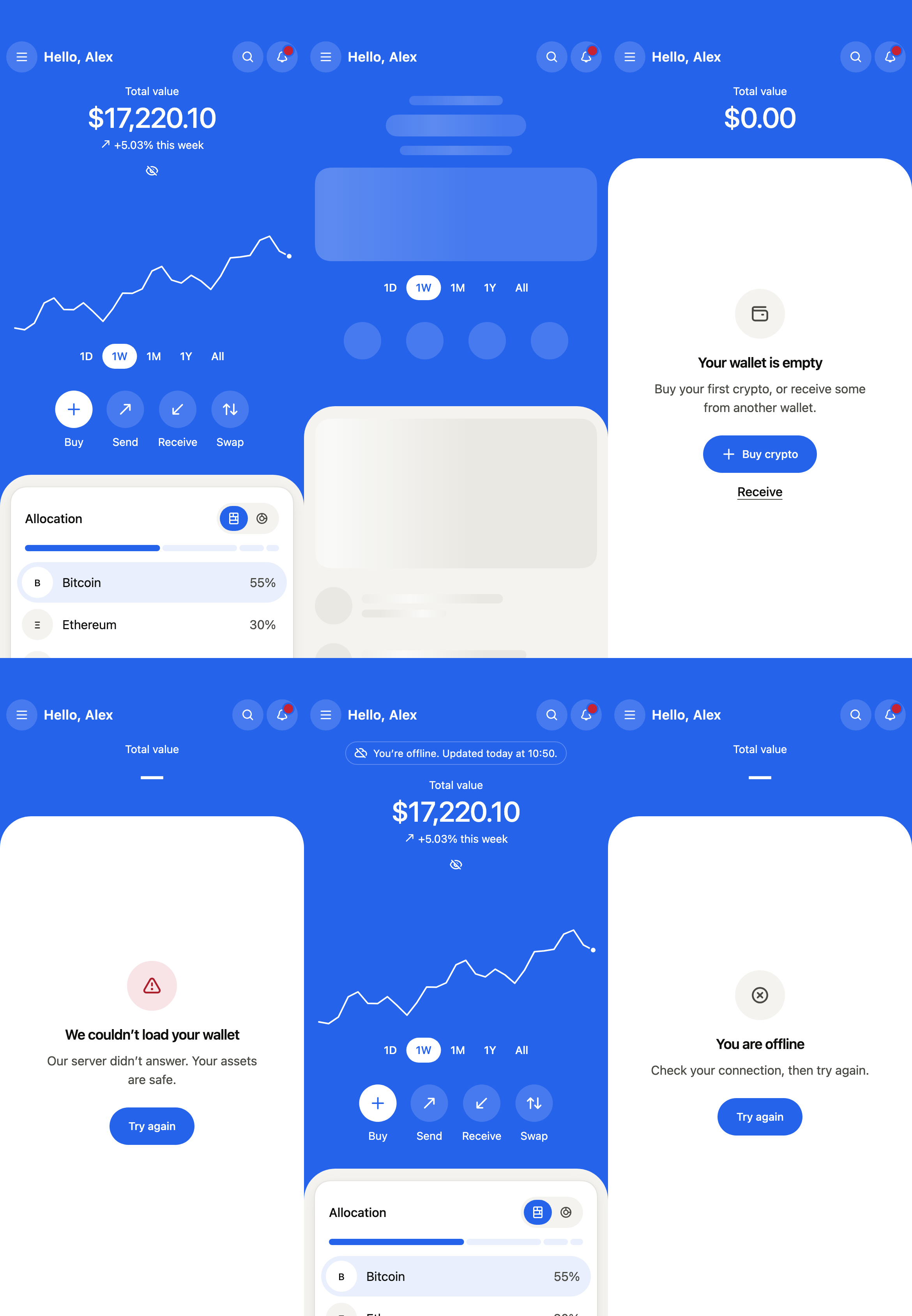
The 16 images published with version 0.2.0, rendered by the shared harness on macOS with Flutter 3.47.7. Each shows every state side by side, at the size of an iPhone (390 × 844) or of an Android phone (412 × 915). fliin verify crypto-wallet compares your copy to them.
Use it to
- show the value of a crypto wallet and how it moved over a period
- show a crypto portfolio's trend from the last 24 hours to all time
- send, receive, swap or buy crypto from the home screen
- show how a crypto portfolio is split between coins, as a bar or a ring
- show the coins that moved the most in 24 hours
- show the coins held and watched with their price and change
- Not for
- a bank account's balance, budget and spending: use the finance dashboard (finance-dashboard)
- a chart alone: use a chart (chart)
- States