Screens / dashboard
Finance report
Shows a month's expenses or income by category as tiles, a ring or a table, one row per category with its share and its change from last month, and a month stepper.
Import
Finance report is part of Fliin Pro. With a license key, sign in once with fliin login, then add it in a Flutter app where fliin init has run:
fliin login
fliin add finance-report
Also installs: app-bar, chart, core, empty-state, icons, page, segmented, skeleton, surface
Examples
Ready
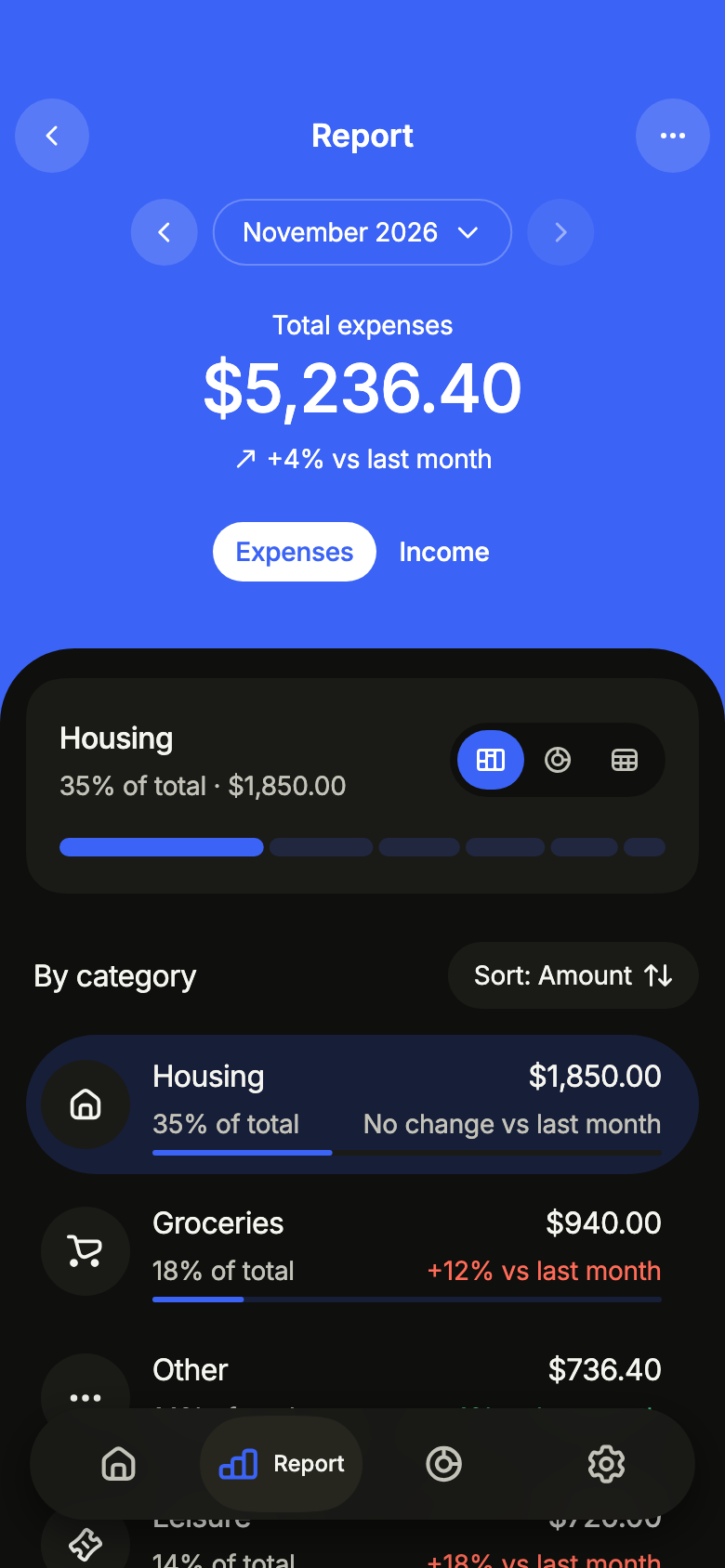
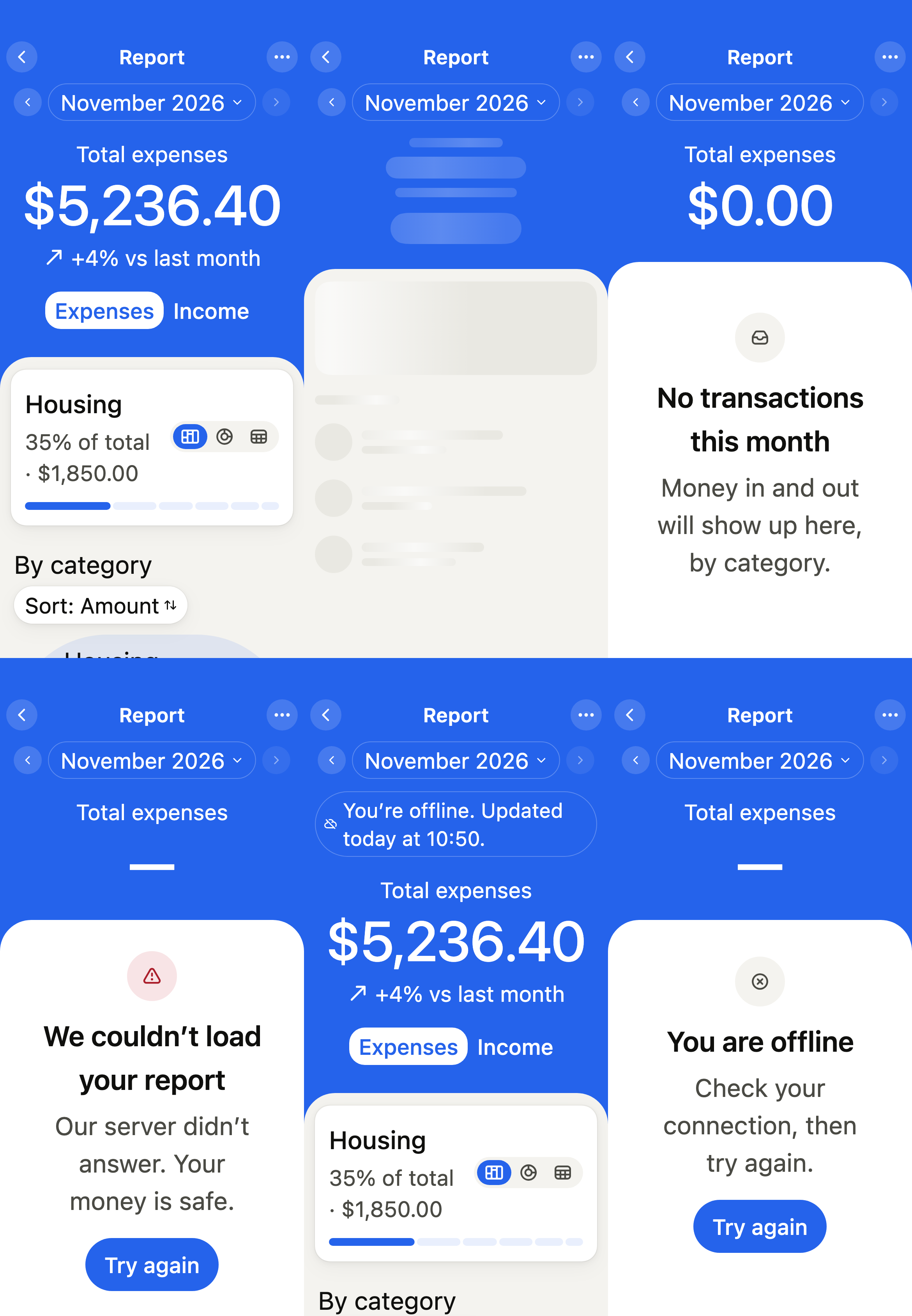
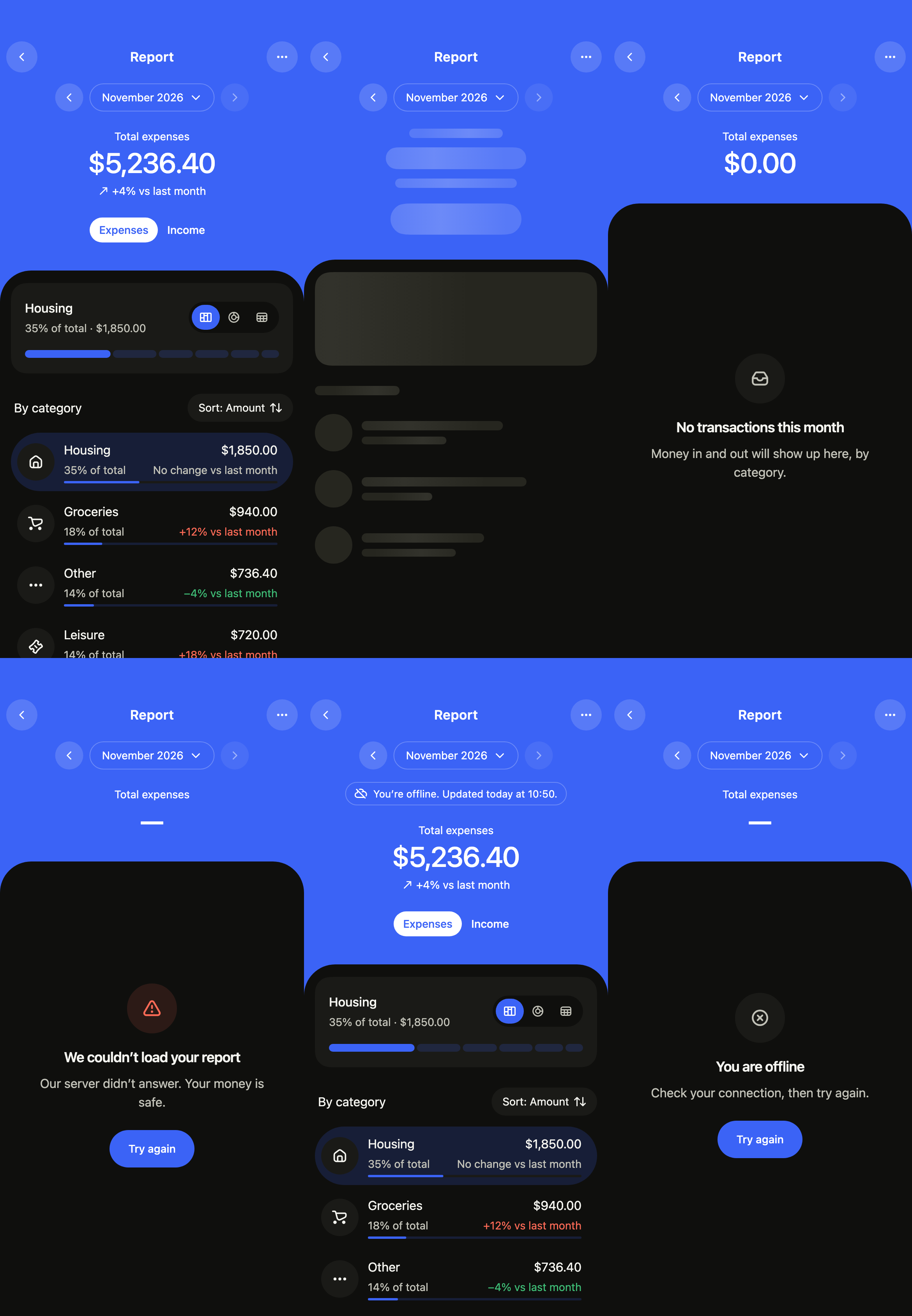
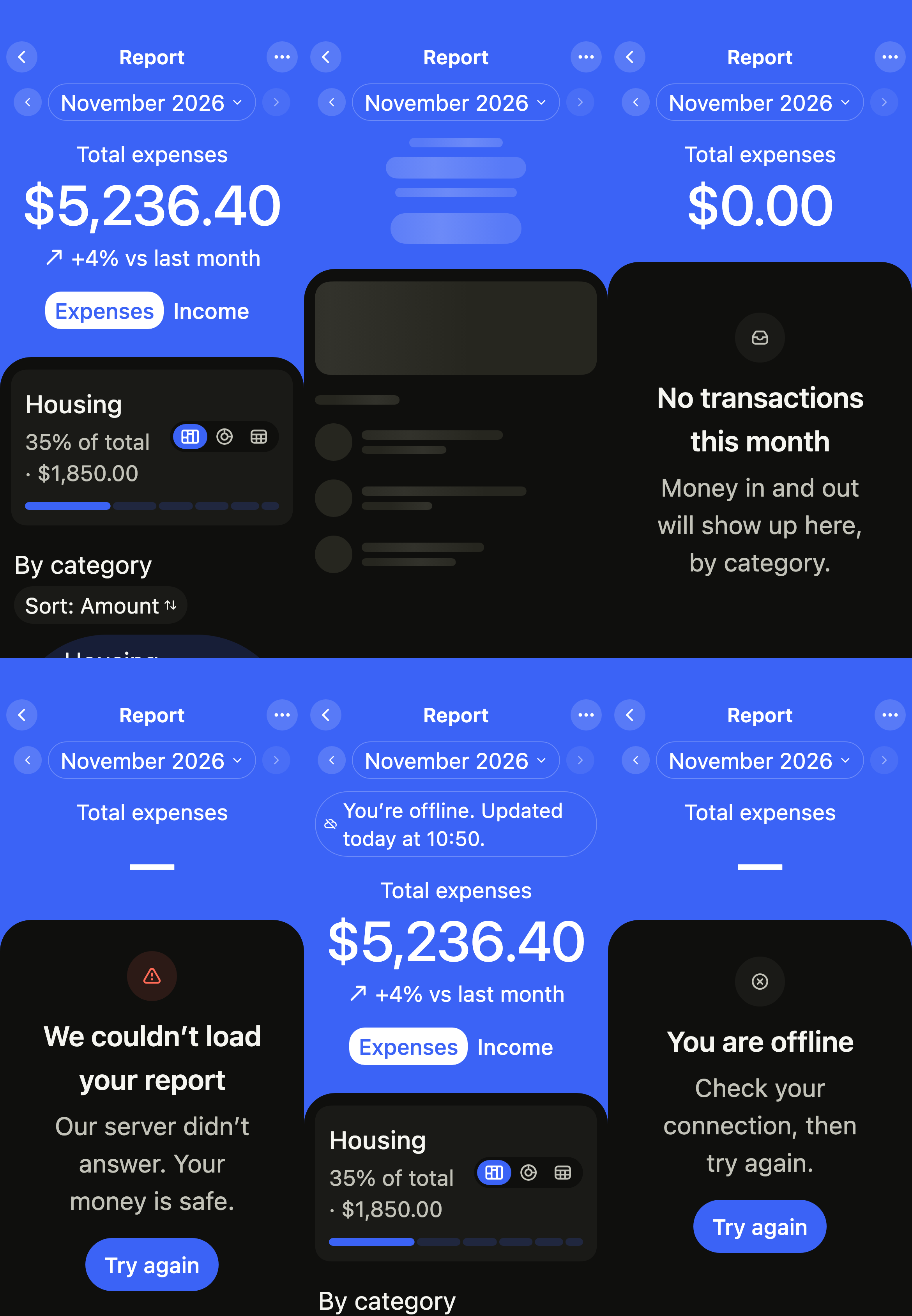
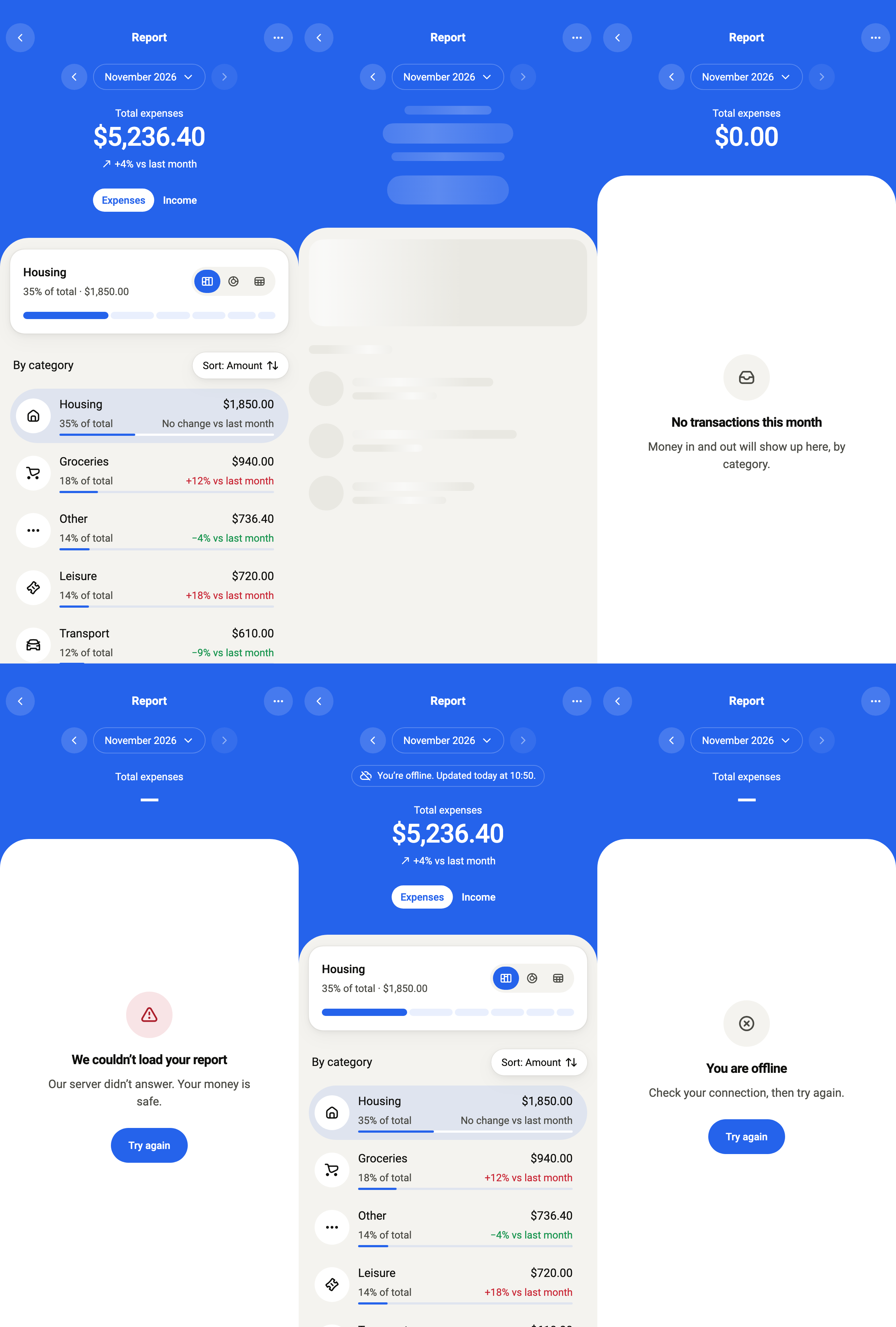
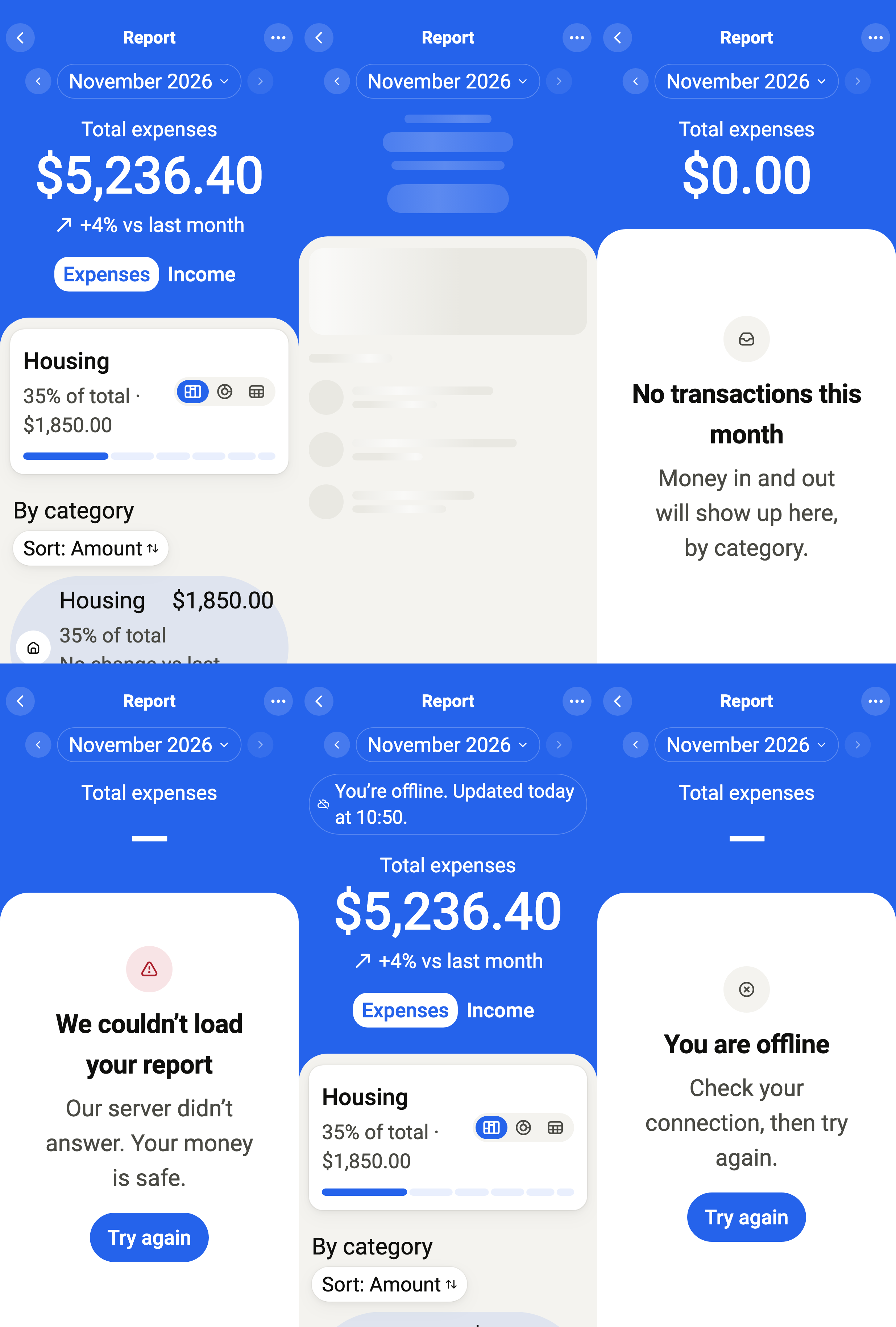
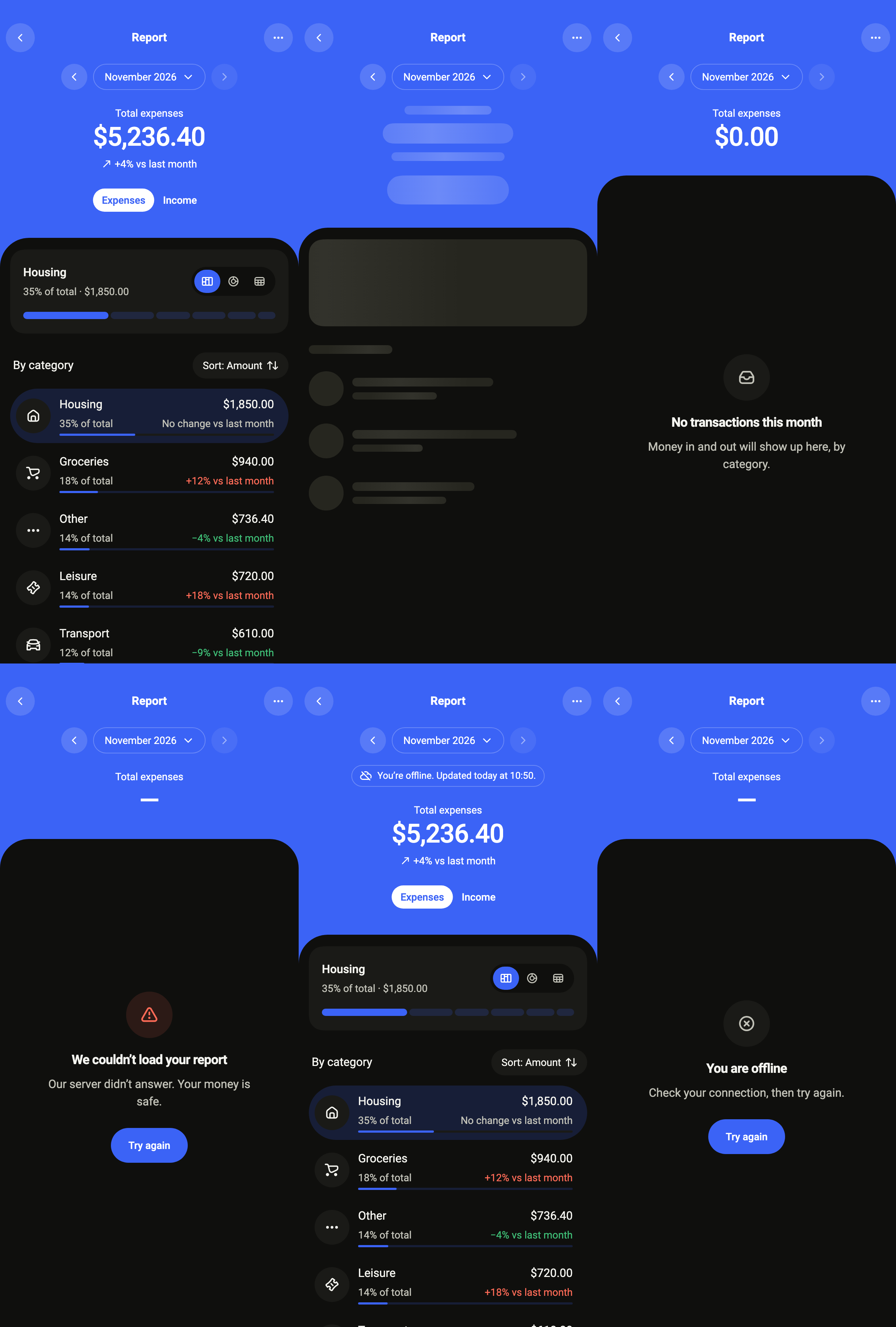
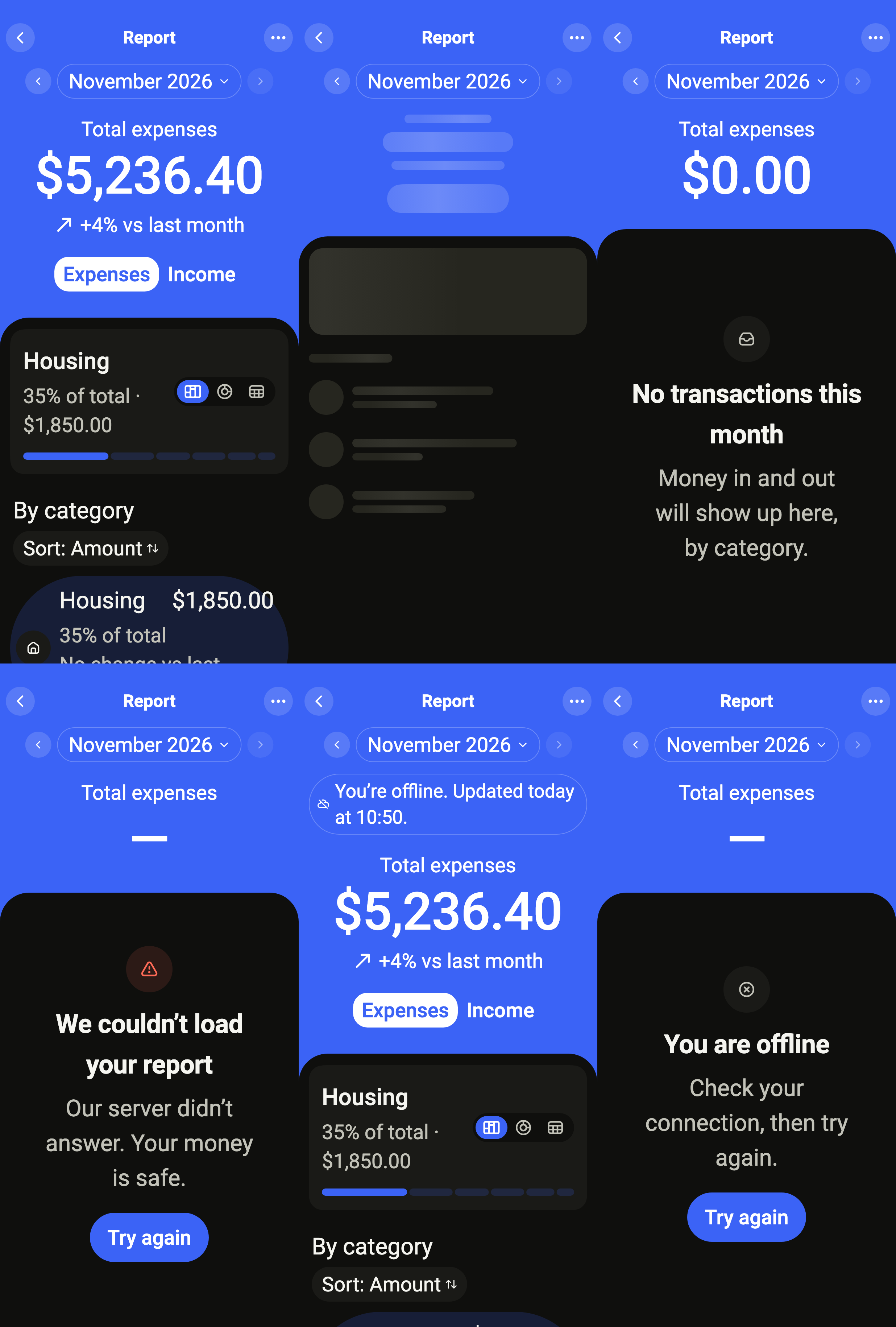
The month's report: the month's total on a band in the theme's accent, then where the money went or came from, by category, under the app's floating tab bar. The arrows step from month to month; the month's name opens your picker, here a sheet of this year's months.
import 'package:your_app/ui/fliin/components/button/fl_button.dart';
import 'package:your_app/ui/fliin/components/sheet/fl_sheet.dart';
import 'package:your_app/ui/fliin/components/tab_bar/fl_tab_bar.dart';
import 'package:your_app/ui/fliin/core/fliin.dart';
import 'package:your_app/ui/fliin/icons/fl_icons.dart';
import 'package:your_app/ui/fliin/screens/finance_report/finance_report_controller.dart';
import 'package:your_app/ui/fliin/screens/finance_report/finance_report_data.dart';
import 'package:your_app/ui/fliin/screens/finance_report/finance_report_screen.dart';
import 'package:flutter/widgets.dart';

class FinanceReportReadyExample extends StatefulWidget {
  const FinanceReportReadyExample({super.key});

  @override
  State<FinanceReportReadyExample> createState() => _FinanceReportReadyExampleState();
}

class _FinanceReportReadyExampleState extends State<FinanceReportReadyExample> {
  int _tab = 1;

  Future<DateTime?> _pickMonth(DateTime shown) => showFlSheet<DateTime>(
    context,
    label: 'Choose a month',
    barrierLabel: 'Close',
    title: 'Choose a month',
    fitContent: true,
    builder: (context) {
      final theme = FlScope.of(context);
      final now = sampleReportNow;
      const names = ['Jan', 'Feb', 'Mar', 'Apr', 'May', 'Jun', 'Jul', 'Aug', 'Sep', 'Oct', 'Nov', 'Dec'];
      return Padding(
        padding: EdgeInsetsDirectional.fromSTEB(theme.space.lg, 0, theme.space.lg, theme.space.lg),
        child: Wrap(
          spacing: theme.space.sm,
          runSpacing: theme.space.sm,
          children: [
            for (var m = 1; m <= now.month; m++)
              FlButton(
                label: names[m - 1],
                variant: m == shown.month && shown.year == now.year
                    ? FlButtonVariant.secondary
                    : FlButtonVariant.tertiary,
                selected: m == shown.month && shown.year == now.year,
                onPressed: () => Navigator.of(context).pop(DateTime(now.year, m)),
              ),
          ],
        ),
      );
    },
  );

  @override
  Widget build(BuildContext context) {
    return FinanceReportScreen.standalone(
      service: const SampleFinanceReportService(latency: Duration(milliseconds: 900)),
      initial: ReportLoaded(sampleMonthlyReport(sampleReportNow)),
      onBack: () {},
      onMore: () {},
      onPickMonth: _pickMonth,
      onOpenCategory: (category, flow, month) {},
      now: sampleReportNow,
      tabBar: FlBottomTabBar(
        floating: true,
        translucent: true,
        labels: FlBottomTabLabels.beside,
        indicator: FlBottomTabIndicator.capsule,
        index: _tab,
        onSelected: (index) => setState(() => _tab = index),
        tabs: [
          FlBottomTab(icon: FlIcon(FlIcons.house), label: 'Home'),
          FlBottomTab(icon: FlIcon(FlIcons.chartColumn), label: 'Report'),
          FlBottomTab(icon: FlIcon(FlIcons.chartDonut), label: 'Plan'),
          FlBottomTab(icon: FlIcon(FlIcons.gear), label: 'Settings'),
        ],
      ),
    );
  }
}Loading
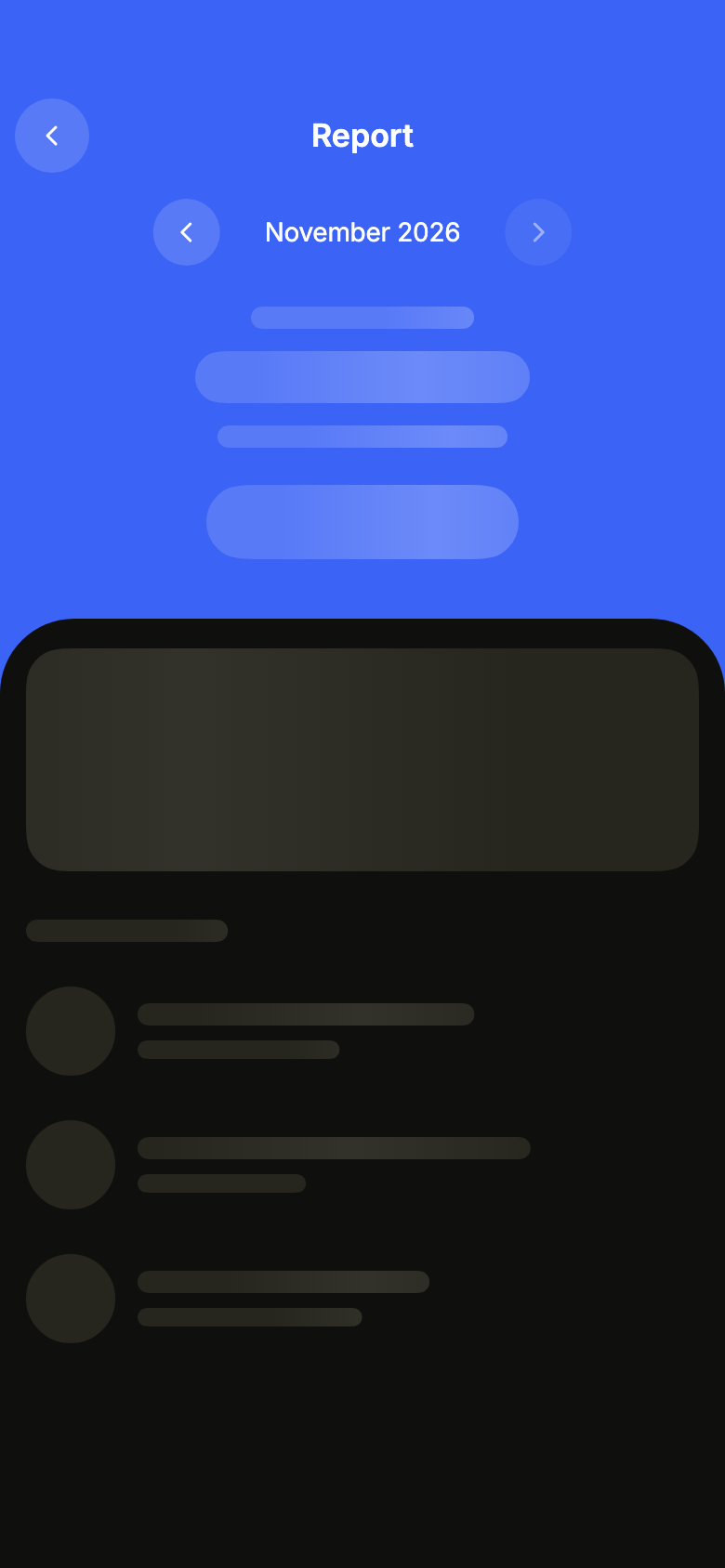
While the month loads, skeletons keep the place of the chart and the rows; the arrows already step to another month.
import 'package:your_app/ui/fliin/screens/finance_report/finance_report_controller.dart';
import 'package:your_app/ui/fliin/screens/finance_report/finance_report_data.dart';
import 'package:your_app/ui/fliin/screens/finance_report/finance_report_screen.dart';
import 'package:flutter/widgets.dart';

class FinanceReportLoadingExample extends StatelessWidget {
  const FinanceReportLoadingExample({super.key});

  @override
  Widget build(BuildContext context) {
    return FinanceReportScreen.standalone(
      service: const SampleFinanceReportService(latency: Duration(milliseconds: 900)),
      initial: ReportLoading(reportMonthOf(sampleReportNow)),
      onBack: () {},
      onOpenCategory: (category, flow, month) {},
      now: sampleReportNow,
    );
  }
}Empty
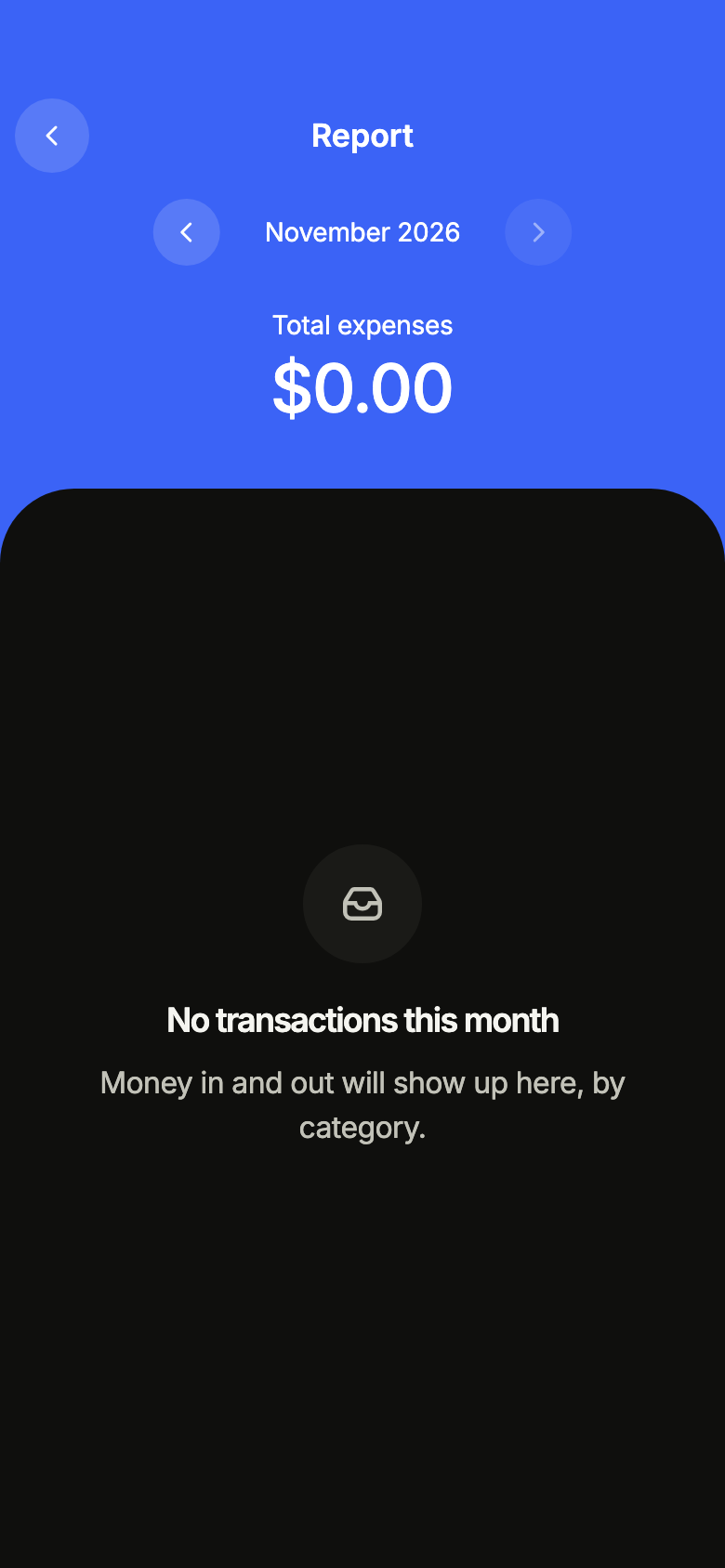
A month without any money in or out: the report says so rather than drawing an empty chart, and the arrows lead to another month.
import 'package:your_app/ui/fliin/screens/finance_report/finance_report_controller.dart';
import 'package:your_app/ui/fliin/screens/finance_report/finance_report_data.dart';
import 'package:your_app/ui/fliin/screens/finance_report/finance_report_screen.dart';
import 'package:flutter/widgets.dart';

class FinanceReportEmptyExample extends StatelessWidget {
  const FinanceReportEmptyExample({super.key});

  @override
  Widget build(BuildContext context) {
    return FinanceReportScreen.standalone(
      service: const SampleFinanceReportService(latency: Duration(milliseconds: 900)),
      initial: ReportEmpty(reportMonthOf(sampleReportNow)),
      onBack: () {},
      onOpenCategory: (category, flow, month) {},
      now: sampleReportNow,
    );
  }
}Error
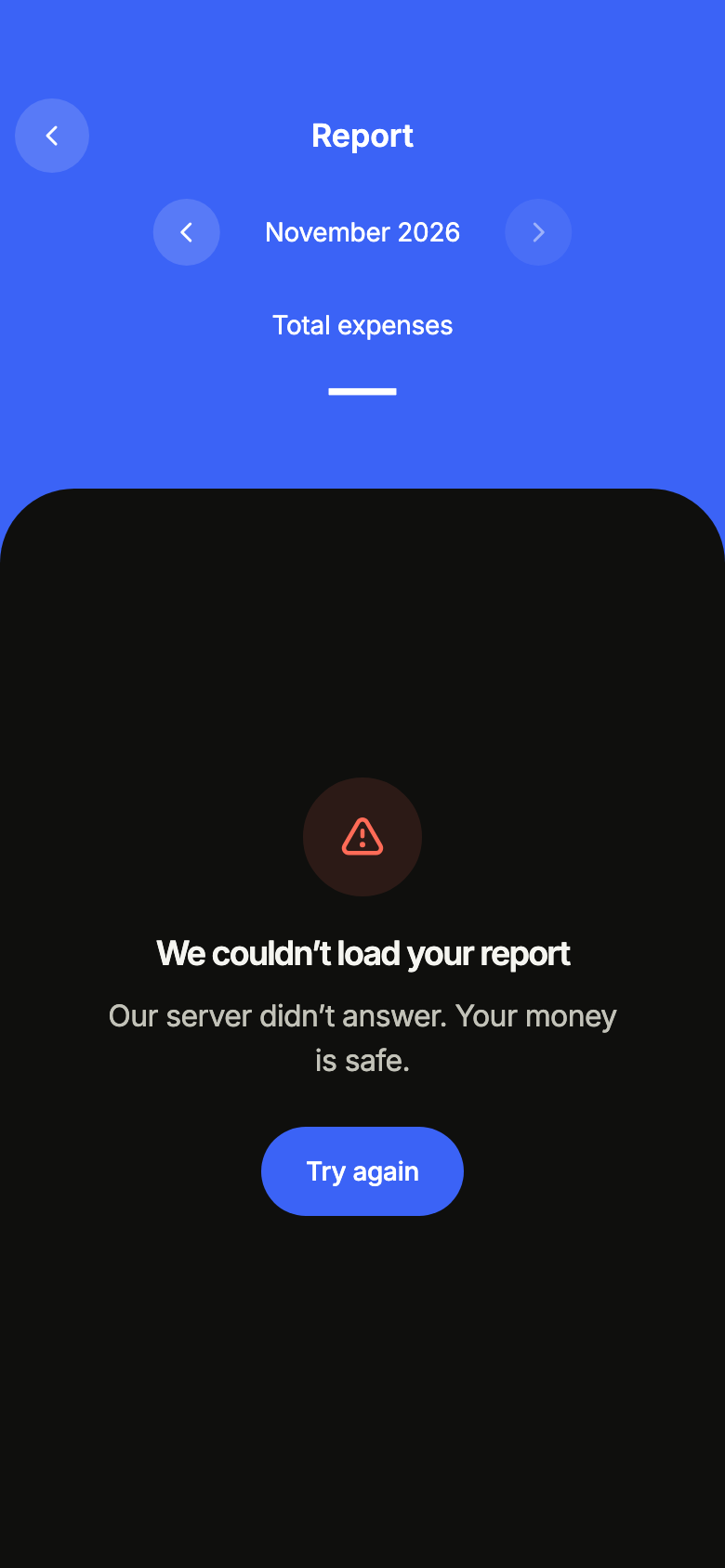
When loading fails, the screen says so and offers to try again.
import 'package:your_app/ui/fliin/screens/finance_report/finance_report_controller.dart';
import 'package:your_app/ui/fliin/screens/finance_report/finance_report_data.dart';
import 'package:your_app/ui/fliin/screens/finance_report/finance_report_screen.dart';
import 'package:flutter/widgets.dart';

class FinanceReportErrorExample extends StatelessWidget {
  const FinanceReportErrorExample({super.key});

  @override
  Widget build(BuildContext context) {
    return FinanceReportScreen.standalone(
      service: const SampleFinanceReportService(latency: Duration(milliseconds: 900)),
      initial: ReportFailed(reportMonthOf(sampleReportNow)),
      onBack: () {},
      onOpenCategory: (category, flow, month) {},
      now: sampleReportNow,
    );
  }
}Offline
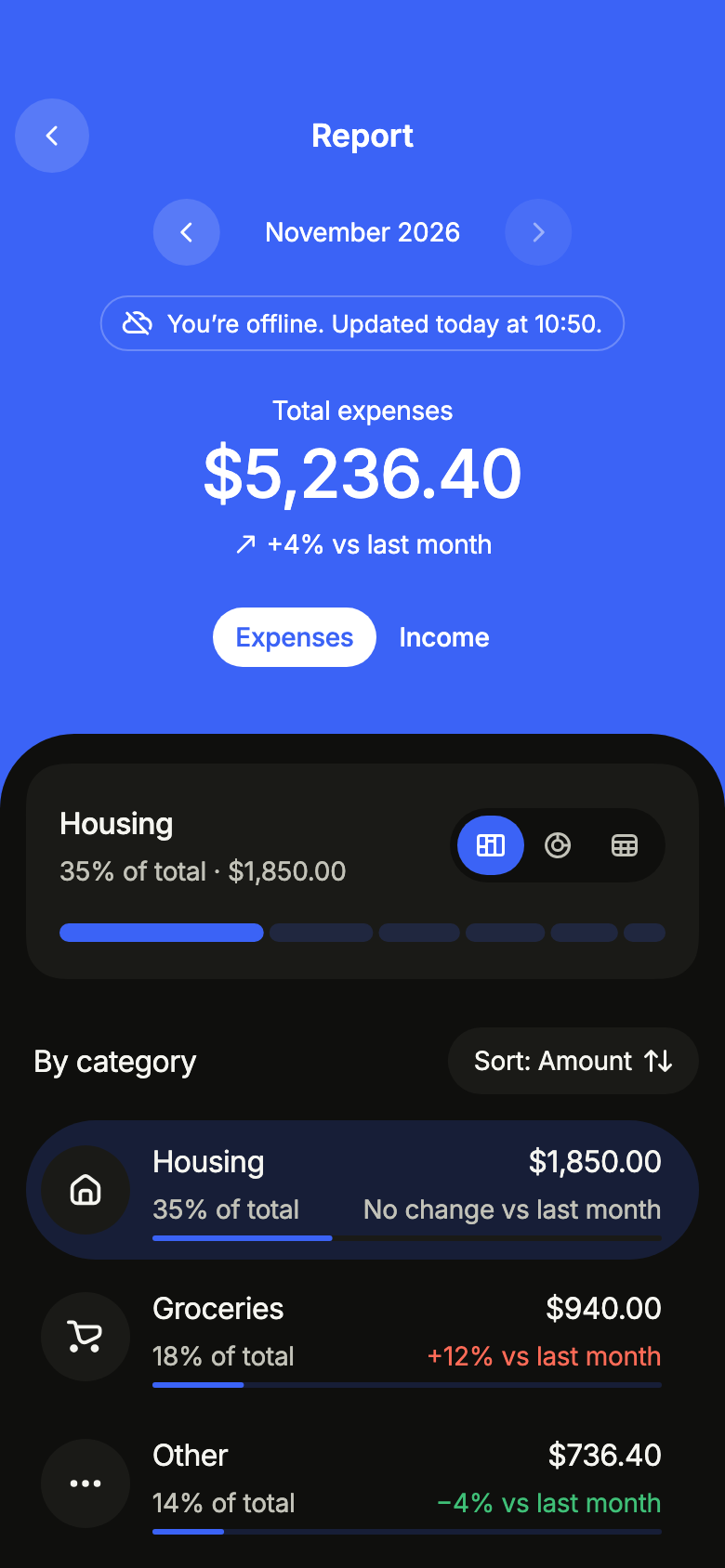
Offline with the month already loaded: the figures stay, under a notice that says when they were last updated.
import 'package:your_app/ui/fliin/screens/finance_report/finance_report_controller.dart';
import 'package:your_app/ui/fliin/screens/finance_report/finance_report_data.dart';
import 'package:your_app/ui/fliin/screens/finance_report/finance_report_screen.dart';
import 'package:flutter/widgets.dart';

class FinanceReportOfflineExample extends StatelessWidget {
  const FinanceReportOfflineExample({super.key});

  @override
  Widget build(BuildContext context) {
    return FinanceReportScreen.standalone(
      service: const SampleFinanceReportService(latency: Duration(milliseconds: 900)),
      initial: ReportLoaded(sampleMonthlyReport(sampleReportNow), notice: ReportNotice.offline),
      onBack: () {},
      onOpenCategory: (category, flow, month) {},
      now: sampleReportNow,
    );
  }
}Offline empty
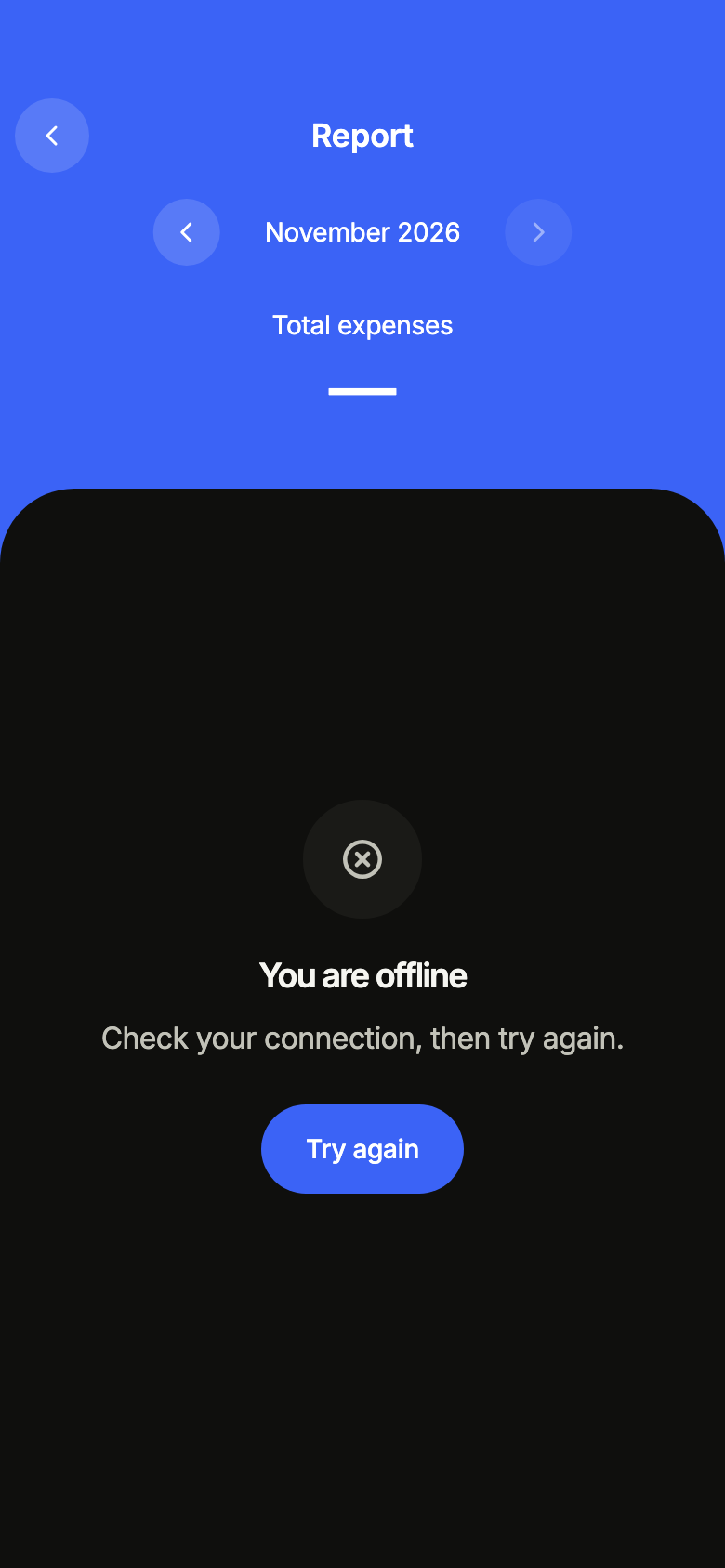
Offline with nothing loaded yet: the screen asks to reconnect.
import 'package:your_app/ui/fliin/screens/finance_report/finance_report_controller.dart';
import 'package:your_app/ui/fliin/screens/finance_report/finance_report_data.dart';
import 'package:your_app/ui/fliin/screens/finance_report/finance_report_screen.dart';
import 'package:flutter/widgets.dart';

class FinanceReportOfflineEmptyExample extends StatelessWidget {
  const FinanceReportOfflineEmptyExample({super.key});

  @override
  Widget build(BuildContext context) {
    return FinanceReportScreen.standalone(
      service: const SampleFinanceReportService(latency: Duration(milliseconds: 900)),
      initial: ReportOffline(reportMonthOf(sampleReportNow)),
      onBack: () {},
      onOpenCategory: (category, flow, month) {},
      now: sampleReportNow,
    );
  }
}Routing
fliin add finance-report prints the route for the router it finds in your pubspec, a file next to the page that wires its navigation. Each of them:
go_router
// lib/finance_report_route.dart, next to finance_report_page.dart.
import 'package:go_router/go_router.dart';

import 'finance_report_page.dart';

/// Add financeReportRoute to the routes of your GoRouter.
final financeReportRoute = GoRoute(
  path: '/finances/report',
  builder: (context, state) => FinanceReportPage(
    // Alone in the stack (deep link, go): your app's home.
    onBack: () => context.canPop() ? context.pop() : context.go('/'),
  ),
);navigator
// lib/finance_report_route.dart, next to finance_report_page.dart.
import 'package:flutter/material.dart';

import 'finance_report_page.dart';

/// Opens “Finance report”: `Navigator.of(context).push(financeReportRoute())`.
Route<void> financeReportRoute() => MaterialPageRoute<void>(
  builder: (context) => FinanceReportPage(
    onBack: () => Navigator.of(context).maybePop(),
  ),
);State
The controller is a ChangeNotifier from widgets.dart, with no package. fliin add finance-report prints the page that holds it with the state management it finds, its imports written for your package; below they read your_app. Your backend implements the Service interface of the screen's _data.dart file:
none
// lib/finance_report_page.dart
// Your backend: implement FinanceReportService (finance_report_data.dart) and pass it instead of the sample service.
import 'package:your_app/ui/fliin/screens/finance_report/finance_report_data.dart';
import 'package:your_app/ui/fliin/screens/finance_report/finance_report_screen.dart';
import 'package:flutter/widgets.dart';

class FinanceReportPage extends StatelessWidget {
  const FinanceReportPage({
    super.key,
    required this.onBack,
  });

  final VoidCallback onBack;

  @override
  Widget build(BuildContext context) => FinanceReportScreen.standalone(
    service: const SampleFinanceReportService(),
    onBack: onBack,
  );
}provider
// lib/finance_report_page.dart
// Your backend: implement FinanceReportService (finance_report_data.dart) and pass it instead of the sample service.
import 'package:your_app/ui/fliin/screens/finance_report/finance_report_controller.dart';
import 'package:your_app/ui/fliin/screens/finance_report/finance_report_data.dart';
import 'package:your_app/ui/fliin/screens/finance_report/finance_report_screen.dart';
import 'package:flutter/widgets.dart';
import 'package:provider/provider.dart';

class FinanceReportPage extends StatelessWidget {
  const FinanceReportPage({
    super.key,
    required this.onBack,
  });

  final VoidCallback onBack;

  @override
  Widget build(BuildContext context) => ChangeNotifierProvider(
    create: (_) => FinanceReportController(service: const SampleFinanceReportService())..load(),
    child: Builder(
      builder: (context) => FinanceReportScreen(
        controller: context.read<FinanceReportController>(),
        onBack: onBack,
      ),
    ),
  );
}riverpod
// lib/finance_report_page.dart
// Your backend: implement FinanceReportService (finance_report_data.dart) and pass it instead of the sample service.
import 'package:your_app/ui/fliin/screens/finance_report/finance_report_controller.dart';
import 'package:your_app/ui/fliin/screens/finance_report/finance_report_data.dart';
import 'package:your_app/ui/fliin/screens/finance_report/finance_report_screen.dart';
import 'package:flutter/widgets.dart';
import 'package:flutter_riverpod/flutter_riverpod.dart';

final financeReportProvider = Provider.autoDispose<FinanceReportController>((ref) {
  final controller = FinanceReportController(service: const SampleFinanceReportService())..load();
  ref.onDispose(controller.dispose);
  return controller;
});

class FinanceReportPage extends ConsumerWidget {
  const FinanceReportPage({
    super.key,
    required this.onBack,
  });

  final VoidCallback onBack;

  @override
  Widget build(BuildContext context, WidgetRef ref) => FinanceReportScreen(
    controller: ref.watch(financeReportProvider),
    onBack: onBack,
  );
}bloc
// lib/finance_report_page.dart
// Your backend: implement FinanceReportService (finance_report_data.dart) and pass it instead of the sample service.
import 'package:your_app/ui/fliin/screens/finance_report/finance_report_controller.dart';
import 'package:your_app/ui/fliin/screens/finance_report/finance_report_data.dart';
import 'package:your_app/ui/fliin/screens/finance_report/finance_report_screen.dart';
import 'package:flutter/widgets.dart';
import 'package:flutter_bloc/flutter_bloc.dart';

/// The screen's controller as a bloc, for your BlocListener and BlocBuilder:
/// one emission per controller notification. `version` tells them apart
/// when `state` does not change (mode, filters, text…, read them on
/// `controller`). The screen listens to the controller itself.
class FinanceReportCubit extends Cubit<({FinanceReportState state, int version})> {
  FinanceReportCubit(this.controller) : super((state: controller.state, version: 0)) {
    controller.addListener(_changed);
  }

  final FinanceReportController controller;

  void _changed() => emit((state: controller.state, version: state.version + 1));

  @override
  Future<void> close() {
    controller
      ..removeListener(_changed)
      ..dispose();
    return super.close();
  }
}

class FinanceReportPage extends StatelessWidget {
  const FinanceReportPage({
    super.key,
    required this.onBack,
  });

  final VoidCallback onBack;

  @override
  Widget build(BuildContext context) => BlocProvider(
    create: (_) => FinanceReportCubit(FinanceReportController(service: const SampleFinanceReportService())..load()),
    child: Builder(
      builder: (context) => FinanceReportScreen(
        controller: context.read<FinanceReportCubit>().controller,
        onBack: onBack,
      ),
    ),
  );
}API
ReportChartStyle: enum {blocks, ring, table}
ReportChartStyle.blocks: static final ReportChartStyle
ReportChartStyle.ring: static final ReportChartStyle
ReportChartStyle.table: static final ReportChartStyle
ReportCategoryCallback: typedef = void Function(ReportCategory category, ReportFlow flow, DateTime month)
FinanceReportScreen: class extends StatefulWidget
FinanceReportScreen.new: const new({super.key, required FinanceReportController controller, VoidCallback? onBack, VoidCallback? onMore, Future<DateTime?> Function(DateTime month)? onPickMonth, ReportCategoryCallback? onOpenCategory, Widget? tabBar, FinanceReportFormat? format, DateTime? now})
FinanceReportScreen.standalone: const new({super.key, required FinanceReportService service, FinanceReportState? initial, DateTime? month, VoidCallback? onBack, VoidCallback? onMore, Future<DateTime?> Function(DateTime month)? onPickMonth, ReportCategoryCallback? onOpenCategory, Widget? tabBar, FinanceReportFormat? format, DateTime? now})
FinanceReportScreen.controller: get FinanceReportController?
FinanceReportScreen.service: get FinanceReportService?
FinanceReportScreen.initial: get FinanceReportState?
FinanceReportScreen.month: get DateTime?
FinanceReportScreen.onBack: get VoidCallback?
FinanceReportScreen.onMore: get VoidCallback?
FinanceReportScreen.onPickMonth: get Future<DateTime?> Function(DateTime month)?
FinanceReportScreen.onOpenCategory: get ReportCategoryCallback?
FinanceReportScreen.tabBar: get Widget?
FinanceReportScreen.format: get FinanceReportFormat?
FinanceReportScreen.now: get DateTime?
FinanceReportScreen.createState: State<FinanceReportScreen>()
reportMonthOf: DateTime(DateTime at)
FinanceReportState: sealed class permits {ReportEmpty, ReportFailed, ReportLoaded, ReportLoading, ReportOffline}
FinanceReportState.new: const new()
FinanceReportState.month: abstract get DateTime
ReportLoading: final class extends FinanceReportState
ReportLoading.new: const new(DateTime month)
ReportLoading.month: get DateTime
ReportNotice: enum {refreshFailed, offline}
ReportNotice.refreshFailed: static final ReportNotice
ReportNotice.offline: static final ReportNotice
ReportLoaded: final class extends FinanceReportState
ReportLoaded.new: const new(MonthlyReport report, {ReportNotice? notice})
ReportLoaded.report: get MonthlyReport
ReportLoaded.notice: get ReportNotice?
ReportLoaded.month: get DateTime
ReportEmpty: final class extends FinanceReportState
ReportEmpty.new: const new(DateTime month, {ReportNotice? notice})
ReportEmpty.month: get DateTime
ReportEmpty.notice: get ReportNotice?
ReportFailed: final class extends FinanceReportState
ReportFailed.new: const new(DateTime month)
ReportFailed.month: get DateTime
ReportOffline: final class extends FinanceReportState
ReportOffline.new: const new(DateTime month)
ReportOffline.month: get DateTime
FinanceReportController: class extends ChangeNotifier
FinanceReportController.new: new({required FinanceReportService service, FinanceReportState? initial, DateTime? month})
FinanceReportController.service: get FinanceReportService
FinanceReportController.state: get FinanceReportState
FinanceReportController.load: Future<void>([DateTime? month])
FinanceReportController.setMonth: Future<void>(DateTime month)
FinanceReportController.previousMonth: Future<void>()
FinanceReportController.nextMonth: Future<void>()
FinanceReportController.refresh: Future<bool>()
FinanceReportController.dispose: void()
ReportFlow: enum {expenses, income}
ReportFlow.expenses: static final ReportFlow
ReportFlow.income: static final ReportFlow
ReportSort: enum {amount, change, name}
ReportSort.amount: static final ReportSort
ReportSort.change: static final ReportSort
ReportSort.name: static final ReportSort
ReportCategory: final class
ReportCategory.new: const new({required String id, required String name, required int amount, double? change, FlIconData? icon})
ReportCategory.id: get String
ReportCategory.name: get String
ReportCategory.amount: get int
ReportCategory.change: get double?
ReportCategory.icon: get FlIconData?
MonthlyReport: final class
MonthlyReport.new: const new({required DateTime month, required List<ReportCategory> expenses, required List<ReportCategory> income, required DateTime updatedAt, double? expensesChange, double? incomeChange})
MonthlyReport.month: get DateTime
MonthlyReport.expenses: get List<ReportCategory>
MonthlyReport.income: get List<ReportCategory>
MonthlyReport.expensesChange: get double?
MonthlyReport.incomeChange: get double?
MonthlyReport.updatedAt: get DateTime
MonthlyReport.categories: List<ReportCategory>(ReportFlow flow)
MonthlyReport.total: int(ReportFlow flow)
MonthlyReport.change: double?(ReportFlow flow)
MonthlyReport.isEmpty: get bool
FinanceReportNoNetwork: final class implements Exception
FinanceReportNoNetwork.new: const new({MonthlyReport? lastKnown})
FinanceReportNoNetwork.lastKnown: get MonthlyReport?
FinanceReportService: abstract interface class
FinanceReportService.new: new()
FinanceReportService.load: abstract Future<MonthlyReport>(DateTime month)
FinanceReportFormat: abstract interface class
FinanceReportFormat.new: new()
FinanceReportFormat.amount: abstract String(int cents)
FinanceReportFormat.axis: abstract String(int cents)
SampleFinanceReportFormat: final class implements FinanceReportFormat
SampleFinanceReportFormat.new: const new(String language)
SampleFinanceReportFormat.language: get String
SampleFinanceReportFormat.amount: String(int cents)
SampleFinanceReportFormat.axis: String(int cents)
sampleReportNow: get dynamic
sampleReportFirstMonth: get dynamic
sampleReportExpenses: get dynamic
sampleReportIncome: get dynamic
sampleMonthlyReport: MonthlyReport(DateTime month)
SampleFinanceReportService: final class implements FinanceReportService
SampleFinanceReportService.new: const new({MonthlyReport Function(DateTime month)? report, Duration latency})
SampleFinanceReportService.report: get MonthlyReport Function(DateTime month)?
SampleFinanceReportService.latency: get Duration
SampleFinanceReportService.load: Future<MonthlyReport>(DateTime month)
financeReportL10n: const Map<String, Map<String, String>>
FinanceReportStrings: final class
FinanceReportStrings.new: const new(String language)
FinanceReportStrings.of: factory new(BuildContext context)
FinanceReportStrings.language: get String
FinanceReportStrings.title: get String
FinanceReportStrings.back: get String
FinanceReportStrings.more: get String
FinanceReportStrings.refresh: get String
FinanceReportStrings.loading: get String
FinanceReportStrings.previous: String(DateTime month)
FinanceReportStrings.next: String(DateTime month)
FinanceReportStrings.pickMonth: String(DateTime month)
FinanceReportStrings.flowLabel: get String
FinanceReportStrings.flow: String(ReportFlow flow)
FinanceReportStrings.chartTitle: String(ReportFlow flow)
FinanceReportStrings.chartStyle: get String
FinanceReportStrings.blocks: get String
FinanceReportStrings.ring: get String
FinanceReportStrings.table: get String
FinanceReportStrings.chartReading: String(String chart, DateTime month, String total, List<String> parts)
FinanceReportStrings.categoryReading: String(String name, String amount, String share)
FinanceReportStrings.chosenDetails: String(String share, String amount)
FinanceReportStrings.caption: String(String chart, DateTime month)
FinanceReportStrings.categoryColumn: get String
FinanceReportStrings.amountColumn: get String
FinanceReportStrings.byCategory: get String
FinanceReportStrings.sortLabel: String(ReportSort sort)
FinanceReportStrings.changeColumn: get String
FinanceReportStrings.sortBy: String(String column, {required bool sorted})
FinanceReportStrings.total: get String
FinanceReportStrings.ofTotal: String(String share)
FinanceReportStrings.versus: String(double rate, String change)
FinanceReportStrings.rowDetails: String(String amount, String share, String? change)
FinanceReportStrings.open: String(String name, String details)
FinanceReportStrings.rowReading: String(String name, String details)
FinanceReportStrings.all: String(ReportFlow flow)
FinanceReportStrings.nothing: String(ReportFlow flow, DateTime month)
FinanceReportStrings.month: String(DateTime at)
FinanceReportStrings.monthYear: String(DateTime at)
FinanceReportStrings.dayMonth: String(DateTime at)
FinanceReportStrings.time: String(DateTime at)
FinanceReportStrings.percent: String(double share)
FinanceReportStrings.change: String(double rate)
FinanceReportStrings.emptyTitle: get String
FinanceReportStrings.emptyMessage: get String
FinanceReportStrings.errorTitle: get String
FinanceReportStrings.errorMessage: get String
FinanceReportStrings.offlineTitle: get String
FinanceReportStrings.offlineMessage: get String
FinanceReportStrings.retry: get String
FinanceReportStrings.refreshFailed: get String
FinanceReportStrings.offlineSince: String(DateTime at, DateTime now)Strings
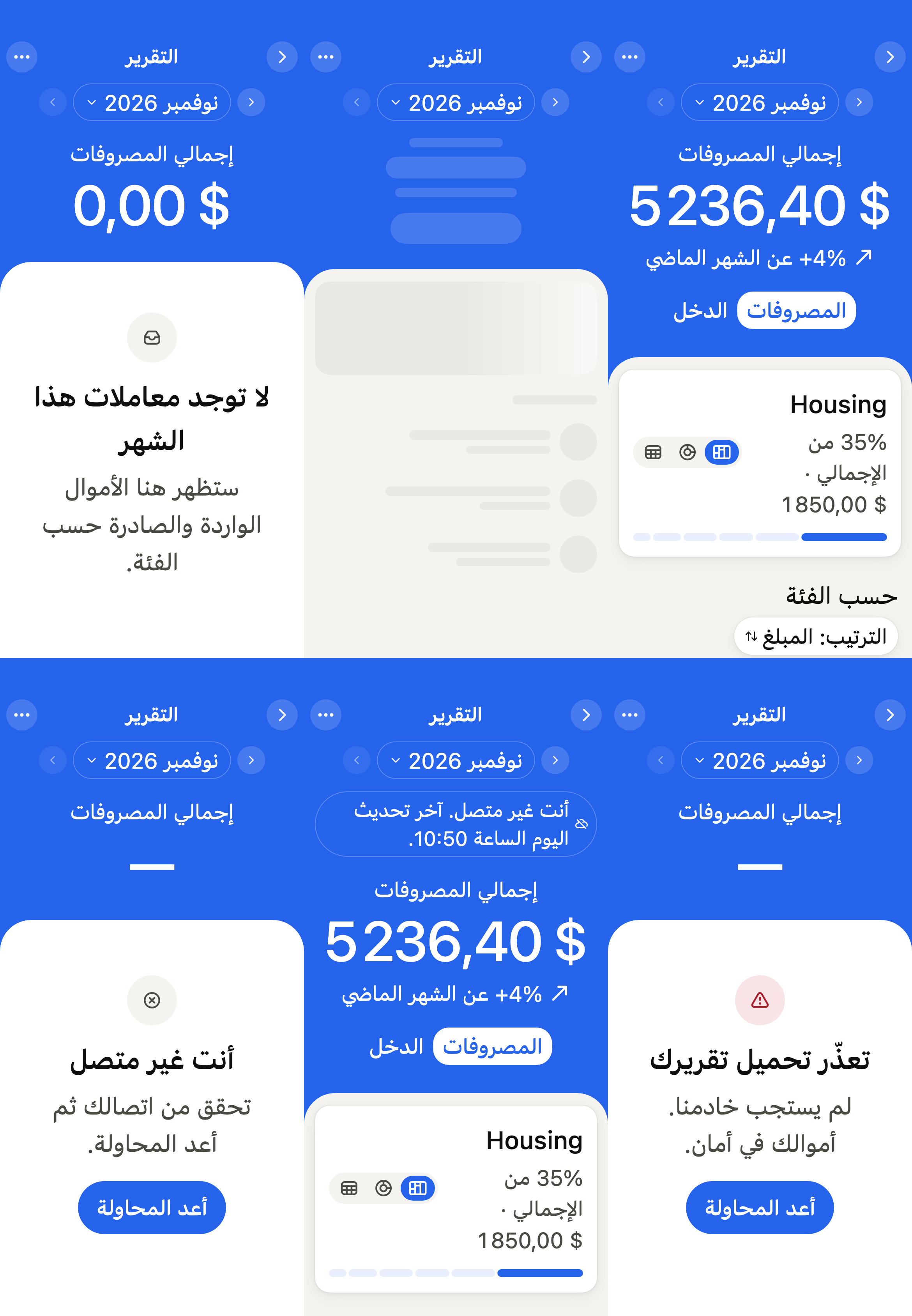
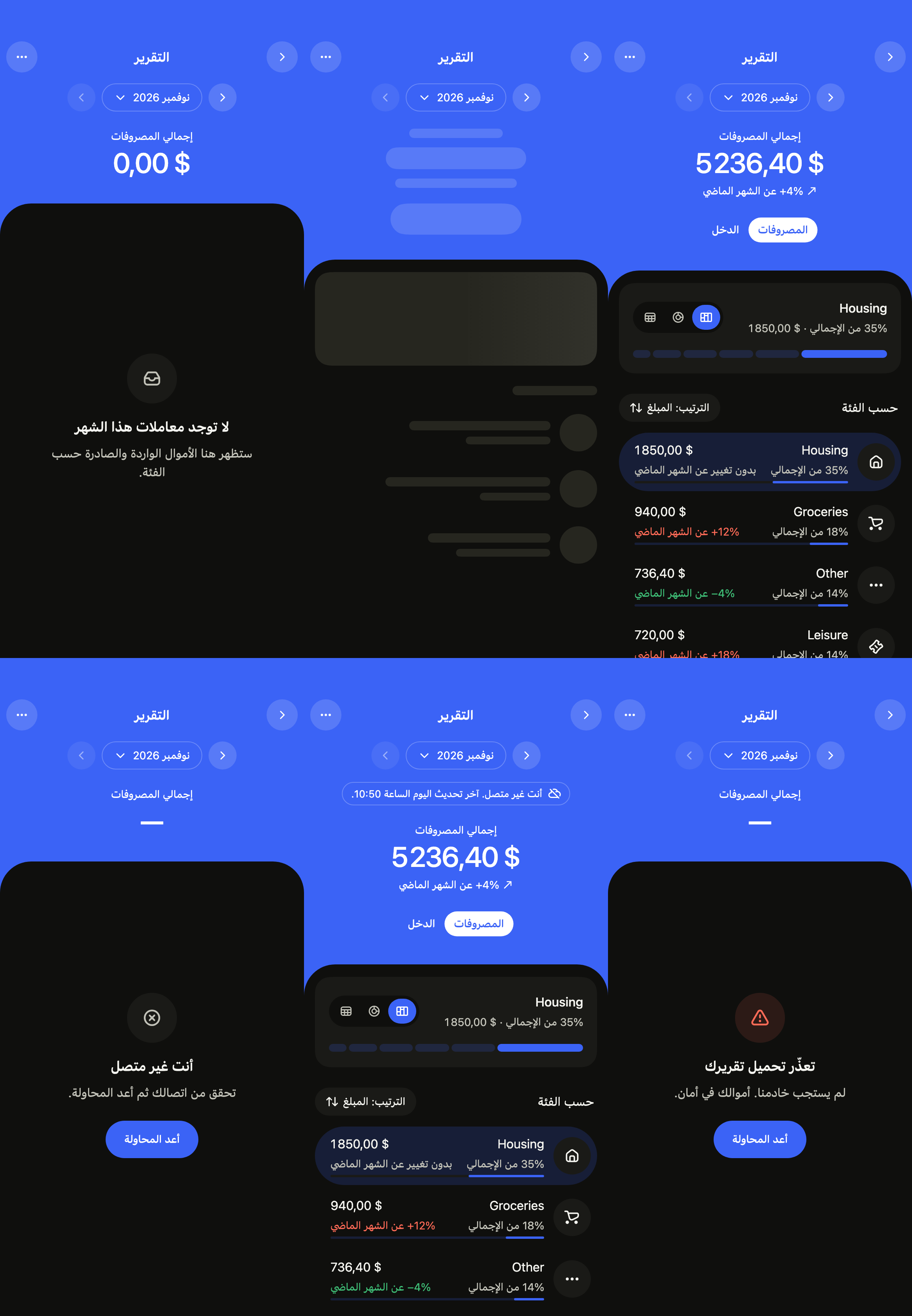
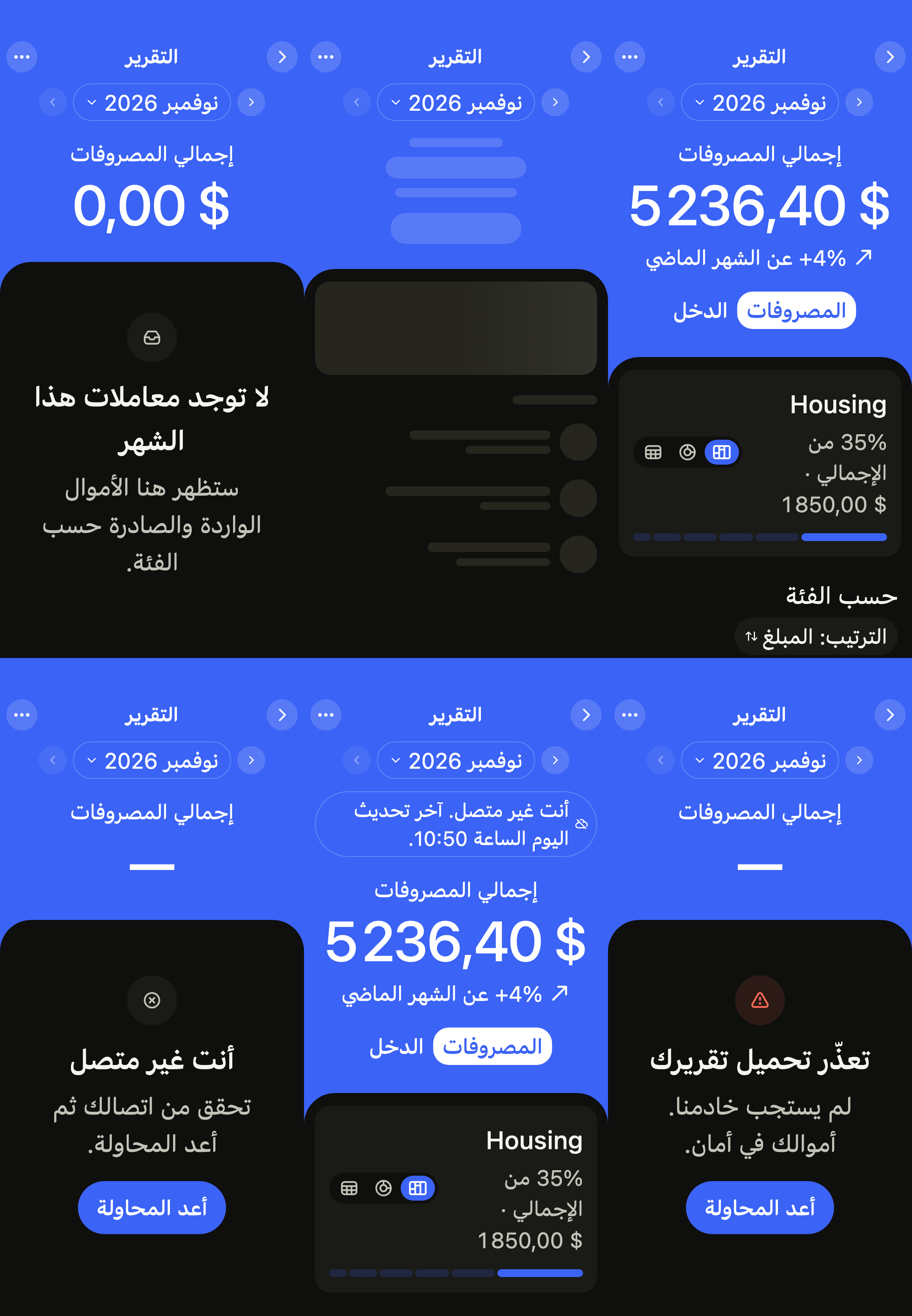
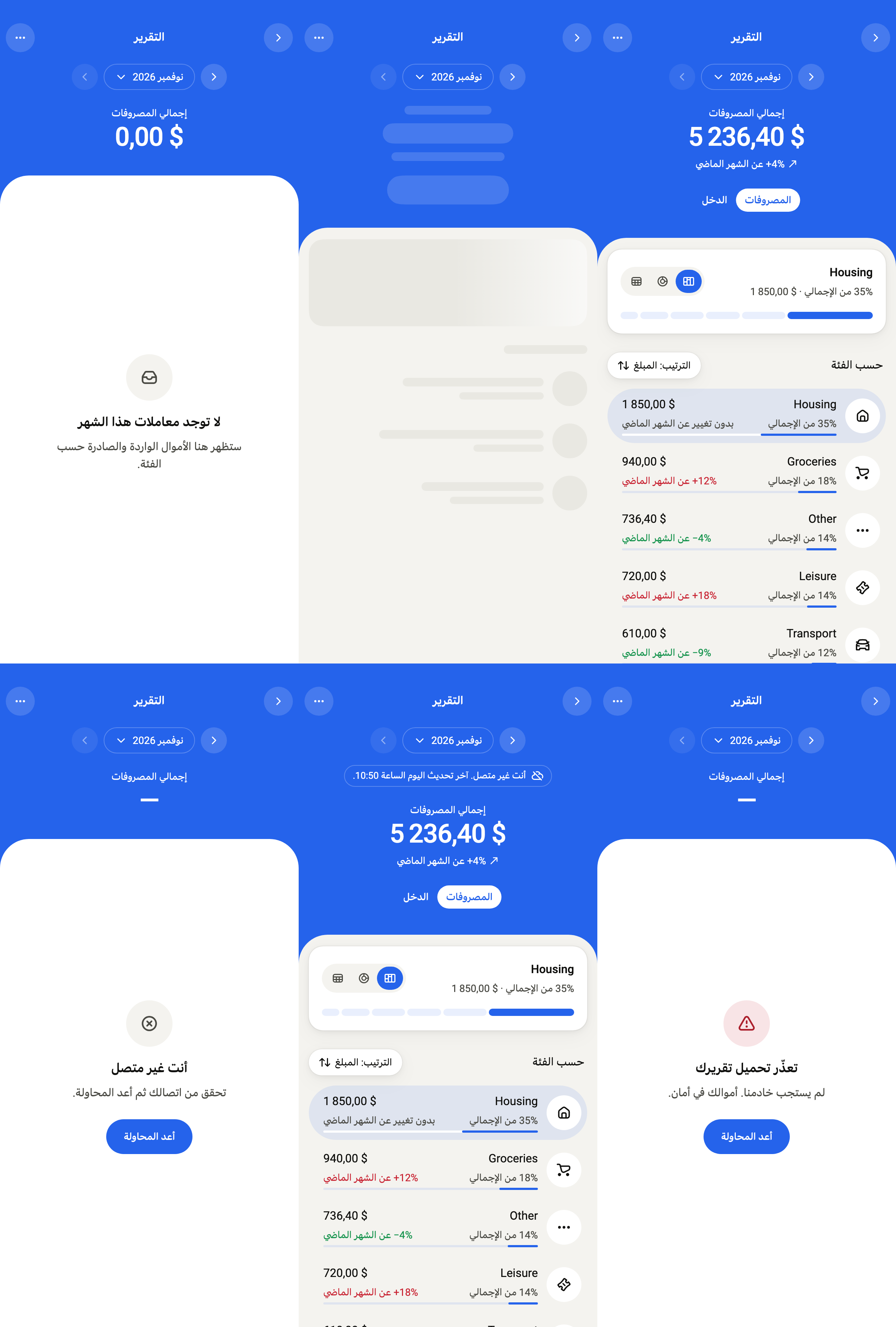
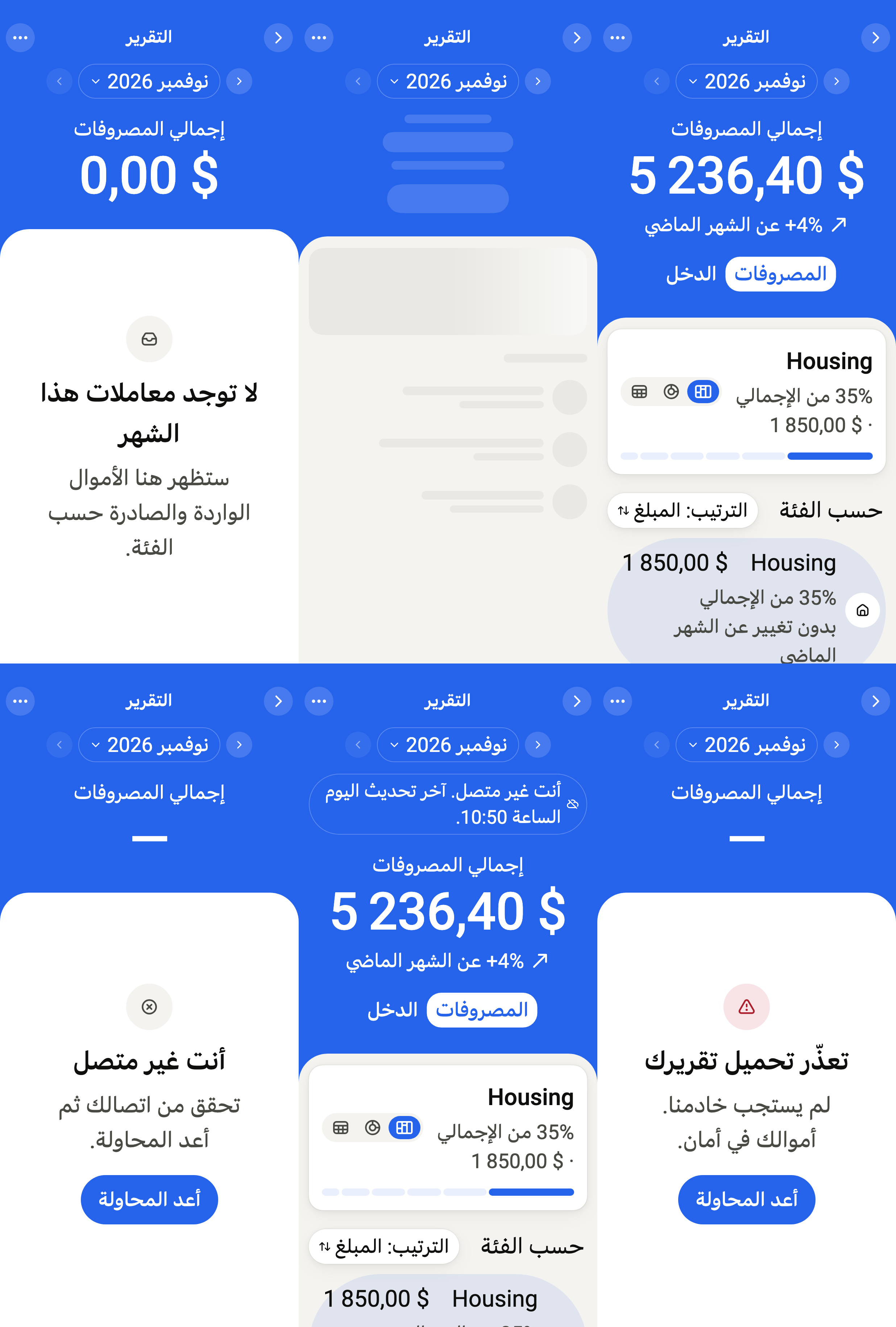
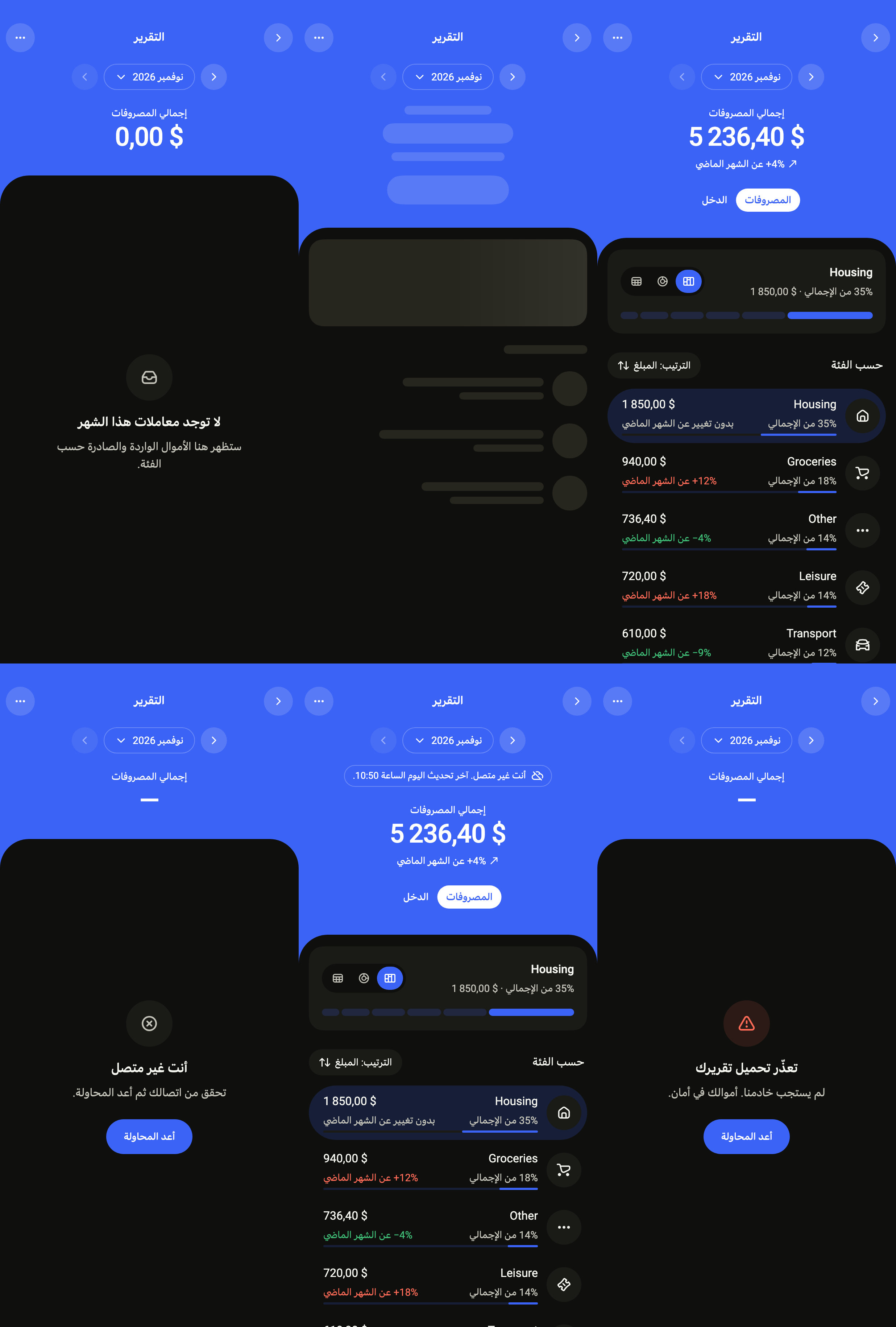
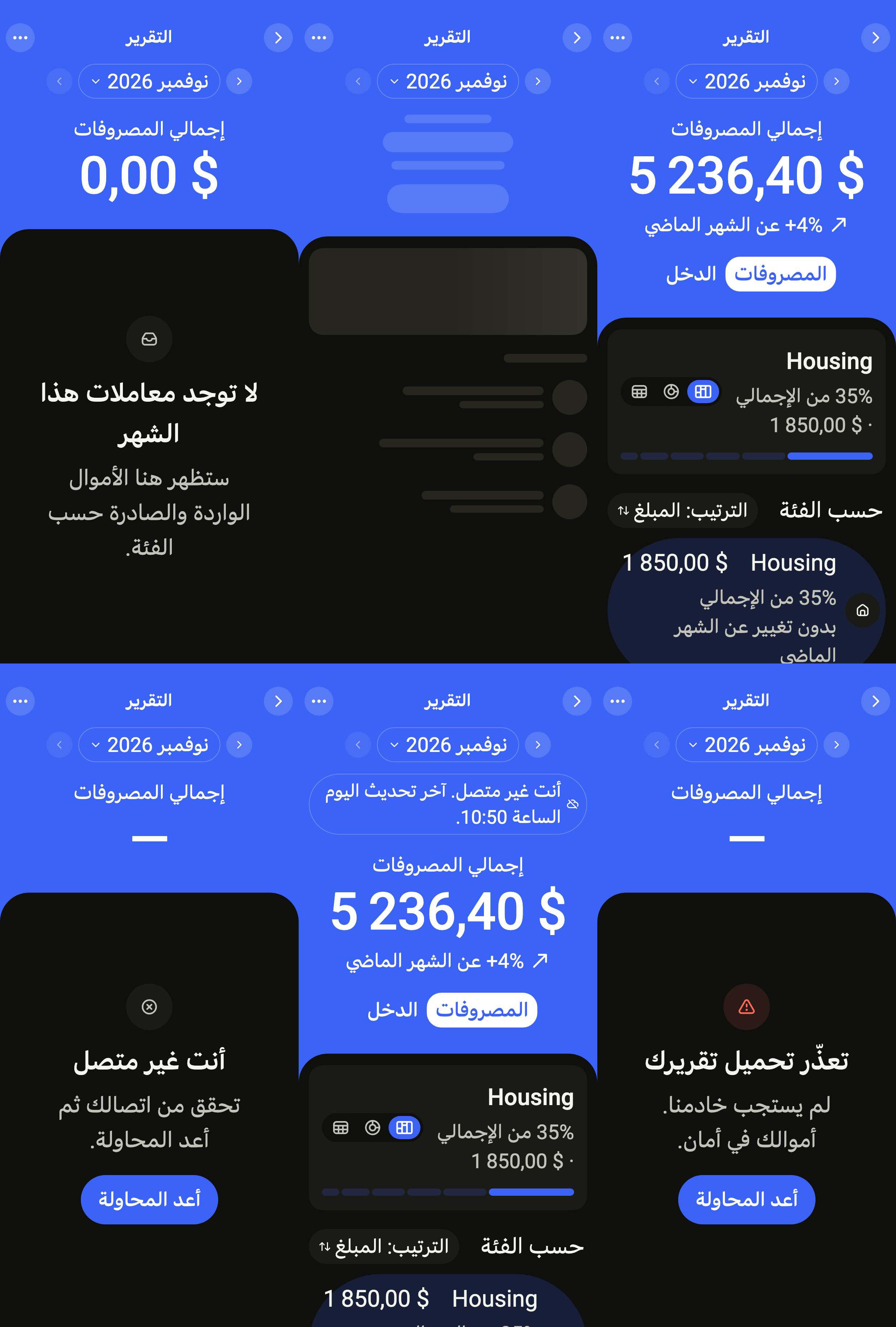
Every label in English, French and Arabic. The screen follows the closest Localizations; the same table is in the manifest, ready for your ARB files.
| Key | en | fr | ar |
|---|---|---|---|
reportTitle | Report | Rapport | التقرير |
reportBack | Back | Retour | رجوع |
reportMore | More options | Plus d’options | مزيد من الخيارات |
reportRefresh | Refresh | Actualiser | تحديث |
reportLoading | Loading your report | Chargement de votre rapport | جارٍ تحميل تقريرك |
reportPrevious | Previous month, {month} | Mois précédent, {month} | الشهر السابق، {month} |
reportNext | Next month, {month} | Mois suivant, {month} | الشهر التالي، {month} |
reportPickMonth | Choose a month, {month} | Choisir un mois, {month} | اختيار شهر، {month} |
reportFlow | Expenses or income | Dépenses ou revenus | المصروفات أو الدخل |
reportExpenses | Expenses | Dépenses | المصروفات |
reportIncome | Income | Revenus | الدخل |
reportTotalExpenses | Total expenses | Total des dépenses | إجمالي المصروفات |
reportTotalIncome | Total income | Total des revenus | إجمالي الدخل |
reportChartStyle | Chart style | Style du graphique | نمط الرسم |
reportBlocks | Split bar | Barre des parts | شريط الحصص |
reportRing | Ring chart | Anneau | رسم حلقي |
reportTable | Show as table | Afficher en tableau | عرض كجدول |
reportChartReading | {chart}, {month}, {total}: {parts}. | {chart}, {month}, {total} : {parts}. | {chart}، {month}، {total}: {parts}. |
reportPartsSeparator | ; | ; | ؛ |
reportCategoryReading | {name}, {amount}, {share} | {name}, {amount}, {share} | {name}، {amount}، {share} |
reportChosenDetails | {share} of total · {amount} | {share} du total · {amount} | {share} من الإجمالي · {amount} |
reportCaption | {chart}, {month} | {chart}, {month} | {chart}، {month} |
reportCategory | Category | Catégorie | الفئة |
reportAmount | Amount | Montant | المبلغ |
reportByCategory | By category | Par catégorie | حسب الفئة |
reportSort | Sort: {order} | Tri : {order} | الترتيب: {order} |
reportSortAmount | Amount | Montant | المبلغ |
reportSortChange | Change | Évolution | التغيّر |
reportSortBy | Sort by {column} | Trier par {column} | الترتيب حسب {column} |
reportSortedBy | Sorted by {column} | Trié par {column} | مرتّب حسب {column} |
reportTotal | Total | Total | الإجمالي |
reportSortName | Name | Nom | الاسم |
reportOfTotal | {share} of total | {share} du total | {share} من الإجمالي |
reportVsLastMonth | {change} vs last month | {change} par rapport au mois dernier | {change} عن الشهر الماضي |
reportNoChange | No change vs last month | Stable par rapport au mois dernier | بدون تغيير عن الشهر الماضي |
reportRowDetails | {amount}, {share}, {change} | {amount}, {share}, {change} | {amount}، {share}، {change} |
reportRowDetailsShort | {amount}, {share} | {amount}, {share} | {amount}، {share} |
reportOpen | Open {name} transactions. {details} | Ouvrir les transactions {name}. {details} | فتح معاملات {name}. {details} |
reportRowReading | {name}, {details} | {name}, {details} | {name}، {details} |
reportAllExpenses | All expenses | Toutes les dépenses | كل المصروفات |
reportAllIncome | All income | Tous les revenus | كل الدخل |
reportNoExpenses | No expenses in {month}. | Aucune dépense en {month}. | لا مصروفات في {month}. |
reportNoIncome | No income in {month}. | Aucun revenu en {month}. | لا دخل في {month}. |
reportMonths | January,February,March,April,May,June,July,August,September,October,November,December | janvier,février,mars,avril,mai,juin,juillet,août,septembre,octobre,novembre,décembre | يناير,فبراير,مارس,أبريل,مايو,يونيو,يوليو,أغسطس,سبتمبر,أكتوبر,نوفمبر,ديسمبر |
reportMonthYear | {month} {year} | {month} {year} | {month} {year} |
reportDayMonth | {month} {day} | {day} {month} | {day} {month} |
reportEmptyTitle | No transactions this month | Aucune transaction ce mois-ci | لا توجد معاملات هذا الشهر |
reportEmptyMessage | Money in and out will show up here, by category. | Les entrées et sorties d’argent apparaîtront ici, par catégorie. | ستظهر هنا الأموال الواردة والصادرة حسب الفئة. |
reportErrorTitle | We couldn’t load your report | Impossible de charger votre rapport | تعذّر تحميل تقريرك |
reportErrorMessage | Our server didn’t answer. Your money is safe. | Notre serveur n’a pas répondu. Votre argent ne risque rien. | لم يستجب خادمنا. أموالك في أمان. |
reportOfflineTitle | You are offline | Vous êtes hors ligne | أنت غير متصل |
reportOfflineMessage | Check your connection, then try again. | Vérifiez votre connexion, puis réessayez. | تحقق من اتصالك ثم أعد المحاولة. |
reportRetry | Try again | Réessayer | أعد المحاولة |
reportRefreshFailed | Couldn’t refresh. Amounts may be out of date. | Actualisation impossible. Les montants ne sont peut-être plus à jour. | تعذّر التحديث. قد لا تكون المبالغ محدّثة. |
reportOfflineSince | You’re offline. Updated {date} at {time}. | Vous êtes hors ligne. Mis à jour le {date} à {time}. | أنت غير متصل. آخر تحديث {date} الساعة {time}. |
reportOfflineToday | You’re offline. Updated today at {time}. | Vous êtes hors ligne. Mis à jour aujourd’hui à {time}. | أنت غير متصل. آخر تحديث اليوم الساعة {time}. |
Reference renders
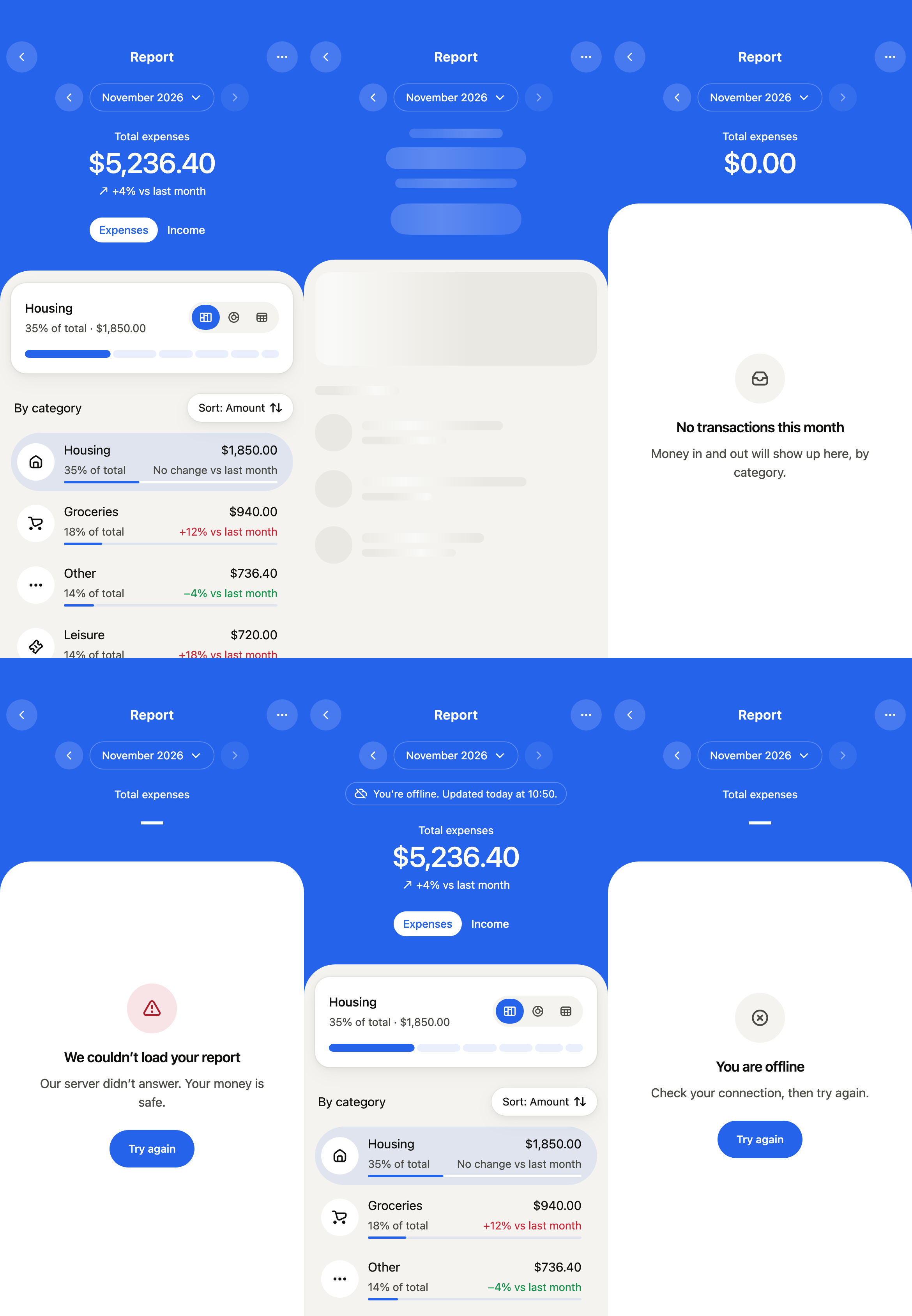
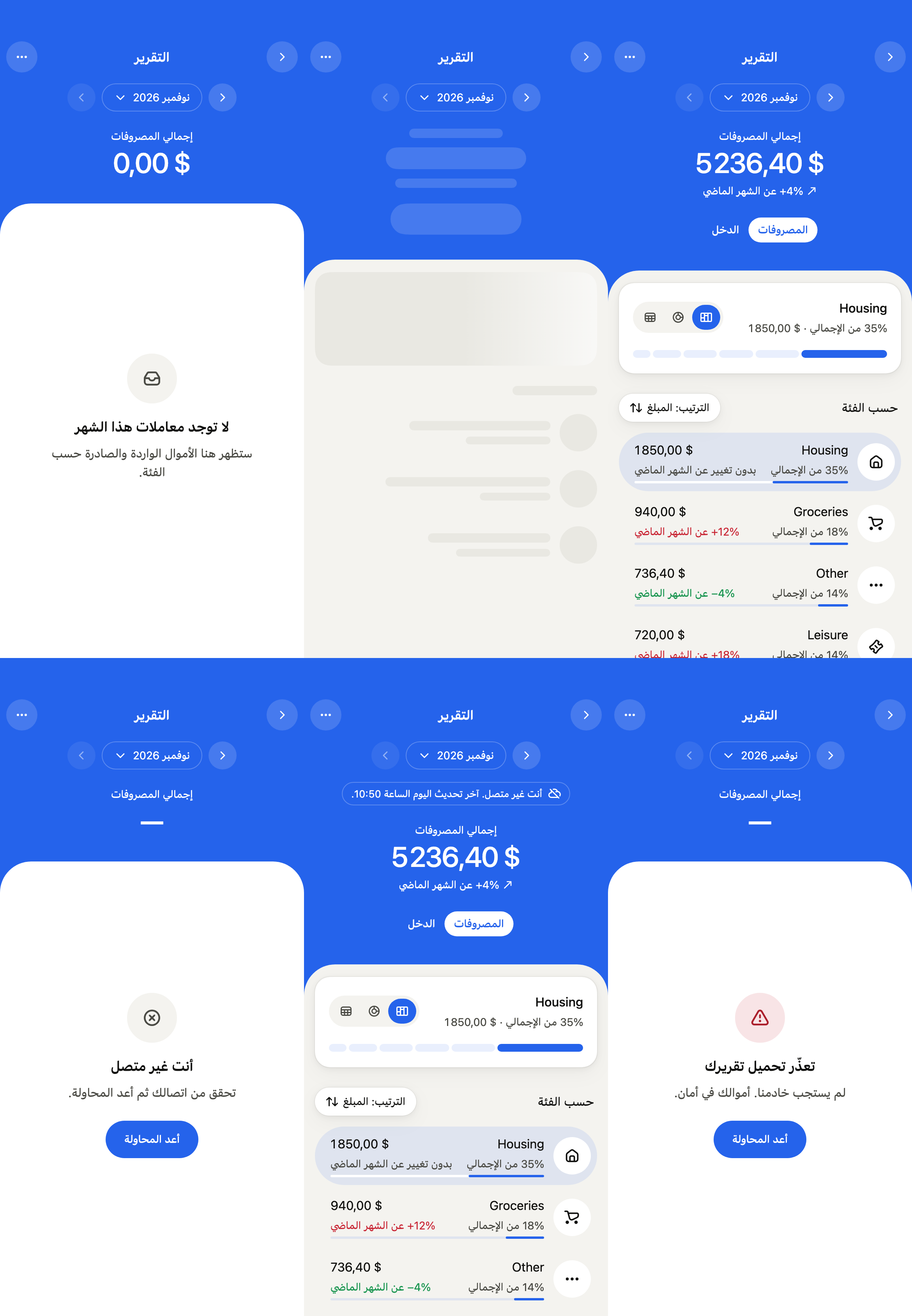
The 16 images published with version 0.2.0, rendered by the shared harness on macOS with Flutter 3.47.7. Each shows every state side by side, at the size of an iPhone (390 × 844) or of an Android phone (412 × 915). fliin verify finance-report compares your copy to them.
Use it to
- show a month's spending split by category
- show each spending category against the month before
- show a month's income by source: salary, freelance work, interest
- switch from one month to the next in a money report
- show each category's share as a split bar, a ring or a table
- let the user sort the categories by amount, change or name
- Not for
- a home with the balance, budget and latest transactions: use the finance dashboard (finance-dashboard)
- a chart alone: use a chart (chart)
- States