Screens / data-display
Crypto asset
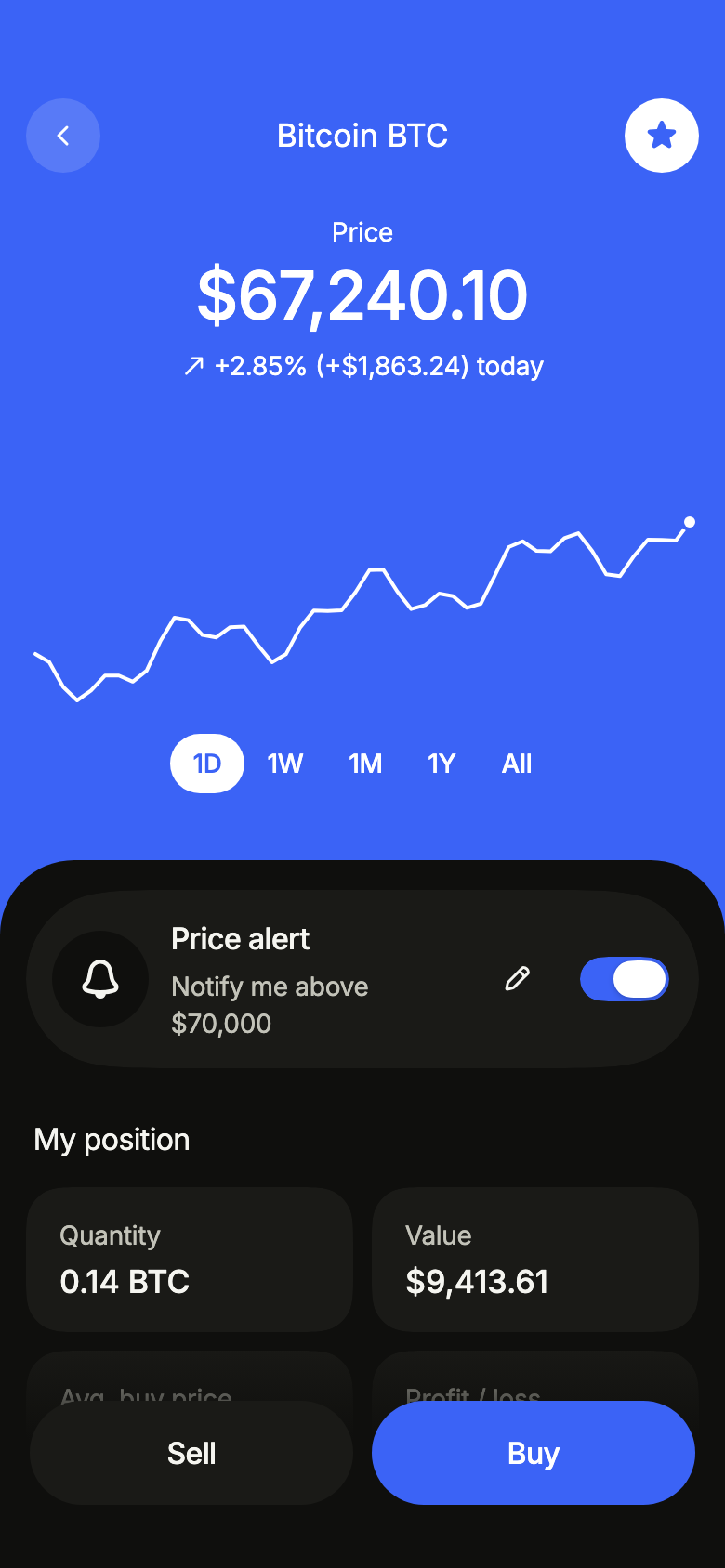
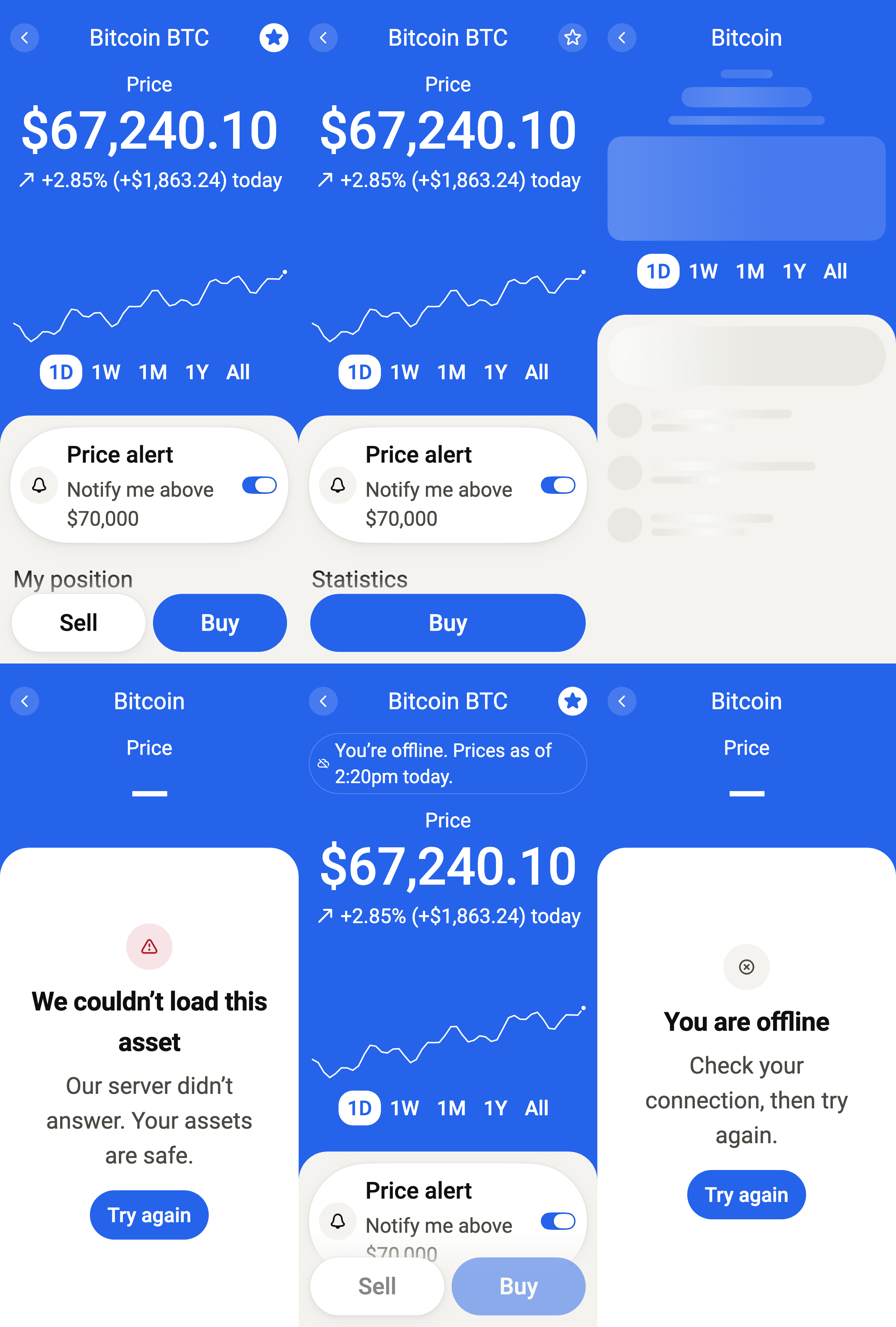
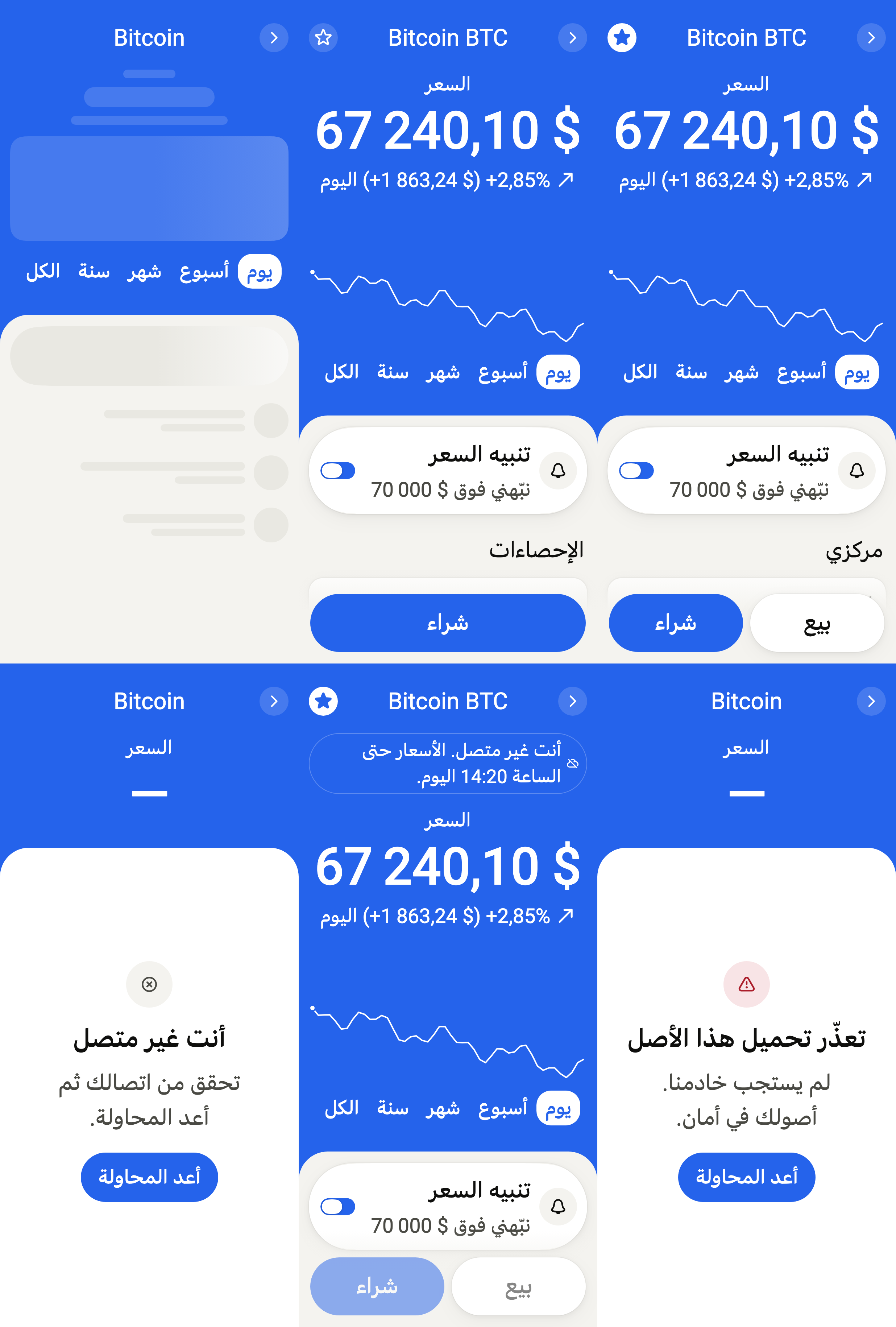
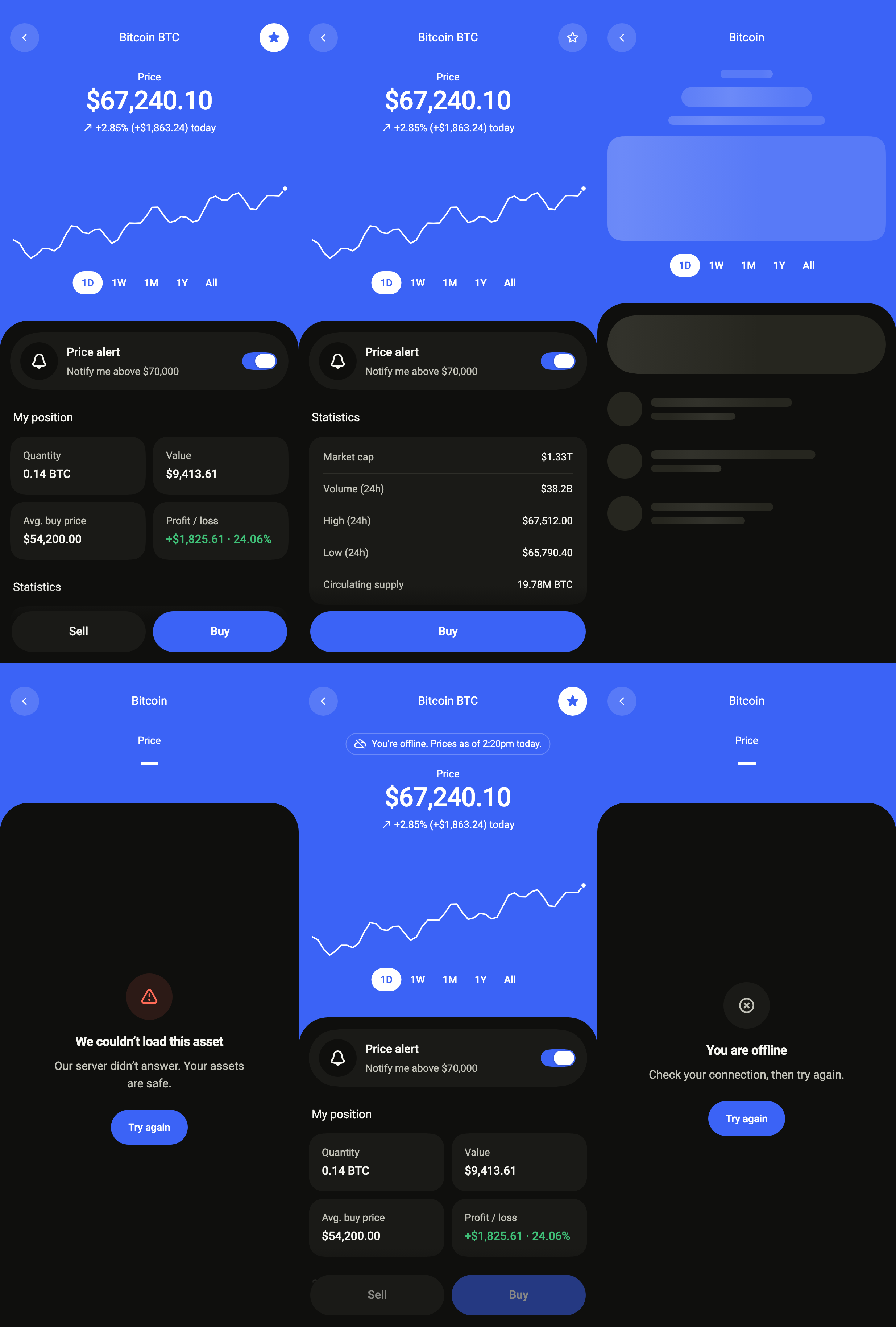
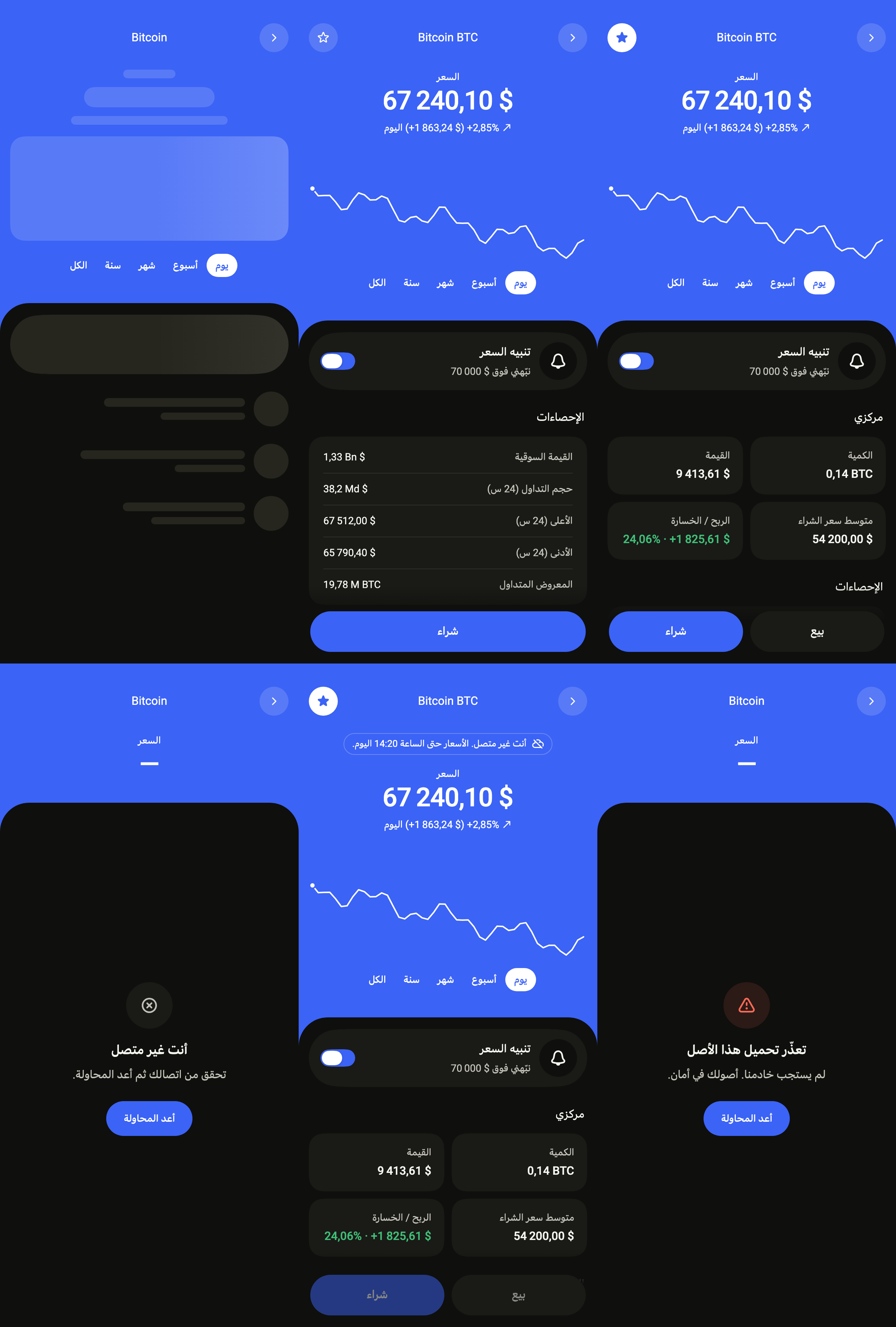
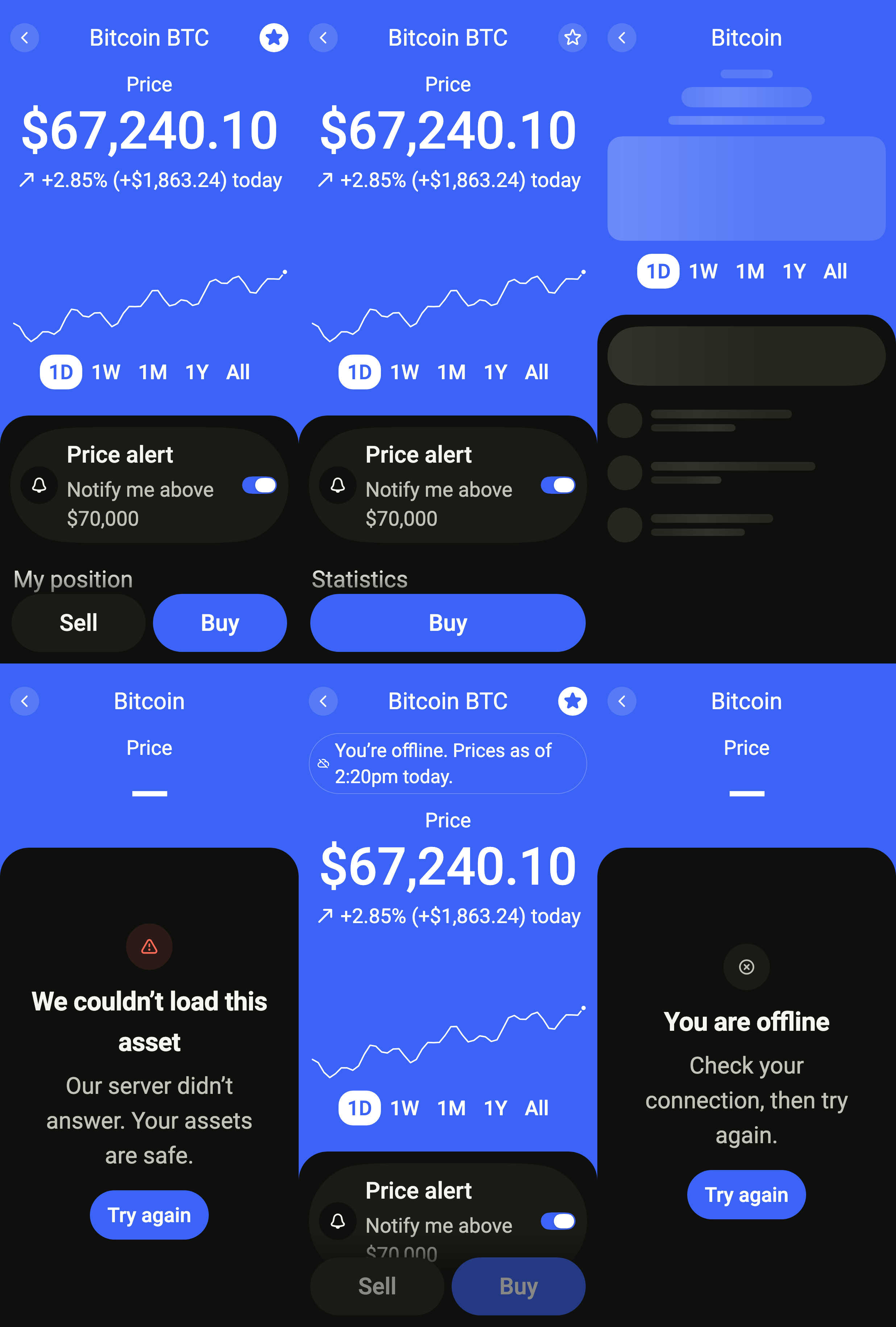
Shows one crypto asset: its price and change, a chart from a day to all time, a price alert, the position held, market statistics, the latest transactions, and Sell and Buy at the bottom.
Import
Crypto asset is part of Fliin Pro. With a license key, sign in once with fliin login, then add it in a Flutter app where fliin init has run:
fliin login
fliin add crypto-asset
Also installs: app-bar, button, chart, core, empty-state, icons, link-button, page, segmented, skeleton, surface, switch, transaction-row
Examples
Ready
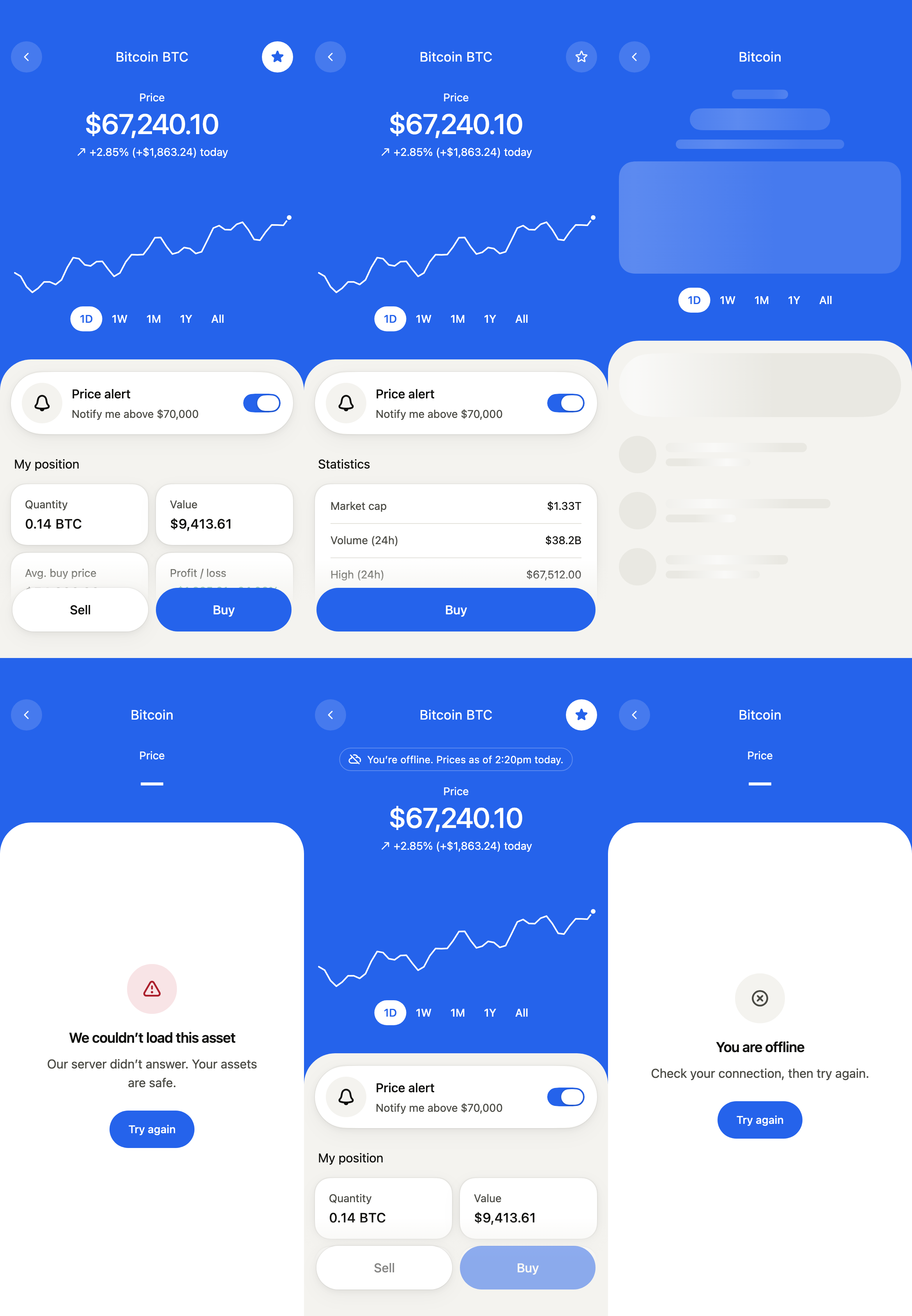
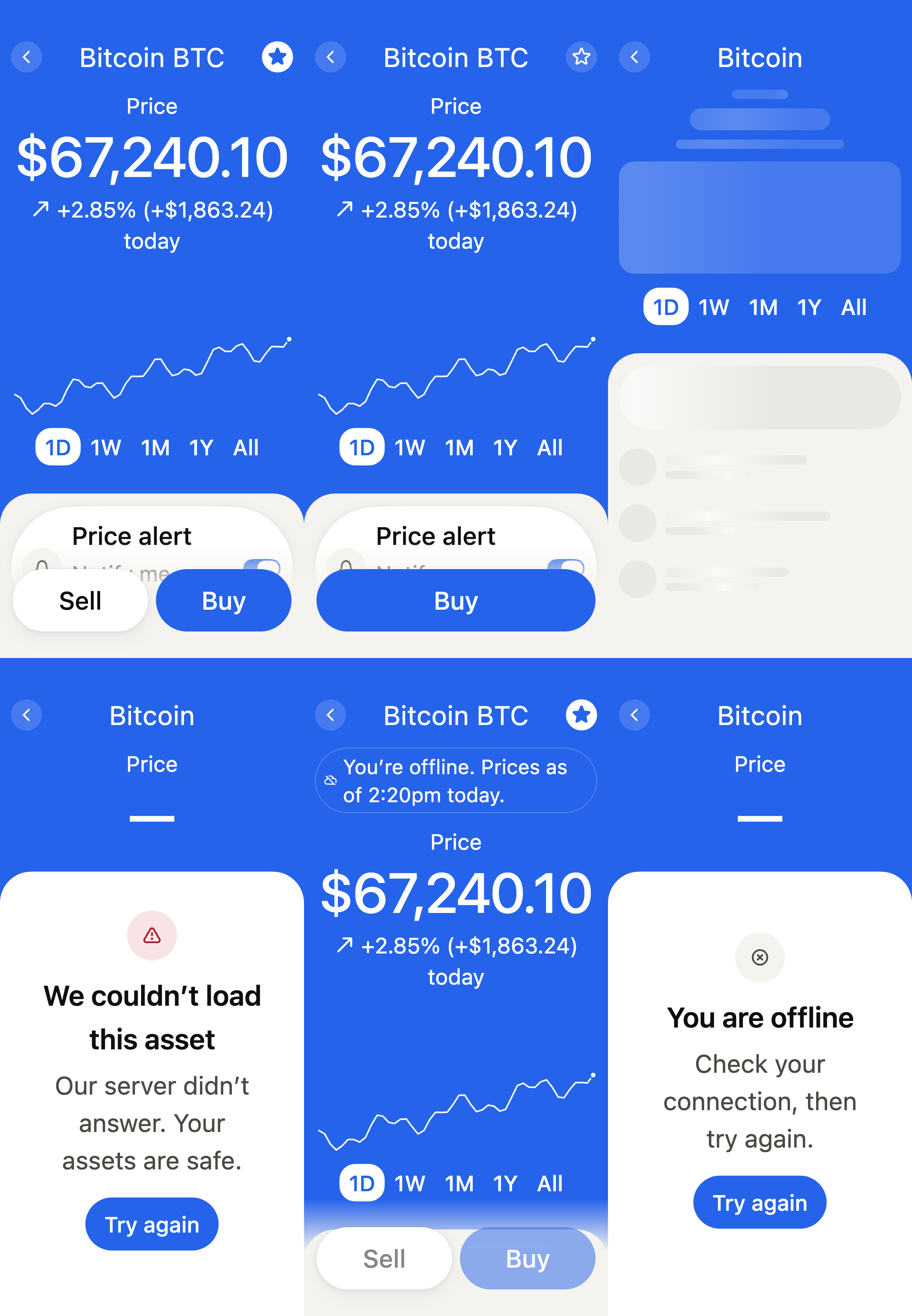
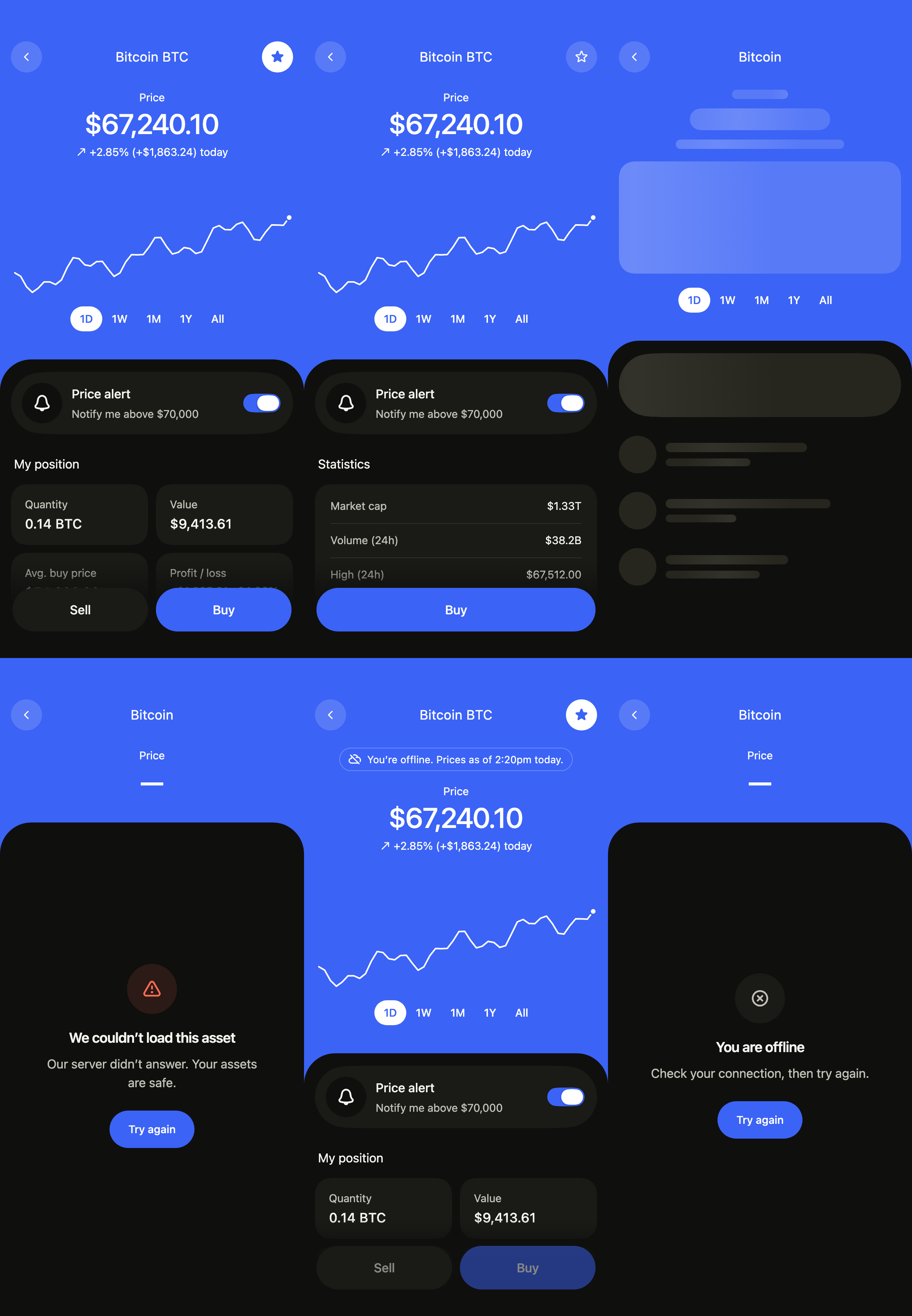
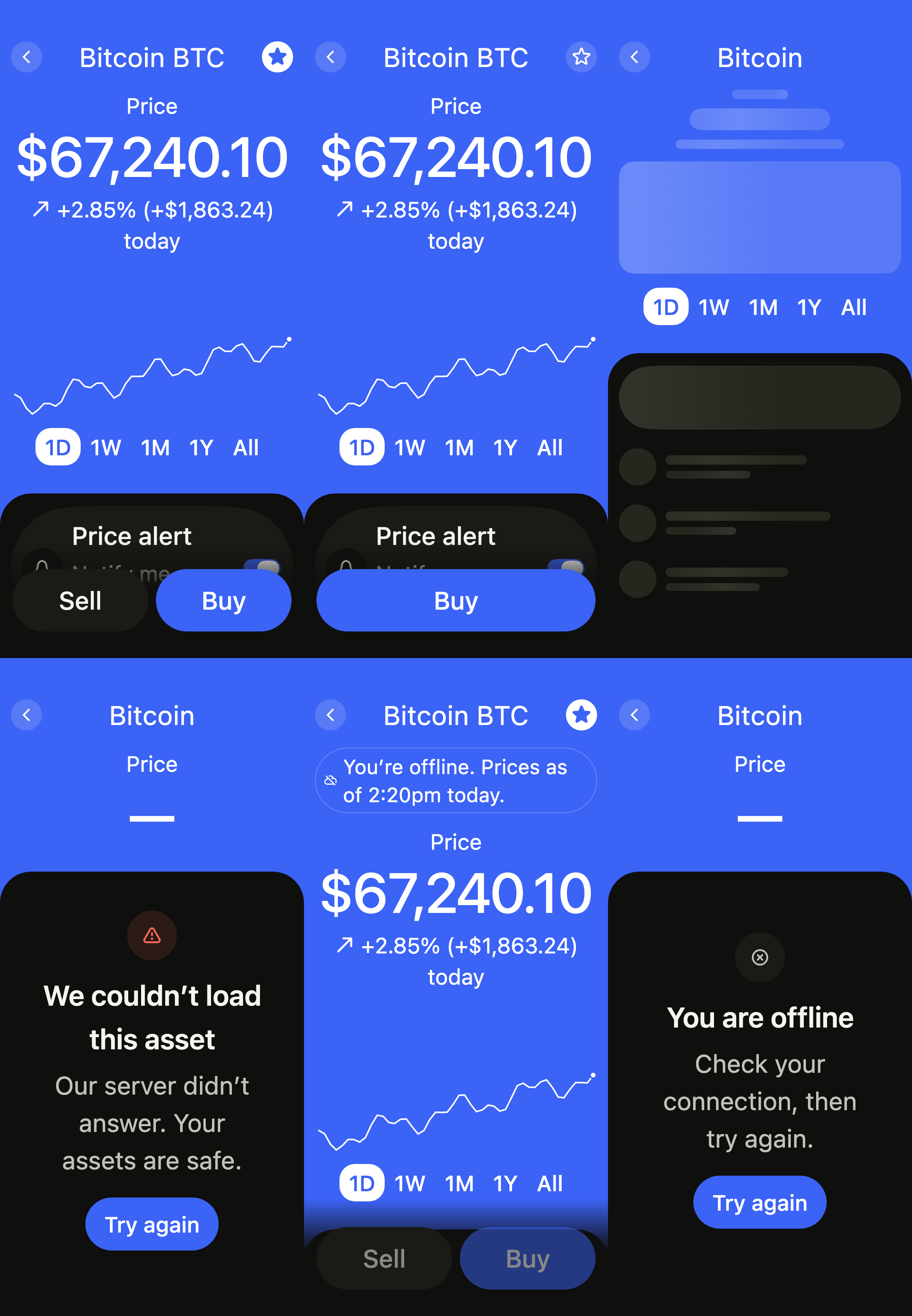
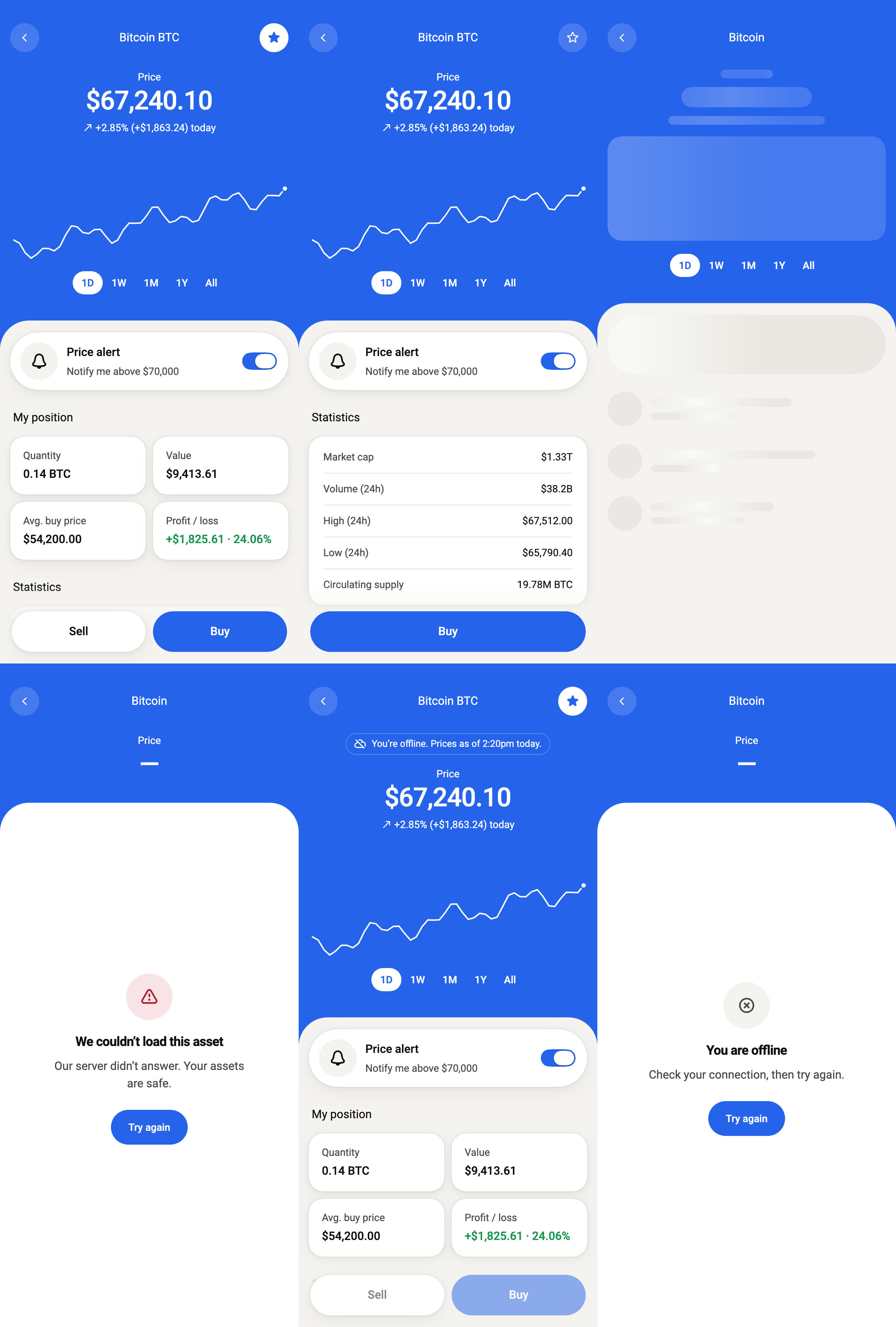
An asset the user holds: its price, change and chart over the day on a band in the accent, then the alert, the position, the market's figures and the latest transactions, with Sell and Buy at the bottom. standalone holds the screen over the CryptoAssetService you pass; changing the range reloads the chart.
import 'package:your_app/ui/fliin/screens/crypto_asset/crypto_asset_controller.dart';
import 'package:your_app/ui/fliin/screens/crypto_asset/crypto_asset_data.dart';
import 'package:your_app/ui/fliin/screens/crypto_asset/crypto_asset_screen.dart';
import 'package:flutter/widgets.dart';

class CryptoAssetReadyExample extends StatelessWidget {
  const CryptoAssetReadyExample({super.key});

  @override
  Widget build(BuildContext context) {
    return CryptoAssetScreen.standalone(
      service: const SampleCryptoAssetService(latency: Duration(milliseconds: 900), logo: _logo),
      initial: CryptoAssetLoaded(sampleCryptoAssetSnapshot(CryptoAssetRange.day, logo: _logo)),
      assetName: 'Bitcoin',
      onBack: () {},
      onWatchChanged: (_) {},
      onAlertChanged: (_) {},
      onEditAlert: () {},
      onViewAllTransactions: () {},
      onOpenTransaction: (_) {},
      onSell: () {},
      onBuy: () {},
      now: sampleCryptoAssetNow,
    );
  }
}

/// The sample's logos, from the app's assets, by symbol.
ImageProvider _logo(String symbol) => AssetImage('images/crypto/${symbol.toLowerCase()}.png');Not held
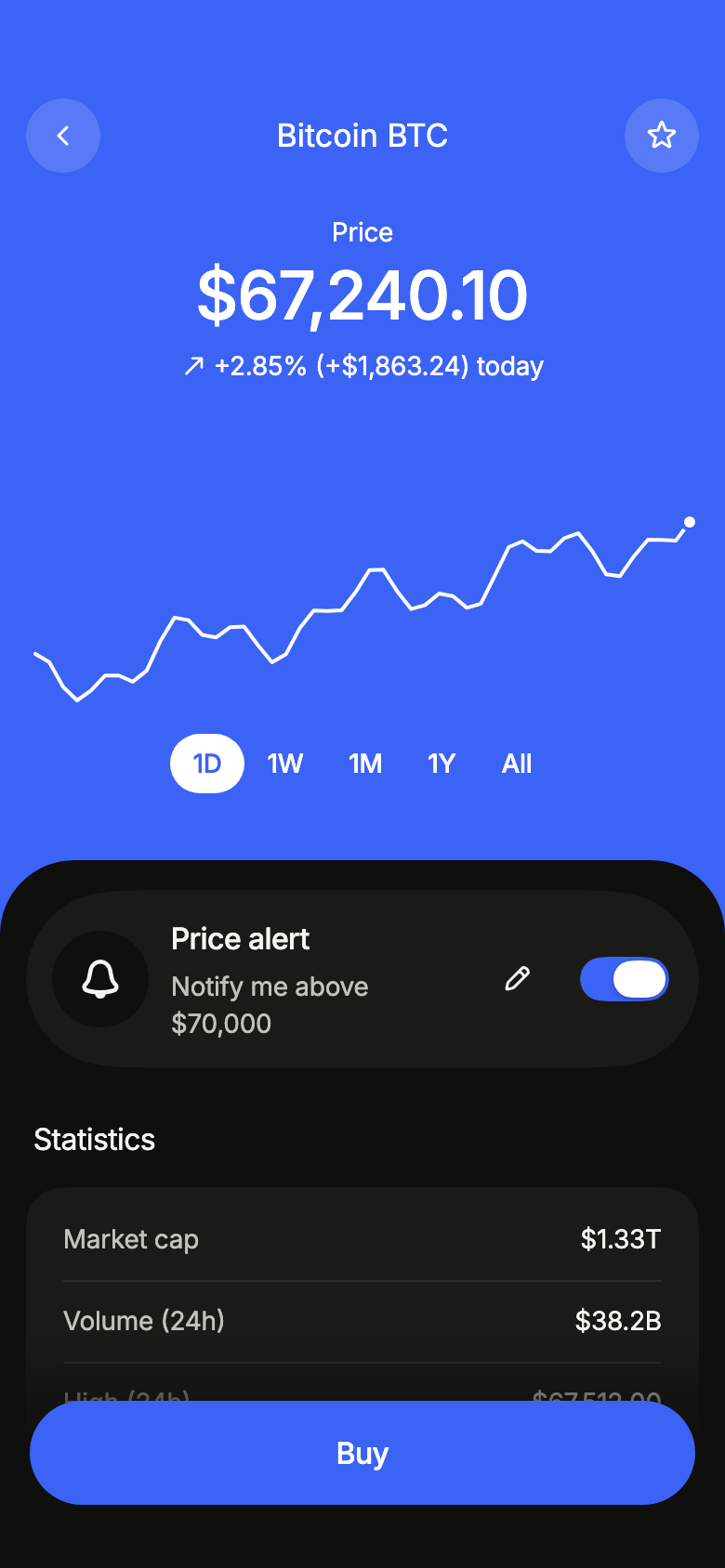
An asset the user does not hold: no position, no transactions, and Buy alone at the bottom.
import 'package:your_app/ui/fliin/screens/crypto_asset/crypto_asset_controller.dart';
import 'package:your_app/ui/fliin/screens/crypto_asset/crypto_asset_data.dart';
import 'package:your_app/ui/fliin/screens/crypto_asset/crypto_asset_screen.dart';
import 'package:flutter/widgets.dart';

class CryptoAssetNotHeldExample extends StatelessWidget {
  const CryptoAssetNotHeldExample({super.key});

  @override
  Widget build(BuildContext context) {
    return CryptoAssetScreen.standalone(
      service: SampleCryptoAssetService(
        latency: const Duration(milliseconds: 900),
        snapshot: (range) => sampleCryptoAssetSnapshot(range, held: false, logo: _logo),
      ),
      initial: CryptoAssetLoaded(sampleCryptoAssetSnapshot(CryptoAssetRange.day, held: false, logo: _logo)),
      assetName: 'Bitcoin',
      onBack: () {},
      onWatchChanged: (_) {},
      onAlertChanged: (_) {},
      onEditAlert: () {},
      onViewAllTransactions: () {},
      onOpenTransaction: (_) {},
      onSell: () {},
      onBuy: () {},
      now: sampleCryptoAssetNow,
    );
  }
}

/// The sample's logos, from the app's assets, by symbol.
ImageProvider _logo(String symbol) => AssetImage('images/crypto/${symbol.toLowerCase()}.png');Loading
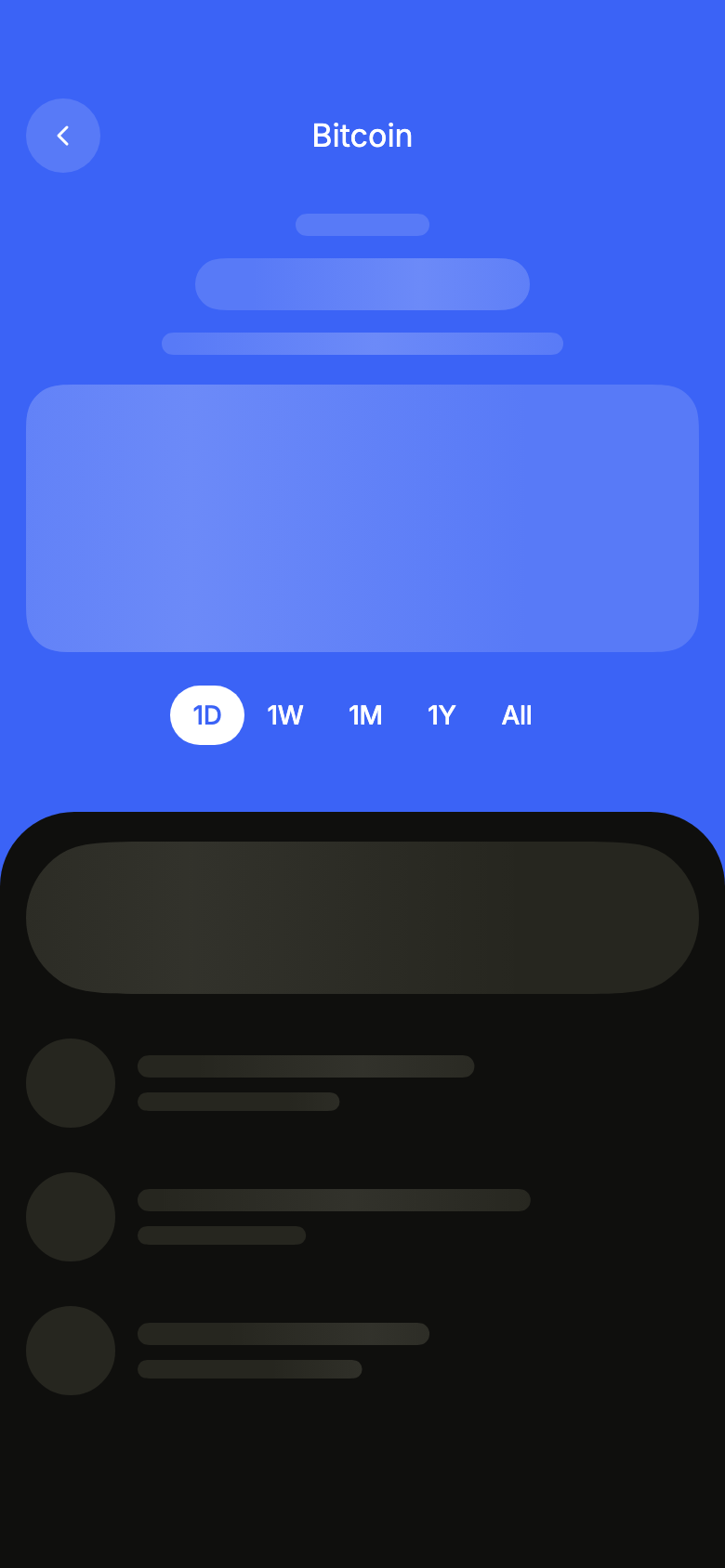
While the asset loads, skeletons keep the place of the price and the chart on the band, and of the alert and the rows on the sheet; the range stays.
import 'package:your_app/ui/fliin/screens/crypto_asset/crypto_asset_controller.dart';
import 'package:your_app/ui/fliin/screens/crypto_asset/crypto_asset_data.dart';
import 'package:your_app/ui/fliin/screens/crypto_asset/crypto_asset_screen.dart';
import 'package:flutter/widgets.dart';

class CryptoAssetLoadingExample extends StatelessWidget {
  const CryptoAssetLoadingExample({super.key});

  @override
  Widget build(BuildContext context) {
    return CryptoAssetScreen.standalone(
      service: const SampleCryptoAssetService(latency: Duration(milliseconds: 900), logo: _logo),
      initial: const CryptoAssetLoading(CryptoAssetRange.day),
      assetName: 'Bitcoin',
      onBack: () {},
      onWatchChanged: (_) {},
      onAlertChanged: (_) {},
      onEditAlert: () {},
      onViewAllTransactions: () {},
      onOpenTransaction: (_) {},
      onSell: () {},
      onBuy: () {},
      now: sampleCryptoAssetNow,
    );
  }
}

/// The sample's logos, from the app's assets, by symbol.
ImageProvider _logo(String symbol) => AssetImage('images/crypto/${symbol.toLowerCase()}.png');Error
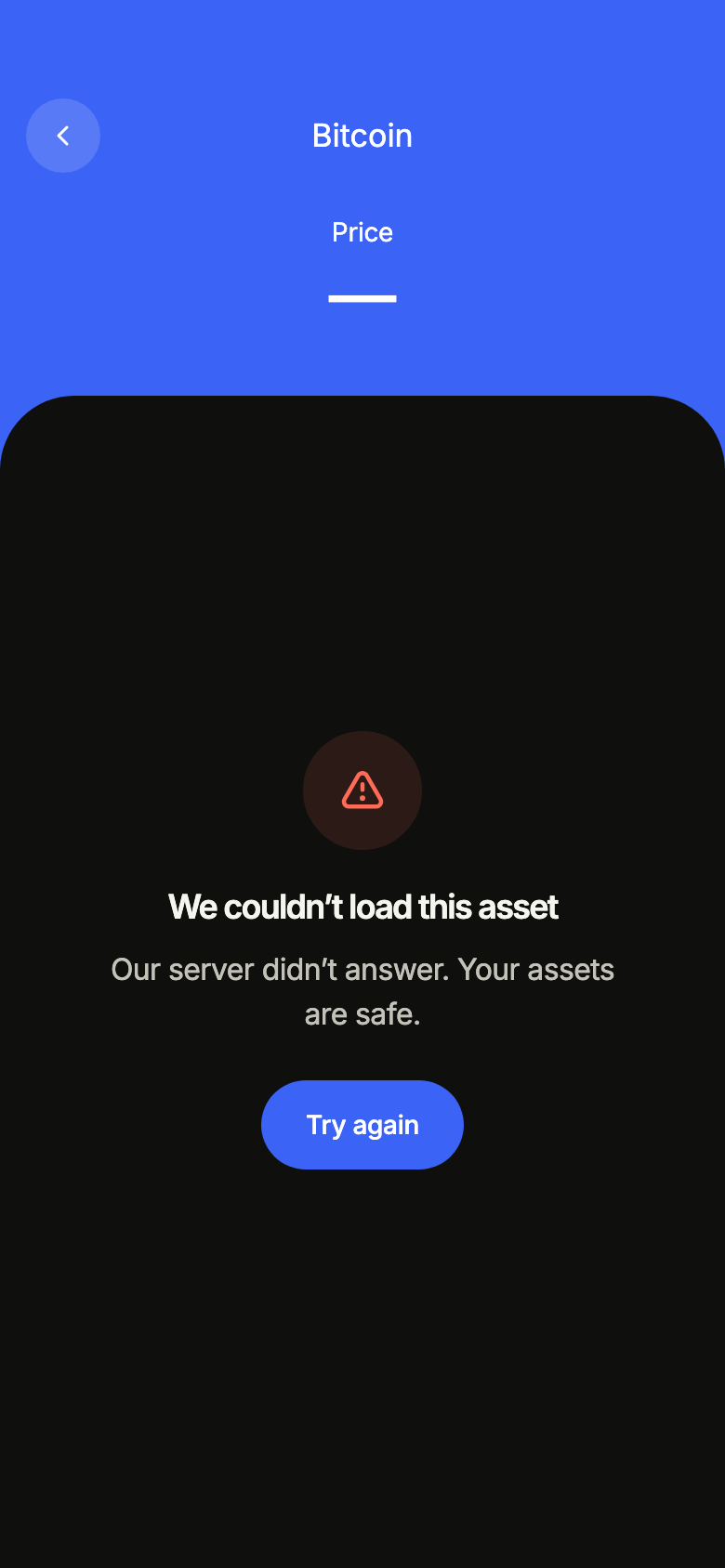
When loading fails, the band keeps the asset's name, and the sheet says so and offers to try again.
import 'package:your_app/ui/fliin/screens/crypto_asset/crypto_asset_controller.dart';
import 'package:your_app/ui/fliin/screens/crypto_asset/crypto_asset_data.dart';
import 'package:your_app/ui/fliin/screens/crypto_asset/crypto_asset_screen.dart';
import 'package:flutter/widgets.dart';

class CryptoAssetErrorExample extends StatelessWidget {
  const CryptoAssetErrorExample({super.key});

  @override
  Widget build(BuildContext context) {
    return CryptoAssetScreen.standalone(
      service: const SampleCryptoAssetService(latency: Duration(milliseconds: 900), logo: _logo),
      initial: const CryptoAssetFailed(CryptoAssetRange.day),
      assetName: 'Bitcoin',
      onBack: () {},
      onWatchChanged: (_) {},
      onAlertChanged: (_) {},
      onEditAlert: () {},
      onViewAllTransactions: () {},
      onOpenTransaction: (_) {},
      onSell: () {},
      onBuy: () {},
      now: sampleCryptoAssetNow,
    );
  }
}

/// The sample's logos, from the app's assets, by symbol.
ImageProvider _logo(String symbol) => AssetImage('images/crypto/${symbol.toLowerCase()}.png');Offline
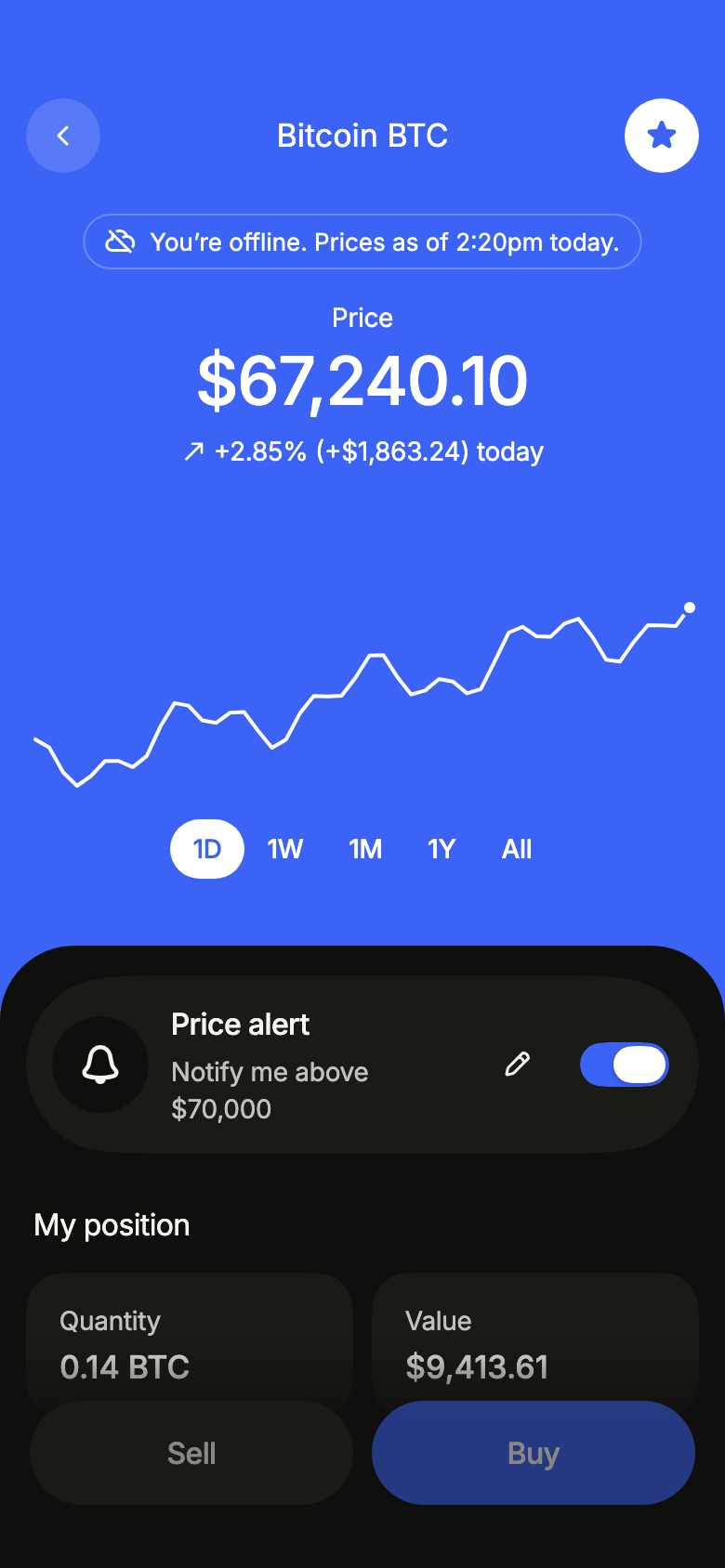
Offline with data already loaded: the figures stay, a notice on the band dates them, and trading waits for the network.
import 'package:your_app/ui/fliin/screens/crypto_asset/crypto_asset_controller.dart';
import 'package:your_app/ui/fliin/screens/crypto_asset/crypto_asset_data.dart';
import 'package:your_app/ui/fliin/screens/crypto_asset/crypto_asset_screen.dart';
import 'package:flutter/widgets.dart';

class CryptoAssetOfflineExample extends StatelessWidget {
  const CryptoAssetOfflineExample({super.key});

  @override
  Widget build(BuildContext context) {
    return CryptoAssetScreen.standalone(
      service: const SampleCryptoAssetService(latency: Duration(milliseconds: 900), logo: _logo),
      initial: CryptoAssetLoaded(
        sampleCryptoAssetSnapshot(CryptoAssetRange.day, logo: _logo),
        notice: CryptoAssetNotice.offline,
      ),
      assetName: 'Bitcoin',
      onBack: () {},
      onWatchChanged: (_) {},
      onAlertChanged: (_) {},
      onEditAlert: () {},
      onViewAllTransactions: () {},
      onOpenTransaction: (_) {},
      onSell: () {},
      onBuy: () {},
      now: sampleCryptoAssetNow,
    );
  }
}

/// The sample's logos, from the app's assets, by symbol.
ImageProvider _logo(String symbol) => AssetImage('images/crypto/${symbol.toLowerCase()}.png');Offline empty
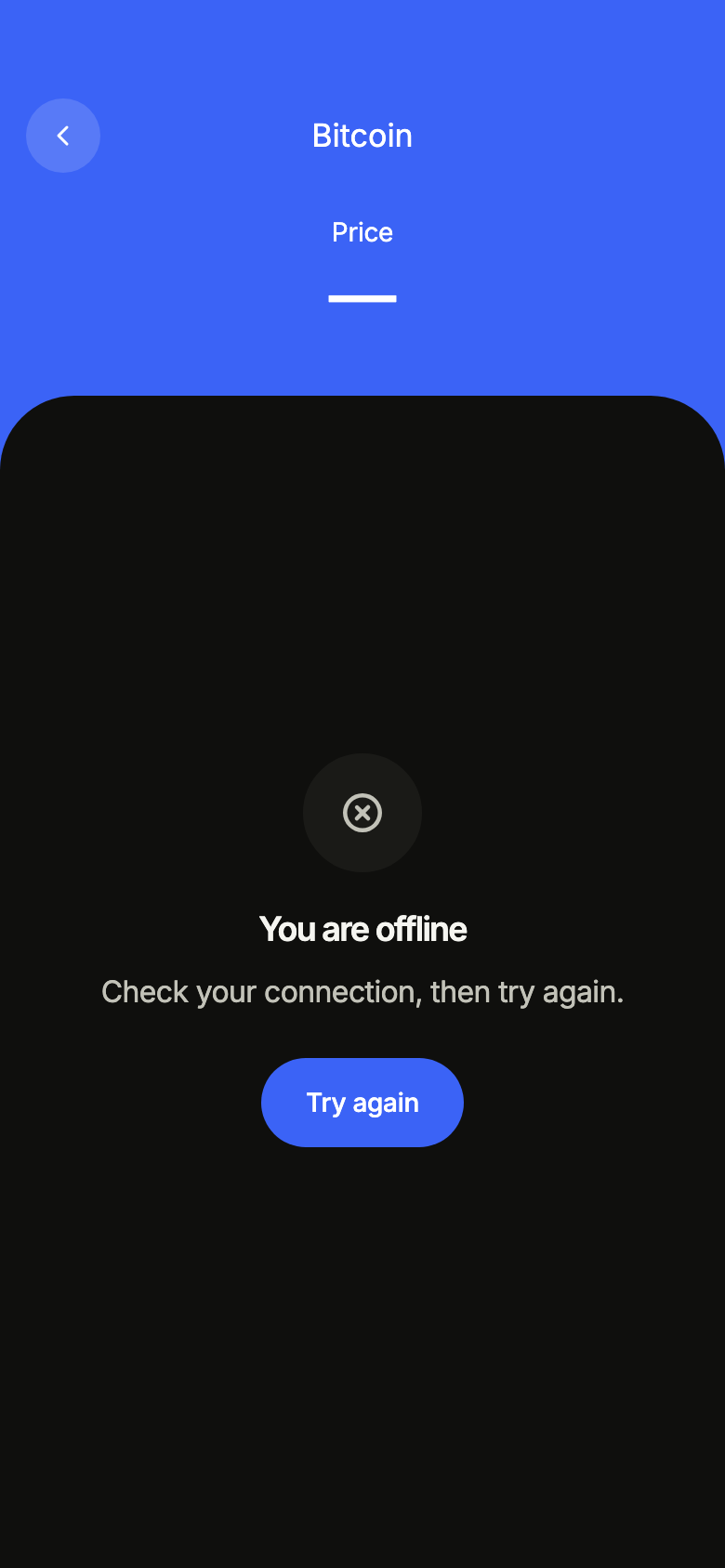
Offline with nothing loaded yet: the band keeps the asset's name, and the sheet asks to reconnect.
import 'package:your_app/ui/fliin/screens/crypto_asset/crypto_asset_controller.dart';
import 'package:your_app/ui/fliin/screens/crypto_asset/crypto_asset_data.dart';
import 'package:your_app/ui/fliin/screens/crypto_asset/crypto_asset_screen.dart';
import 'package:flutter/widgets.dart';

class CryptoAssetOfflineEmptyExample extends StatelessWidget {
  const CryptoAssetOfflineEmptyExample({super.key});

  @override
  Widget build(BuildContext context) {
    return CryptoAssetScreen.standalone(
      service: const SampleCryptoAssetService(latency: Duration(milliseconds: 900), logo: _logo),
      initial: const CryptoAssetOffline(CryptoAssetRange.day),
      assetName: 'Bitcoin',
      onBack: () {},
      onWatchChanged: (_) {},
      onAlertChanged: (_) {},
      onEditAlert: () {},
      onViewAllTransactions: () {},
      onOpenTransaction: (_) {},
      onSell: () {},
      onBuy: () {},
      now: sampleCryptoAssetNow,
    );
  }
}

/// The sample's logos, from the app's assets, by symbol.
ImageProvider _logo(String symbol) => AssetImage('images/crypto/${symbol.toLowerCase()}.png');Routing
fliin add crypto-asset prints the route for the router it finds in your pubspec, a file next to the page that wires its navigation. Each of them:
go_router
// lib/crypto_asset_route.dart, next to crypto_asset_page.dart.
import 'package:go_router/go_router.dart';

import 'crypto_asset_page.dart';

/// Add cryptoAssetRoute to the routes of your GoRouter.
final cryptoAssetRoute = GoRoute(
  path: '/crypto/asset',
  builder: (context, state) => CryptoAssetPage(
    // Alone in the stack (deep link, go): your app's home.
    onBack: () => context.canPop() ? context.pop() : context.go('/'),
  ),
);navigator
// lib/crypto_asset_route.dart, next to crypto_asset_page.dart.
import 'package:flutter/material.dart';

import 'crypto_asset_page.dart';

/// Opens “Crypto asset”: `Navigator.of(context).push(cryptoAssetRoute())`.
Route<void> cryptoAssetRoute() => MaterialPageRoute<void>(
  builder: (context) => CryptoAssetPage(
    onBack: () => Navigator.of(context).maybePop(),
  ),
);State
The controller is a ChangeNotifier from widgets.dart, with no package. fliin add crypto-asset prints the page that holds it with the state management it finds, its imports written for your package; below they read your_app. Your backend implements the Service interface of the screen's _data.dart file:
none
// lib/crypto_asset_page.dart
// Your backend: implement CryptoAssetService (crypto_asset_data.dart) and pass it instead of the sample service.
import 'package:your_app/ui/fliin/screens/crypto_asset/crypto_asset_data.dart';
import 'package:your_app/ui/fliin/screens/crypto_asset/crypto_asset_screen.dart';
import 'package:flutter/widgets.dart';

class CryptoAssetPage extends StatelessWidget {
  const CryptoAssetPage({
    super.key,
    required this.onBack,
  });

  final VoidCallback onBack;

  @override
  Widget build(BuildContext context) => CryptoAssetScreen.standalone(
    service: const SampleCryptoAssetService(),
    onBack: onBack,
  );
}provider
// lib/crypto_asset_page.dart
// Your backend: implement CryptoAssetService (crypto_asset_data.dart) and pass it instead of the sample service.
import 'package:your_app/ui/fliin/screens/crypto_asset/crypto_asset_controller.dart';
import 'package:your_app/ui/fliin/screens/crypto_asset/crypto_asset_data.dart';
import 'package:your_app/ui/fliin/screens/crypto_asset/crypto_asset_screen.dart';
import 'package:flutter/widgets.dart';
import 'package:provider/provider.dart';

class CryptoAssetPage extends StatelessWidget {
  const CryptoAssetPage({
    super.key,
    required this.onBack,
  });

  final VoidCallback onBack;

  @override
  Widget build(BuildContext context) => ChangeNotifierProvider(
    create: (_) => CryptoAssetController(service: const SampleCryptoAssetService())..load(),
    child: Builder(
      builder: (context) => CryptoAssetScreen(
        controller: context.read<CryptoAssetController>(),
        onBack: onBack,
      ),
    ),
  );
}riverpod
// lib/crypto_asset_page.dart
// Your backend: implement CryptoAssetService (crypto_asset_data.dart) and pass it instead of the sample service.
import 'package:your_app/ui/fliin/screens/crypto_asset/crypto_asset_controller.dart';
import 'package:your_app/ui/fliin/screens/crypto_asset/crypto_asset_data.dart';
import 'package:your_app/ui/fliin/screens/crypto_asset/crypto_asset_screen.dart';
import 'package:flutter/widgets.dart';
import 'package:flutter_riverpod/flutter_riverpod.dart';

final cryptoAssetProvider = Provider.autoDispose<CryptoAssetController>((ref) {
  final controller = CryptoAssetController(service: const SampleCryptoAssetService())..load();
  ref.onDispose(controller.dispose);
  return controller;
});

class CryptoAssetPage extends ConsumerWidget {
  const CryptoAssetPage({
    super.key,
    required this.onBack,
  });

  final VoidCallback onBack;

  @override
  Widget build(BuildContext context, WidgetRef ref) => CryptoAssetScreen(
    controller: ref.watch(cryptoAssetProvider),
    onBack: onBack,
  );
}bloc
// lib/crypto_asset_page.dart
// Your backend: implement CryptoAssetService (crypto_asset_data.dart) and pass it instead of the sample service.
import 'package:your_app/ui/fliin/screens/crypto_asset/crypto_asset_controller.dart';
import 'package:your_app/ui/fliin/screens/crypto_asset/crypto_asset_data.dart';
import 'package:your_app/ui/fliin/screens/crypto_asset/crypto_asset_screen.dart';
import 'package:flutter/widgets.dart';
import 'package:flutter_bloc/flutter_bloc.dart';

/// The screen's controller as a bloc, for your BlocListener and BlocBuilder:
/// one emission per controller notification. `version` tells them apart
/// when `state` does not change (mode, filters, text…, read them on
/// `controller`). The screen listens to the controller itself.
class CryptoAssetCubit extends Cubit<({CryptoAssetState state, int version})> {
  CryptoAssetCubit(this.controller) : super((state: controller.state, version: 0)) {
    controller.addListener(_changed);
  }

  final CryptoAssetController controller;

  void _changed() => emit((state: controller.state, version: state.version + 1));

  @override
  Future<void> close() {
    controller
      ..removeListener(_changed)
      ..dispose();
    return super.close();
  }
}

class CryptoAssetPage extends StatelessWidget {
  const CryptoAssetPage({
    super.key,
    required this.onBack,
  });

  final VoidCallback onBack;

  @override
  Widget build(BuildContext context) => BlocProvider(
    create: (_) => CryptoAssetCubit(CryptoAssetController(service: const SampleCryptoAssetService())..load()),
    child: Builder(
      builder: (context) => CryptoAssetScreen(
        controller: context.read<CryptoAssetCubit>().controller,
        onBack: onBack,
      ),
    ),
  );
}API
CryptoAssetScreen: class extends StatefulWidget
CryptoAssetScreen.new: const new({super.key, required CryptoAssetController controller, String? assetName, VoidCallback? onBack, ValueChanged<bool>? onWatchChanged, ValueChanged<bool>? onAlertChanged, VoidCallback? onEditAlert, VoidCallback? onViewAllTransactions, ValueChanged<CryptoAssetTransaction>? onOpenTransaction, VoidCallback? onSell, VoidCallback? onBuy, CryptoAssetFormat? format, DateTime? now})
CryptoAssetScreen.standalone: const new({super.key, required CryptoAssetService service, CryptoAssetState? initial, String? assetName, VoidCallback? onBack, ValueChanged<bool>? onWatchChanged, ValueChanged<bool>? onAlertChanged, VoidCallback? onEditAlert, VoidCallback? onViewAllTransactions, ValueChanged<CryptoAssetTransaction>? onOpenTransaction, VoidCallback? onSell, VoidCallback? onBuy, CryptoAssetFormat? format, DateTime? now})
CryptoAssetScreen.controller: get CryptoAssetController?
CryptoAssetScreen.service: get CryptoAssetService?
CryptoAssetScreen.initial: get CryptoAssetState?
CryptoAssetScreen.assetName: get String?
CryptoAssetScreen.onBack: get VoidCallback?
CryptoAssetScreen.onWatchChanged: get ValueChanged<bool>?
CryptoAssetScreen.onAlertChanged: get ValueChanged<bool>?
CryptoAssetScreen.onEditAlert: get VoidCallback?
CryptoAssetScreen.onViewAllTransactions: get VoidCallback?
CryptoAssetScreen.onOpenTransaction: get ValueChanged<CryptoAssetTransaction>?
CryptoAssetScreen.onSell: get VoidCallback?
CryptoAssetScreen.onBuy: get VoidCallback?
CryptoAssetScreen.format: get CryptoAssetFormat?
CryptoAssetScreen.now: get DateTime?
CryptoAssetScreen.createState: State<CryptoAssetScreen>()
CryptoAssetState: sealed class permits {CryptoAssetFailed, CryptoAssetLoaded, CryptoAssetLoading, CryptoAssetOffline}
CryptoAssetState.new: const new()
CryptoAssetState.range: abstract get CryptoAssetRange
CryptoAssetLoading: final class extends CryptoAssetState
CryptoAssetLoading.new: const new(CryptoAssetRange range)
CryptoAssetLoading.range: get CryptoAssetRange
CryptoAssetNotice: enum {refreshFailed, offline}
CryptoAssetNotice.refreshFailed: static final CryptoAssetNotice
CryptoAssetNotice.offline: static final CryptoAssetNotice
CryptoAssetLoaded: final class extends CryptoAssetState
CryptoAssetLoaded.new: const new(CryptoAssetSnapshot snapshot, {CryptoAssetNotice? notice, CryptoAssetRange? pending})
CryptoAssetLoaded.snapshot: get CryptoAssetSnapshot
CryptoAssetLoaded.notice: get CryptoAssetNotice?
CryptoAssetLoaded.pending: get CryptoAssetRange?
CryptoAssetLoaded.range: get CryptoAssetRange
CryptoAssetFailed: final class extends CryptoAssetState
CryptoAssetFailed.new: const new(CryptoAssetRange range)
CryptoAssetFailed.range: get CryptoAssetRange
CryptoAssetOffline: final class extends CryptoAssetState
CryptoAssetOffline.new: const new(CryptoAssetRange range)
CryptoAssetOffline.range: get CryptoAssetRange
CryptoAssetController: class extends ChangeNotifier
CryptoAssetController.new: new({required CryptoAssetService service, CryptoAssetState initial})
CryptoAssetController.service: get CryptoAssetService
CryptoAssetController.state: get CryptoAssetState
CryptoAssetController.load: Future<void>([CryptoAssetRange? range])
CryptoAssetController.setRange: Future<void>(CryptoAssetRange range)
CryptoAssetController.refresh: Future<bool>()
CryptoAssetController.setWatched: void(bool watched)
CryptoAssetController.setAlertEnabled: void(bool enabled)
CryptoAssetController.dispose: void()
CryptoAssetRange: enum {day, week, month, year, all}
CryptoAssetRange.day: static final CryptoAssetRange
CryptoAssetRange.week: static final CryptoAssetRange
CryptoAssetRange.month: static final CryptoAssetRange
CryptoAssetRange.year: static final CryptoAssetRange
CryptoAssetRange.all: static final CryptoAssetRange
CryptoAssetInfo: final class
CryptoAssetInfo.new: const new({required String id, required String name, required String symbol, String? mark, ImageProvider? logo})
CryptoAssetInfo.id: get String
CryptoAssetInfo.name: get String
CryptoAssetInfo.symbol: get String
CryptoAssetInfo.mark: get String?
CryptoAssetInfo.logo: get ImageProvider?
CryptoAssetPoint: final class
CryptoAssetPoint.new: const new({required DateTime at, required int price})
CryptoAssetPoint.at: get DateTime
CryptoAssetPoint.price: get int
CryptoAssetPosition: final class
CryptoAssetPosition.new: const new({required double quantity, required int averagePrice})
CryptoAssetPosition.quantity: get double
CryptoAssetPosition.averagePrice: get int
CryptoAssetPosition.value: int(int price)
CryptoAssetPosition.cost: get int
CryptoAssetPosition.profit: int(int price)
CryptoAssetPosition.rate: double(int price)
CryptoAssetStats: final class
CryptoAssetStats.new: const new({required double marketCap, required double volume, required int high, required int low, required double supply})
CryptoAssetStats.marketCap: get double
CryptoAssetStats.volume: get double
CryptoAssetStats.high: get int
CryptoAssetStats.low: get int
CryptoAssetStats.supply: get double
CryptoAssetTransactionKind: enum {bought, sold, exchange, sent, received}
CryptoAssetTransactionKind.bought: static final CryptoAssetTransactionKind
CryptoAssetTransactionKind.sold: static final CryptoAssetTransactionKind
CryptoAssetTransactionKind.exchange: static final CryptoAssetTransactionKind
CryptoAssetTransactionKind.sent: static final CryptoAssetTransactionKind
CryptoAssetTransactionKind.received: static final CryptoAssetTransactionKind
CryptoAssetTransaction: final class
CryptoAssetTransaction.new: const new({required String id, required CryptoAssetTransactionKind kind, required DateTime at, required double quantity, required int value, String? counterpart})
CryptoAssetTransaction.id: get String
CryptoAssetTransaction.kind: get CryptoAssetTransactionKind
CryptoAssetTransaction.at: get DateTime
CryptoAssetTransaction.quantity: get double
CryptoAssetTransaction.value: get int
CryptoAssetTransaction.counterpart: get String?
CryptoAssetAlertDirection: enum {above, below}
CryptoAssetAlertDirection.above: static final CryptoAssetAlertDirection
CryptoAssetAlertDirection.below: static final CryptoAssetAlertDirection
CryptoAssetAlert: final class
CryptoAssetAlert.new: const new({required int price, CryptoAssetAlertDirection direction, bool enabled})
CryptoAssetAlert.price: get int
CryptoAssetAlert.direction: get CryptoAssetAlertDirection
CryptoAssetAlert.enabled: get bool
CryptoAssetAlert.copyWith: CryptoAssetAlert({bool? enabled})
CryptoAssetSnapshot: final class
CryptoAssetSnapshot.new: const new({required CryptoAssetInfo asset, required CryptoAssetRange range, required int price, required List<CryptoAssetPoint> history, required DateTime updatedAt, CryptoAssetPosition? position, CryptoAssetStats? stats, List<CryptoAssetTransaction> transactions, bool watched, CryptoAssetAlert? alert})
CryptoAssetSnapshot.asset: get CryptoAssetInfo
CryptoAssetSnapshot.range: get CryptoAssetRange
CryptoAssetSnapshot.price: get int
CryptoAssetSnapshot.history: get List<CryptoAssetPoint>
CryptoAssetSnapshot.updatedAt: get DateTime
CryptoAssetSnapshot.position: get CryptoAssetPosition?
CryptoAssetSnapshot.stats: get CryptoAssetStats?
CryptoAssetSnapshot.transactions: get List<CryptoAssetTransaction>
CryptoAssetSnapshot.watched: get bool
CryptoAssetSnapshot.alert: get CryptoAssetAlert?
CryptoAssetSnapshot.change: get int?
CryptoAssetSnapshot.rate: get double?
CryptoAssetSnapshot.copyWith: CryptoAssetSnapshot({bool? watched, CryptoAssetAlert? alert})
CryptoAssetNoNetwork: final class implements Exception
CryptoAssetNoNetwork.new: const new({CryptoAssetSnapshot? lastKnown})
CryptoAssetNoNetwork.lastKnown: get CryptoAssetSnapshot?
CryptoAssetService: abstract interface class
CryptoAssetService.new: new()
CryptoAssetService.load: abstract Future<CryptoAssetSnapshot>(CryptoAssetRange range)
CryptoAssetFormat: abstract interface class
CryptoAssetFormat.new: new()
CryptoAssetFormat.amount: abstract String(int cents)
CryptoAssetFormat.signed: abstract String(int cents)
CryptoAssetFormat.rounded: abstract String(int cents)
CryptoAssetFormat.compact: abstract String(double units)
CryptoAssetFormat.quantity: abstract String(double units, String symbol)
CryptoAssetFormat.signedQuantity: abstract String(double units, String symbol)
CryptoAssetFormat.compactQuantity: abstract String(double units, String symbol)
SampleCryptoAssetFormat: final class implements CryptoAssetFormat
SampleCryptoAssetFormat.new: const new(String language)
SampleCryptoAssetFormat.language: get String
SampleCryptoAssetFormat.amount: String(int cents)
SampleCryptoAssetFormat.signed: String(int cents)
SampleCryptoAssetFormat.rounded: String(int cents)
SampleCryptoAssetFormat.compact: String(double units)
SampleCryptoAssetFormat.quantity: String(double units, String symbol)
SampleCryptoAssetFormat.signedQuantity: String(double units, String symbol)
SampleCryptoAssetFormat.compactQuantity: String(double units, String symbol)
sampleCryptoAssetNow: get dynamic
sampleBitcoin: const dynamic
sampleCryptoAssetTransactions: get dynamic
sampleCryptoAssetStats: const dynamic
sampleCryptoAssetLogo: ImageProvider(String symbol)
sampleCryptoAssetSnapshot: CryptoAssetSnapshot(CryptoAssetRange range, {bool held, ImageProvider Function(String symbol)? logo})
SampleCryptoAssetService: final class implements CryptoAssetService
SampleCryptoAssetService.new: const new({CryptoAssetSnapshot Function(CryptoAssetRange range)? snapshot, Duration latency, ImageProvider Function(String symbol)? logo})
SampleCryptoAssetService.snapshot: get CryptoAssetSnapshot Function(CryptoAssetRange range)?
SampleCryptoAssetService.logo: get ImageProvider Function(String symbol)?
SampleCryptoAssetService.latency: get Duration
SampleCryptoAssetService.load: Future<CryptoAssetSnapshot>(CryptoAssetRange range)
cryptoAssetL10n: const Map<String, Map<String, String>>
CryptoAssetStrings: final class
CryptoAssetStrings.new: const new(String language)
CryptoAssetStrings.of: factory new(BuildContext context)
CryptoAssetStrings.language: get String
CryptoAssetStrings.title: get String
CryptoAssetStrings.back: get String
CryptoAssetStrings.refresh: get String
CryptoAssetStrings.loading: get String
CryptoAssetStrings.loadingChart: get String
CryptoAssetStrings.watchlist: get String
CryptoAssetStrings.price: get String
CryptoAssetStrings.periodLabel: get String
CryptoAssetStrings.range: String(CryptoAssetRange range)
CryptoAssetStrings.since: String(CryptoAssetRange range)
CryptoAssetStrings.change: String(double share, String rate, String amount, CryptoAssetRange range)
CryptoAssetStrings.changeLine: String(String rate, String amount, CryptoAssetRange range)
CryptoAssetStrings.chart: String(String name, CryptoAssetRange range)
CryptoAssetStrings.chartSummary: String({required String open, required String now, required String low, required String high})
CryptoAssetStrings.alert: get String
CryptoAssetStrings.alertWhen: String(CryptoAssetAlertDirection direction, String price)
CryptoAssetStrings.alertSwitch: String(CryptoAssetAlertDirection direction, String price)
CryptoAssetStrings.editAlert: get String
CryptoAssetStrings.position: get String
CryptoAssetStrings.quantity: get String
CryptoAssetStrings.value: get String
CryptoAssetStrings.average: get String
CryptoAssetStrings.profit: get String
CryptoAssetStrings.profitLine: String(String amount, String rate)
CryptoAssetStrings.profitReading: String(int cents, String amount, String rate)
CryptoAssetStrings.statistics: get String
CryptoAssetStrings.marketCap: get String
CryptoAssetStrings.volume: get String
CryptoAssetStrings.high: get String
CryptoAssetStrings.low: get String
CryptoAssetStrings.supply: get String
CryptoAssetStrings.transactions: get String
CryptoAssetStrings.seeAll: get String
CryptoAssetStrings.kind: String(CryptoAssetTransactionKind kind)
CryptoAssetStrings.transactionTitle: String(CryptoAssetTransaction t)
CryptoAssetStrings.transactionWhen: String(DateTime at, DateTime now)
CryptoAssetStrings.direction: String(double units, String amount)
CryptoAssetStrings.time: String(DateTime at)
CryptoAssetStrings.dayMonth: String(DateTime at)
CryptoAssetStrings.monthYear: String(DateTime at)
CryptoAssetStrings.point: String(DateTime at, CryptoAssetRange range)
CryptoAssetStrings.sell: get String
CryptoAssetStrings.buy: get String
CryptoAssetStrings.rate: String(double share)
CryptoAssetStrings.unsignedRate: String(double share)
CryptoAssetStrings.errorTitle: get String
CryptoAssetStrings.errorMessage: get String
CryptoAssetStrings.offlineTitle: get String
CryptoAssetStrings.offlineMessage: get String
CryptoAssetStrings.retry: get String
CryptoAssetStrings.refreshFailed: get String
CryptoAssetStrings.offlineSince: String(DateTime at, DateTime now)Strings
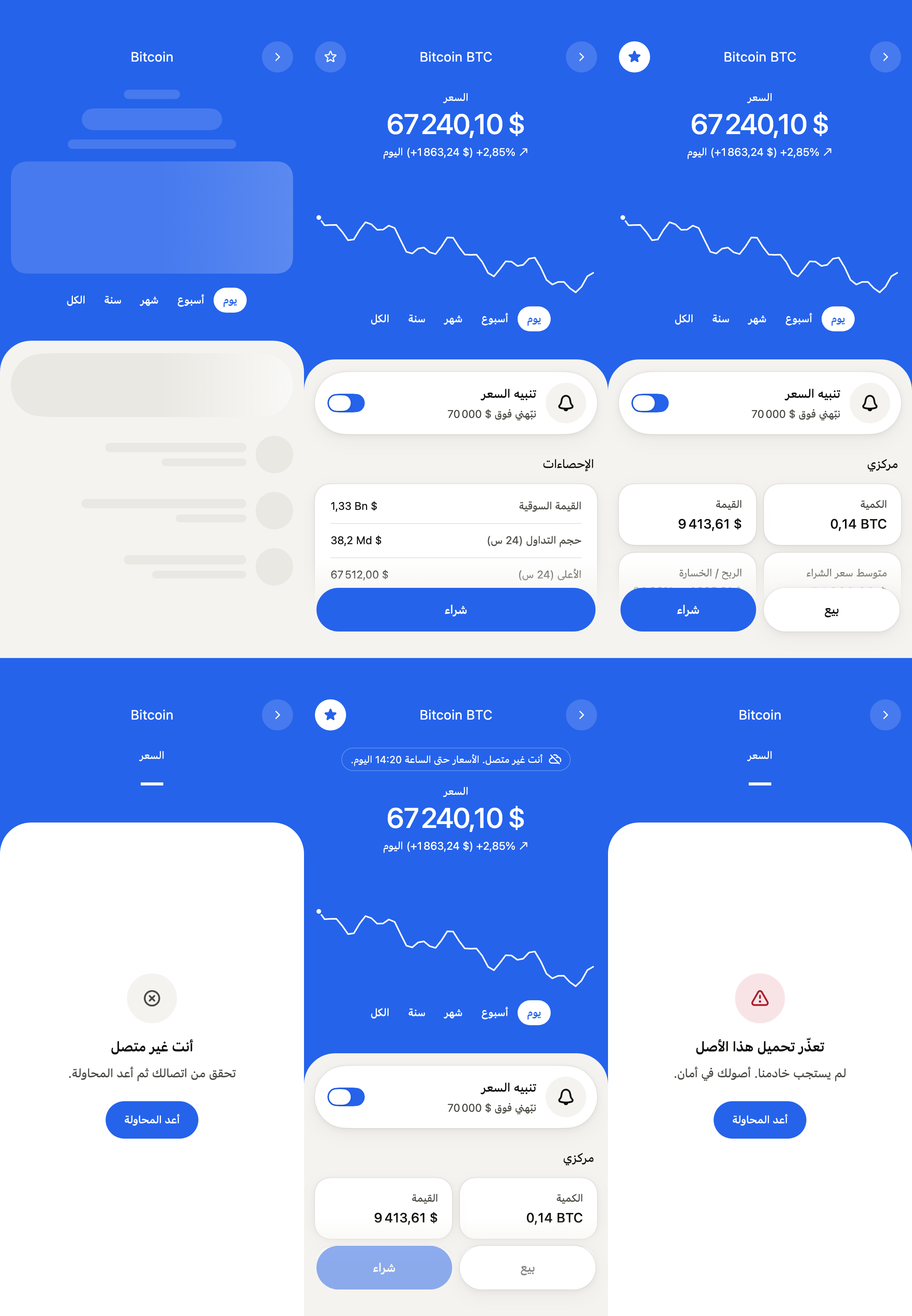
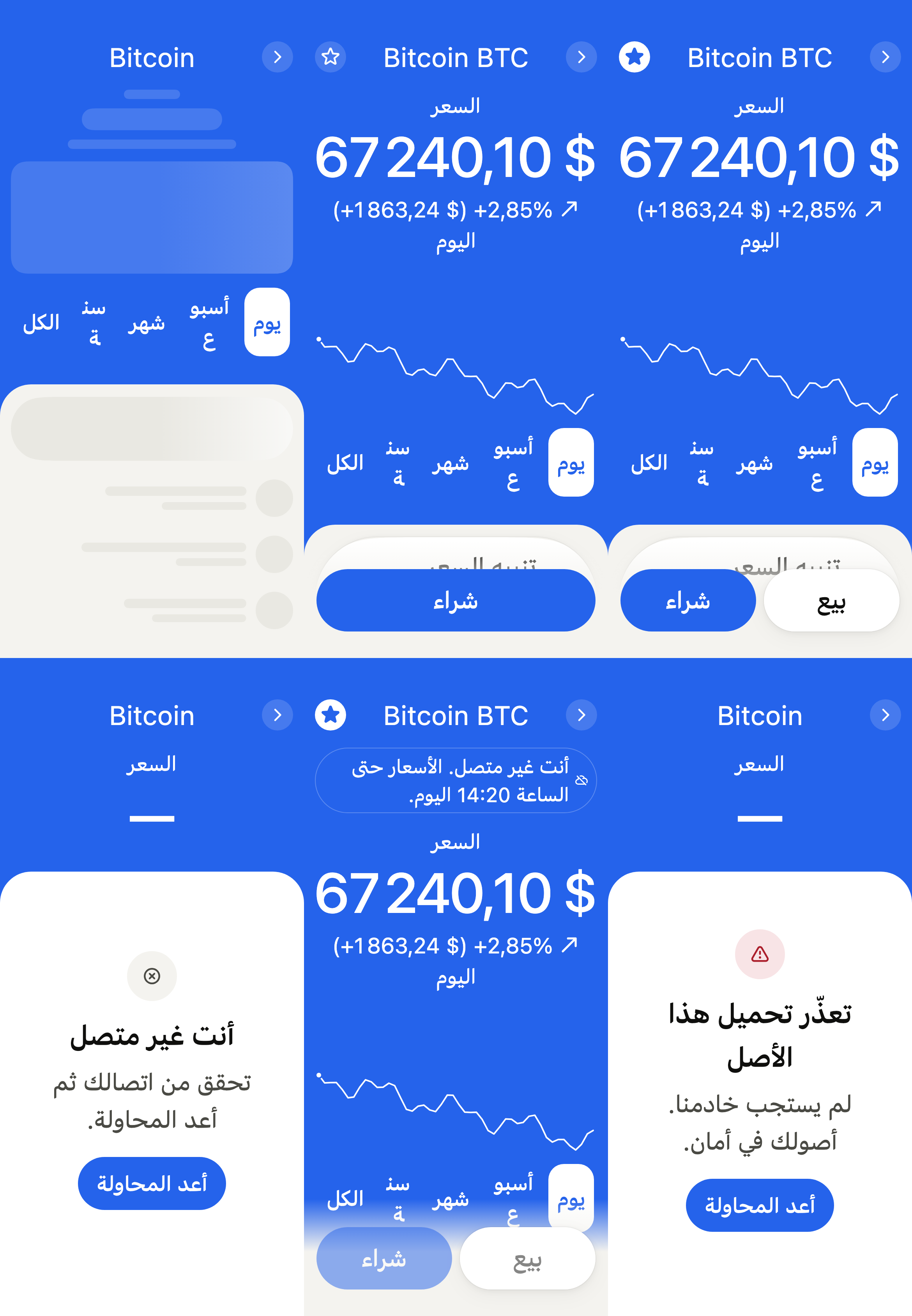
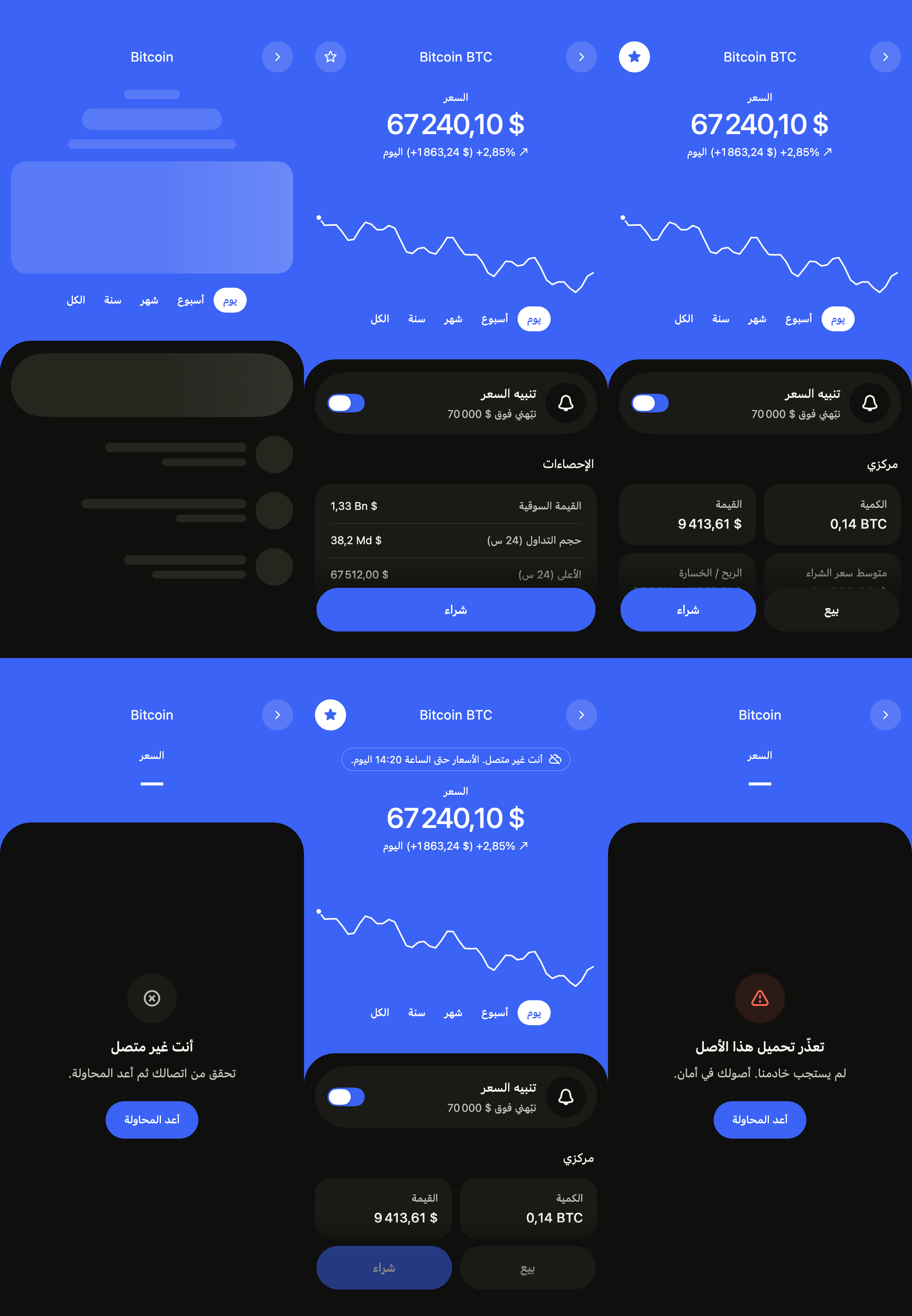
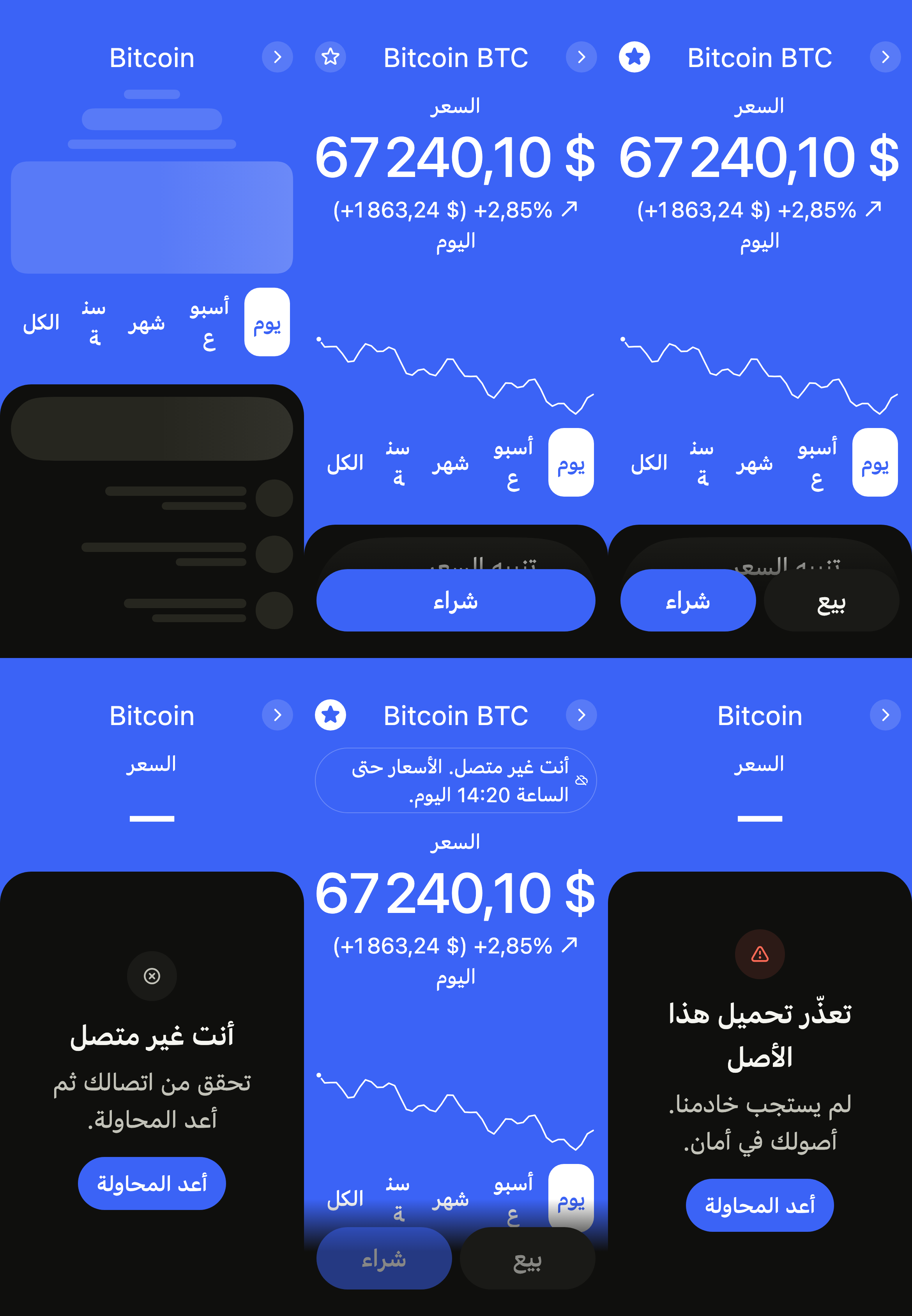
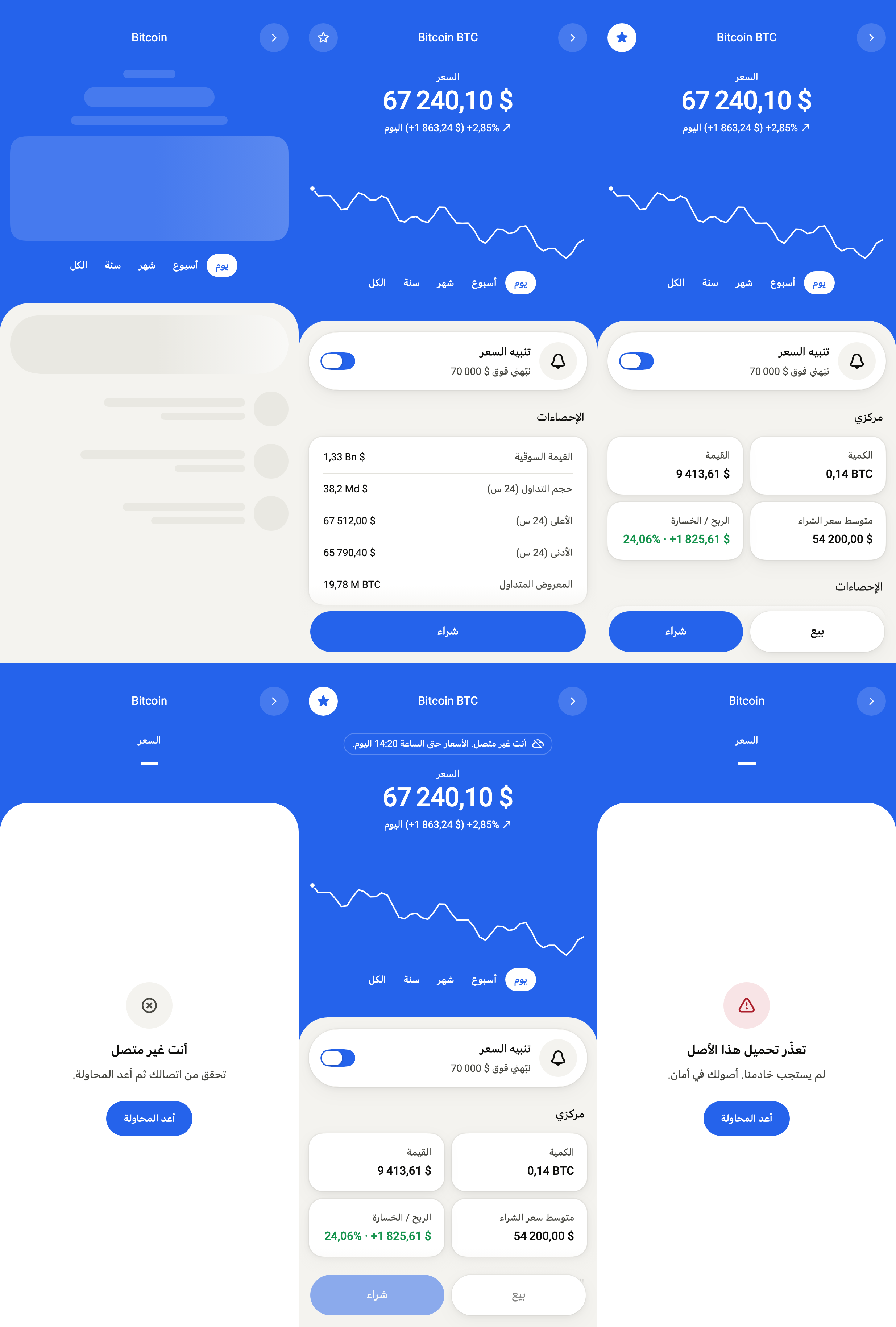
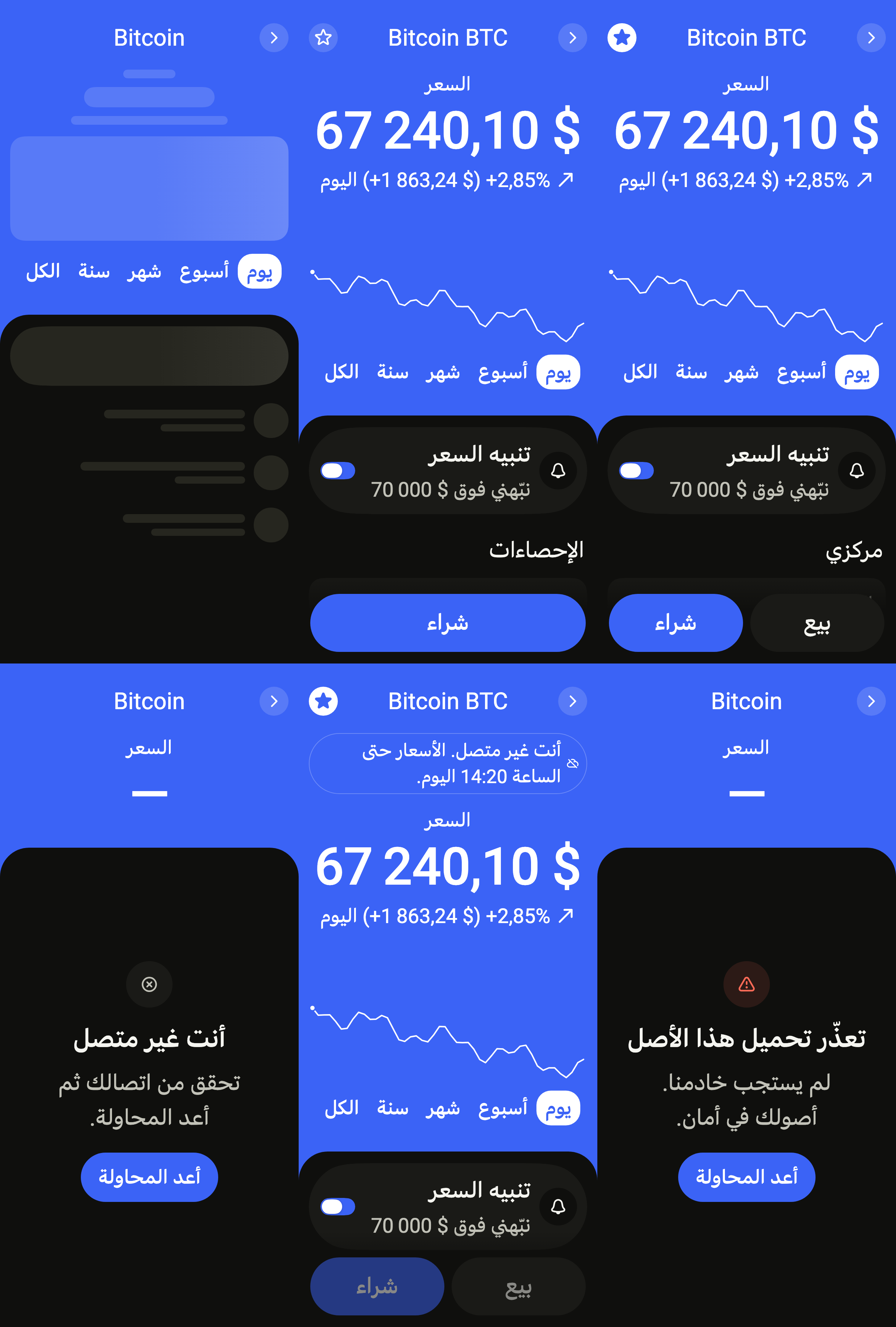
Every label in English, French and Arabic. The screen follows the closest Localizations; the same table is in the manifest, ready for your ARB files.
| Key | en | fr | ar |
|---|---|---|---|
cryptoAssetTitle | Asset | Actif | الأصل |
cryptoAssetBack | Back | Retour | رجوع |
cryptoAssetRefresh | Refresh | Actualiser | تحديث |
cryptoAssetLoading | Loading the asset | Chargement de l’actif | جارٍ تحميل الأصل |
cryptoAssetLoadingChart | Loading the chart | Chargement du graphique | جارٍ تحميل الرسم البياني |
cryptoAssetWatchlist | Watchlist | Liste de suivi | قائمة المتابعة |
cryptoAssetPrice | Price | Cours | السعر |
cryptoAssetPeriod | Chart period | Période du graphique | فترة الرسم البياني |
cryptoAssetDay | 1D | 1J | يوم |
cryptoAssetWeek | 1W | 1S | أسبوع |
cryptoAssetMonth | 1M | 1M | شهر |
cryptoAssetYear | 1Y | 1A | سنة |
cryptoAssetAll | All | Tout | الكل |
cryptoAssetSinceDay | today | aujourd’hui | اليوم |
cryptoAssetSinceWeek | past week | sur 7 jours | خلال أسبوع |
cryptoAssetSinceMonth | past month | sur 30 jours | خلال شهر |
cryptoAssetSinceYear | past year | sur un an | خلال سنة |
cryptoAssetSinceAll | all time | depuis le début | منذ البداية |
cryptoAssetUp | Up {rate}, {amount}, {since} | En hausse de {rate}, {amount}, {since} | ارتفاع {rate}، {amount}، {since} |
cryptoAssetDown | Down {rate}, {amount}, {since} | En baisse de {rate}, {amount}, {since} | انخفاض {rate}، {amount}، {since} |
cryptoAssetFlat | Unchanged {since} | Stable {since} | دون تغيير {since} |
cryptoAssetChangeLine | {rate} ({amount}) {since} | {rate} ({amount}) {since} | {rate} ({amount}) {since} |
cryptoAssetChart | {name} price, {since} | Cours du {name}, {since} | سعر {name}، {since} |
cryptoAssetChartSummary | opened {open}, now {now}, low {low}, high {high} | ouverture {open}, maintenant {now}, plus bas {low}, plus haut {high} | الافتتاح {open}، الآن {now}، الأدنى {low}، الأعلى {high} |
cryptoAssetAlert | Price alert | Alerte de cours | تنبيه السعر |
cryptoAssetAbove | Notify me above {price} | M’avertir au-dessus de {price} | نبّهني فوق {price} |
cryptoAssetBelow | Notify me below {price} | M’avertir en dessous de {price} | نبّهني تحت {price} |
cryptoAssetAlertAbove | Price alert above {price} | Alerte de cours au-dessus de {price} | تنبيه السعر فوق {price} |
cryptoAssetAlertBelow | Price alert below {price} | Alerte de cours en dessous de {price} | تنبيه السعر تحت {price} |
cryptoAssetEditAlert | Change the price alert | Modifier l’alerte de cours | تعديل تنبيه السعر |
cryptoAssetPosition | My position | Ma position | مركزي |
cryptoAssetQuantity | Quantity | Quantité | الكمية |
cryptoAssetValue | Value | Valeur | القيمة |
cryptoAssetAverage | Avg. buy price | Prix d’achat moyen | متوسط سعر الشراء |
cryptoAssetProfit | Profit / loss | Plus-value | الربح / الخسارة |
cryptoAssetProfitLine | {amount} · {rate} | {amount} · {rate} | {amount} · {rate} |
cryptoAssetGain | Profit of {amount}, {rate} | Gain de {amount}, {rate} | ربح {amount}، {rate} |
cryptoAssetLoss | Loss of {amount}, {rate} | Perte de {amount}, {rate} | خسارة {amount}، {rate} |
cryptoAssetStatistics | Statistics | Statistiques | الإحصاءات |
cryptoAssetMarketCap | Market cap | Capitalisation | القيمة السوقية |
cryptoAssetVolume | Volume (24h) | Volume (24 h) | حجم التداول (24 س) |
cryptoAssetHigh | High (24h) | Plus haut (24 h) | الأعلى (24 س) |
cryptoAssetLow | Low (24h) | Plus bas (24 h) | الأدنى (24 س) |
cryptoAssetSupply | Circulating supply | Offre en circulation | المعروض المتداول |
cryptoAssetTransactions | Recent transactions | Transactions récentes | المعاملات الأخيرة |
cryptoAssetSeeAll | See all | Tout voir | عرض الكل |
cryptoAssetBought | Bought | Achat | شراء |
cryptoAssetSold | Sold | Vente | بيع |
cryptoAssetExchange | Exchange | Échange | مبادلة |
cryptoAssetSent | Sent | Envoi | إرسال |
cryptoAssetReceived | Received | Réception | استلام |
cryptoAssetExchangeFrom | Exchange from {asset} | Échange depuis {asset} | مبادلة من {asset} |
cryptoAssetExchangeTo | Exchange to {asset} | Échange vers {asset} | مبادلة إلى {asset} |
cryptoAssetToday | Today | Aujourd’hui | اليوم |
cryptoAssetYesterday | Yesterday | Hier | أمس |
cryptoAssetIn | {amount} in | Entrée de {amount} | دخول {amount} |
cryptoAssetOut | {amount} out | Sortie de {amount} | خروج {amount} |
cryptoAssetMonthsShort | Jan,Feb,Mar,Apr,May,Jun,Jul,Aug,Sep,Oct,Nov,Dec | janv.,févr.,mars,avr.,mai,juin,juil.,août,sept.,oct.,nov.,déc. | يناير,فبراير,مارس,أبريل,مايو,يونيو,يوليو,أغسطس,سبتمبر,أكتوبر,نوفمبر,ديسمبر |
cryptoAssetDayMonth | {day} {month} | {day} {month} | {day} {month} |
cryptoAssetMonthYear | {month} {year} | {month} {year} | {month} {year} |
cryptoAssetDateTime | {date}, {time} | {date}, {time} | {date}، {time} |
cryptoAssetSell | Sell | Vendre | بيع |
cryptoAssetBuy | Buy | Acheter | شراء |
cryptoAssetErrorTitle | We couldn’t load this asset | Impossible de charger cet actif | تعذّر تحميل هذا الأصل |
cryptoAssetErrorMessage | Our server didn’t answer. Your assets are safe. | Notre serveur n’a pas répondu. Vos actifs ne risquent rien. | لم يستجب خادمنا. أصولك في أمان. |
cryptoAssetOfflineTitle | You are offline | Vous êtes hors ligne | أنت غير متصل |
cryptoAssetOfflineMessage | Check your connection, then try again. | Vérifiez votre connexion, puis réessayez. | تحقق من اتصالك ثم أعد المحاولة. |
cryptoAssetRetry | Try again | Réessayer | أعد المحاولة |
cryptoAssetRefreshFailed | Couldn’t refresh. Prices may be out of date. | Actualisation impossible. Les cours ne sont peut-être plus à jour. | تعذّر التحديث. قد لا تكون الأسعار محدّثة. |
cryptoAssetOfflineSince | You’re offline. Prices as of {date} at {time}. | Vous êtes hors ligne. Cours du {date} à {time}. | أنت غير متصل. الأسعار حتى {date} الساعة {time}. |
cryptoAssetOfflineToday | You’re offline. Prices as of {time} today. | Vous êtes hors ligne. Cours d’aujourd’hui à {time}. | أنت غير متصل. الأسعار حتى الساعة {time} اليوم. |
Reference renders
The 16 images published with version 0.2.0, rendered by the shared harness on macOS with Flutter 3.47.7. Each shows every state side by side, at the size of an iPhone (390 × 844) or of an Android phone (412 × 915). fliin verify crypto-asset compares your copy to them.
Use it to
- show a cryptocurrency's price and how it moved over the chosen range
- add a coin to a watchlist with a star
- turn on an alert when the price crosses a threshold
- show how much of a coin is held, what it is worth and the profit
- show market cap and the day's high and low of a coin
- offer to buy or sell a coin from the bottom of the screen
- Not for
- a single transaction in a list: use a transaction row (transaction-row)
- a chart alone: use a chart (chart)
- States