Blocks / commerce
Order summary
Lists the amounts of an order, subtotal, shipping, discount and taxes, above the total, as given by the service, and hides them while they are recalculated.
Import
Order summary is part of Fliin Pro. With a license key, sign in once with fliin login, then add it in a Flutter app where fliin init has run:
fliin login
fliin add order-summaryExamples
Amounts
The amounts of an order, then the total: subtotal, shipping, and whatever lines your shop needs.
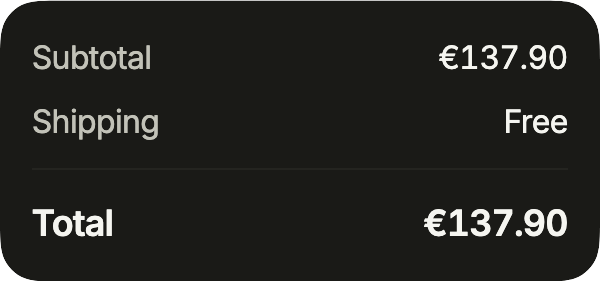
import 'package:your_app/ui/fliin/components/order_summary/fl_order_summary.dart';
import 'package:flutter/widgets.dart';

class OrderSummaryAmountsExample extends StatelessWidget {
  const OrderSummaryAmountsExample({super.key});

  @override
  Widget build(BuildContext context) {
    return const FlOrderSummary(
      amounts: [
        FlOrderAmount('Subtotal', '€137.90'),
        FlOrderAmount('Shipping', 'Free'),
      ],
      totalLabel: 'Total',
      total: '€137.90',
      updatingLabel: 'Updating the total',
    );
  }
}Discount
A discount is one more amount, negative; the total you pass already includes it.
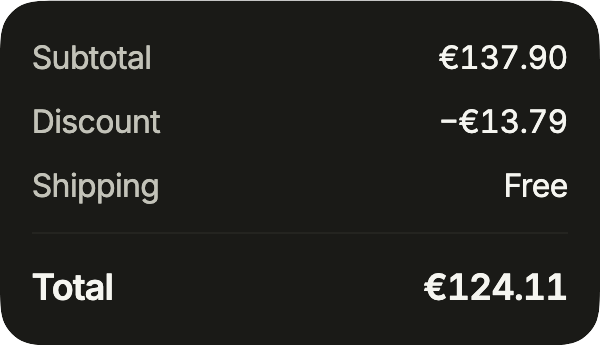
import 'package:your_app/ui/fliin/components/order_summary/fl_order_summary.dart';
import 'package:flutter/widgets.dart';

class OrderSummaryDiscountExample extends StatelessWidget {
  const OrderSummaryDiscountExample({super.key});

  @override
  Widget build(BuildContext context) {
    return const FlOrderSummary(
      amounts: [
        FlOrderAmount('Subtotal', '€137.90'),
        FlOrderAmount('Discount', '−€13.79'),
        FlOrderAmount('Shipping', 'Free'),
      ],
      totalLabel: 'Total',
      total: '€124.11',
      updatingLabel: 'Updating the total',
    );
  }
}Updating
updating covers the total with a spinner while your backend recomputes it, after a quantity or a code changes.
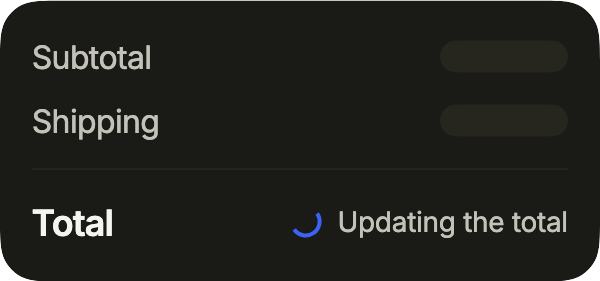
import 'package:your_app/ui/fliin/components/order_summary/fl_order_summary.dart';
import 'package:flutter/widgets.dart';

class OrderSummaryUpdatingExample extends StatelessWidget {
  const OrderSummaryUpdatingExample({super.key});

  @override
  Widget build(BuildContext context) {
    return const FlOrderSummary(
      amounts: [
        FlOrderAmount('Subtotal', '€137.90'),
        FlOrderAmount('Shipping', 'Free'),
      ],
      totalLabel: 'Total',
      total: '€137.90',
      updating: true,
      updatingLabel: 'Updating the total',
    );
  }
}Titled
The summary as a card of its own: title heads it, footer holds the pay button under the total.
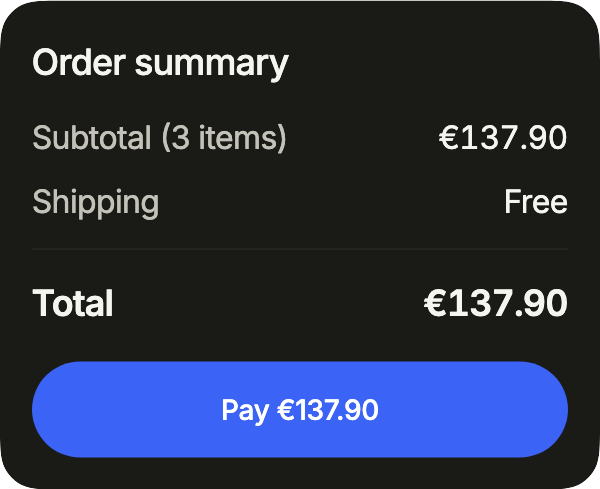
import 'package:your_app/ui/fliin/components/button/fl_button.dart';
import 'package:your_app/ui/fliin/components/order_summary/fl_order_summary.dart';
import 'package:flutter/widgets.dart';

class OrderSummaryTitledExample extends StatelessWidget {
  const OrderSummaryTitledExample({super.key});

  @override
  Widget build(BuildContext context) {
    return FlOrderSummary(
      title: 'Order summary',
      amounts: const [FlOrderAmount('Subtotal (3 items)', '€137.90'), FlOrderAmount('Shipping', 'Free')],
      totalLabel: 'Total',
      total: '€137.90',
      footer: FlButton(label: 'Pay €137.90', onPressed: () {}),
    );
  }
}Usage
The code the reference images render:
final example = ColoredBox(
  color: FlScope.of(context).colors.surface,
  child: Padding(
    padding: EdgeInsetsDirectional.all(FlScope.of(context).space.lg),
    child: Column(
      crossAxisAlignment: CrossAxisAlignment.stretch,
      spacing: FlScope.of(context).space.xl,
      children: [
        FlOrderSummary(
          amounts: [
            FlOrderAmount(
              (variant.dir == TextDirection.rtl
                  ? "المجموع الفرعي"
                  : "Subtotal"),
              (variant.dir == TextDirection.rtl ? "137٫90 €" : "€137.90"),
            ),
            FlOrderAmount(
              (variant.dir == TextDirection.rtl ? "الشحن" : "Shipping"),
              (variant.dir == TextDirection.rtl ? "مجاني" : "Free"),
            ),
          ],
          totalLabel: (variant.dir == TextDirection.rtl ? "الإجمالي" : "Total"),
          total: (variant.dir == TextDirection.rtl ? "137٫90 €" : "€137.90"),
        ),
        FlOrderSummary(
          amounts: [
            FlOrderAmount(
              (variant.dir == TextDirection.rtl
                  ? "المجموع الفرعي"
                  : "Subtotal"),
              (variant.dir == TextDirection.rtl ? "137٫90 €" : "€137.90"),
            ),
            FlOrderAmount(
              (variant.dir == TextDirection.rtl
                  ? "خصم WELCOME"
                  : "Discount WELCOME"),
              (variant.dir == TextDirection.rtl ? "−13٫79 €" : "−€13.79"),
              credit: true,
            ),
            FlOrderAmount(
              (variant.dir == TextDirection.rtl ? "الشحن" : "Shipping"),
              (variant.dir == TextDirection.rtl ? "4٫90 €" : "€4.90"),
            ),
            FlOrderAmount(
              (variant.dir == TextDirection.rtl
                  ? "ضريبة القيمة المضافة (20٪)"
                  : "VAT (20%)"),
              (variant.dir == TextDirection.rtl ? "21٫50 €" : "€21.50"),
            ),
          ],
          totalLabel: (variant.dir == TextDirection.rtl ? "الإجمالي" : "Total"),
          total: (variant.dir == TextDirection.rtl ? "129٫01 €" : "€129.01"),
        ),
        FlOrderSummary(
          amounts: [
            FlOrderAmount(
              (variant.dir == TextDirection.rtl
                  ? "المجموع الفرعي"
                  : "Subtotal"),
              (variant.dir == TextDirection.rtl ? "137٫90 €" : "€137.90"),
            ),
            FlOrderAmount(
              (variant.dir == TextDirection.rtl ? "الشحن" : "Shipping"),
              (variant.dir == TextDirection.rtl ? "مجاني" : "Free"),
            ),
          ],
          totalLabel: (variant.dir == TextDirection.rtl ? "الإجمالي" : "Total"),
          total: (variant.dir == TextDirection.rtl ? "137٫90 €" : "€137.90"),
          updating: true,
          updatingLabel: (variant.dir == TextDirection.rtl
              ? "جارٍ تحديث الإجمالي"
              : "Updating the total"),
        ),
      ],
    ),
  ),
);API
FlOrderAmount: final class
FlOrderAmount.new: const new(String label, String amount, {bool credit})
FlOrderAmount.label: get String
FlOrderAmount.amount: get String
FlOrderAmount.credit: get bool
FlOrderSummary: class extends StatelessWidget
FlOrderSummary.new: const new({super.key, required List<FlOrderAmount> amounts, required String totalLabel, required String total, bool updating, String? updatingLabel, FlSurfaceVariant variant, String? title, Widget? footer})
FlOrderSummary.amounts: get List<FlOrderAmount>
FlOrderSummary.totalLabel: get String
FlOrderSummary.total: get String
FlOrderSummary.updating: get bool
FlOrderSummary.updatingLabel: get String?
FlOrderSummary.variant: get FlSurfaceVariant
FlOrderSummary.title: get String?
FlOrderSummary.footer: get Widget?
FlOrderSummary.build: Widget(BuildContext context)Reference renders
The 16 images published with version 0.2.2, rendered by the shared harness on macOS with Flutter 3.47.7. fliin verify order-summary compares your copy to them.
















Use it to
- show the subtotal, shipping and total of an order
- show a promo discount above the total
- make clear the total is being recalculated after the bag changes
- present the amounts paid on a receipt
- separate taxes from the total price
- Not for
- a value row in a list: use a list row (list-row)
- a key figure on a dashboard: use a card (card)
- States